Yes! You can use AI to fill out Adult Guardianship - Order Fixing Hearing Date and Appointing Attorney for Alleged Incapacitated Person

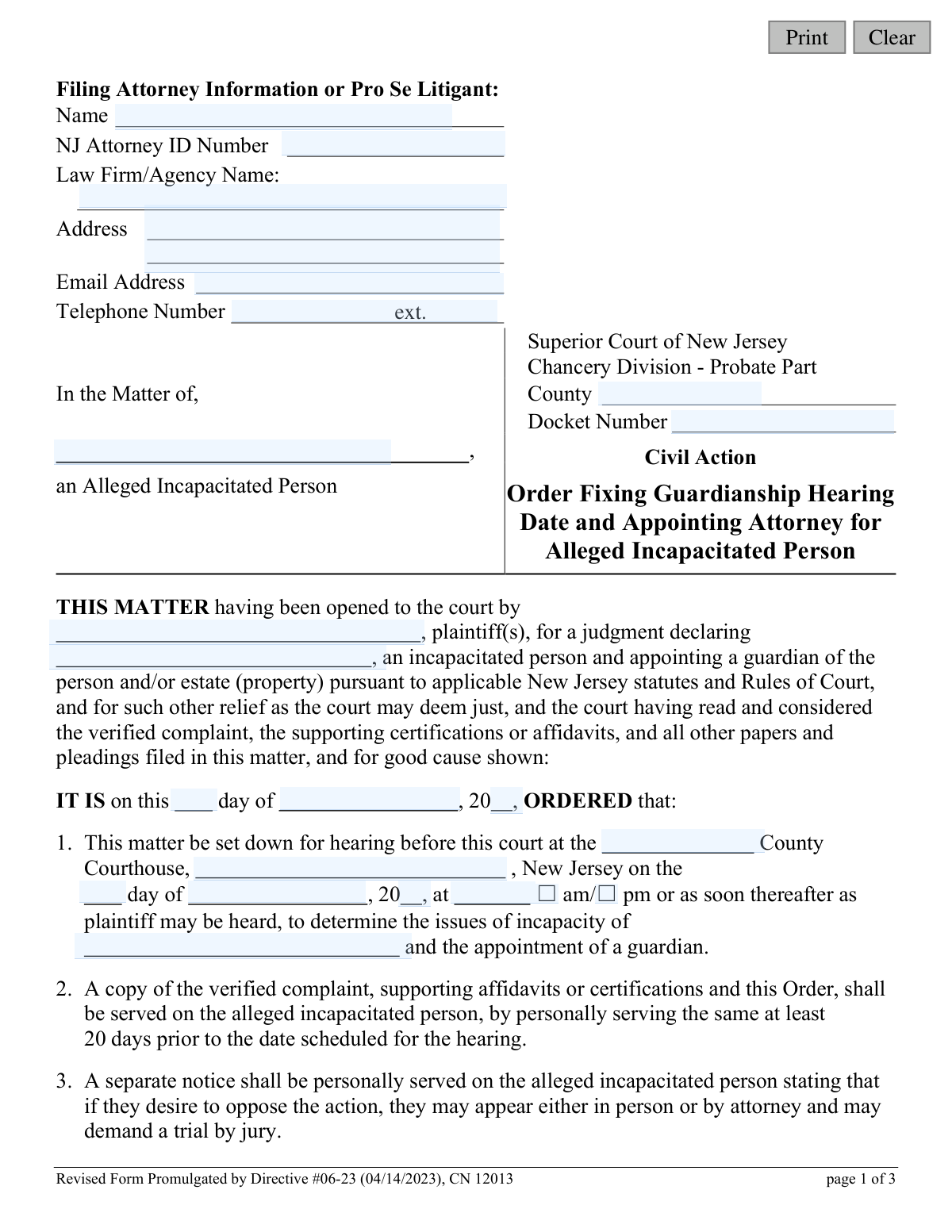
This form, CN 12013, is a legal document issued by the Superior Court of New Jersey's Chancery Division, Probate Part. It serves as a court order that officially schedules a hearing to determine if an individual is incapacitated and needs a guardian, while also appointing an attorney to represent the interests of that individual. Today, this form can be filled out quickly and accurately using AI-powered services like Instafill.ai, which can also convert non-fillable PDF versions into interactive fillable forms.
CN 12013 is part of the New Jersey forms category on Instafill.
Our AI automatically handles information lookup, data retrieval, formatting, and form filling.
It takes less than a minute to fill out CN 12013 using our AI form filling.
Securely upload your data. Information is encrypted in transit and deleted immediately after the form is filled out.

Form specifications

Form name: Adult Guardianship - Order Fixing Hearing Date and Appointing Attorney for Alleged Incapacitated Person
Number of fields: 38
Number of pages: 1
Language: English
main-image

Instafill Demo: How to fill out PDF forms in seconds with AI

How to Fill Out CN 12013 Online for Free in 2026

Are you looking to fill out a CN 12013 form online quickly and accurately? Instafill.ai offers the #1 AI-powered PDF filling software of 2026, allowing you to complete your CN 12013 form in just 37 seconds or less.
Follow these steps to fill out your CN 12013 form online using Instafill.ai:
  1. 1 Navigate to Instafill.ai and upload or select the 'Order Fixing Hearing Date and Appointing Attorney for Alleged Incapacitated Person' form.
  2. 2 Enter the information for the filing attorney or pro se litigant, including name, NJ Attorney ID number, and contact details.
  3. 3 Input the case-specific details such as the County, Docket Number, plaintiff's name, and the name of the alleged incapacitated person.
  4. 4 Fill in the court-ordered hearing information, including the date, time, and courthouse location.
  5. 5 Provide the full details of the court-appointed attorney, including their name, office address, and telephone number.
  6. 6 Select the appropriate checkboxes as directed by the court regarding attorney fees and the requirement for a certified judgment search.
  7. 7 Review all the information populated by the AI for accuracy, make any necessary adjustments, and then download the completed order for signature by the judge and subsequent filing.

Our AI-powered system ensures each field is filled out correctly, reducing errors and saving you time.

Why Choose Instafill.ai for Your Fillable CN 12013 Form?

Speed

Complete your CN 12013 in as little as 37 seconds.

Up-to-Date

Always use the latest 2026 CN 12013 form version.

Cost-effective

No need to hire expensive lawyers.

Accuracy

Our AI performs 10 compliance checks to ensure your form is error-free.

Security

Your personal information is protected with bank-level encryption.

Frequently Asked Questions About Form CN 12013

This form is a court order prepared by the plaintiff (the person seeking guardianship) for a judge to sign. It officially sets the court hearing date for a guardianship case and appoints an independent attorney to represent the alleged incapacitated person.

The plaintiff or their attorney prepares this form with the relevant case information. It is then submitted to a judge, who completes the hearing details and signs it, making it an official court order.

The plaintiff must serve (officially deliver) a copy of the signed order, along with the verified complaint, to the alleged incapacitated person, their next-of-kin, and other interested parties at least 20 days before the hearing.

The court appoints an attorney to protect the rights and interests of the person who is the subject of the guardianship action. This attorney acts independently to investigate the circumstances, interview the person, and report their findings to the court.

The order will specify if the attorney is working pro bono (for free) or will be paid. If paid, the court may direct payment from the alleged incapacitated person's assets or, if those are insufficient, from the person who filed for guardianship.

The alleged incapacitated person has the right to hire their own attorney. If they do, that attorney must notify the court and the court-appointed attorney at least ten days before the scheduled hearing date.

If you are a next-of-kin or other interested party and wish to be heard, you must file a written response, such as an answer or affidavit, with the County Surrogate at least ten days before the hearing date.

The proposed guardian is required to complete a guardianship training tutorial provided by the NJ Courts. They may also need to undergo a background screening, which could include fingerprinting and a judgment search, as directed by the court.

This designation gives the court-appointed attorney the legal authority to access the alleged incapacitated person's confidential medical and psychiatric records. This is necessary for them to conduct a thorough investigation for their report to the court.

Proof of service is a document you file with the court to confirm that you have legally delivered the required court papers to all parties. This must be filed at least ten days before the hearing to show you have followed the court's rules for notification.

Yes, services like Instafill.ai use AI to help you accurately populate form fields with information like names, addresses, and case details. This can save time and help prevent errors before submitting the document for the judge's signature.

To fill this form out online, you can upload the PDF to Instafill.ai. The platform will automatically identify all the fillable fields, allowing you to type in your information, then save or print the completed document.

You can use a service like Instafill.ai to make the form interactive. Simply upload the flat PDF, and the tool will convert it into a fillable version that you can complete on your computer.

Compliance CN 12013
Validation Checks by Instafill.ai

1
Hearing Date Occurs After Order Date
Ensures the specified 'Hearing Date' is chronologically after the 'Order Date'. A hearing cannot be scheduled for a date before the order authorizing it was issued, which would be a logical impossibility. This check prevents invalid timelines and requires the user to correct one or both dates before proceeding.
2
Minimum 20-Day Hearing Notice Period
Validates that the scheduled 'Hearing Date' is at least 20 days after the 'Order Date'. This is a critical legal requirement explicitly stated in the form to allow sufficient time for serving the alleged incapacitated person and other parties. A failure indicates a non-compliant timeline that violates due process and would require the hearing date to be rescheduled further into the future.
3
Completeness of Plaintiff and Alleged Incapacitated Person Names
Checks that the names of the 'plaintiff(s)' and the 'alleged incapacitated person' are both provided. These individuals are the primary parties in the legal action, and their identification is fundamental to the case's validity. The form cannot be processed without this essential information, as it would be legally meaningless.
4
Completeness of Appointed Attorney Information
Verifies that the name, office address, and telephone number for the court-appointed attorney are all filled in. This information is essential for the alleged incapacitated person, the plaintiff, and the court to contact the appointed legal representation. Missing details would halt the process and prevent proper communication as required by the order.
5
Consistent County Name Across Form
Compares the 'County' name entered in multiple locations throughout the document (e.g., in the header, in the body, and for the Surrogate's office) to ensure they are identical. Inconsistent county information can lead to filing in the wrong venue, jurisdictional challenges, and significant legal delays. The system should flag mismatches and require correction for uniformity.
6
NJ Attorney ID Number Format
Verifies that the 'NJ Attorney ID Number' field for the filing attorney follows the state's standard format. This unique identifier is crucial for verifying the attorney's credentials and good standing with the New Jersey State Bar. A validation failure would prevent submission until a correctly formatted ID is entered, ensuring proper record-keeping.
7
Mandatory Selection of Appointed Attorney Fee Status
Ensures that one of the two options ('pro bono' or 'to be paid') for the appointed attorney's compensation has been selected. This selection is mandatory to clarify the financial arrangements for the appointed counsel from the outset. The form submission will be blocked until a choice is made to avoid ambiguity regarding payment.
8
Mandatory Selection of Background Screening Requirement
Validates that a selection has been made regarding the certified judgment search for the proposed guardian ('required' or 'not required'). This decision is a required part of the order, often based on the estate's value. The form cannot be finalized without this selection being explicitly made by the judge or filer.
9
Complete Hearing Time Specification
Verifies that a 'Hearing Time' has been entered and that either 'am' or 'pm' has been selected. An ambiguous or incomplete time would cause confusion for all parties and could result in missed court appearances. This validation ensures a precise, unambiguous hearing time is recorded on the official order.
10
Valid Docket Number Format
Checks if the 'Docket Number' conforms to the expected format for the New Jersey Superior Court, such as including a county prefix and year. A valid docket number is crucial for correctly filing and tracking the case within the court system. An invalid format would trigger an error to ensure proper case association and prevent misfiling.
11
Valid Filing Attorney Email Address Format
Checks that the provided 'Email Address' for the filing attorney or pro se litigant follows the standard '[email protected]' format. A valid email is essential for electronic communication, service of documents, and notifications from the court. An invalid format would prompt the user for correction to ensure reliable contact.
12
Valid Calendar Date for Order
Checks that the day, month, and year entered for the 'Order Date' constitute a real calendar date (e.g., prevents 'February 30'). This basic data integrity check prevents clerical errors and ensures the legal document has a valid, non-fictitious date. If the date is invalid, the user must correct it before the form can be saved or submitted.
13
Presence of County Surrogate Address
Verifies that the address for the County Surrogate's office is filled in, as this is where interested parties must file responses. This information is critical for ensuring due process and allowing parties to participate in the proceedings. The field should be populated, potentially automatically based on the selected county, before the form can be considered complete.

Common Mistakes in Completing CN 12013

Incorrectly Filling Court-Determined Fields

Pro se litigants or inexperienced filers often mistakenly fill in fields that are reserved for the court, such as the hearing date, time, and the date the order is signed. This happens because they assume the form must be completed in its entirety before filing. The consequence is that the form will be rejected or returned by the court clerk, as it improperly dictates the court's schedule and actions, causing significant delays in the guardianship process. To avoid this, leave fields blank that are clearly intended for the judge or court staff to complete, such as hearing dates and judicial signature lines.

Omitting or Incorrect NJ Attorney ID

Attorneys filing the form sometimes forget to include their New Jersey Attorney ID Number, or a pro se litigant (representing themselves) gets confused by the field. This unique identifier is crucial for the court to verify the attorney's standing and for proper record-keeping. Leaving it blank or entering an incorrect number can lead to the court being unable to process the filing, causing delays until the information is corrected. Always double-check that the NJ Attorney ID is present and accurate for attorney filings.

Misspelling Names of the Parties

Typographical errors in the name of the plaintiff or, more critically, the Alleged Incapacitated Person (AIP) are a frequent issue. This often occurs due to haste or clerical error when transcribing information. An incorrect name can create serious legal defects in the order, potentially invalidating it and requiring a motion to amend, which wastes time and money. To prevent this, meticulously proofread all names against source documents like birth certificates or driver's licenses. AI-powered tools like Instafill.ai can help by storing and consistently applying correctly spelled names across all related documents.

Failing to Specify the Surrogate's Office Address

In section 11, the form requires the filer to provide the full address of the County Surrogate's office where interested parties must file any response. Filers sometimes leave this blank, assuming it's common knowledge or that the court will fill it in. This omission is a critical failure of notice, as it prevents next-of-kin from knowing where to direct their legal responses, potentially violating their due process rights and creating grounds for an appeal. The filer must look up and enter the complete, correct address for the relevant county's Surrogate.

Plaintiff Pre-filling the Court-Appointed Attorney Section

The plaintiff may incorrectly write in the name and contact information for an attorney in section 5, which is reserved for the judge's appointment of counsel for the AIP. This happens when the plaintiff misunderstands that the court, not the filer, selects the independent attorney to represent the AIP's interests. This section must be left blank for the judge to complete; filling it in will result in the form being rejected or the information being struck, delaying the appointment process.

Improper Service of the Order and Complaint

The order explicitly details strict service requirements, including personal service on the AIP and certified mail to next-of-kin, at least 20 days before the hearing. A common mistake is using an incorrect service method (e.g., regular mail) or failing to meet the 20-day deadline. This is a major procedural error that violates due process, and it will almost certainly result in the court postponing the hearing until proper service can be proven, significantly delaying the guardianship.

Using an Outdated Version of the Form

The footer of the form clearly indicates it was revised on a specific date (e.g., "Directive #06-23 (04/14/2023)"). People often download old versions of forms from unofficial websites or reuse files from previous cases. Courts update forms to comply with new laws and procedures, and submitting an outdated version is a common reason for immediate rejection by the court clerk, forcing the filer to start over and lose time.

Illegible Handwriting on a Non-Fillable PDF

Many court forms are only available as non-fillable PDFs, leading people to print and complete them by hand. If the handwriting is illegible, the court clerk cannot accurately enter the data into the system, and the judge cannot read critical information like names, addresses, or dates. This frequently results in the form being rejected for being unreadable. To avoid this, use an AI tool like Instafill.ai, which can convert a flat PDF into a digitally fillable version, ensuring all entries are clear, legible, and professional.

Neglecting to Select an Attorney Fee Option

In section 5, the form presents a mandatory choice: whether the court-appointed attorney will serve 'pro bono' or 'be paid'. Filers sometimes overlook these checkboxes, leaving a critical term of the attorney's appointment ambiguous. The court cannot issue the order without this detail being clarified, so the form will be returned for completion, halting the progress of the case until the filer makes a selection and resubmits the document.

Incorrect County or Docket Number

Entering the wrong county or an incorrect docket number in the case caption is a frequent data entry error. The county must be where the case is filed, and the docket number is the unique identifier for the entire case. An error here can cause the document to be misfiled in the wrong county's system or rejected because it doesn't match an existing case file, leading to confusion, lost documents, and significant processing delays.
Saved over 80 hours a year

“I was never sure if my IRS forms like W-9 were filled correctly. Now, I can complete the forms accurately without any external help.”

Kevin Martin Green

Your data stays secure with advanced protection from Instafill and our subprocessors

Robust compliance program

Transparent business model

You’re not the product. You always know where your data is and what it is processed for.

ISO 27001, HIPAA, and GDPR

Our subprocesses adhere to multiple compliance standards, including but not limited to ISO 27001, HIPAA, and GDPR.

Security & privacy by design

We consider security and privacy from the initial design phase of any new service or functionality. It’s not an afterthought, it’s built-in, including support for two-factor authentication (2FA) to further protect your account.

Fill out CN 12013 with Instafill.ai

Worried about filling PDFs wrong? Instafill securely fills adult-guardianship-order-fixing-hearing-date-and-appointing-attorney-for-alleged-incapacitated-person forms, ensuring each field is accurate.