Yes! You can use AI to fill out Application for Judgment to Apply Freeze Act using Tax Court judgment figures (N.J.S.A. 54:51A-8)
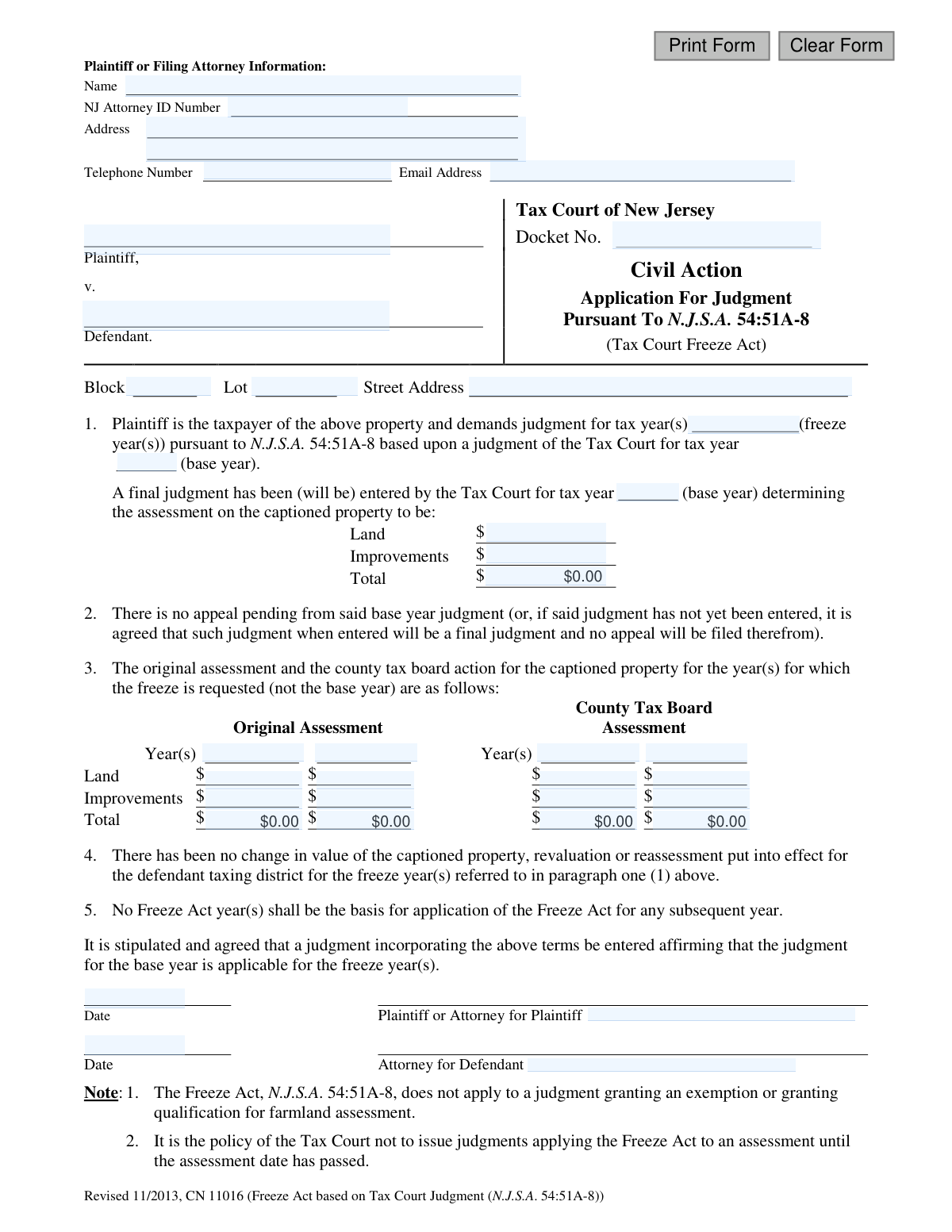
Form CN 11016 is a legal application filed with the Tax Court of New Jersey by a taxpayer or their attorney. Its purpose is to request that a favorable property tax assessment determined by the court in a 'base year' be 'frozen' and applied to subsequent tax years, preventing assessment increases under the provisions of N.J.S.A. 54:51A-8. Today, this form can be filled out quickly and accurately using AI-powered services like Instafill.ai, which can also convert non-fillable PDF versions into interactive fillable forms.
CN 11016 is part of the
New Jersey forms category on Instafill.
Our AI automatically handles information lookup, data retrieval, formatting, and form filling.
It takes less than a minute to fill out CN 11016 using our AI form filling.
Securely upload your data. Information is encrypted in transit and deleted immediately after the form is filled out.
Form specifications
| Form name: | Application for Judgment to Apply Freeze Act using Tax Court judgment figures (N.J.S.A. 54:51A-8) |
| Number of fields: | 39 |
| Number of pages: | 1 |
| Language: | English |
Instafill Demo: How to fill out PDF forms in seconds with AI
How to Fill Out CN 11016 Online for Free in 2026
Are you looking to fill out a CN 11016 form online quickly and accurately? Instafill.ai offers the #1 AI-powered PDF filling software of 2026, allowing you to complete your CN 11016 form in just 37 seconds or less.
Follow these steps to fill out your CN 11016 form online using Instafill.ai:
- 1 Navigate to Instafill.ai and upload or select the 'Application for Judgment to Apply Freeze Act' form.
- 2 Provide the Plaintiff or Filing Attorney's information, including name, NJ Attorney ID, address, and contact details.
- 3 Enter the specific case information, such as the Tax Court Docket Number, Defendant, and the property's Block, Lot, and Street Address.
- 4 Specify the 'base year' and the 'freeze year(s)' for the application, and input the assessment figures (Land, Improvements, Total) from the base year's Tax Court judgment.
- 5 Fill in the original and county tax board assessment details for the freeze year(s) as required in section 3.
- 6 Carefully review all the information populated by the AI for accuracy, then e-sign and date the application where indicated for the Plaintiff or Attorney.
- 7 Download the completed form, ready for submission to the opposing counsel for their signature and subsequent filing with the Tax Court of New Jersey.
Our AI-powered system ensures each field is filled out correctly, reducing errors and saving you time.
Why Choose Instafill.ai for Your Fillable CN 11016 Form?
Speed
Complete your CN 11016 in as little as 37 seconds.
Up-to-Date
Always use the latest 2026 CN 11016 form version.
Cost-effective
No need to hire expensive lawyers.
Accuracy
Our AI performs 10 compliance checks to ensure your form is error-free.
Security
Your personal information is protected with bank-level encryption.
Frequently Asked Questions About Form CN 11016
This form is used by a taxpayer to request that a favorable property tax assessment from a Tax Court judgment (the 'base year') be applied to one or two subsequent tax years (the 'freeze years').
A property owner or their attorney who has received a final, favorable judgment from the New Jersey Tax Court and wishes to 'freeze' that assessment value for subsequent years.
The 'base year' is the tax year for which you received a final judgment from the Tax Court. The 'freeze year(s)' are the one or two years immediately following the base year for which you are requesting the same assessment value be applied.
You must have a final, unappealed judgment from the New Jersey Tax Court for your property's assessment for the 'base year.' This application is a stipulation, meaning the attorney for the municipality (defendant) must also agree and sign.
The Freeze Act cannot be used if there has been a change in the property's value, a municipal-wide revaluation, or if the original judgment was for a property tax exemption or farmland assessment.
This information shows the assessment that the taxing district originally placed on your property for the freeze years. You are providing it to show the value that needs to be corrected to the lower, frozen value from your base year judgment.
Both the plaintiff (or their attorney) and the attorney for the defendant (the taxing district) must sign the form. This is because it serves as a joint agreement to be entered as a court judgment.
If there was a change in the property's value, such as from new construction, you cannot use this form to apply the Freeze Act for that year as the conditions for the freeze are no longer met.
You can only apply after the official assessment date for the freeze year has passed. The Tax Court's policy is not to issue a judgment for a freeze year until that year's assessment date is in the past.
No, as stated in paragraph 5 of the form, a year where the assessment was determined by the Freeze Act cannot be used as a base year for a subsequent Freeze Act application.
Yes, services like Instafill.ai use AI to accurately auto-fill form fields with your information, which can save time and help prevent errors.
Simply upload the form to the Instafill.ai platform. The AI will identify the fields, and you can provide your information once to have it automatically and accurately populated throughout the document.
You can use a service like Instafill.ai, which can convert flat, non-fillable PDFs into interactive, fillable forms. This allows you to easily type your information directly into the fields before printing.
Compliance CN 11016
Validation Checks by Instafill.ai
1
Base Year Judgment Assessment Summation
Verifies that the sum of the 'Land' assessment (JdgmtAssmtLand) and 'Improvements' assessment (JdgmtAssmtImprvmts) equals the 'Total' assessment (JdgmtAssmtTtl) for the base year judgment. This ensures mathematical accuracy in the core judgment figures upon which the freeze is based. A mismatch would invalidate the application's financial data and lead to rejection.
2
Freeze Year Chronology
Ensures that the freeze year(s) listed in 'JdgmtTaxYrs' are subsequent to the 'JdgmtBaseYr'. The Freeze Act applies a base year's assessment to future years, so the freeze years must logically follow the base year. An invalid chronological order would make the application legally nonsensical and would be rejected.
3
NJ Attorney ID Format Validation
Checks that the 'attyIDNo' field, if provided, conforms to the standard format for a New Jersey Attorney ID number. This is crucial for verifying the identity and credentials of the filing attorney with the state bar. An invalid ID format would prevent proper identification and could indicate an unauthorized filing.
4
Required Property Identifiers
Validates that the 'Block' (JdgmtBlockNo) and 'Lot' (JdgmtLotNo) fields are not empty. These numbers are the primary, unique identifiers for the property in municipal records. Without them, the court and taxing authority cannot locate the correct property, making the application unenforceable.
5
Base and Freeze Year Completeness
Confirms that both the base year ('JdgmtBaseYr') and at least one freeze year ('JdgmtTaxYrs') are specified. These years define the fundamental terms of the application—the year of the judgment and the year(s) to which it should be applied. Missing either of these fields makes the application's request incomplete and invalid.
6
Original Assessment Summation
Validates that for each freeze year column, the sum of 'OrigAssmtLand1' and 'OrigAssmtImprvmts1' equals the 'OrigAssmtTtl1'. This check ensures the integrity of the 'as-assessed' data being presented for comparison. Incorrect totals would misrepresent the original tax liability and undermine the basis for the requested adjustment.
7
County Board Assessment Summation
Validates that for each freeze year column, the sum of the County Tax Board's 'CtyAssmtLand1' and 'CtyAssmtImprvmts1' equals the 'CtyAssmtTtl1'. This ensures the data from the County Tax Board action is arithmetically correct. Inaccurate figures would prevent a proper comparison with the base year judgment and could lead to an incorrect final judgment.
8
Email Address Format
Checks that the value entered in the 'attyEmail' field is a valid email address format (e.g., contains '@' and a domain). This is essential for ensuring reliable electronic communication with the plaintiff or their attorney regarding the case. If the email is invalid, important notices and updates from the court may not be received.
9
Plaintiff and Defendant Name Presence
Ensures that the 'PlaNameFull' (Plaintiff) and 'DefNameFull' (Defendant) fields are both filled out. These fields identify the primary parties in the legal action, the taxpayer and the taxing district. An application without clearly identified parties is legally deficient and cannot be processed.
10
Base Year Consistency Check
Verifies that the base year entered in paragraph 1 ('JdgmtBaseYr') is identical to the base year for which the final judgment assessment is detailed ('JdgmtFinalyr'). This ensures consistency throughout the document, confirming that the assessment figures provided correspond to the correct base year cited in the application. A discrepancy would create ambiguity and require clarification.
11
Docket Number Presence and Format
Validates that the 'Docket No.' field is not empty and, if possible, conforms to the expected Tax Court format. The docket number is the unique identifier for the case in the court's system. An absent or incorrect docket number would prevent the application from being correctly filed and associated with the existing case record.
12
Assessment Value Format
Checks that all assessment value fields (e.g., 'JdgmtAssmtLand', 'OrigAssmtLand1') contain valid, non-negative numeric or currency values. These fields represent financial data that is central to the judgment. Non-numeric or negative values are invalid and would prevent any calculations or meaningful processing of the application.
13
Signature Date Validity
Ensures that the signature dates ('AttySigPlaDt', 'AttySigDefDt') are valid dates and are not set in the future. This confirms that the signature was made on a plausible date, which is a standard requirement for legal documents. A future date would invalidate the signature and render the document void until corrected.
14
Telephone Number Format
Validates that the 'TeleNo' field contains a valid phone number format, such as ten digits, possibly with formatting like parentheses or hyphens. A valid phone number is crucial for enabling direct contact with the filing party or their attorney for urgent matters or clarifications. An invalid number hinders communication and can delay the case.
Common Mistakes in Completing CN 11016
A frequent error is incorrectly entering the years in Section 1. The 'base year' is the single tax year for which a final judgment was already obtained, while the 'freeze year(s)' are the subsequent one or two years to which that judgment's assessment will be applied. Reversing these years or entering incorrect ones invalidates the entire premise of the application, leading to immediate rejection and the need to refile.
The Tax Court Docket Number is the primary identifier linking this application to the original case. Filers often make typos, omit leading zeros, or copy the number from an incorrect document. An inaccurate docket number will prevent the court clerk from locating the base year judgment, causing significant processing delays or outright rejection of the filing.
The form requires entering Land, Improvements, and Total assessment values in multiple sections. A common mistake is a simple arithmetic error where the sum of Land and Improvements does not equal the entered Total. This inconsistency undermines the credibility of the filing and will require correction, delaying the entry of judgment. Using a tool that performs automatic calculations can prevent this.
Section 3's table, which compares 'Original Assessment' with 'County Tax Board Assessment' for the freeze years, is highly prone to data entry errors. Filers may transpose numbers, mix up the columns, or enter data for the wrong year. Such mistakes can lead to an incorrect judgment being entered, and if discovered, will require a motion to amend, wasting time and resources.
The declaration in Section 4 states there has been no revaluation or reassessment. Filers sometimes are unaware that the municipality conducted a revaluation in one of the freeze years, making this declaration false. This is a fatal defect in the application, as the Freeze Act does not apply in such years, and the application will be denied.
This form is a stipulation, as indicated by the phrase 'It is stipulated and agreed'. It requires the signature of both the plaintiff's and defendant's attorneys to be valid. Submitting the form without the signature from the municipality's attorney turns it into a unilateral request, which the court will reject for failing to comply with the stipulated agreement format.
The Block, Lot, and Street Address must exactly match the information on the base year Tax Court judgment. People sometimes use a slightly different address format (e.g., 'St' vs. 'Street') or an incorrect Block/Lot number from a different tax bill. Any discrepancy can cause the court to question if it is the correct property, leading to rejection or a request for clarification.
Section 2 requires a declaration that the base year judgment is final and no appeal is pending. Filers may prematurely submit this application while an appeal window is still open or before the judgment has been formally entered by the court. This makes the declaration inaccurate and the application invalid, resulting in its rejection until the base year case is truly concluded.
When the form is filed by an attorney, the 'NJ Attorney ID Number' is a mandatory field. This is often overlooked, especially when support staff prepares the form. The court clerk's office uses this number for verification, and its absence can lead to the filing being flagged as incomplete and rejected, delaying the entire process.
If the form is a non-fillable PDF and is completed by hand, contact information for the plaintiff or attorney can be illegible. Furthermore, filers may forget to include a full address or provide a faulty email address. This prevents the court and opposing counsel from sending important notices, which can cause the filer to miss deadlines or hearings. AI-powered tools like Instafill.ai can convert flat PDFs into fillable forms, ensuring all contact information is typed, legible, and complete.
Saved over 80 hours a year
“I was never sure if my IRS forms like W-9 were filled correctly. Now, I can complete the forms accurately without any external help.”
Kevin Martin Green
Your data stays secure with advanced protection from Instafill and our subprocessors

Robust compliance program
Transparent business model
You’re not the product. You always know where your data is and what it is processed for.
ISO 27001, HIPAA, and GDPR
Our subprocesses adhere to multiple compliance standards, including but not limited to ISO 27001, HIPAA, and GDPR.
Security & privacy by design
We consider security and privacy from the initial design phase of any new service or functionality. It’s not an afterthought, it’s built-in, including support for two-factor authentication (2FA) to further protect your account.
Fill out CN 11016 with Instafill.ai
Worried about filling PDFs wrong? Instafill securely fills application-for-judgment-to-apply-freeze-act-using-tax-court-judgment-figures-njsa-5451a-8 forms, ensuring each field is accurate.