Yes! You can use AI to fill out Arbitration/Alternate Dispute Resolution Questionnaire - Appendix XXIX-A
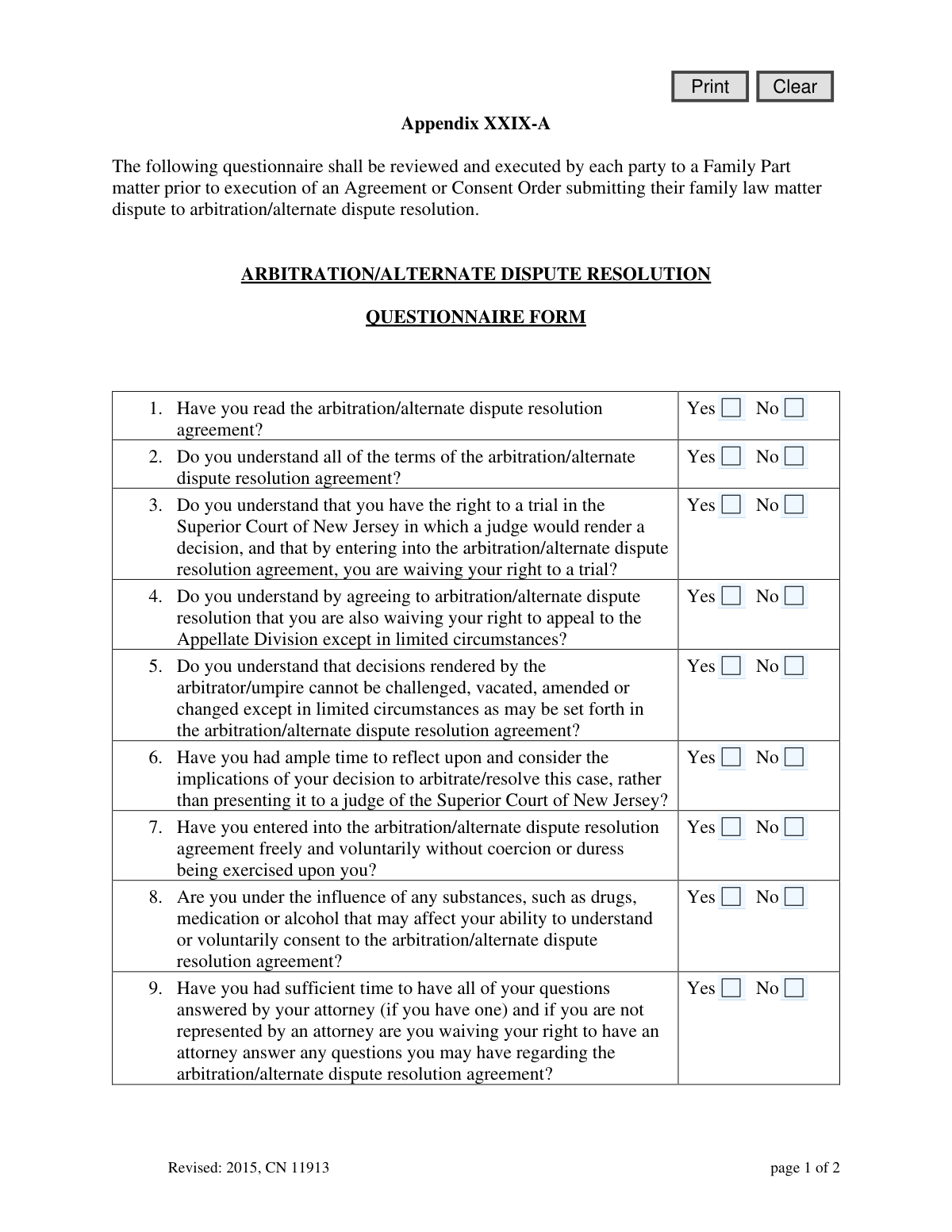
The Appendix XXIX-A is a mandatory questionnaire for individuals in New Jersey Family Part cases who are considering arbitration or alternate dispute resolution (ADR) instead of a traditional court trial. Its purpose is to ensure that each party fully understands they are waiving significant rights, such as the right to a trial and the right to appeal, before they commit to the ADR process. This critical document confirms informed consent and helps prevent future challenges to the arbitration agreement. Today, this form can be filled out quickly and accurately using AI-powered services like Instafill.ai, which can also convert non-fillable PDF versions into interactive fillable forms.
Appendix XXIX-A is part of the
New Jersey forms category on Instafill.
Our AI automatically handles information lookup, data retrieval, formatting, and form filling.
It takes less than a minute to fill out Appendix XXIX-A using our AI form filling.
Securely upload your data. Information is encrypted in transit and deleted immediately after the form is filled out.
Form specifications
| Form name: | Arbitration/Alternate Dispute Resolution Questionnaire - Appendix XXIX-A |
| Number of fields: | 32 |
| Number of pages: | 1 |
| Language: | English |
Instafill Demo: How to fill out PDF forms in seconds with AI
How to Fill Out Appendix XXIX-A Online for Free in 2026
Are you looking to fill out a APPENDIX XXIX-A form online quickly and accurately? Instafill.ai offers the #1 AI-powered PDF filling software of 2026, allowing you to complete your APPENDIX XXIX-A form in just 37 seconds or less.
Follow these steps to fill out your APPENDIX XXIX-A form online using Instafill.ai:
- 1 Navigate to Instafill.ai and upload or select the Appendix XXIX-A form.
- 2 Use the AI assistant to automatically identify all the yes/no questions and certification fields on the form.
- 3 Carefully review each question on the questionnaire, considering its legal implications, and select your 'Yes' or 'No' answer for each one.
- 4 If you are represented by an attorney, consult with them to ensure you fully understand each question before answering.
- 5 Once all questions are answered, proceed to the certification section. Enter your full name to certify your answers are true.
- 6 Review the entire completed form for accuracy, then securely download, print, or share the finalized document as required by the court or your legal counsel.
Our AI-powered system ensures each field is filled out correctly, reducing errors and saving you time.
Why Choose Instafill.ai for Your Fillable Appendix XXIX-A Form?
Speed
Complete your Appendix XXIX-A in as little as 37 seconds.
Up-to-Date
Always use the latest 2026 Appendix XXIX-A form version.
Cost-effective
No need to hire expensive lawyers.
Accuracy
Our AI performs 10 compliance checks to ensure your form is error-free.
Security
Your personal information is protected with bank-level encryption.
Frequently Asked Questions About Form Appendix XXIX-A
This form ensures that you fully understand the rights you are giving up and the consequences of choosing arbitration for your family law case instead of going to trial. It serves as a record that your consent is informed and voluntary.
Each party involved in a New Jersey Family Part matter must review and sign this questionnaire before executing an agreement to submit their dispute to arbitration or alternate dispute resolution (ADR).
By agreeing to arbitration, you are waiving your right to a trial in the Superior Court of New Jersey and significantly limiting your right to appeal the final decision. The arbitrator's decision is binding and can only be changed in rare circumstances.
You only need to answer questions 11 through 14 if your case involves disputes over child support, custody, or parenting time. If these issues are not part of your case, you can skip that section.
You can still complete the form, but by doing so, you acknowledge that you are waiving your right to have an attorney answer your questions about the arbitration agreement. It is highly recommended to consult with a lawyer before signing.
Generally, no. Decisions made by the arbitrator are final and cannot be changed simply because you disagree with the outcome. They can only be challenged or vacated under very limited circumstances defined by law.
An arbitrator's award related to child support, custody, or parenting time can be vacated by a court if it is proven that the decision threatens or poses a risk of harm to the child. Disagreement with the outcome is not a sufficient reason for it to be changed.
If a court stenographer is required to transcribe the proceeding, you and/or the other party will be responsible for the cost. This is an expense you agree to bear by choosing arbitration.
After you sign the questionnaire, it should be attached to your Agreement or Consent Order to arbitrate. It serves as official proof that you understood the process before agreeing to it.
When you sign the form, you certify that your answers are true. If you are found to have willfully provided false answers, you are subject to punishment for making a false statement.
Yes, services like Instafill.ai use AI to help you accurately auto-fill form fields with your information, which saves time and helps prevent errors. However, AI cannot provide legal advice, so you must still understand the questions you are answering.
You can upload the form to a platform like Instafill.ai to make it fillable online. This allows you to type your answers, check the 'Yes' or 'No' boxes, and sign the document digitally before downloading or printing it.
If you have a non-fillable or 'flat' PDF, you can use a service like Instafill.ai to instantly convert it into an interactive form. The tool will automatically identify the fields, allowing you to complete and sign it on your computer.
Compliance Appendix XXIX-A
Validation Checks by Instafill.ai
1
Ensures all mandatory questions (1-10) are answered
This check verifies that a 'Yes' or 'No' response has been provided for each of the first ten questions. These questions are fundamental to confirming the party's understanding and voluntary consent to the arbitration process. Failure to answer any of these questions will prevent form submission and prompt the user to complete the required fields.
2
Requires Signature Name for Certification
This validation ensures that the 'sigName' field under the certification statement is not empty. The signature name is crucial for legally binding the individual to their sworn statements on the questionnaire. An empty field would invalidate the certification, so the form cannot be submitted without this information.
3
Requires Signature Date for Certification
This check confirms that the signature date field ('sigDt') has been filled out. The date establishes when the certification was made, which is essential for legal and record-keeping purposes. The form will be considered incomplete and cannot be submitted without a valid date.
4
Validates Signature Date Format
This validation ensures the signature date is entered in a recognized format, such as MM/DD/YYYY. A standardized date format is necessary for accurate record-keeping and to prevent data entry errors. If the date is entered in an incorrect format, the user will receive an error message and be asked to correct it before submission.
5
Prevents Future Dates for Signature Date
This validation check verifies that the signature date entered is not a future date. The certification must reflect the date the form was actually completed and signed. Allowing a future date would be logically inconsistent and could create legal challenges, so the system will reject any date set after the current day.
6
Flags 'Yes' Response to Substance Influence Question (Q8)
This check validates the response to question 8, which asks if the party is under the influence of substances. A 'Yes' answer indicates the person may lack the capacity to give informed consent, potentially invalidating the agreement. The system should prevent submission and display a critical warning advising the user not to proceed if they answer 'Yes'.
7
Flags 'No' Response to Key Understanding and Consent Questions
This validation checks for 'No' answers to questions 1, 2, 3, 4, 5, 7, and 10, which confirm understanding, voluntariness, and agreement. A 'No' response suggests a lack of informed consent, which undermines the entire purpose of the questionnaire. The system should block submission and advise the user to seek legal counsel or clarification before proceeding.
8
Ensures Conditional Child-Related Questions (11-14) are Answered When Applicable
This validation is triggered if the case involves child support, custody, or parenting time. It ensures that questions 11 through 14 are all answered with a 'Yes' or 'No'. Completing this section is mandatory when children's issues are being arbitrated, and failure to do so will prevent submission until the fields are completed.
9
Flags 'No' Response to Child-Related Understanding Questions (11-14)
This check validates responses to questions 11, 12, 13, and 14 when they are applicable. A 'No' answer to any of these questions indicates the party does not understand the specific, critical rules regarding arbitration of child support or custody. The system should block submission and advise the user that they cannot proceed without fully understanding and agreeing to these terms.
10
Validates Format of Signature Name
This check ensures the signature name field contains only alphabetic characters, spaces, hyphens, or apostrophes. This prevents the entry of invalid characters or numbers, ensuring the name provided is a plausible human name for legal certification. If invalid characters are detected, the user will be prompted to correct the entry.
11
Ensures All Question Responses are Binary
This validation confirms that every answered question field (q1 through q14) has a value of either 'Yes' or 'No'. It prevents corrupted or invalid data, such as 'Maybe' or a blank space, from being submitted. This ensures data integrity and that each question is answered definitively as required by the form's structure.
12
Verifies Use of Current Form Version
This check compares the form's revision code ('CN 11913') against the most current version available in the system. Submitting an outdated form could mean the party is not agreeing to the latest legal terms and procedures. If the form is outdated, the system should block submission and direct the user to obtain and complete the current version.
Common Mistakes in Completing Appendix XXIX-A
Users may feel pressured to answer 'Yes' to questions about understanding complex legal concepts, such as waiving trial rights (Q3) or appeal rights (Q4), just to move the process forward. This can lead to future legal challenges where the individual claims they did not give informed consent, potentially invalidating the agreement. To avoid this, one must read each question carefully and ask an attorney for clarification on any term or concept they do not fully grasp before answering.
A frequent error is incorrectly handling questions 11-14, which only apply if child support, custody, or parenting time are issues. People either answer them when they are not applicable or, more critically, skip them when they are required. This oversight can invalidate the agreement concerning child matters or fail to properly document the understanding of rights related to children, causing significant delays and legal complications.
People may be hesitant to answer 'Yes' to Question 8 regarding the influence of medication or other substances, fearing it will prejudice their case. Answering 'No' when the answer should be 'Yes' constitutes a false statement under penalty of punishment and can be grounds to void the entire agreement later. The correct action is to postpone reviewing and signing the form until you are clear-headed and can truthfully answer 'No'.
In a rush to complete the form, it's easy to accidentally skip one or more of the 'Yes/No' questions. An incomplete questionnaire will be rejected by the court or opposing counsel, causing delays in the legal process and requiring the form to be filled out again. It is crucial to review the entire document to ensure every applicable question has a definitive 'Yes' or 'No' response before signing.
Answering 'No' to foundational questions like 'Do you understand the agreement?' (Q2) or 'Do you agree to be bound by the agreement?' (Q10) while still signing the form creates a direct contradiction. This indicates a lack of consent and will prevent the arbitration agreement from being executed, halting the entire process. If the answer to any of these key questions is genuinely 'No,' you must not sign the agreement and should seek immediate clarification or legal advice.
The signature and date certify that the answers are true under penalty of punishment, but these fields are often overlooked or completed illegibly. Forgetting to sign and date the form, or providing an unreadable signature, can invalidate the document entirely. Always double-check the final page for the signature and date lines and provide a clear, legally-binding signature and the current date.
Question 9 is complex, addressing both individuals with attorneys and those without. A common mistake is misinterpreting this dual-purpose question, creating ambiguity about whether the right to legal counsel was knowingly waived. This can be a point of contention later, so it's vital to read the entire question carefully and ensure the answer accurately reflects your representation status and actions.
This form may only be available as a flat, non-fillable PDF, requiring it to be printed and completed by hand. This often leads to illegible handwriting, which can cause processing delays or disputes over the respondent's intended answers. To avoid this, AI-powered tools like Instafill.ai can convert the non-fillable PDF into an interactive, fillable form, ensuring all entries are clear, legible, and correctly formatted.
The form is marked 'Revised: 2015, CN 11913,' indicating it has specific versioning. Legal forms are updated periodically, and submitting an outdated version sourced from an unofficial website can lead to immediate rejection. This happens because older forms may not contain current legal language or requirements. Always verify you are using the most current version of any legal document as specified by the court.
Saved over 80 hours a year
“I was never sure if my IRS forms like W-9 were filled correctly. Now, I can complete the forms accurately without any external help.”
Kevin Martin Green
Your data stays secure with advanced protection from Instafill and our subprocessors

Robust compliance program
Transparent business model
You’re not the product. You always know where your data is and what it is processed for.
ISO 27001, HIPAA, and GDPR
Our subprocesses adhere to multiple compliance standards, including but not limited to ISO 27001, HIPAA, and GDPR.
Security & privacy by design
We consider security and privacy from the initial design phase of any new service or functionality. It’s not an afterthought, it’s built-in, including support for two-factor authentication (2FA) to further protect your account.
Fill out Appendix XXIX-A with Instafill.ai
Worried about filling PDFs wrong? Instafill securely fills arbitrationalternate-dispute-resolution-questionnaire-appendix-xxix-a forms, ensuring each field is accurate.