Yes! You can use AI to fill out Broker Price Opinion / Comparative Market Analysis (BPO/CMA) Form

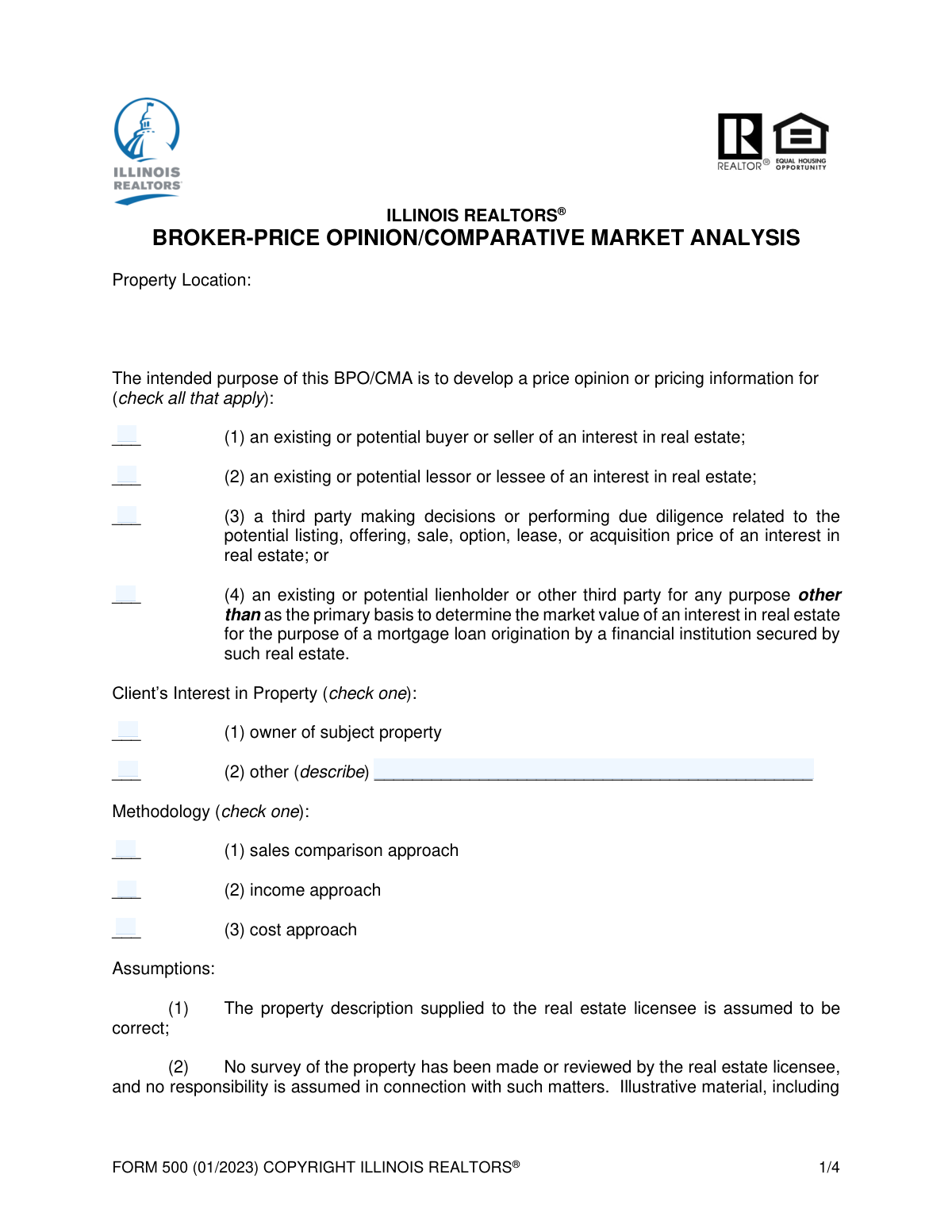
A Broker Price Opinion / Comparative Market Analysis (BPO/CMA) is a report prepared by a licensed real estate agent or broker to estimate the probable selling price of a property. While not as detailed as a formal appraisal, it's a crucial tool for pricing properties, making offers, and for financial institutions in certain non-origination scenarios. Today this form can be filled out quickly and accurately using AI-powered services like Instafill.ai, which can also convert non-fillable PDF versions into interactive fillable forms.
Our AI automatically handles information lookup, data retrieval, formatting, and form filling.
It takes less than a minute to fill out BPO/CMA Form using our AI form filling.
Securely upload your data. Information is encrypted in transit and deleted immediately after the form is filled out.

Form specifications

Form name: Broker Price Opinion / Comparative Market Analysis (BPO/CMA) Form
Number of fields: 18
Number of pages: 4
Language: English
Categories: broker forms
main-image

Instafill Demo: How to fill out PDF forms in seconds with AI

How to Fill Out BPO/CMA Form Online for Free in 2026

Are you looking to fill out a BPO/CMA FORM form online quickly and accurately? Instafill.ai offers the #1 AI-powered PDF filling software of 2026, allowing you to complete your BPO/CMA FORM form in just 37 seconds or less.
Follow these steps to fill out your BPO/CMA FORM form online using Instafill.ai:
  1. 1 Navigate to Instafill.ai and upload or select the Broker Price Opinion / Comparative Market Analysis (BPO/CMA) Form.
  2. 2 Use the AI assistant to specify the intended purpose of the BPO/CMA and identify the client's interest in the subject property.
  3. 3 Detail the valuation methodology used, such as the Sales Comparison, Income, or Cost Approach, by checking the appropriate boxes.
  4. 4 Disclose any existing or contemplated interest the real estate licensee has in the property to ensure transparency.
  5. 5 Enter any additional limiting conditions or specific details required by the client or the nature of the assignment.
  6. 6 Complete the acknowledgement section by providing the licensee's printed name and license number, then digitally sign the form.
  7. 7 Review the completed BPO/CMA form for accuracy and download the final document to share with the client or for your records.

Our AI-powered system ensures each field is filled out correctly, reducing errors and saving you time.

Why Choose Instafill.ai for Your Fillable BPO/CMA Form Form?

Speed

Complete your BPO/CMA Form in as little as 37 seconds.

Up-to-Date

Always use the latest 2026 BPO/CMA Form form version.

Cost-effective

No need to hire expensive lawyers.

Accuracy

Our AI performs 10 compliance checks to ensure your form is error-free.

Security

Your personal information is protected with bank-level encryption.

Frequently Asked Questions About Form BPO/CMA Form

This form is used by a real estate licensee to document a Broker Price Opinion (BPO) or Comparative Market Analysis (CMA), which provides an estimated value for a property.

A licensed real estate professional, such as a broker or agent, is responsible for completing this form based on their analysis of the subject property and market data.

These options clarify who the report is for. You must select whether it's for a buyer/seller, a landlord/tenant, a third party performing due diligence, or a lienholder for a non-mortgage purpose.

No, the form explicitly states it is for a lienholder or third party in 'Non-Mortgage Origination' cases. It should not be the primary basis for originating a mortgage loan.

Select 'Other' if the client is not the current owner, such as a potential buyer, lender, or attorney. You must then briefly describe their specific interest in the provided field.

The form lists three standard valuation methods: the Sales Comparison Approach (comparing to similar sold properties), the Income Approach (based on rental income), and the Cost Approach (based on replacement cost).

Disclosing any existing or contemplated interest in the property is a critical ethical requirement to ensure transparency and avoid any potential conflicts of interest in your valuation.

Use this section to note any disclaimers or specific conditions that impact your analysis, such as the valuation being based only on an exterior inspection or being subject to specific assumptions.

To complete the form, you must provide your printed name and official real estate license number to certify that you prepared the BPO/CMA.

You will typically need access to MLS data for comparable properties, public property records, and potentially income/expense statements if you are using the Income Approach methodology.

Yes, services like Instafill.ai use AI to accurately auto-fill form fields from your data sources. This can save you significant time and help reduce manual data entry errors.

Simply upload the BPO/CMA form to the Instafill.ai platform. The AI will make the fields interactive, allowing you to connect your data and automatically populate the information before you review and finalize it.

You can use a tool like Instafill.ai, which is designed to convert flat, non-fillable PDFs into interactive, fillable forms. This allows you to easily complete and save the document digitally.

Compliance BPO/CMA Form
Validation Checks by Instafill.ai

1
Intended Purpose Selection Required
This validation ensures that at least one checkbox under 'Intended Purpose of BPO/CMA' is selected. The purpose of the report is a fundamental piece of information required for context and compliance. If no purpose is selected, the form submission should be rejected with a message prompting the user to specify the intended use.
2
Methodology Selection Required
This check verifies that at least one methodology approach ('Sales Comparison', 'Income', or 'Cost') has been selected. A BPO/CMA report is invalid without a declared methodology, as this defines the analytical basis for the price opinion. Failure to select a methodology would make the report's conclusions indefensible and incomplete.
3
Exclusive Licensee Interest Declaration
This validation ensures that exactly one of the two 'Licensee's Interest in Property' options ('No existing interest' or 'Has existing interest') is checked. This is a critical disclosure requirement, and the status must be unambiguous. The system should prevent the user from checking both or neither option.
4
Conditional 'Other Interest' Description
This check is triggered if the 'Other' checkbox is selected under 'Client's Interest in Property'. It validates that the corresponding 'Other Interest Description' text field is not empty. This is important because selecting 'Other' without providing an explanation leaves critical information missing.
5
Prohibit 'Other Interest' Description when Owner
This validation ensures that if the 'Owner of subject property' checkbox is selected, the 'Other Interest Description' text field is empty. This prevents contradictory information from being submitted. If the client is the owner, no other interest description is necessary, and providing one could cause confusion.
6
Mutually Exclusive Client Interest
This check ensures that the 'Owner of subject property' and 'Other' checkboxes under 'Client's Interest in Property' cannot be selected at the same time. A client is either the owner or has a different type of interest, but not both in this context. The form should treat these as mutually exclusive radio buttons or enforce this logic upon submission.
7
Printed Licensee Name Required
This validation verifies that the 'Printed Name of Licensee' field is not empty. The licensee's name is essential for identifying the author of the BPO/CMA and is a core part of the legal acknowledgement. A submission without this information is invalid and must be rejected.
8
License Number Required
This check ensures that the 'License Number of Licensee' field has been filled out. The license number is a unique identifier required for regulatory compliance and verification of the licensee's credentials. The form cannot be processed without this mandatory information.
9
Valid License Number Format
This validation checks that the value entered in the 'License Number of Licensee' field conforms to a predefined format (e.g., specific length, alphanumeric characters, etc.). This helps prevent typographical errors and ensures the data is clean and usable for verification purposes. An invalid format should trigger an error message explaining the expected pattern.
10
Client Interest Completeness
This check ensures that at least one option under 'Client's Interest in Property' ('Owner' or 'Other') is selected. This information is necessary to understand the context of the BPO/CMA request. A failure to provide this information results in an incomplete record and the submission should be blocked.
11
Sequential Entry for Limiting Conditions
This validation enforces a sequential entry for the 'Additional Limiting Conditions'. It ensures that 'Additional Limiting Condition 2' cannot be filled unless 'Additional Limiting Condition 1' is also filled, and the same logic applies to Condition 3 relative to Condition 2. This maintains an orderly and structured list of conditions without gaps.
12
Acknowledgement Field Completion
This check verifies that the final acknowledgement field, identified as 'text_Atf8KD_35ea', is completed. This field likely represents a digital signature or a date of acknowledgement, which is legally required to certify the report. A submission is incomplete and invalid until this final acknowledgement is provided.

Common Mistakes in Completing BPO/CMA Form

Incorrectly Identifying the Intended Purpose

Users often misunderstand the nuanced differences between a 'Third Party' and a 'Lienholder,' or between a 'Buyer/Seller' and a 'Lessor/Lessee.' This confusion can lead to selecting the wrong purpose, which misrepresents the context of the valuation and can cause legal or compliance issues for the client. To avoid this, carefully read each definition and select the one that most accurately describes the end-user of the BPO/CMA before submitting.

Failing to Describe 'Other' Client Interest

A frequent error is checking the 'Other' box under 'Client's Interest in Property' but then failing to provide a clear description in the corresponding text field. This omission leaves a critical piece of information blank, making the form incomplete and potentially invalid. Always ensure that if you select 'Other,' you provide a concise but thorough explanation of the client's specific interest, such as 'Trustee' or 'Executor of Estate'.

Incorrect Disclosure of Licensee's Personal Interest

Licensees sometimes mistakenly check 'No existing interest' when they have a contemplated future interest, or vice versa, due to a misunderstanding of what constitutes a disclosable interest. This is a critical disclosure with significant ethical and legal ramifications, and an incorrect declaration can lead to disciplinary action or void the BPO. It is crucial to carefully consider any current or potential future involvement with the property and disclose it accurately.

Misidentifying the Valuation Methodology

The preparer may not fully understand the technical differences between the Sales Comparison, Income, and Cost approaches, leading them to check the wrong box or multiple incorrect boxes. This misrepresents the analytical basis of the opinion of value, which can mislead the client and undermine the report's credibility. Before filling, confirm which valuation method was primarily used to derive the price opinion and select only the appropriate option(s).

Entering an Incorrect License Number

Simple typos, such as transposing digits or omitting leading zeros or prefixes, are common when entering the 'License Number of Licensee'. An incorrect number can cause the BPO to be rejected during compliance checks, leading to significant delays. To prevent this, carefully proofread the number against the official license document. AI-powered form filling tools like Instafill.ai can help by storing and accurately populating this information every time.

Using a Nickname or Incorrect Printed Name

Users may casually enter a nickname or an abbreviated version of their name in the 'Printed Name of Licensee' field instead of their full legal name as it appears on their license. This creates a mismatch with official records and can cause validation issues. Always use the full, official name to ensure the document is legally sound and compliant.

Forgetting to Sign or Date the Acknowledgement

The field labeled 'text_Atf8KD_35ea' likely represents a required signature or date, which is crucial for attesting to the accuracy of the information. Forgetting to sign or date the form is a very common oversight that renders the document unofficial and invalid. This can halt transactions and require the form to be re-submitted, causing significant delays.

Using Vague or Improper Limiting Conditions

Users may add conditions that are unclear, unenforceable, or not actual limiting conditions in the 'Additional Limiting Conditions' fields. A proper limiting condition clarifies the scope of the BPO (e.g., 'Value is based on exterior inspection only'), while vague entries create ambiguity and potential liability. Only add clear, specific conditions that are relevant to the scope of your analysis, or leave the fields blank if none apply.

Selecting Multiple Contradictory Options

It is common for users to accidentally check multiple boxes that are mutually exclusive, such as selecting both 'No existing interest' and 'Has existing interest' for the licensee. This error often happens due to rushing or misunderstanding the form's logic, creating a contradiction that invalidates the entry. It is essential to read the options carefully and select only one in such sections. If the form is a non-fillable PDF, tools like Instafill.ai can convert it into an interactive version, making checkboxes and logic clearer.

Using the BPO for Prohibited Mortgage Origination

The form explicitly states that for a 'Lienholder or Other Third Party,' it should not be the primary basis for mortgage loan origination. A serious mistake is completing this form for that exact purpose, which violates the form's stated limitations and could have serious regulatory consequences. Users must understand the legal scope of a BPO/CMA and ensure a full appraisal is used when required for mortgage origination.
Saved over 80 hours a year

“I was never sure if my IRS forms like W-9 were filled correctly. Now, I can complete the forms accurately without any external help.”

Kevin Martin Green

Your data stays secure with advanced protection from Instafill and our subprocessors

Robust compliance program

Transparent business model

You’re not the product. You always know where your data is and what it is processed for.

ISO 27001, HIPAA, and GDPR

Our subprocesses adhere to multiple compliance standards, including but not limited to ISO 27001, HIPAA, and GDPR.

Security & privacy by design

We consider security and privacy from the initial design phase of any new service or functionality. It’s not an afterthought, it’s built-in, including support for two-factor authentication (2FA) to further protect your account.

Fill out BPO/CMA Form with Instafill.ai

Worried about filling PDFs wrong? Instafill securely fills broker-price-opinion-comparative-market-analysis-bpocma-form forms, ensuring each field is accurate.