Yes! You can use AI to fill out Case Information Statement (CIS-LP)
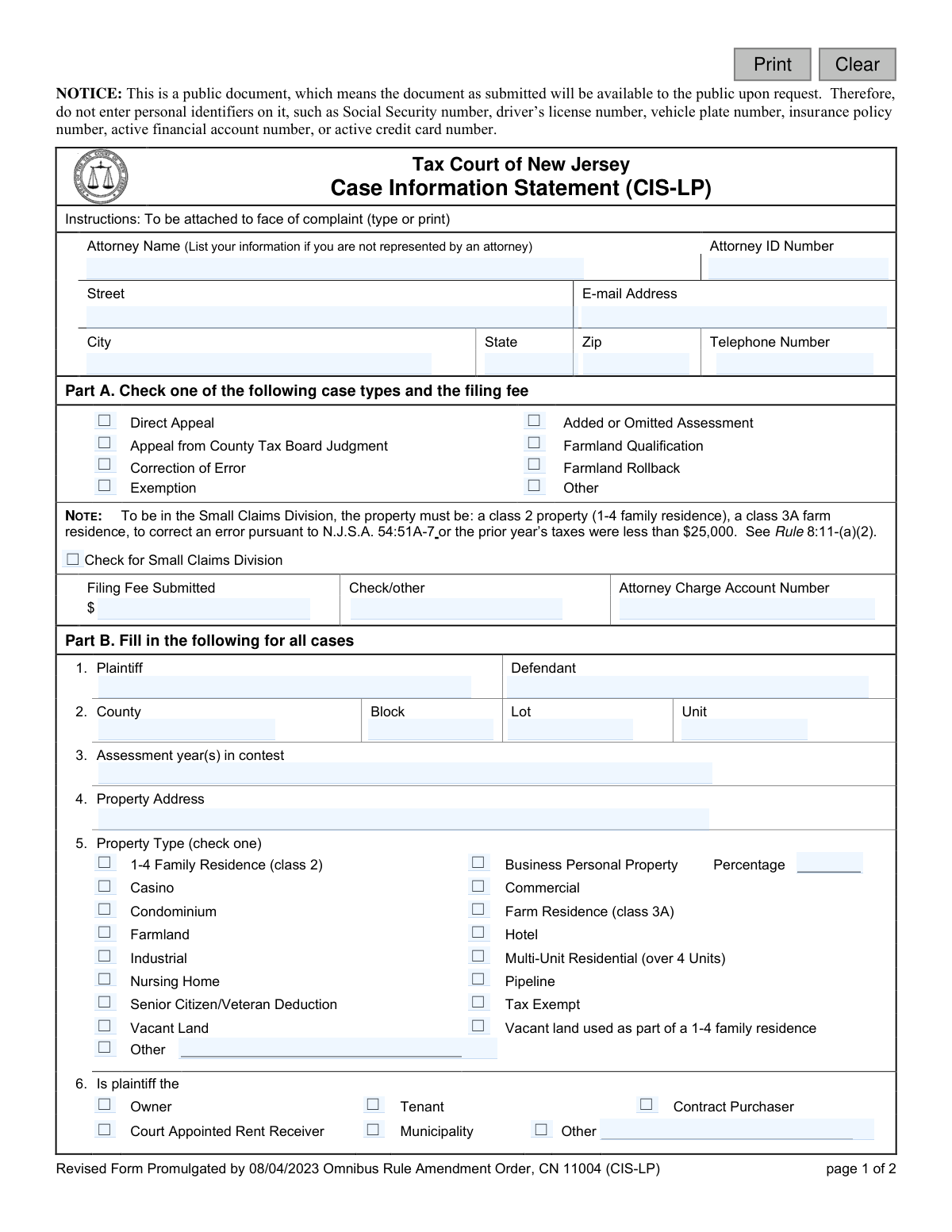
The Case Information Statement (CIS-LP) is a mandatory document submitted with a complaint to the Tax Court of New Jersey. It provides the court with essential details about a property tax case, including the type of appeal, property information, and assessment values being contested. This statement ensures all necessary preliminary information is available for the court to properly docket and manage the case. Today, this form can be filled out quickly and accurately using AI-powered services like Instafill.ai, which can also convert non-fillable PDF versions into interactive fillable forms.
CIS-LP is part of the
New Jersey forms category on Instafill.
Our AI automatically handles information lookup, data retrieval, formatting, and form filling.
It takes less than a minute to fill out CIS-LP using our AI form filling.
Securely upload your data. Information is encrypted in transit and deleted immediately after the form is filled out.
Form specifications
| Form name: | Case Information Statement (CIS-LP) |
| Number of fields: | 103 |
| Number of pages: | 1 |
| Language: | English |
Instafill Demo: How to fill out PDF forms in seconds with AI
How to Fill Out CIS-LP Online for Free in 2026
Are you looking to fill out a CIS-LP form online quickly and accurately? Instafill.ai offers the #1 AI-powered PDF filling software of 2026, allowing you to complete your CIS-LP form in just 37 seconds or less.
Follow these steps to fill out your CIS-LP form online using Instafill.ai:
- 1 Navigate to Instafill.ai and upload or select the New Jersey Case Information Statement (CIS-LP) form.
- 2 Provide your attorney's information or your own if you are self-represented, including name, address, and contact details.
- 3 Complete Part A by selecting the appropriate case type and indicating the filing fee submitted.
- 4 Fill out Part B with detailed information about the plaintiff, defendant, property location, assessment year, and property type.
- 5 Enter the specific assessment figures in the relevant section (Part C, D, or E) based on the type of appeal you are filing.
- 6 Answer the questions regarding exemptions, contiguous properties, and the need for an interpreter.
- 7 Review all the information populated by the AI for accuracy, then certify, sign, and date the form before submission.
Our AI-powered system ensures each field is filled out correctly, reducing errors and saving you time.
Why Choose Instafill.ai for Your Fillable CIS-LP Form?
Speed
Complete your CIS-LP in as little as 37 seconds.
Up-to-Date
Always use the latest 2026 CIS-LP form version.
Cost-effective
No need to hire expensive lawyers.
Accuracy
Our AI performs 10 compliance checks to ensure your form is error-free.
Security
Your personal information is protected with bank-level encryption.
Frequently Asked Questions About Form CIS-LP
This form is used to provide the Tax Court of New Jersey with essential details about a property tax case. It must be attached to the face of your complaint when filing a tax appeal.
Anyone filing a complaint with the Tax Court of New Jersey, such as a property owner, tenant, or municipality contesting a property assessment, must complete and submit this form along with their complaint.
This means you should not write sensitive information like your Social Security number, driver's license number, or bank account numbers on the form, as it is a public document.
Your case may qualify for the Small Claims Division if the property is a 1-4 family residence, a farm residence, or if the prior year’s taxes were less than $25,000.
You will need your property details (address, county, block, lot), the assessment year(s) in question, and the assessment values from both the original assessment and the County Tax Board judgment.
You must attach a separate Case Information Statement for each individually assessed property. If the properties are contiguous and have common ownership, you should indicate that on the form.
Mail the form with your complaint to the Tax Court Management Office, P.O. Box 972, Trenton, NJ 08625-0972. Make the filing fee check payable to 'Treasurer, State of New Jersey'.
You only need to complete Part E if your case specifically involves an added, omitted, or omitted/added assessment. For all other standard appeals, you will primarily use Part C.
To file a Direct Appeal with the Tax Court, the property's total assessment must be over $750,000.
Indicate that an interpreter is needed on the form and specify the language. The Judiciary will provide a registered interpreter for your court proceeding.
The form must be dated and signed by each plaintiff in the case. By signing, you also certify that you have removed confidential personal identifiers from all submitted documents.
Yes, services like Instafill.ai use AI to accurately auto-fill form fields. This can save you time and help you avoid common errors.
You can use a service like Instafill.ai by uploading the form to its platform. The AI will make the fields fillable, allowing you to type your information and generate a completed document.
Tools like Instafill.ai can convert flat, non-fillable PDFs into interactive, fillable forms. Simply upload the document, and the platform will make it easy to complete online.
Compliance CIS-LP
Validation Checks by Instafill.ai
1
Requires at least one Case Type to be selected
This validation ensures that the user has selected at least one checkbox from the list of case types in Part A. This information is critical for correctly categorizing and processing the appeal. If no case type is selected, the form submission should be blocked and the user prompted to make a selection.
2
Verifies Property Identification Fields are Complete
This check confirms that the 'County', 'Block', 'Lot', and 'Property Address' fields in Part B are all filled out. These fields are essential for uniquely identifying the property in question for the tax appeal. A failure to provide this complete set of information would make it impossible to process the case, so the submission should be rejected until the fields are completed.
3
Validates the Total Assessment Calculation in Part C
This check verifies the mathematical accuracy of the 'Total' assessment fields in Part C. The value in 'Total' must equal the 'Land' value plus the 'Improvements' value, minus the 'Exemption' value. This validation applies to both the 'Original Assessment' and 'County Tax Board Assessment' columns, preventing clerical errors and ensuring the financial data is consistent before submission.
4
Enforces Direct Appeal Assessment Threshold
This validation checks that if the 'Direct Appeal' case type is selected in Part A, the 'Total' under 'Original Assessment' in Part C is greater than $750,000. This is a specific jurisdictional rule mentioned in the form's notes for Part E. If the rule is not met, the user should be alerted that they do not qualify for a Direct Appeal based on the assessment value entered.
5
Ensures Farmland Rollback Data is Provided Conditionally
This check ensures that if the 'Farmland Rollback' case type is selected in Part A, the relevant fields in Part D are completed. Conversely, it ensures that Part D is not filled out if a different case type is chosen. This prevents incomplete submissions for Farmland Rollback cases and irrelevant data for all other case types.
6
Requires Language Specification if Interpreter is Needed
This validation enforces a conditional requirement based on the interpreter question. If the user checks 'Yes' for 'Will an interpreter be needed?', the 'If yes, for what language' field must be filled out. This ensures the court can make the necessary arrangements for the specified language, preventing delays and communication issues during proceedings.
7
Requires Description for 'Other' Property Type
This check validates that if the 'Other' checkbox is selected for 'Property Type' in Part B, the corresponding text field for describing the property type is not empty. This ensures that the court receives specific, necessary information when a standard category does not apply. An error should be shown if 'Other' is checked but no description is provided.
8
Validates Prorated Assessment Months are within Range
This check ensures that any value entered into a 'for months' field within Part E (for Added or Omitted Assessments) is a whole number between 1 and 12. This prevents invalid or nonsensical data entry for the proration period. An invalid entry could lead to incorrect calculations and should be flagged for correction.
9
Prohibits Personal Identifiers in All Fields
This validation scans all text input fields to detect patterns that match personal identifiers like Social Security numbers (###-##-####), driver's license numbers, or financial account numbers. This is based on the explicit 'NOTICE' at the top of the form. If a potential identifier is found, the system should warn the user to remove it to protect their privacy and comply with court rules.
10
Ensures Signature Date and Name are Provided
This check confirms that the 'Dated' and 'Signed' fields at the end of the form are both completed before submission. The signature and date are legally required to certify the information and formally file the document. The form cannot be considered valid or complete without this information, so submission must be blocked until they are provided.
11
Validates Assessment Year(s) Format
This check ensures the 'Assessment year(s) in contest' field contains a valid year or range of years (e.g., '2023', '2022-2023'). The year is the primary subject of the dispute, so it must be present and formatted clearly. The validation prevents ambiguous or incorrectly formatted data that could cause the case to be misfiled or rejected.
12
Requires Plaintiff Type Selection
This validation ensures that one of the options under 'Is plaintiff the' in Part B is selected. This information establishes the filer's legal standing to bring the appeal (e.g., as the owner, tenant, etc.). Failure to provide this information would leave a critical question about the plaintiff's eligibility unanswered, so the submission should be blocked until a selection is made.
Common Mistakes in Completing CIS-LP
Filers often overlook the prominent notice at the top of the form and include sensitive information like Social Security or financial account numbers. Because this is a public document, including such data exposes it to public access, risking identity theft and privacy breaches. To avoid this, carefully read all notices and redact any personal identifiers before submission, a process that can be automated and flagged by AI-powered form filling tools like Instafill.ai.
Users frequently select the wrong case type, such as choosing 'Direct Appeal' when it should be an 'Appeal from County Tax Board Judgment'. This happens due to misunderstanding the specific legal pathways for tax appeals. An incorrect selection can lead to the case being improperly docketed, causing significant delays or even dismissal, requiring a refiling. Carefully review your case history to select the correct appeal type.
Filers may incorrectly check the 'Small Claims Division' box without meeting the specific criteria (e.g., property class, prior year's taxes under $25,000) or fail to check it when they qualify. This mistake often stems from not reading the detailed note in Part A. This can result in the case being assigned to the wrong judicial track, leading to procedural complications and delays. Always verify your property type and tax amount against the rules before making a selection.
In Part B, filers often provide incomplete or inaccurate County, Block, Lot, or Unit numbers, which are critical for identifying the property in question. This error can occur from referencing outdated or informal documents instead of official tax records. An incorrect identifier will prevent the court from processing the appeal and will likely result in the case being rejected for inability to identify the subject property.
In Part C, people frequently transpose the 'Original Assessment' and 'County Tax Board Assessment' values or enter the same figures in both columns. This confusion undermines the entire basis of the appeal, which is to challenge a change in assessment. This error makes it impossible for the court to understand the dispute, leading to requests for clarification and delaying the case. Double-check your assessment notices to ensure the correct values are in the correct columns.
When an appeal involves multiple properties, filers often mistakenly group them on one form even if they are not 'contiguous and in common ownership' as required. This happens from misinterpreting the rule stated in Part B. The court requires a separate Case Information Statement for each non-contiguous or separately owned parcel, and failure to comply will result in the filing being rejected as incomplete.
For Direct Appeals involving added or omitted assessments, filers often enter the prorated assessment value in Part E instead of the full 12-month assessment value as explicitly instructed. This mistake can make the total assessment appear to be below the $750,000 jurisdictional minimum for a Direct Appeal. As a result, the court may incorrectly determine it lacks jurisdiction and dismiss the case.
Forgetting to sign the form is one of the most common and easily avoidable errors, often happening when filers are in a rush. An unsigned form is legally invalid and will be immediately rejected by the court clerk's office. This halts the filing process entirely until a properly signed form is resubmitted, potentially causing you to miss critical deadlines. Always perform a final review of the entire document, paying special attention to the signature line before mailing.
Individuals representing themselves (pro se) sometimes leave the attorney information section at the top of the form blank, assuming it doesn't apply to them. However, the instructions clearly state to list your own information in this space. This omission leaves the court with no way to contact the plaintiff, leading to missed communications, hearings, and potential dismissal of the case for failure to prosecute.
Filers frequently make the filing fee check payable to the wrong entity, such as the 'Tax Court' or the local municipality, instead of the required 'Treasurer, State of New Jersey'. This occurs from not reading the fine print at the bottom of the form. An incorrectly written check will be rejected, rendering the filing incomplete and unpaid, which will delay the case until correct payment is received.
Often, official forms are only available as flat, non-fillable PDFs, forcing users to print them and fill them out by hand, which can lead to illegible handwriting and data entry errors. This makes processing difficult for the court and increases the chance of rejection. To avoid this, use a tool like Instafill.ai, which can convert any non-fillable PDF into an interactive, fillable form, ensuring all entries are clear, legible, and properly formatted.
Saved over 80 hours a year
“I was never sure if my IRS forms like W-9 were filled correctly. Now, I can complete the forms accurately without any external help.”
Kevin Martin Green
Your data stays secure with advanced protection from Instafill and our subprocessors

Robust compliance program
Transparent business model
You’re not the product. You always know where your data is and what it is processed for.
ISO 27001, HIPAA, and GDPR
Our subprocesses adhere to multiple compliance standards, including but not limited to ISO 27001, HIPAA, and GDPR.
Security & privacy by design
We consider security and privacy from the initial design phase of any new service or functionality. It’s not an afterthought, it’s built-in, including support for two-factor authentication (2FA) to further protect your account.
Fill out CIS-LP with Instafill.ai
Worried about filling PDFs wrong? Instafill securely fills case-information-statement-cis-lp forms, ensuring each field is accurate.