Yes! You can use AI to fill out Certification for Dismissal of Victim’s Assistance and Survivor Protective Order

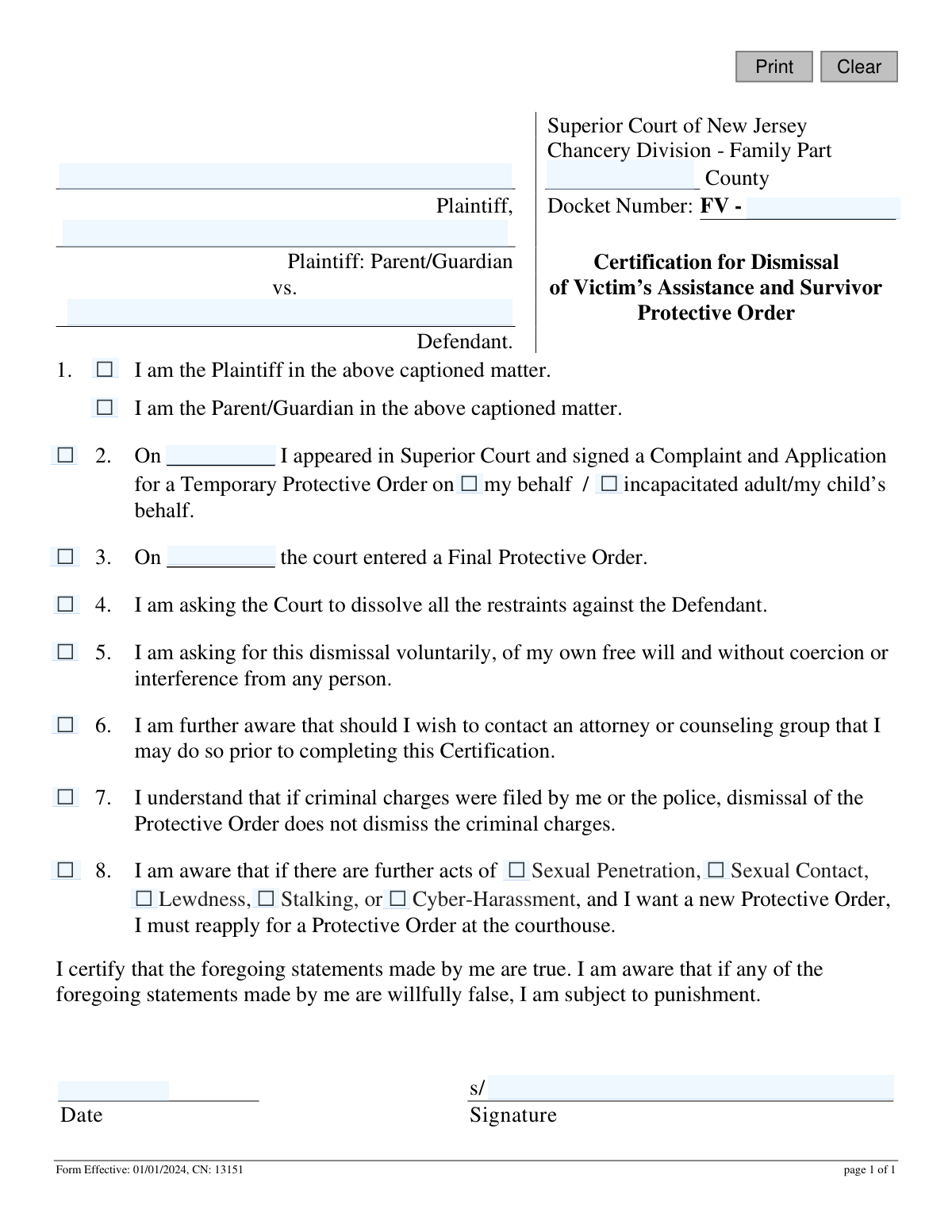
This form is a legal document used in the Superior Court of New Jersey, Chancery Division - Family Part, by a plaintiff to formally request the dismissal of a previously issued Victim’s Assistance and Survivor Protective Order. By signing this certification, the individual attests that they are making the request voluntarily, without coercion, and understand the implications of dissolving the order. Today, this form can be filled out quickly and accurately using AI-powered services like Instafill.ai, which can also convert non-fillable PDF versions into interactive fillable forms.
CN: 13151 is part of the New Jersey forms category on Instafill.
Our AI automatically handles information lookup, data retrieval, formatting, and form filling.
It takes less than a minute to fill out CN: 13151 using our AI form filling.
Securely upload your data. Information is encrypted in transit and deleted immediately after the form is filled out.

Form specifications

Form name: Certification for Dismissal of Victim’s Assistance and Survivor Protective Order
Number of fields: 27
Number of pages: 1
Language: English
main-image

Instafill Demo: How to fill out PDF forms in seconds with AI

How to Fill Out CN: 13151 Online for Free in 2026

Are you looking to fill out a CN: 13151 form online quickly and accurately? Instafill.ai offers the #1 AI-powered PDF filling software of 2026, allowing you to complete your CN: 13151 form in just 37 seconds or less.
Follow these steps to fill out your CN: 13151 form online using Instafill.ai:
  1. 1 Navigate to Instafill.ai and upload the Certification for Dismissal of Victim’s Assistance and Survivor Protective Order form.
  2. 2 Provide the case details, including the New Jersey county, docket number, and the full names of the plaintiff and defendant.
  3. 3 Indicate your status by checking the box for either 'Plaintiff' or 'Parent/Guardian'.
  4. 4 Enter the date you initially applied for the Temporary Protective Order and specify on whose behalf it was filed.
  5. 5 If a Final Protective Order was entered, provide the date it was issued.
  6. 6 Carefully read and check the boxes for statements 4 through 8 to certify your voluntary request, awareness of your rights, and understanding of the consequences.
  7. 7 Review all entered information for accuracy, then securely e-sign and date the certification to complete the process.

Our AI-powered system ensures each field is filled out correctly, reducing errors and saving you time.

Why Choose Instafill.ai for Your Fillable CN: 13151 Form?

Speed

Complete your CN: 13151 in as little as 37 seconds.

Up-to-Date

Always use the latest 2026 CN: 13151 form version.

Cost-effective

No need to hire expensive lawyers.

Accuracy

Our AI performs 10 compliance checks to ensure your form is error-free.

Security

Your personal information is protected with bank-level encryption.

Frequently Asked Questions About Form CN: 13151

This form is used to formally request that the New Jersey Superior Court dismiss a previously issued Temporary or Final Protective Order against a defendant.

The person who originally requested the protective order (the Plaintiff), or the parent/guardian of a minor or incapacitated adult for whom the order was granted, must fill out this form.

You will need the case docket number, the county where the case was filed, the names of the Plaintiff and Defendant, and the date the original Temporary or Final Protective Order was issued.

The docket number is the unique identification number assigned to your case by the court. You can find it on any previous court documents related to your protective order, such as the original complaint or the order itself.

This means you are making the decision to dismiss the protective order yourself, without being threatened, forced, or pressured by the defendant or anyone else. The court needs to ensure your request is genuine and you are safe.

No, dismissing the protective order does not automatically dismiss any related criminal charges. Criminal cases are separate and are handled by the prosecutor's office.

If you dismiss the order and another incident occurs, you will have to start the process over by filing a new complaint and application for a protective order at the courthouse.

While you are not required to have a lawyer, the form states you are aware of your right to contact an attorney before completing it. It is often wise to seek legal advice to fully understand the consequences of dismissing a protective order.

You must file this form with the Superior Court, Chancery Division - Family Part in the county where your protective order was originally issued.

Once the judge signs the order dismissing the protective order, it is officially terminated. You should be absolutely certain about your decision before submitting the form, as you would need to file a new case to get another order.

Yes, services like Instafill.ai use AI to help you accurately auto-fill form fields, which can save you time and reduce errors.

Simply upload the form to the Instafill.ai platform, and its AI will identify the fields and help you fill in your information like names, docket number, and dates quickly and accurately.

You can use a service like Instafill.ai, which can convert flat, non-fillable PDFs into interactive, fillable forms that you can complete and sign digitally.

Compliance CN: 13151
Validation Checks by Instafill.ai

1
Ensures County is Specified
This check verifies that the 'County' field ('typeCounty2') has been filled out. The county is essential for routing the form to the correct Superior Court jurisdiction for processing. If this field is left blank, the form cannot be filed and the user will be prompted to select the appropriate county.
2
Validates Docket Number Format and Presence
This validation ensures the 'Docket Number' field ('dktNumb2') is not empty and follows the required format, which typically starts with 'FV -'. A valid docket number is critical for associating this dismissal request with the correct case file. An invalid or missing docket number will result in a processing error and rejection of the submission.
3
Verifies Plaintiff and Defendant Names are Provided
This check confirms that the 'Plaintiff' ('pfName4') and 'Defendant' ('dfName3') name fields are both completed. These names are fundamental for identifying the parties involved in the protective order. Failure to provide both names makes the document legally insufficient and will prevent it from being processed.
4
Confirms Filer's Role is Selected
This validation ensures that exactly one checkbox in section 1 ('q1a') is selected, identifying the filer as either the 'Plaintiff' or the 'Parent/Guardian'. This selection clarifies the filer's legal standing to request the dismissal. If no box or both boxes are checked, the form is ambiguous and will be rejected until a single, clear role is indicated.
5
Ensures Parent/Guardian Name is Provided when Applicable
This check is triggered if the 'I am the Parent/Guardian' checkbox is selected in section 1. It verifies that the corresponding 'Parent/Guardian' name field ('pfParGuaName3') is filled out. This is necessary to properly identify the adult acting on behalf of a minor or incapacitated plaintiff. If the box is checked but the name is missing, the user will be required to enter the name.
6
Validates Temporary Protective Order Date
This check ensures that if section 2 is checked, the corresponding date field ('orderDt') contains a valid, properly formatted date that is not in the future. This date establishes the timeline of the case and must be accurate. An invalid or future date would be a logical error and must be corrected before submission.
7
Validates Final Protective Order Date
This validation confirms that if section 3 is checked, the date of the Final Protective Order ('fpoOrderDt') is a valid, non-future date. This date is a key piece of information identifying the specific order to be dismissed. The form cannot be processed without a valid date for the order in question.
8
Ensures Chronological Consistency of Order Dates
This logical check verifies that the Final Protective Order date ('fpoOrderDt') is on or after the Temporary Protective Order date ('orderDt'). A final order cannot precede a temporary one. This validation prevents data entry errors and ensures the legal timeline of events is logical, rejecting the form if the dates are out of sequence.
9
Mandatory Check for Dismissal Request
This check verifies that the checkbox in section 4 ('q4'), which states the filer is asking to dissolve the restraints, is checked. This is the primary purpose of the form, and its explicit confirmation is required. If this box is not checked, the form has no legal effect and will be considered incomplete.
10
Mandatory Acknowledgement of Voluntary Action
This validation ensures the checkbox in section 5 ('q5') is checked, confirming the dismissal is requested voluntarily and without coercion. This is a critical safeguard to protect the plaintiff. The court will not process a dismissal without this explicit, sworn statement of free will.
11
Mandatory Acknowledgement of Right to Counsel
This check confirms that the checkbox in section 6 ('q6') has been selected, indicating the filer is aware of their right to consult an attorney or counseling group. This ensures the filer is making an informed decision. The form is not considered complete without this acknowledgement.
12
Mandatory Acknowledgement of Separate Criminal Charges
This validation verifies that the checkbox in section 7 ('q7') is checked. This confirms the filer understands that dismissing the protective order does not dismiss any related criminal charges. This is a crucial piece of information to prevent misunderstanding the legal consequences of this action.
13
Mandatory Acknowledgement of Reapplication Process
This check ensures the checkbox in section 8 ('q8') is selected, confirming the filer understands they must file a new application if future acts of abuse occur. This is important for managing the filer's expectations about future protection. The form will be rejected if this acknowledgement is missing.
14
Validates Signature Date Presence and Format
This check ensures the 'Date' field in the signature block ('signDt') is filled with a valid, non-future date. The signature date legally attests to when the certification was made. A missing, invalid, or future date would invalidate the certification and must be corrected.
15
Ensures Signature Date is Chronologically Correct
This logical validation verifies that the signature date ('signDt') is on or after the date of the Final Protective Order ('fpoOrderDt'). A person cannot sign a form to dismiss an order before that order was officially entered by the court. This check prevents logical impossibilities and ensures the integrity of the legal record.
16
Verifies Presence of Signature
This check confirms that the signature field ('certSign') has been completed, whether through a digital signature or an uploaded image of a wet signature. The signature is what makes the document a legally binding certification. A submission without a signature is invalid and will be rejected immediately.

Common Mistakes in Completing CN: 13151

Incorrect or Incomplete Docket Number

Users often misremember or mistype the docket number, a critical identifier for their case. A frequent error is omitting the 'FV' prefix, which specifies the case as a Family Part, domestic violence matter. An incorrect docket number can lead to significant processing delays or the court being unable to locate the case file, causing the dismissal request to be rejected. To avoid this, carefully copy the full docket number from previous court documents.

Failing to Specify Role as Plaintiff or Guardian

The form requires the filer to check a box indicating if they are the direct Plaintiff or a Parent/Guardian filing on behalf of someone else. People sometimes forget to check either box or, in confusion, check both. This ambiguity can cause the court to question the filer's standing to request a dismissal, leading to rejection of the form and requiring a new submission. It is essential to select only one, accurate role to clearly establish your authority.

Entering Incorrect or Missing Key Dates

The form asks for specific dates, such as when the initial complaint was filed or when the Final Protective Order was entered. Filers may leave these blank, guess, or confuse the date of the Temporary Protective Order (TPO) with the Final Protective Order (FPO). Providing inaccurate dates requires court staff to spend extra time verifying case history, delaying the dismissal process. Always reference your original court papers to ensure dates are precise.

Forgetting to Check All Required Acknowledgment Boxes

The form contains several numbered statements that must be individually checked to affirm understanding and intent, especially the statement confirming the request is voluntary (#5). Filers often read through them but forget to physically check each box. An unchecked box implies the filer does not agree with that statement, which will almost certainly lead to the court rejecting the dismissal request until the form is completed correctly.

Misunderstanding the Dismissal's Scope Regarding Criminal Charges

Statement #7 clarifies that dismissing the protective order does not dismiss any related criminal charges. Some filers mistakenly believe this form will resolve all legal issues with the defendant, leading to false expectations and future complications when they discover the criminal case is still active. It is crucial to read and acknowledge this statement carefully and consult an attorney if there is any confusion about pending criminal matters.

Incorrectly Checking Specific Offense Types

Statement #8 lists specific acts like 'Stalking' or 'Cyber-Harassment' with checkboxes next to them. These are meant to be illustrative examples of acts that would require a new protective order, not a checklist for the user to fill out based on past events. A common mistake is for filers to check the boxes corresponding to the original complaint, creating confusion. Filers should only check the main box for statement #8 and leave the specific offense boxes unchecked.

Missing Signature or Date

An unsigned or undated form is legally invalid and a very common oversight. In the rush to complete the paperwork, filers often submit the form without a signature or the date of signing. This critical error results in immediate rejection by the court clerk, halting the entire dismissal process. AI-powered tools like Instafill.ai can convert flat PDFs into fillable forms and highlight required signature and date fields to prevent such oversights.

Specifying the Incorrect County

The form must be filed in the Superior Court of the county where the order was originally issued. People who have moved or are unfamiliar with the court system might accidentally write their current county of residence instead of the county of jurisdiction. This error will cause the form to be rejected and returned, as the court in the wrong county has no authority over the case. Always verify the correct county from your original case documents.

Transposing Plaintiff and Defendant Names

It's surprisingly common for individuals filling out legal forms under stress to accidentally switch the names of the Plaintiff and Defendant in the case caption. This creates significant confusion for court clerks and can delay the processing of the form as they must first clarify the identities of the parties. To prevent this, carefully review the case caption on your original court documents and double-check that you have entered each name in the correct field.

Incorrectly Completing the Final Protective Order Section

Section 3, which documents the date a Final Protective Order (FPO) was entered, should only be completed if an FPO was granted by a judge after a hearing. Many dismissal requests occur while a Temporary Protective Order (TPO) is still in effect. A common error is filling in this section with the TPO date or completing it at all when only a TPO exists, which creates an inaccurate record and should be left blank in such cases.
Saved over 80 hours a year

“I was never sure if my IRS forms like W-9 were filled correctly. Now, I can complete the forms accurately without any external help.”

Kevin Martin Green

Your data stays secure with advanced protection from Instafill and our subprocessors

Robust compliance program

Transparent business model

You’re not the product. You always know where your data is and what it is processed for.

ISO 27001, HIPAA, and GDPR

Our subprocesses adhere to multiple compliance standards, including but not limited to ISO 27001, HIPAA, and GDPR.

Security & privacy by design

We consider security and privacy from the initial design phase of any new service or functionality. It’s not an afterthought, it’s built-in, including support for two-factor authentication (2FA) to further protect your account.

Fill out CN: 13151 with Instafill.ai

Worried about filling PDFs wrong? Instafill securely fills certification-for-dismissal-of-victims-assistance-and-survivor-protective-order forms, ensuring each field is accurate.