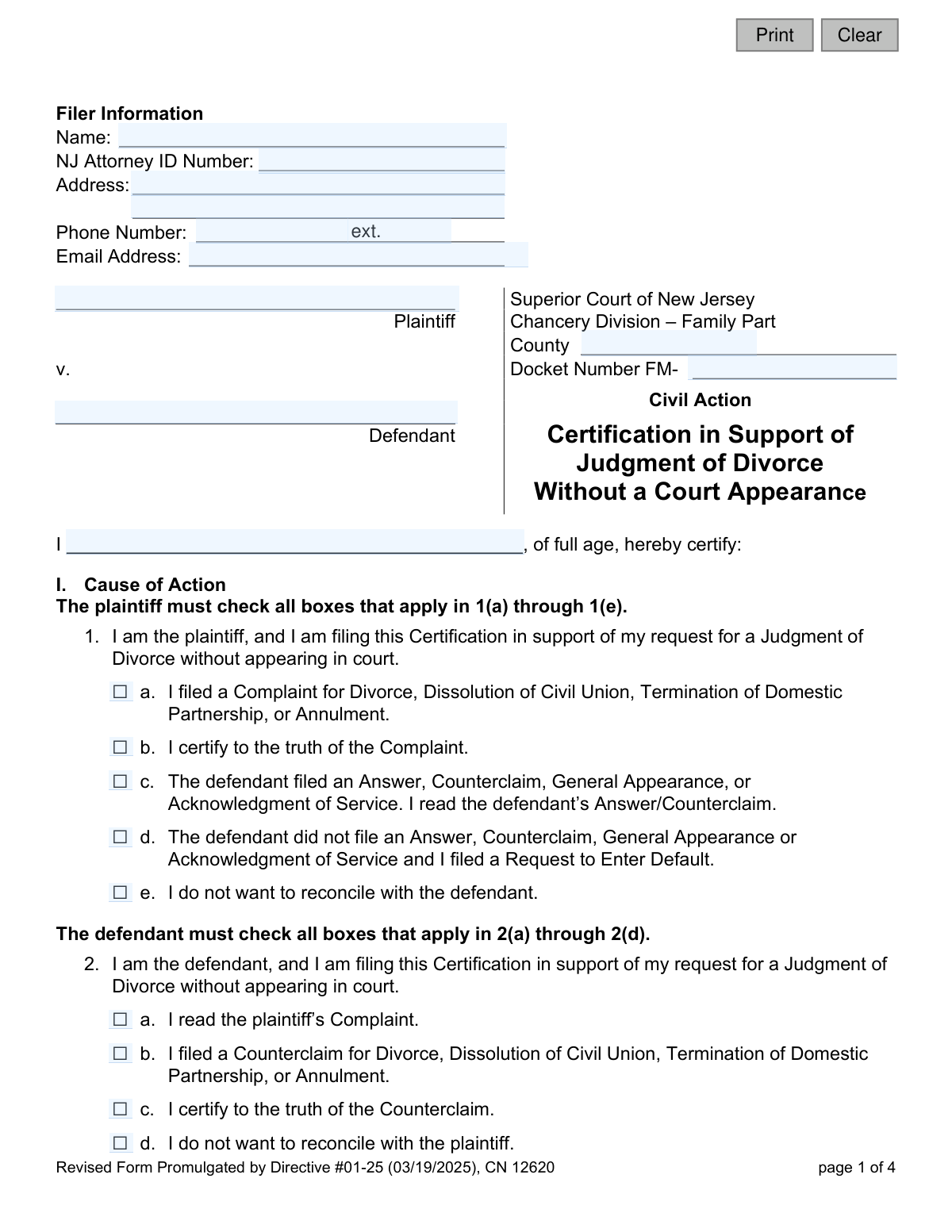
Yes! You can use AI to fill out Certification in Support of Judgment of Divorce without a Court Appearance (CN 12620)

Form CN 12620, the Certification in Support of Judgment of Divorce without a Court Appearance, is a legal document filed in the Superior Court of New Jersey, Family Part. It allows parties in an uncontested or default divorce to finalize their case by submitting sworn statements instead of appearing before a judge. This certification confirms the truth of the complaint, waives the right to a trial, and incorporates any settlement agreements. Today, this form can be filled out quickly and accurately using AI-powered services like Instafill.ai, which can also convert non-fillable PDF versions into interactive fillable forms.
CN 12620 is part of the New Jersey forms category on Instafill.
Our AI automatically handles information lookup, data retrieval, formatting, and form filling.
It takes less than a minute to fill out CN 12620 using our AI form filling.
Securely upload your data. Information is encrypted in transit and deleted immediately after the form is filled out.

Form specifications

Form name: Certification in Support of Judgment of Divorce without a Court Appearance (CN 12620)
Number of fields: 60
Number of pages: 1
Language: English
main-image

Instafill Demo: How to fill out PDF forms in seconds with AI

How to Fill Out CN 12620 Online for Free in 2026

Are you looking to fill out a CN 12620 form online quickly and accurately? Instafill.ai offers the #1 AI-powered PDF filling software of 2026, allowing you to complete your CN 12620 form in just 37 seconds or less.
Follow these steps to fill out your CN 12620 form online using Instafill.ai:
  1. 1 Navigate to Instafill.ai and upload the Certification in Support of Judgment of Divorce without a Court Appearance (CN 12620) or select it from the form library.
  2. 2 Provide the filer's information, court details, and case docket number in the header section.
  3. 3 Complete Section I (Cause of Action) by checking the boxes that apply to your role (plaintiff or defendant), certifying the truth of your legal filings, and waiving your right to a trial.
  4. 4 If a Property or Marital Settlement Agreement exists, complete Section II by certifying that you understand, agree to, and were not coerced into signing the agreement.
  5. 5 If you are requesting to resume a former name, complete Section III (Name Change) by certifying you are not changing your name for fraudulent purposes.
  6. 6 Carefully review all the information you've provided and the certifications you've made to ensure accuracy and completeness.
  7. 7 Electronically sign and date the form, then download it for filing with the New Jersey Superior Court along with other required documents for a divorce on the papers.

Our AI-powered system ensures each field is filled out correctly, reducing errors and saving you time.

Why Choose Instafill.ai for Your Fillable CN 12620 Form?

Speed

Complete your CN 12620 in as little as 37 seconds.

Up-to-Date

Always use the latest 2026 CN 12620 form version.

Cost-effective

No need to hire expensive lawyers.

Accuracy

Our AI performs 10 compliance checks to ensure your form is error-free.

Security

Your personal information is protected with bank-level encryption.

Frequently Asked Questions About Form CN 12620

This form is used to ask the New Jersey Superior Court to finalize your divorce based on the submitted paperwork, without you having to physically appear in court. It is for cases that are either uncontested or in default.

This form should be completed by the plaintiff in a default or uncontested divorce. In an uncontested divorce, the defendant may also file their own certification to show their agreement with the terms.

No, it is not guaranteed. The instructions state that the judge can still require you to appear in court, and you will be notified if an appearance is necessary.

A default divorce is when you file for divorce and the other party does not respond or participate. An uncontested divorce is when both parties agree on the divorce and its terms and file the required documents.

You may need to file several other documents, including a Proposed Final Judgment of Divorce, Proof of Service, and a Property Settlement Agreement if you have one. The instructions list all required documents for both default and uncontested cases.

If you have no property that was acquired during the marriage that needs to be legally divided, you can indicate this by checking the box in Section I, question 6.

This means the court will not evaluate the fairness or legality of your Property Settlement Agreement. The court only confirms that you both understand it, believe it's fair, and entered into it willingly.

To request a name change, you must check the appropriate boxes in Section III of this form and also file a separate form called 'Dissolution (FM) Judgment for Name Change and Addendum' (CN 13146).

The form clarifies that any restraining order entered under the Prevention of Domestic Violence Act will remain valid and in effect even after the Judgment of Divorce is final.

By checking this box, you are agreeing to give up your right to have a formal trial where you present evidence and testimony before a judge. You are instead asking the judge to make a decision based on the submitted paperwork.

Not necessarily on the same form. The plaintiff must file it, but in an uncontested case, it is recommended that the defendant also file their own certification to avoid a potential court hearing.

Yes, services like Instafill.ai use AI to accurately auto-fill form fields with your information, which can save time and help prevent common errors.

You can use a service like Instafill.ai to upload the PDF, which makes it an interactive form you can fill out on your computer. You can then download or print the completed document for filing.

If you have a non-fillable or 'flat' PDF, you can use a tool like Instafill.ai. It can convert the document into an interactive, fillable form that you can easily complete online.

Compliance CN 12620
Validation Checks by Instafill.ai

1
Ensures Filer Role Matches Certifications
This check verifies that the party selected in the final signature block ('Plaintiff' or 'Defendant') corresponds to the correct certification section filled out in Section I. If 'Plaintiff' is signed, Section I.1 must be completed; if 'Defendant' is signed, Section I.2 must be completed. This validation prevents ambiguity and ensures the correct party is making the required legal certifications for the divorce.
2
Validates NJ Family Part Docket Number Format
Verifies that the Docket Number follows the standard New Jersey Family Part format, which is 'FM-' followed by a county code and case number (e.g., FM-01-123456). This is critical for correctly identifying and filing the document with the specific case in the court's system. An incorrect format will lead to filing rejection or misfiling.
3
Prevents Contradictory Defendant Action Status
This validation ensures that for the Plaintiff's certification in Section I, only one of checkbox 1(c) or 1(d) is selected. A defendant cannot have both filed a response (1c) and not filed a response (1d). Selecting both creates a logical impossibility that makes the certification invalid and will cause the court to reject the filing.
4
Requires Details for Other Pending/Closed Cases
In Section I, question 5, if the filer checks box 5(b) indicating other cases exist, this validation ensures the corresponding details text field is not empty. The filer must provide the court address, case caption, docket number, and status for each case. Failure to provide these details makes the certification incomplete and may delay the divorce proceedings.
5
Ensures Exclusive Selection for Other Cases Status
This check verifies that in Section I, question 5, the filer has selected either box 5(a) 'No other cases' OR box 5(b) 'List of other cases', but not both. Selecting both options is contradictory and invalidates this part of the certification. The court requires a clear and unambiguous statement on the existence of other litigation between the parties.
6
Validates Mutually Exclusive Alimony Status
In Section II, question 11, this check ensures that either box 11(a) 'Alimony is not being paid' or 11(b) 'Alimony is being paid' is selected, but not both. These are mutually exclusive conditions. An ambiguous selection regarding alimony would render the settlement agreement unclear and unenforceable, requiring clarification before a judgment can be entered.
7
Requires Lifestyle Certification for Alimony Status
This validation confirms that if box 11(a) or 11(b) for alimony is checked, one of its corresponding sub-options regarding lifestyle impact must also be checked. For example, if 11(a) is checked, either 11(a)(1) or 11(a)(2) must be selected. This certification is a required acknowledgment of the financial consequences of the agreement and is necessary for the court to accept it.
8
Ensures Signature Block is Fully Completed
Verifies that the signature date is provided and that the filer has checked either the 'Plaintiff' or 'Defendant' box next to the signature line. These elements are essential for authenticating the document and identifying the certifying party. An incomplete signature block renders the entire certification invalid and will be rejected by the court clerk.
9
Verifies Plaintiff Certification Completeness
If the filer is the Plaintiff, this check ensures that all required boxes in Section I, question 1 are checked (1a, 1b, 1e, and either 1c or 1d). These certifications form the legal basis for the divorce request without a court appearance. Missing any of these required statements makes the request incomplete and will prevent the judge from granting the divorce on the papers.
10
Ensures All Name Change Certifications are Checked if Requested
If the filer requests a name change by checking any box in Section III, this validation ensures that all three checkboxes (1, 2, and 3) within that section are checked. These certifications are legally required to attest that the name change is not for fraudulent purposes. An incomplete certification will result in the denial of the name change request.
11
Prevents Contradiction Between Agreement and No-Property Statements
This check ensures that if the filer has completed any part of Section II (Property or Marital Settlement Agreement), they have not also checked boxes 6 or 7 in Section I. Boxes 6 and 7 state that there is no property to divide or no child-related issues, which directly contradicts the existence of a settlement agreement. This logical conflict must be resolved for the filing to be coherent.
12
Validates Filer Phone Number and Email Format
This check verifies that the provided Phone Number and Email Address in the Filer Information section are in a valid, standard format. Correct contact information is crucial for the court to communicate with the filer regarding hearing dates, requests for more information, or the final judgment. Invalid formats could lead to missed communications and significant delays.
13
Ensures Essential Case Information is Provided
This validation confirms that the Plaintiff Name, Defendant Name, and County fields are not empty. This information is fundamental for identifying the specific legal action and parties involved. Without this data, the document cannot be correctly docketed or associated with the proper case file.
14
Verifies Defendant Certification Completeness
If the filer is the Defendant, this check ensures that all required boxes in Section I, question 2 are checked (2a, 2b, 2c, and 2d). These certifications are necessary for an uncontested divorce where the defendant agrees to proceed without a court appearance. An incomplete set of certifications from the defendant may force the case to be scheduled for a hearing.

Common Mistakes in Completing CN 12620

Incorrectly Filling Plaintiff/Defendant Sections

The form has distinct certification sections for the Plaintiff (Part 1) and the Defendant (Part 2). Filers often get confused and check boxes in the wrong section or miss their designated section entirely. This error invalidates the certification and requires refiling, which significantly delays the divorce process. To avoid this, carefully identify your role in the case and only complete the certifications in the part designated for you.

Missing Required Checkboxes in Section I

The instructions mandate that the filing party check all applicable boxes in their respective section (e.g., 1a-1e for the Plaintiff). People often miss one or more of these boxes, mistakenly believing they are optional. An incomplete certification will be rejected by the court clerk, halting the 'divorce on the papers' process and potentially forcing an unnecessary court appearance.

Entering an Incorrect or Incomplete Docket Number

The Docket Number is the unique case identifier and must be transcribed with perfect accuracy. Common mistakes include transposing numbers or omitting parts of the required 'FM-XX-XXXXX-XX' format. An incorrect docket number can cause the document to be misfiled or rejected, leading to major processing delays. AI-powered form filling tools like Instafill.ai can help prevent these data entry errors by validating the format and allowing you to save and reuse correct case information across multiple documents.

Failing to Disclose or Detail Other Litigation

Question 5 requires filers to disclose any other open or closed court cases between the parties. Filers may forget about prior domestic violence or support cases, or if they do disclose them, they often fail to provide the complete details (court address, docket number, status) as required. This omission can cause the judge to delay the divorce to investigate the other matters, defeating the purpose of an expedited process.

Making Contradictory Statements About Agreements

A frequent error is checking a box in Section I stating there is no property to divide (Question 6), but then also completing Section II, which is dedicated to a Property Settlement Agreement. These conflicting statements create ambiguity that will cause the court to reject the filing. It is crucial to ensure your answers are consistent across all sections of the form to reflect your situation accurately.

Incorrectly Completing the Nested Alimony Questions

Question 11 regarding alimony has a complex two-part structure that is a frequent source of errors. Filers may check both 'alimony is not being paid' and 'alimony is being paid,' or they check one but forget to select the mandatory sub-option about their resulting lifestyle. This complex logic can be simplified using tools like Instafill.ai, which can guide users through conditional questions to ensure a valid selection is made. If the form is a non-fillable PDF, such tools can also convert it into an interactive, fillable version to reduce errors.

Submitting an Unsigned or Undesignated Form

A simple but critical mistake is forgetting to sign and date the form, or failing to check the box indicating whether the signatory is the 'Plaintiff' or 'Defendant'. An unsigned form is legally invalid, and a missing party designation creates ambiguity that will cause the clerk to return the document. Always perform a final check of the signature block before submission to ensure it is complete.

Failing to File All Accompanying Documents

This certification is just one piece of a larger packet required to finalize a divorce without a court appearance. Filers frequently submit this form alone, without the mandatory accompanying documents like the Proposed Final Judgment of Divorce, Proof of Service, or the Property Settlement Agreement itself. This results in an incomplete filing that is immediately rejected, bringing the entire process to a halt.

Improperly Requesting a Name Change

A filer may check the boxes in Section III to request a name change but neglect to file the separate, mandatory 'Dissolution (FM) Judgment for Name Change Addendum' (CN 13146) form. The court cannot legally grant the name change without this specific addendum being filed correctly. This oversight means the divorce may be granted, but the name change request will be denied, requiring a separate post-judgment motion.
Saved over 80 hours a year

“I was never sure if my IRS forms like W-9 were filled correctly. Now, I can complete the forms accurately without any external help.”

Kevin Martin Green

Your data stays secure with advanced protection from Instafill and our subprocessors

Robust compliance program

Transparent business model

You’re not the product. You always know where your data is and what it is processed for.

ISO 27001, HIPAA, and GDPR

Our subprocesses adhere to multiple compliance standards, including but not limited to ISO 27001, HIPAA, and GDPR.

Security & privacy by design

We consider security and privacy from the initial design phase of any new service or functionality. It’s not an afterthought, it’s built-in, including support for two-factor authentication (2FA) to further protect your account.

Fill out CN 12620 with Instafill.ai

Worried about filling PDFs wrong? Instafill securely fills certification-in-support-of-judgment-of-divorce-without-a-court-appearance-cn-12620 forms, ensuring each field is accurate.