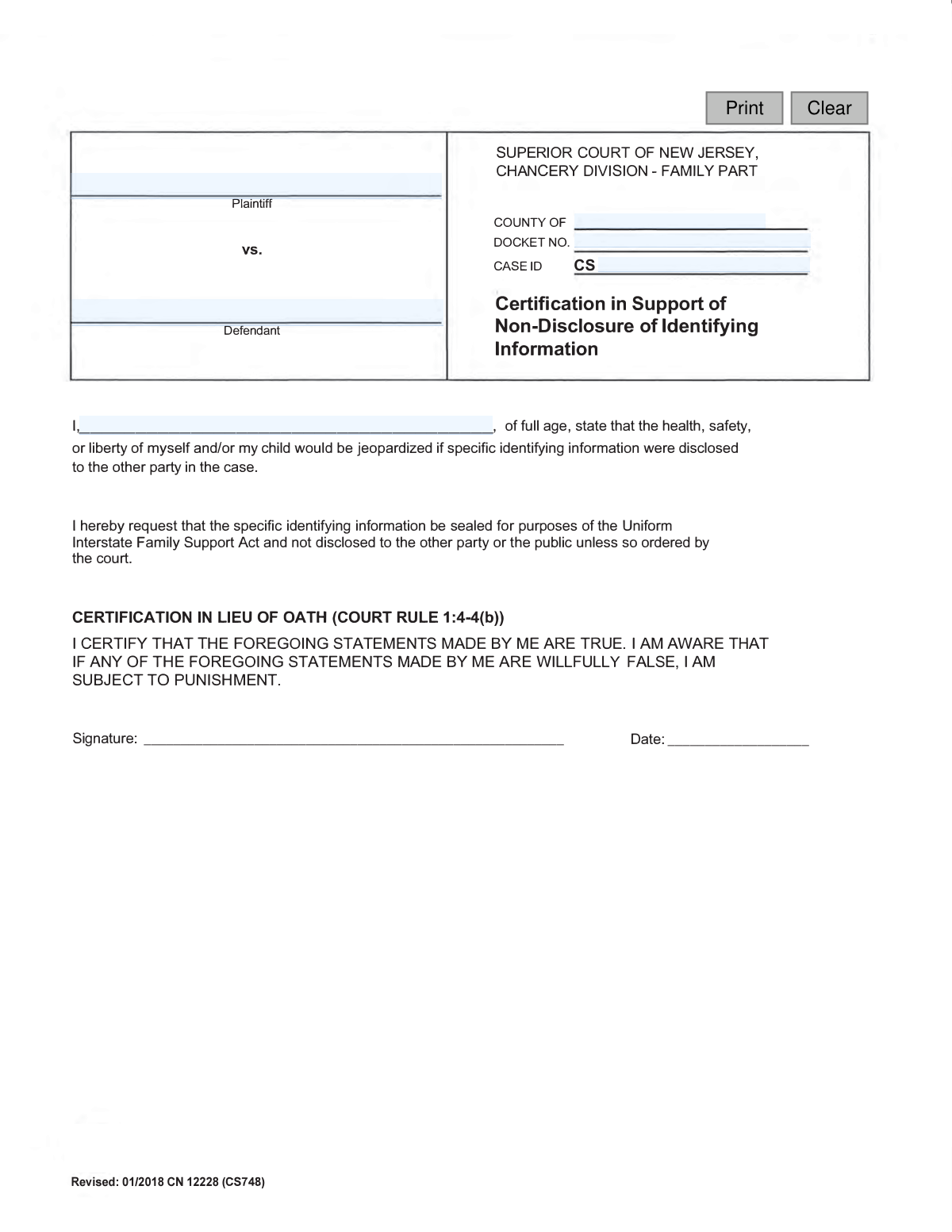
Yes! You can use AI to fill out Certification in Support of Non-Disclosure (for use with Personal Information Form for UIFSA 311)
This form is a legal certification submitted alongside the Personal Information Form for UIFSA 311 (Uniform Interstate Family Support Act). Its purpose is to formally request that the court seal specific identifying information, preventing its disclosure to the other party or the public, often due to concerns about potential harm. This is a crucial step for protecting the safety of a parent or child in sensitive interstate child support cases. Today, this form can be filled out quickly and accurately using AI-powered services like Instafill.ai, which can also convert non-fillable PDF versions into interactive fillable forms.
UIFSA 311 Non-Disclosure Certification is part of the
New Jersey forms category on Instafill.
Our AI automatically handles information lookup, data retrieval, formatting, and form filling.
It takes less than a minute to fill out UIFSA 311 Non-Disclosure Certification using our AI form filling.
Securely upload your data. Information is encrypted in transit and deleted immediately after the form is filled out.
Form specifications
| Form name: | Certification in Support of Non-Disclosure (for use with Personal Information Form for UIFSA 311) |
| Number of fields: | 8 |
| Number of pages: | 1 |
| Language: | English |
Instafill Demo: How to fill out PDF forms in seconds with AI
How to Fill Out UIFSA 311 Non-Disclosure Certification Online for Free in 2026
Are you looking to fill out a UIFSA 311 NON-DISCLOSURE CERTIFICATION form online quickly and accurately? Instafill.ai offers the #1 AI-powered PDF filling software of 2026, allowing you to complete your UIFSA 311 NON-DISCLOSURE CERTIFICATION form in just 37 seconds or less.
Follow these steps to fill out your UIFSA 311 NON-DISCLOSURE CERTIFICATION form online using Instafill.ai:
- 1 Navigate to Instafill.ai and upload or select the 'Certification in Support of Non-Disclosure' form.
- 2 Use the AI assistant to input the case details, including Plaintiff and Defendant names, Docket Number, and Case ID.
- 3 Enter your full name in the designated field to identify yourself as the person making the certification.
- 4 Carefully read the declaration statement, which asserts that disclosing your information could jeopardize your or your child's safety.
- 5 Digitally sign and date the form in the appropriate fields using the provided tools.
- 6 Review the entire completed document for accuracy and completeness before finalizing.
- 7 Download, print, or electronically file the completed certification as required by the court or child support agency.
Our AI-powered system ensures each field is filled out correctly, reducing errors and saving you time.
Why Choose Instafill.ai for Your Fillable UIFSA 311 Non-Disclosure Certification Form?
Speed
Complete your UIFSA 311 Non-Disclosure Certification in as little as 37 seconds.
Up-to-Date
Always use the latest 2026 UIFSA 311 Non-Disclosure Certification form version.
Cost-effective
No need to hire expensive lawyers.
Accuracy
Our AI performs 10 compliance checks to ensure your form is error-free.
Security
Your personal information is protected with bank-level encryption.
Frequently Asked Questions About Form UIFSA 311 Non-Disclosure Certification
This form is used to request that your personal identifying information, like your address, be kept confidential in a family support case. It is filed when you believe disclosing this information would endanger the health, safety, or liberty of yourself or your child.
You should complete this form if you are involved in a case under the Uniform Interstate Family Support Act (UIFSA) and have a genuine fear for your or your child's safety if your personal information is shared with the other party.
Yes, this certification is specifically designed to be filed along with the 'Personal Information Form for UIFSA 311'. Submitting them together strengthens your request for confidentiality.
You will need to provide the case details, including the Plaintiff and Defendant names, the county, the Docket Number, and the Case ID. You must also print your name, sign, and date the form.
Your Case ID and Docket Number are typically printed on official court documents you have received for your case. If you cannot locate them, contact the clerk of the court where your case is filed.
After you submit the form, a judge will review your request. If approved, your identifying information will be sealed and not disclosed to the other party or the public unless the court specifically orders it.
No, confidentiality is not guaranteed. The final decision is made by the court, which retains the authority to order the disclosure of your information if it finds it necessary.
The form states that if a court finds your request was made in 'bad faith' (i.e., dishonestly), you could be subject to legal penalties. It is crucial to be truthful in your certification.
This form requests that 'specific identifying information' be sealed. This generally includes your residential address, employer details, and other personal data that could be used to locate you.
The Plaintiff is the person who initiated the legal case, and the Defendant is the person responding to the case. You should enter the names exactly as they appear on your other court documents.
Yes, services like Instafill.ai use AI to help you accurately auto-fill form fields from your saved information, which saves time and reduces the chance of errors.
To use Instafill.ai, you upload the PDF form to their platform. The AI makes the form interactive, allowing you to click and fill the fields with your saved profile data or type in the information directly.
If you have a non-fillable PDF, you can use a service like Instafill.ai. It can convert flat PDFs into interactive, fillable forms that you can easily complete and sign online.
Compliance UIFSA 311 Non-Disclosure Certification
Validation Checks by Instafill.ai
1
Defendant Name Completeness
This validation ensures that the 'Defendant' field is not empty. As a primary party in a legal case, the defendant's name is required to properly identify the case to which this certification applies. A submission without a defendant's name would be legally insufficient and would be rejected, preventing the form from being filed.
2
Plaintiff Name Completeness
This check verifies that the 'Plaintiff' field contains a value. The plaintiff is a crucial party to the legal action, and their name is necessary for the document's validity and for associating it with the correct court case. If this field is left blank, the form is considered incomplete and cannot be processed.
3
Docket Number Format Validation
This validation checks that the 'Docket No' field is not only present but also conforms to the expected format for the jurisdiction (e.g., a specific combination of letters, numbers, and hyphens). A valid docket number is critical for the court clerk to locate the case file and attach this document correctly. An incorrectly formatted or missing number will result in filing errors and delays.
4
Case ID Presence and Format
This check ensures the 'Case ID' field is filled out and matches the system's expected format. The Case ID is a unique identifier used by the court's electronic management system to track all documents related to a specific case. Failure to provide a valid Case ID would prevent the document from being electronically linked to the case record, rendering the submission useless.
5
Certifier's Name Presence
This validation confirms that the 'Name' field, corresponding to the person making the certification, is not empty. The statement 'I, [Name], hereby request...' is a legal declaration that is invalid without the declarant's name. A submission lacking the certifier's name would be rejected as it fails to identify who is making the legal request.
6
Signature Date Presence and Validity
This check ensures that a date is entered next to the signature line and that it is a valid, plausible date. The date of signature is legally significant, establishing when the certification was made. The validation should confirm the date is in the correct format (e.g., MM/DD/YYYY) and is not a future date, which would be invalid.
7
County Name Presence
This validation verifies that the 'countyName' field has been filled in. The county specifies the legal jurisdiction of the court handling the case, which is essential for routing and filing the document correctly. A missing county name would make it impossible to determine the correct courthouse, leading to rejection of the filing.
8
Prohibited Characters in Name Fields
This validation scans the 'Defendant', 'Plaintiff', and 'Name' fields to ensure they do not contain numbers or prohibited special characters. Name fields should only contain letters, and in some cases, hyphens or apostrophes, to maintain data integrity and prevent potential security risks like injection attacks. Invalid characters can cause errors in case management systems and official records.
9
Logical Consistency of Certifier
This check compares the name in the 'Name' field (the certifier) against the names in the 'Plaintiff' and 'Defendant' fields. While the certifier could be a third party like a guardian, they are most often one of the primary parties. If the name does not match either, the system could raise a soft warning, asking the user to confirm the entry is correct, thereby preventing accidental data entry errors.
10
Signature Date Plausibility
This validation checks if the signature date is not unreasonably far in the past (e.g., more than 5 years ago). While a document might be signed on a past date, an extremely old date is more likely a typo (e.g., entering '2004' instead of '2024'). This check serves as a safeguard against common data entry mistakes, prompting the user to verify the date if it seems implausible.
11
County Name from Approved List
This validation ensures the value entered in the 'countyName' field matches an entry from a predefined list of valid counties for the state. This is more robust than a simple presence check, as it prevents misspellings or the entry of non-existent jurisdictions. Using a dropdown menu is a good practice, but this server-side check is crucial for data integrity and ensures the document is routed correctly.
12
Overall Form Completeness Check
This final validation runs before submission to ensure all mandatory fields (Defendant, Plaintiff, Docket No, Case ID, Name, County, Signature Date) are filled. It acts as a comprehensive gatekeeper to prevent the submission of incomplete forms. If any required field is empty, the submission is blocked, and the user is notified of all missing information at once.
Common Mistakes in Completing UIFSA 311 Non-Disclosure Certification
Individuals often reverse the Plaintiff and Defendant roles, especially if they are not familiar with legal terminology. This can happen when a person is representing themselves and is unsure who initiated the legal action. Incorrectly identifying the parties can cause significant confusion for court clerks, lead to misfiling of the document, and may require a corrected submission, delaying the non-disclosure order.
The Docket Number or Case ID is the unique identifier for the entire case file. People often make transcription errors, leave it blank because they don't know where to find it, or guess the format. Without the correct number, the form cannot be linked to the proper case, rendering it effectively lost. This means the non-disclosure request will not be processed, and sensitive information remains unprotected.
The form is a legal certification made under penalty of perjury and requires the individual's full legal name. Using a nickname, an abbreviated name, or an initial instead of a full first name can create a mismatch with other official court records. This discrepancy can be used to challenge the validity of the certification, potentially invalidating the non-disclosure request.
In the rush to complete and file paperwork, the signature and date lines are frequently overlooked. An unsigned certification is legally void and will be rejected by the court clerk, meaning the request for non-disclosure is not even considered. A missing date creates ambiguity about when the sworn statement was made, which can also lead to rejection or delays.
Filers may not fully grasp the legal weight of certifying 'under penalty of perjury,' treating it as standard boilerplate. This is a sworn statement to the court, and any intentionally false information constitutes a serious crime. The consequences can include criminal charges, fines, and a complete loss of credibility with the judge, which can be devastating to the outcome of their case.
This form explicitly states it is 'in support of' the Personal Information Form for UIFSA 311. A common mistake is submitting this certification alone, without the main form it is meant to supplement. This results in an incomplete filing that will be rejected, as the court has no context for the non-disclosure request, causing critical delays in protecting the filer's information.
The form requires the county where the case is being heard. People sometimes mistakenly enter the county where they live, rather than the county with legal jurisdiction over the case. Filing a document in the wrong county courthouse means it will not reach the correct judge or case file, leading to missed deadlines and the failure of the non-disclosure request.
When a form is filled out by hand, poor or rushed handwriting can make critical information like names and docket numbers unreadable. If a court clerk cannot decipher the information, they may enter it incorrectly into the system or reject the form outright. To avoid this, print clearly in block letters. Since many court forms are only available as non-fillable PDFs, a tool like Instafill.ai can convert them into an easily fillable format, ensuring perfect legibility.
The name typed or written in the sentence 'I, [Name], certify...' must be the same person who signs the form. An error occurs if a paralegal or assistant fills out the form and puts a different name in the body than the party who is required to sign. This inconsistency invalidates the document, as the person making the sworn statement must be clearly and consistently identified.
Courts and agencies periodically update their forms, as indicated by the 'REVISED' date. Using an old version found online or saved from a previous matter is a frequent error. Submitting an obsolete form often results in automatic rejection by the clerk's office, forcing the filer to start over with the correct version and losing valuable time.
After filling out the form, many people submit the original without making a copy for themselves. This is a risky oversight. If the court loses the document or if there is a dispute about what was filed, the filer has no proof of submission or a reference for the information they certified. Always make a physical or digital copy of any document before submitting it to the court.
Saved over 80 hours a year
“I was never sure if my IRS forms like W-9 were filled correctly. Now, I can complete the forms accurately without any external help.”
Kevin Martin Green
Your data stays secure with advanced protection from Instafill and our subprocessors

Robust compliance program
Transparent business model
You’re not the product. You always know where your data is and what it is processed for.
ISO 27001, HIPAA, and GDPR
Our subprocesses adhere to multiple compliance standards, including but not limited to ISO 27001, HIPAA, and GDPR.
Security & privacy by design
We consider security and privacy from the initial design phase of any new service or functionality. It’s not an afterthought, it’s built-in, including support for two-factor authentication (2FA) to further protect your account.
Fill out UIFSA 311 Non-Disclosure Certification with Instafill.ai
Worried about filling PDFs wrong? Instafill securely fills certification-in-support-of-non-disclosure-for-use-with-personal-information-form-for-uifsa-311 forms, ensuring each field is accurate.