Yes! You can use AI to fill out Correction of Error Complaint (N.J.S.A. 54:51A-7)
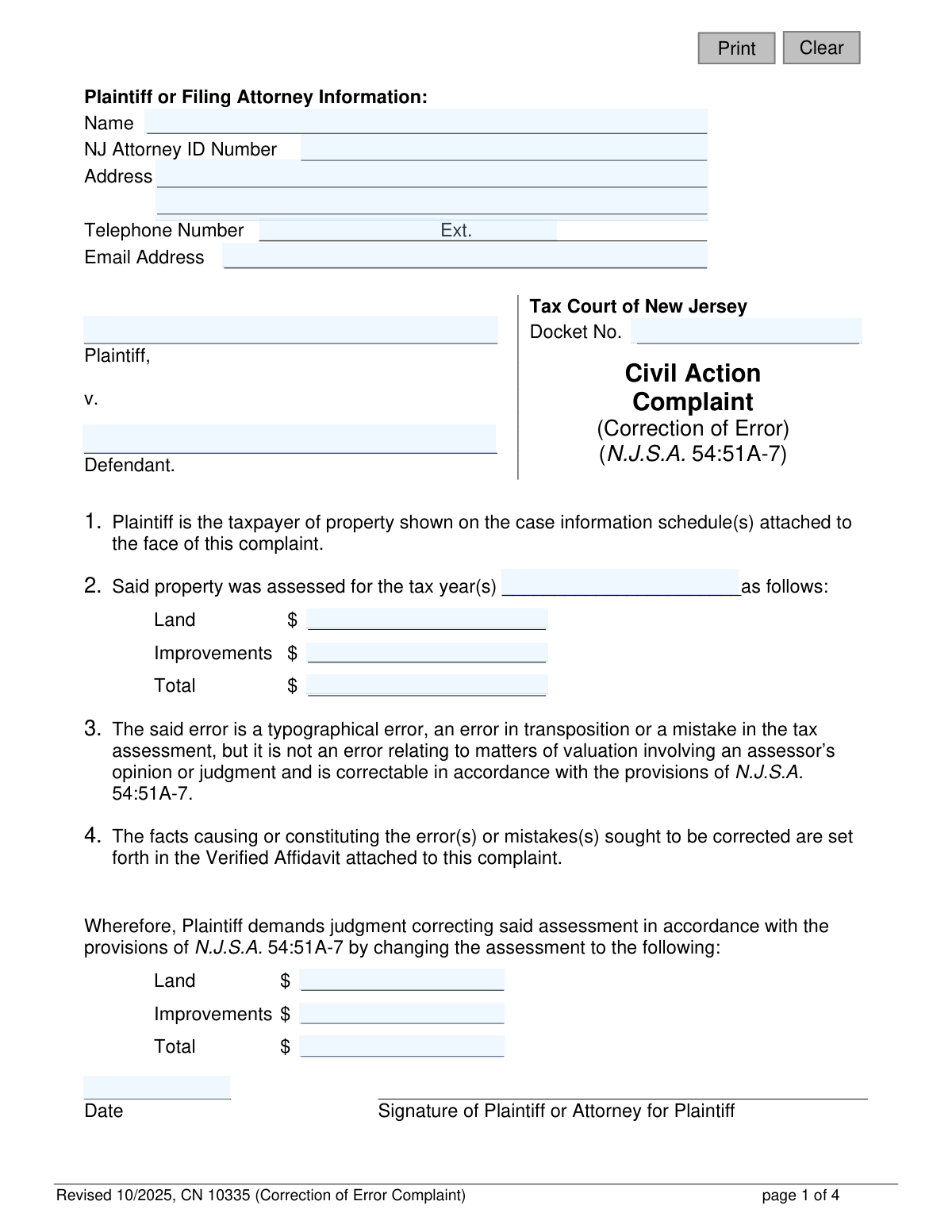
This form is a formal complaint filed with the Tax Court of New Jersey to correct a typographical error, transposition error, or other mistake in a property tax assessment under N.J.S.A. 54:51A-7. It is used for factual errors, not for disputes over the assessor's opinion of the property's value. Filing this complaint is a crucial step for taxpayers to ensure their property assessment is accurate and their tax liability is correct. Today, this form can be filled out quickly and accurately using AI-powered services like Instafill.ai, which can also convert non-fillable PDF versions into interactive fillable forms.
CN 10335 is part of the
New Jersey forms category on Instafill.
Our AI automatically handles information lookup, data retrieval, formatting, and form filling.
It takes less than a minute to fill out CN 10335 using our AI form filling.
Securely upload your data. Information is encrypted in transit and deleted immediately after the form is filled out.
Form specifications
| Form name: | Correction of Error Complaint (N.J.S.A. 54:51A-7) |
| Number of fields: | 34 |
| Number of pages: | 1 |
| Language: | English |
Instafill Demo: How to fill out PDF forms in seconds with AI
How to Fill Out CN 10335 Online for Free in 2026
Are you looking to fill out a CN 10335 form online quickly and accurately? Instafill.ai offers the #1 AI-powered PDF filling software of 2026, allowing you to complete your CN 10335 form in just 37 seconds or less.
Follow these steps to fill out your CN 10335 form online using Instafill.ai:
- 1 Navigate to Instafill.ai and upload or select the New Jersey Correction of Error Complaint (CN 10335).
- 2 Use the AI assistant to input the Plaintiff or Filing Attorney's information, including name, address, and contact details.
- 3 Enter the case details, specifying the defendant (taxing district), the tax year(s) in question, and the original incorrect assessment values.
- 4 State the corrected assessment values for the land, improvements, and total as demanded in the judgment.
- 5 Complete the attached Affidavit by providing a detailed explanation of the facts causing or constituting the error you are seeking to correct.
- 6 Fill out the Proof of Service section, confirming that copies of the complaint have been served to the municipal clerk, assessor, and the county board of taxation administrator.
- 7 Review all the information for accuracy, then generate the completed complaint, ready for signature and filing with the Tax Court of New Jersey.
Our AI-powered system ensures each field is filled out correctly, reducing errors and saving you time.
Why Choose Instafill.ai for Your Fillable CN 10335 Form?
Speed
Complete your CN 10335 in as little as 37 seconds.
Up-to-Date
Always use the latest 2026 CN 10335 form version.
Cost-effective
No need to hire expensive lawyers.
Accuracy
Our AI performs 10 compliance checks to ensure your form is error-free.
Security
Your personal information is protected with bank-level encryption.
Frequently Asked Questions About Form CN 10335
This form is used to file a complaint with the Tax Court of New Jersey to correct a factual or typographical error in your local property tax assessment, as defined under N.J.S.A. 54:51A-7.
Any property taxpayer or their attorney who has identified a specific error, such as a typo or transposition mistake, in their property's tax assessment should file this form.
This form is for correcting factual mistakes like typographical errors, transposition errors (e.g., swapped numbers), or other clear mistakes in the assessment data. It cannot be used to challenge the assessor's opinion or judgment about your property's value.
The complaint must be received by the Tax Court Management Office no later than the end of the third tax year following the tax year for which you are seeking the correction.
You must attach a sworn and notarized Affidavit that explains the error in detail. You also need to attach the applicable Local Property Tax Correction of Error Case Information Statement to the face of the complaint.
The Affidavit is a sworn legal statement detailing the facts of the assessment error. It must be completed and signed by the plaintiff (taxpayer) or another person with direct knowledge of the facts, and it must be notarized.
You are required to serve a copy of the complaint on three separate parties: the Clerk of the taxing district, the Assessor of the taxing district, and the Administrator of the County Board of Taxation.
After you have sent copies of the complaint to the required parties, you must fill out the 'Proof of Service' section by recording the date of service and the name of the taxing district for each party. You must then sign and date this section to certify it is true.
Before filing, you must remove all confidential personal identifiers, such as Social Security numbers, driver's license numbers, active financial account numbers, and insurance policy numbers, from all documents.
Yes, services like Instafill.ai use AI to accurately auto-fill form fields from your saved information, which can save you significant time and help prevent errors.
Simply upload the Correction of Error Complaint PDF to Instafill.ai. The platform will make the form fillable online, allowing you to use its AI-powered tools to quickly complete the required fields before downloading.
If your PDF is not interactive, you can use a service like Instafill.ai. It can convert flat, non-fillable PDFs into interactive forms that you can complete and sign directly on your computer.
A correctable error is a factual mistake (e.g., wrong square footage), while a valuation dispute is a disagreement with the assessor's professional opinion of your property's market value. Valuation disputes require a different tax appeal process.
Compliance CN 10335
Validation Checks by Instafill.ai
1
Verifies Original Assessment Calculation
This check validates that the sum of the 'Land' (OrigAssmtLand) and 'Improvements' (OrigAssmtImprvmts) values equals the 'Total' (OrigAssmtTtl) value for the original assessment. This is crucial for data integrity and prevents filings based on simple mathematical errors. A mismatch would require the user to correct the values before submission.
2
Verifies Corrected Assessment Calculation
This check validates that the sum of the 'Land' (OrigAssmtLand1) and 'Improvements' (OrigAssmtImprvmts1) values equals the 'Total' (OrigAssmtTtl1) value for the corrected assessment. Similar to the original assessment check, this ensures the requested relief is mathematically sound. If the numbers do not add up, the court cannot process the requested change accurately.
3
Checks Complaint Against Statutory Filing Deadline
This is a critical logical check based on N.J.S.A. 54:51A-7. It verifies that the complaint's filing date (attyDt) is no later than the end of the third tax year following the tax year being corrected (assmtYrs). For example, a complaint for tax year 2020 must be filed by December 31, 2023. Failure to meet this jurisdictional deadline will result in the case being dismissed.
4
Ensures Affidavit Details are Provided
This validation confirms that the text area for explaining the facts of the error (affDetails) is not empty. The affidavit is the core evidentiary basis for the complaint, and its absence makes the filing incomplete and without merit. The form cannot be submitted without a detailed explanation of the error.
5
Confirms All Three Proofs of Service are Completed
The form requires serving the complaint on the municipal clerk, the assessor, and the county board of taxation. This validation ensures that dates (posDt1, posDt2, posDt3) and taxing district names (assessDist1, assessDist2) are entered for all three required service certifications. An incomplete proof of service can invalidate the filing and lead to dismissal for failure to properly notify all parties.
6
Validates Service Dates Relative to Complaint Date
This check ensures that the dates listed in the Proof of Service section (posDt1, posDt2, posDt3) are on or before the main complaint signature date (attyDt). It is logically impossible to serve a copy of a complaint before it has been finalized and signed. This validation prevents procedural errors that could be grounds for challenging the validity of the service.
7
Scans for Confidential Personal Identifiers
Based on Court Rule 1:38-7, this validation scans text fields like 'affDetails' for patterns that match confidential identifiers (e.g., SSN, driver's license numbers). If a potential match is found, it warns the user to redact the information before filing. This helps protect personal privacy and ensures compliance with court rules, as court staff are not responsible for redaction.
8
Verifies Original and Corrected Assessments Differ
This validation compares the 'Total' original assessment (OrigAssmtTtl) with the 'Total' corrected assessment (OrigAssmtTtl1). If the values are identical, it indicates no change is being requested, which may be an error. The system should flag this to the user to confirm they intended to file a complaint with no change in the total assessment value.
9
Validates NJ Attorney ID Format
Checks if the 'attyID' field matches the expected format for a New Jersey Attorney ID number. This ensures the attorney is properly identified and can be looked up in the state bar registry. If the format is incorrect, the filing may be rejected or delayed while the clerk verifies the attorney's credentials.
10
Requires Tax Year(s) to be Specified
This validation ensures the 'assmtYrs' field is not left blank. The tax year is a fundamental piece of information that defines the scope of the complaint and which assessment is being challenged. Without it, the complaint is ambiguous and cannot be processed by the court or the taxing district.
11
Validates Affidavit Sworn Date
This check ensures the 'swornDay', 'swornMonth', and 'swornYr' fields combine to form a valid calendar date that is not in the future. The sworn date is a legal requirement for an affidavit, attesting to when the statement was made under oath. An invalid or future date would render the affidavit legally deficient.
12
Validates Plaintiff/Attorney Email Format
This check verifies that the value entered in the 'attyEmail' field follows the standard format of an email address (e.g., [email protected]). Correct email information is crucial for electronic communication from the court and opposing parties. An invalid email address could cause the filer to miss important notices and deadlines.
13
Requires Complaint Signature Date
This check ensures the 'attyDt' field is filled out. The signature date establishes the date the complaint was formally executed and is critical for determining timeliness, especially in relation to the statutory filing deadline and service dates. A complaint without a signature date is incomplete.
Common Mistakes in Completing CN 10335
The form's notes explicitly state that a 'Local Property Tax Correction of Error Case Information Statement must be attached to the face of the complaint.' Filers often overlook this separate required document, focusing only on the complaint and affidavit. An incomplete filing will be rejected by the Tax Court Management Office, causing significant delays and potentially risking the filing deadline.
This complaint is strictly for 'typographical error, an error in transposition or a mistake,' not for challenging an assessor's judgment on property value. People mistakenly use this form to argue their property is over-assessed, which requires a standard tax appeal. This fundamental error will lead to the complaint's dismissal, wasting time and filing fees.
The affidavit is a sworn statement and the core evidence for the complaint. Common mistakes include failing to have it signed in the presence of a Notary Public, forgetting the notary's signature and seal, or having someone without direct knowledge of the facts sign it. An invalid affidavit renders the entire complaint legally insufficient and will result in its rejection or dismissal.
The affidavit requires a detailed explanation of 'the facts causing or constituting the error(s).' Filers often provide vague statements like 'the assessment was a mistake' instead of specific facts, such as 'the assessor incorrectly listed the property as having a two-car garage when it only has a one-car garage.' Without a clear, factual basis, the court has no grounds to grant the correction, leading to denial of the complaint.
The 'Proof of Service' page requires serving the complaint on three distinct parties: the municipal clerk, the municipal assessor, and the county board of taxation administrator. Filers frequently miss one of these parties, believing service on the town is sufficient. Failure to properly serve all three entities results in defective service, which is grounds for the court to dismiss the entire case.
The form notes specify that the complaint must be filed 'not later than the end of the third tax year following the tax year for which the correction is sought.' Many filers are unaware of or miscalculate this strict deadline. Filing even one day late will result in the complaint being permanently time-barred and dismissed by the court.
The form requires listing original and corrected assessment values for Land, Improvements, and a Total. Filers often make simple addition errors where the Land and Improvements values do not sum to the stated Total. These mistakes undermine the filing's credibility and create confusion. AI-powered form filling tools like Instafill.ai can prevent this by performing automatic calculations and validating totals.
A legal complaint requires signatures to be valid, but filers often forget to sign the main complaint (Page 1) or the Proof of Service certification (Page 3). An unsigned document is not legally binding and will be rejected by the court clerk, halting the process until a properly signed version is submitted. This is a common oversight when dealing with multi-page documents.
Court rules mandate the redaction of sensitive information like Social Security or driver's license numbers. People sometimes attach supporting documents without redacting this information, making private data part of the public record and creating a risk of identity theft. It is the filer's sole responsibility to redact this information before submission, as court staff will not do it for them.
This form is often available as a non-fillable PDF, leading people to fill it out by hand. Illegible handwriting can cause data entry errors by court staff or make the complaint difficult to understand, leading to delays or rejection. To avoid this, tools like Instafill.ai can convert the non-fillable PDF into an interactive, fillable version, ensuring a clean, typed, and professional submission.
Saved over 80 hours a year
“I was never sure if my IRS forms like W-9 were filled correctly. Now, I can complete the forms accurately without any external help.”
Kevin Martin Green
Your data stays secure with advanced protection from Instafill and our subprocessors

Robust compliance program
Transparent business model
You’re not the product. You always know where your data is and what it is processed for.
ISO 27001, HIPAA, and GDPR
Our subprocesses adhere to multiple compliance standards, including but not limited to ISO 27001, HIPAA, and GDPR.
Security & privacy by design
We consider security and privacy from the initial design phase of any new service or functionality. It’s not an afterthought, it’s built-in, including support for two-factor authentication (2FA) to further protect your account.
Fill out CN 10335 with Instafill.ai
Worried about filling PDFs wrong? Instafill securely fills correction-of-error-complaint-njsa-5451a-7 forms, ensuring each field is accurate.