Yes! You can use AI to fill out Court User Satisfaction Survey - Atlantic/Cape May (CN 10673-English-Spanish)

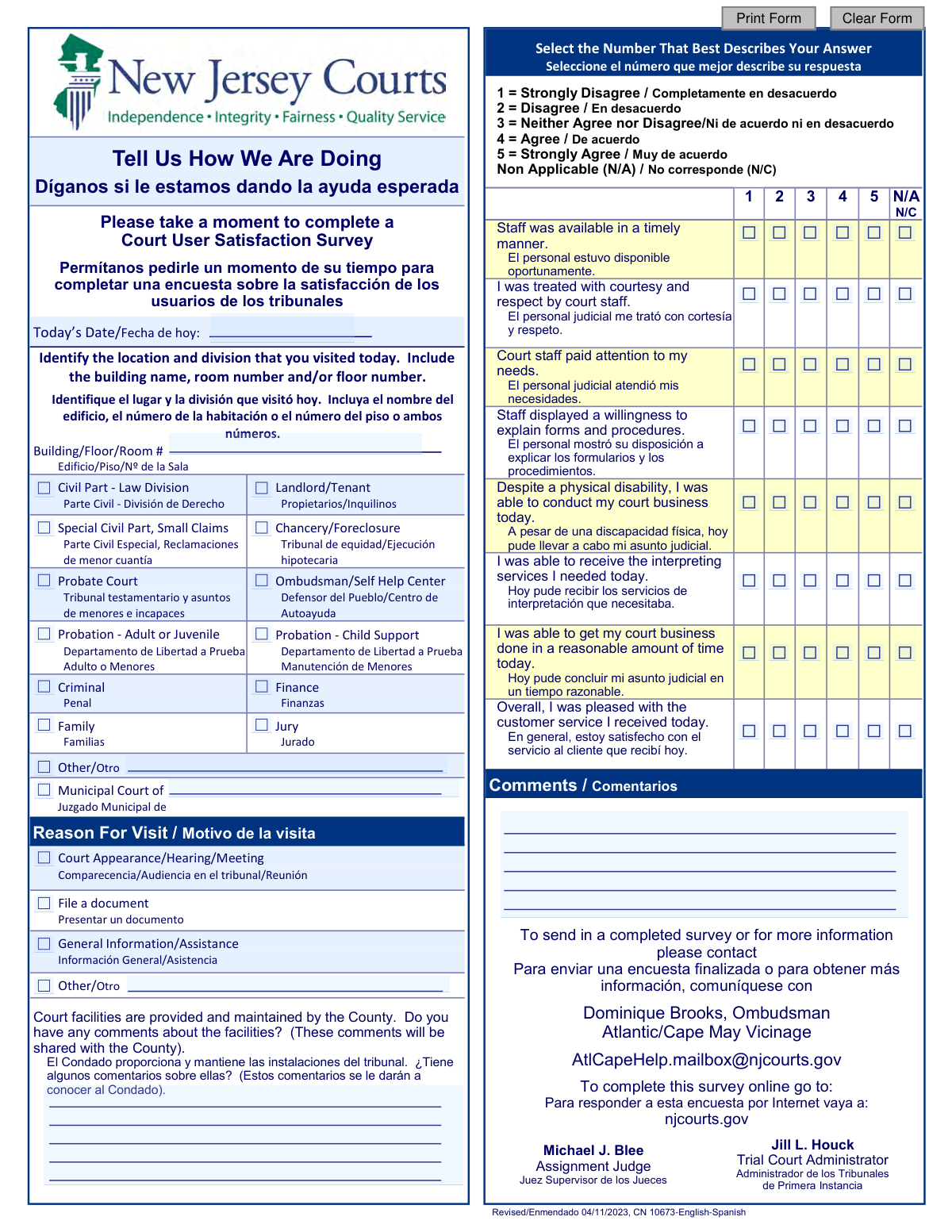
This form is a survey provided by the New Jersey Judiciary for individuals who have visited the courts in the Atlantic/Cape May Vicinage. Its purpose is to collect feedback on user satisfaction regarding staff availability, courtesy, facility accessibility, and overall service quality to help improve court operations. Today, this form can be filled out quickly and accurately using AI-powered services like Instafill.ai, which can also convert non-fillable PDF versions into interactive fillable forms.
CN 10673 is part of the New Jersey forms category on Instafill.
Our AI automatically handles information lookup, data retrieval, formatting, and form filling.
It takes less than a minute to fill out CN 10673 using our AI form filling.
Securely upload your data. Information is encrypted in transit and deleted immediately after the form is filled out.

Form specifications

Form name: Court User Satisfaction Survey - Atlantic/Cape May (CN 10673-English-Spanish)
Number of fields: 75
Number of pages: 1
Language: English
main-image

Instafill Demo: How to fill out PDF forms in seconds with AI

How to Fill Out CN 10673 Online for Free in 2026

Are you looking to fill out a CN 10673 form online quickly and accurately? Instafill.ai offers the #1 AI-powered PDF filling software of 2026, allowing you to complete your CN 10673 form in just 37 seconds or less.
Follow these steps to fill out your CN 10673 form online using Instafill.ai:
  1. 1 Navigate to Instafill.ai and upload or select the Court User Satisfaction Survey form.
  2. 2 Enter the date of your visit and specify the building, floor, room number, and court division you interacted with.
  3. 3 Indicate your primary reason for visiting the court, such as filing a document or attending a hearing.
  4. 4 Rate your experience on a scale of 1 to 5 for each question regarding staff performance, timeliness, and accessibility.
  5. 5 Optionally, provide written comments about the court facilities or your overall experience in the designated sections.
  6. 6 Review all your responses to ensure they accurately reflect your experience.
  7. 7 Securely download, print, or submit your completed survey as instructed on the form.

Our AI-powered system ensures each field is filled out correctly, reducing errors and saving you time.

Why Choose Instafill.ai for Your Fillable CN 10673 Form?

Speed

Complete your CN 10673 in as little as 37 seconds.

Up-to-Date

Always use the latest 2026 CN 10673 form version.

Cost-effective

No need to hire expensive lawyers.

Accuracy

Our AI performs 10 compliance checks to ensure your form is error-free.

Security

Your personal information is protected with bank-level encryption.

Frequently Asked Questions About Form CN 10673

This survey is designed to gather feedback from people who have used court services in the Atlantic/Cape May Vicinage. Your responses help the court system evaluate its performance and identify areas for improvement.

Anyone who recently visited or interacted with the Atlantic/Cape May courts should complete this survey. This includes individuals who had a court appearance, filed a document, or sought general information.

You will need to provide the date of your visit, the specific court location and division, and your reason for being there. The main part of the survey asks you to rate your satisfaction with various aspects of the service you received.

You can email the completed form to the Ombudsman at [email protected]. Alternatively, you can complete the survey online by visiting the New Jersey Courts website at njcourts.gov.

The numbers represent a satisfaction scale where 1 means 'Strongly Disagree' and 5 means 'Strongly Agree.' A rating of 3 indicates you neither agree nor disagree, and you can select 'N/A' if a question does not apply to your experience.

There is a specific section for comments about the court facilities. These comments will be shared with the County, which is responsible for providing and maintaining the courthouse buildings.

Yes, the form includes an option for 'Municipal Court of'. You can check this option and write the name of the specific municipality on the line provided.

The survey includes a specific question to rate your experience receiving interpreter services. This allows you to provide direct feedback on the availability and quality of language assistance.

In the 'Reason For Visit' section, you can select the 'Other/Otro' checkbox. A line is provided for you to write in your specific reason for visiting.

Yes, the form does not ask for your name or other personal identifying information. The goal is to gather honest and anonymous feedback to improve court services.

Yes, services like Instafill.ai use AI to accurately auto-fill form fields, which can save you time. This is especially helpful for entering information like dates and locations quickly.

Simply upload the survey PDF to the Instafill.ai platform. The tool will make the form interactive, allowing you to easily type your answers, select options, and then download the completed document for submission.

If you have a non-fillable or 'flat' PDF, you can use a service like Instafill.ai. It can convert the non-fillable PDF into an interactive form that you can easily complete on your computer.

Compliance CN 10673
Validation Checks by Instafill.ai

1
Validate Survey Date
This check ensures the 'SurveyDate' field contains a valid, properly formatted date (e.g., MM/DD/YYYY). The date should not be in the future or unreasonably far in the past. This is crucial for contextualizing feedback and identifying trends over time, and an invalid entry would corrupt time-series analysis. If validation fails, the user should be prompted to enter a valid date corresponding to their visit.
2
Require Location/Division Selection
This validation verifies that the user has selected at least one checkbox from the location/division list (e.g., 'Civil Part', 'Probate Court'). This information is essential for routing the feedback to the correct department for review and action. A submission without this data is not actionable, so the form should display an error and prevent submission until a selection is made.
3
Require Description for 'Other' Division
If a user selects the 'Other' checkbox in the division list, this check ensures the corresponding 'OtherDivDescription' text field is not empty. This prevents ambiguous data by forcing the user to specify what 'Other' refers to. Without this description, the selection is meaningless, so an error message should prompt the user for details.
4
Require Court Name for 'Municipal Court' Selection
When the 'Municipal Court of' option is selected, this validation confirms that the associated text field for the court's name is filled in. Feedback for a municipal court is useless without knowing which specific court is being reviewed. The form should block submission and require the user to enter the name of the municipal court.
5
Require Reason for Visit
This check ensures that the user selects at least one option from the 'Reason For Visit' section. Understanding why the user was at the court (e.g., to file a document vs. for a hearing) provides critical context for their feedback. If no reason is selected, the form should prompt the user to make a selection before proceeding.
6
Require Description for 'Other' Reason for Visit
Similar to the division check, if the 'Other' option is selected under 'Reason For Visit', this validation ensures the accompanying description field is completed. This provides necessary clarification for data analysis and prevents the collection of vague, unhelpful 'Other' responses. A failure to provide a description should trigger an error message.
7
Ensure All Satisfaction Questions are Answered
This validation confirms that every satisfaction rating question (from 'Staff was available' to 'Overall') has a selected value (1-5 or N/A). Incomplete surveys diminish the value of the dataset and can introduce bias. This check prevents accidental omissions and ensures a complete response set is collected from each user.
8
Validate Survey Response Values
This check verifies that the submitted values for the eight satisfaction questions are only from the allowed set: 1, 2, 3, 4, 5, or N/A. This is a data integrity measure to prevent corruption from invalid inputs, such as text or numbers outside the defined scale. Any submission with an invalid value in these fields should be rejected at the server.
9
Ensure Valid Response for Interpreting Services Question
This validation confirms a response (1-5 or N/A) is provided for the 'I was able to receive the interpreting services I needed today' question. It is vital to distinguish between a user who did not need services (N/A) and a user who needed them but was dissatisfied (1 or 2). An empty response creates ambiguity, so this check ensures the data is clear and actionable for assessing language access services.
10
Require Specific Location Description
This check ensures the 'Building/Floor/Room #' text field is not left empty. Pinpointing the exact physical location of the user's experience is critical for addressing issues related to specific staff, rooms, or facilities. Feedback without this detail is less actionable, so the form should prompt the user to provide it.
11
Enforce Maximum Length for Comment Fields
All free-text fields, such as 'FacilitiesComments' and 'GeneralComments', should be validated against a maximum character limit (e.g., 2500 characters). This prevents database overflow errors and protects the system from excessively long inputs, which can be a vector for attacks. If a user exceeds the limit, the UI should provide immediate feedback and prevent the entry of more characters.
12
Implement Anti-Spam/Bot Detection
This is a system-level check to prevent automated spam or bot submissions that can skew survey results and waste administrative resources. This can be achieved using methods like a CAPTCHA, a honeypot field, or rate-limiting submissions from a single IP address. A submission failing this check should be silently discarded or blocked to maintain data integrity.

Common Mistakes in Completing CN 10673

Misinterpreting the Rating Scale

Users often mistake the 1-5 rating scale, assuming '1' is the best score when it is defined as 'Strongly Disagree'. This completely inverts the user's intended feedback, logging a positive experience as a highly negative one and vice-versa. To avoid this, carefully read the key provided (1 = Strongly Disagree, 5 = Strongly Agree) before making a selection.

Providing Vague Location Information

Respondents frequently enter incomplete location details, such as 'Courthouse' or '2nd floor', in the 'Building/Floor/Room #' field. This makes the feedback unactionable, as administrators cannot trace the experience to a specific department, judge, or staff group. Always provide the full building name, floor, and room number to ensure your comments are routed correctly.

Leaving 'Other' Fields Blank

A common error is checking an 'Other' box for the division visited or reason for visit, but failing to provide a written explanation. This creates a data gap, as the court cannot categorize or understand the context of the visit. If your situation isn't listed, always use the provided space to briefly describe the 'Other' division or reason.

Improper Use of 'N/A' (Non Applicable)

Users either forget to use 'N/A' for services they didn't encounter, like 'interpreting services', or overuse it to skip questions they'd rather not answer. This skews the results by either assigning a false neutral/negative rating to an unused service or by reducing the overall data quality. Only select 'N/A' when a question is genuinely not relevant to your specific visit.

Confusing Facility Comments with Service Comments

People often place feedback about staff or procedures in the comment box for 'facilities', which is intended for the County. This misdirects the feedback, meaning comments on court service may not reach the court administration responsible for improvements. Reserve the facilities box for comments on building cleanliness, temperature, and physical accessibility, and use the general comments section for all other feedback.

Giving Low Scores Without Explanation

A user will rate their experience with a '1' or '2' across multiple categories but leave the final 'Comments' section blank. While this indicates dissatisfaction, it provides no actionable insight for the court. To ensure your concerns are understood and can be addressed, accompany any low scores with brief, constructive comments explaining the issue.

Incorrectly Identifying the Court Division

Unsure of the official name, users may guess the division they visited, check multiple boxes, or leave the section blank entirely. This results in feedback being sent to the wrong department, preventing the relevant staff from seeing it. Before filling out the form, check your paperwork or ask a staff member for the correct name of the division you interacted with.

Inconsistent or Incorrect Date Formatting

Users may enter the date in a non-standard format (e.g., DD-MM-YY) or accidentally write the wrong day, month, or year. This complicates data analysis and makes it difficult to correlate feedback with specific courthouse activities or staff schedules on a given day. To prevent this, use the standard MM/DD/YYYY format and double-check it is the correct date of your visit. AI-powered tools like Instafill.ai can help by automatically populating the current date in the correct format.

Forgetting to Specify the Municipal Court

The form includes a separate line for 'Municipal Court of ____', which is easily overlooked by users who focus only on the main checklist. If the visit was to a municipal court, failing to fill in this line makes it difficult to route the feedback to the correct town. Always check if your visit was to a specific municipal court and write its name on the designated line.

Failing to Properly Submit the Form

The document is a non-fillable PDF, which can be confusing to complete and submit electronically. Users may fill it out in their heads or print it but then fail to follow through with scanning and emailing it, meaning their feedback is lost. To avoid this, users can leverage tools like Instafill.ai, which can convert flat PDFs into fillable forms, making it simple to type, save, and email the completed survey to the correct address.
Saved over 80 hours a year

“I was never sure if my IRS forms like W-9 were filled correctly. Now, I can complete the forms accurately without any external help.”

Kevin Martin Green

Your data stays secure with advanced protection from Instafill and our subprocessors

Robust compliance program

Transparent business model

You’re not the product. You always know where your data is and what it is processed for.

ISO 27001, HIPAA, and GDPR

Our subprocesses adhere to multiple compliance standards, including but not limited to ISO 27001, HIPAA, and GDPR.

Security & privacy by design

We consider security and privacy from the initial design phase of any new service or functionality. It’s not an afterthought, it’s built-in, including support for two-factor authentication (2FA) to further protect your account.

Fill out CN 10673 with Instafill.ai

Worried about filling PDFs wrong? Instafill securely fills court-user-satisfaction-survey-atlanticcape-may-cn-10673-english-spanish forms, ensuring each field is accurate.