Yes! You can use AI to fill out CPR Voluntary Placement - Review Board Recommendation to the Judge
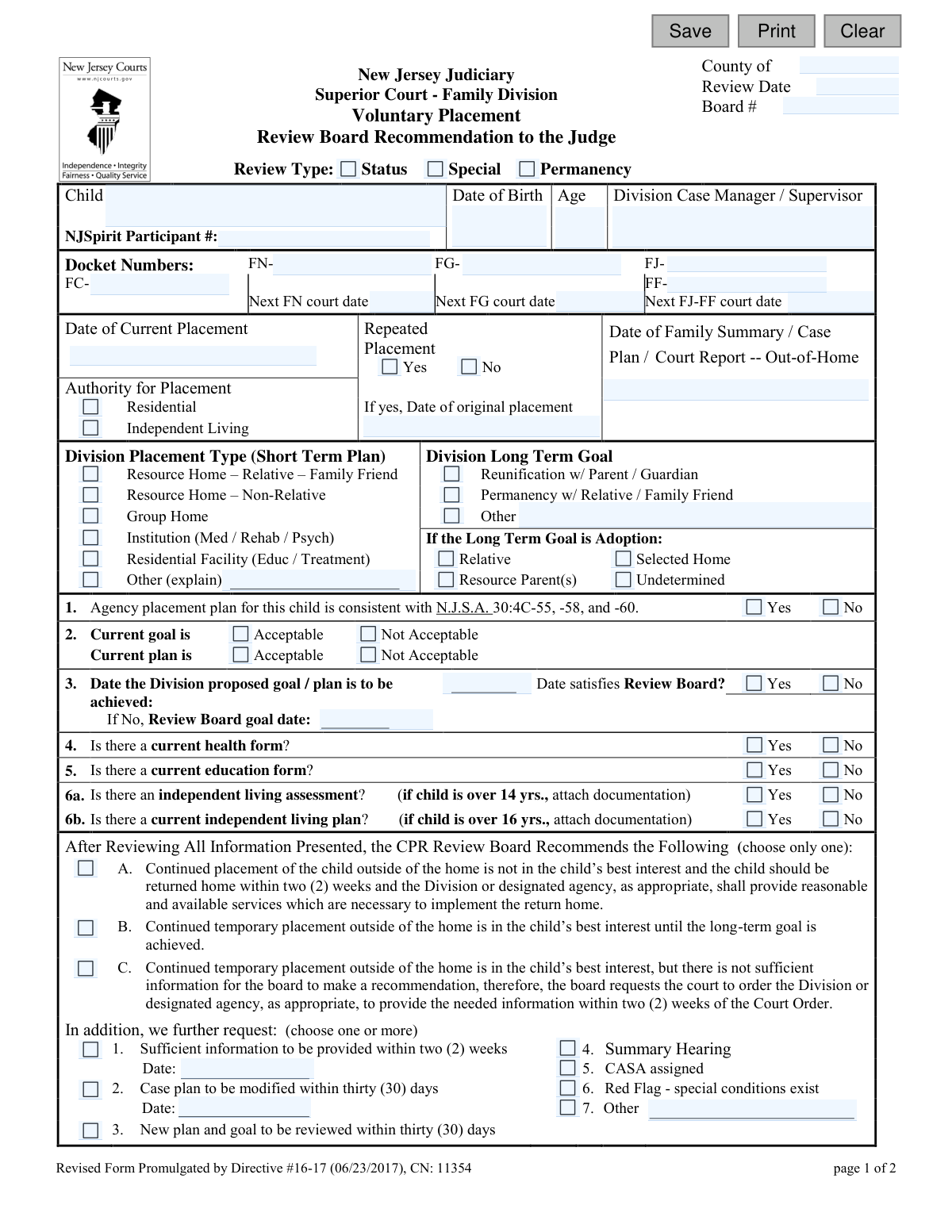
This form is a formal document used by the New Jersey Superior Court, Family Division, for Child Placement Review (CPR) Boards. It serves to communicate the board's official recommendation to a judge regarding a child in voluntary out-of-home placement, assessing whether continued placement is in the child's best interest and evaluating the progress toward a permanent plan. Today, this form can be filled out quickly and accurately using AI-powered services like Instafill.ai, which can also convert non-fillable PDF versions into interactive fillable forms.
NJ Judiciary CN 11354 is part of the
New Jersey forms category on Instafill.
Our AI automatically handles information lookup, data retrieval, formatting, and form filling.
It takes less than a minute to fill out NJ Judiciary CN 11354 using our AI form filling.
Securely upload your data. Information is encrypted in transit and deleted immediately after the form is filled out.
Form specifications
| Form name: | CPR Voluntary Placement - Review Board Recommendation to the Judge |
| Number of fields: | 125 |
| Number of pages: | 1 |
| Language: | English |
Instafill Demo: How to fill out PDF forms in seconds with AI
How to Fill Out NJ Judiciary CN 11354 Online for Free in 2026
Are you looking to fill out a NJ JUDICIARY CN 11354 form online quickly and accurately? Instafill.ai offers the #1 AI-powered PDF filling software of 2026, allowing you to complete your NJ JUDICIARY CN 11354 form in just 37 seconds or less.
Follow these steps to fill out your NJ JUDICIARY CN 11354 form online using Instafill.ai:
- 1 Navigate to Instafill.ai and upload or select the 'CPR Voluntary Placement - Review Board Recommendation to the Judge' form.
- 2 Use the AI assistant to input key case identifiers, including the county, docket numbers, review date, and child's personal information.
- 3 Detail the current placement information, such as placement type, authority for placement, and the Division's long-term goal for the child.
- 4 Answer the series of yes/no questions regarding the agency's plan, health and education forms, and independent living assessments.
- 5 Clearly select the Board's primary recommendation from the provided options (e.g., return child home, continue placement) and check any additional requests.
- 6 Document the case summary, reasons for the recommendation, efforts made by the Division, and list all parties who appeared at the review.
- 7 Review all AI-populated and manually entered data for complete accuracy before the board members provide their initials and the chairperson finalizes the document for submission to the judge.
Our AI-powered system ensures each field is filled out correctly, reducing errors and saving you time.
Why Choose Instafill.ai for Your Fillable NJ Judiciary CN 11354 Form?
Speed
Complete your NJ Judiciary CN 11354 in as little as 37 seconds.
Up-to-Date
Always use the latest 2026 NJ Judiciary CN 11354 form version.
Cost-effective
No need to hire expensive lawyers.
Accuracy
Our AI performs 10 compliance checks to ensure your form is error-free.
Security
Your personal information is protected with bank-level encryption.
Frequently Asked Questions About Form NJ Judiciary CN 11354
This form documents the Child Placement Review (CPR) Board's official recommendation to a Superior Court Judge regarding a child's out-of-home placement case.
The CPR Review Board completes and signs this form after conducting a review of the child's case. It is not filled out by parents or caseworkers, but they provide information for the review.
This refers to a situation where a parent or guardian agrees to place their child in the care of the state's child protection agency without a court order forcing the removal.
The board can recommend returning the child home, continuing the temporary placement, or requesting more information from the Division before a final recommendation can be made.
A judge reviews the board's recommendation to make an informed court order about the child's placement and case plan. The board's recommendation is highly influential but not the final decision.
The form requires key case details, including the child's information, docket numbers, placement history, the Division's proposed goals, and dates of relevant reports.
CASA stands for Court Appointed Special Advocate. This is a request for the court to assign a trained volunteer to advocate for the child's best interests during the legal proceedings.
A Status review is a routine check-in, a Permanency review focuses on finalizing a long-term plan like adoption, and a Special review is called to address a specific, urgent issue in the case.
This section, used only in Permanency Reviews, documents whether a parent's legal rights have been terminated or explains why termination is or is not the recommended plan for the child.
Yes, services like Instafill.ai can use AI to help caseworkers accurately auto-fill form fields from case files, saving time and reducing errors when preparing documents for the review board.
Simply upload the form to Instafill.ai. Its AI will identify all the fields, allowing you to easily click and fill them in or connect a data source to populate them automatically.
If your PDF is not fillable, you can use a service like Instafill.ai. It can convert flat, non-fillable PDFs into interactive forms that you can easily complete, save, and print online.
The form lists potential attendees, including parents, resource family, the Division Supervisor, and the Division Caseworker, who appear before the board members.
This indicates the board disagrees with the Division's proposed plan for the child. The board will then provide its own recommendation for the goal, plan, and timeline to the judge.
Compliance NJ Judiciary CN 11354
Validation Checks by Instafill.ai
1
Ensures Child's Age is Consistent with Date of Birth
This check validates that the entered 'Age' is the correct calculation based on the 'Child Date of Birth' and the 'Review Date'. This is crucial for preventing simple data entry errors and ensuring that all age-dependent logic, such as requirements for independent living assessments, is triggered correctly. If the age and date of birth do not align, the system should flag the discrepancy and require user correction.
2
Validates Original Placement Date for Repeated Placements
If the 'Repeated Placement' field is marked 'Yes', this validation ensures that the 'Date of original placement' field is populated. It also verifies that the original placement date is not later than the 'Date of Current Placement'. This check maintains a logical and accurate timeline of the child's placement history, which is essential for judicial review.
3
Ensures a Single Review Type is Selected
The form requires the selection of a 'Review Type' from 'Status', 'Special', or 'Permanency'. This validation confirms that one and only one of these mutually exclusive options is chosen. Selecting the correct review type is critical as it determines the legal context of the hearing and which sections of the form, such as the 'Termination of Parental Rights' section for permanency reviews, are applicable.
4
Verifies Future Court Dates
This validation checks that any dates entered for 'Next FN court date', 'Next FG court date', or 'Next FJ-FF court date' are set in the future relative to the 'Review Date'. Scheduling a court hearing in the past is a logical impossibility and indicates a significant data entry error. The system should reject past dates to ensure the integrity of scheduling information.
5
Validates Independent Living Assessment for Children Over 14
Based on the child's calculated age, this check verifies that question 6a, 'Is there an independent living assessment?', is answered if the child is 14 years of age or older. This is a key procedural requirement to ensure older youth are being prepared for adulthood. A validation failure would prompt the user to complete this required field for eligible children.
6
Requires a Single Primary Board Recommendation
The form presents three mutually exclusive primary recommendations labeled A, B, and C. This validation ensures that exactly one of these options is selected before submission. This choice represents the core recommendation of the review board to the judge, and allowing zero or multiple selections would render the form's primary purpose ambiguous and invalid.
7
Enforces TPR Section Completion for Permanency Reviews
The 'Termination of Parental Rights' (TPR) section is specifically relevant to 'Permanency Reviews'. This validation checks if the 'Permanency' review type is selected. If it is, the system then requires the user to complete the TPR status fields, confirming whether TPR was granted, is being pursued, or if a valid exception applies, ensuring compliance with permanency hearing requirements.
8
Requires Justification for TPR Exception
If the user indicates that the case is an exception to the requirement to file for Termination of Parental Rights, this validation ensures that a specific reason is provided. The user must select at least one of the sub-options: 'child is living with a relative', 'Division has not provided necessary services', or 'compelling reasons exist'. This provides the necessary legal justification for the court to consider when not pursuing TPR.
9
Validates All Date Fields for Correct Format and Plausibility
This is a comprehensive check across all date fields on the form, such as 'Review Date', 'Date of Birth', and 'Current Placement Date'. It ensures that every entry is a valid calendar date (e.g., not 02/30/2023) and is in the expected format. It also checks for plausibility, for example, ensuring the 'Date of Birth' is not in the future. This prevents data corruption and errors in legal records.
10
Ensures At Least One Docket Number is Provided
A court form must be associated with a specific case, identified by a docket number. This validation ensures that at least one of the docket number fields (FN, FG, FJ, FC, FF) is filled out. Without a docket number, the recommendation cannot be correctly filed with the court or linked to the proper case file, making the submission useless.
11
Validates Goal Achievement Date Logic
This check focuses on question #3 regarding the goal achievement date. It ensures the 'Date the Division proposed goal / plan is to be achieved' is a future date. Furthermore, if the Review Board indicates this date is not satisfactory ('No'), the validation then requires the 'Review Board goal date' field to be populated with a new, future date. This clarifies conflicting timelines for the court.
12
Requires Explanation for 'Other' Compelling TPR Reason
Within the TPR exception section, if the user selects the checkbox for 'The following compelling reasons exist in this case', this validation requires that the corresponding text explanation field is not left empty. This prevents the use of a generic exception without providing a specific, documented reason for the court's consideration, ensuring all recommendations are fully justified.
13
Ensures Placement Authority is Specified
This validation checks that at least one 'Authority for Placement' option (e.g., 'Residential', 'Independent Living') is selected. This information is fundamental to understanding the legal basis and type of the child's current living situation. An omission here would leave a critical gap in the case summary provided to the judge.
14
Verifies Board Chairperson Initials are Present
The form requires the initials of the board members who attended the review, with a specific field for the Chairperson. This validation ensures that the 'Chairperson' initials field is not empty. The Chairperson's presence and sign-off are critical for the recommendation's authority and validity, confirming the review was properly convened and led.
Common Mistakes in Completing NJ Judiciary CN 11354
Users often mistype or omit parts of the various docket numbers (FN, FG, FJ, FC, FF). This error typically happens due to manual data entry from different case files. An incorrect docket number can lead to the recommendation being filed under the wrong case, causing significant legal and administrative delays, and potentially impacting the child's permanency timeline. To avoid this, carefully cross-reference all docket numbers with the official court record before submission; AI-powered tools like Instafill.ai can help by validating number formats and cross-referencing data across fields to ensure consistency.
A frequent mistake is entering dates that conflict with each other, such as a 'Next FN court date' that is earlier than the 'Review Date'. This happens when filers are rushing or pulling information from multiple sources without verifying the timeline. Such inconsistencies can undermine the credibility of the report and require clarification from the court, delaying decisions. Always review all dates on the form together to ensure they form a logical sequence. If the form is a non-fillable PDF, a tool like Instafill.ai can convert it to a fillable version and use date-pickers to reduce formatting errors.
The form includes several 'Other' checkboxes, such as in 'Placement Type' or 'Long Term Goal', which require a written explanation in an adjacent field. People frequently check the box but forget to provide the mandatory clarification. This leaves the board's recommendation incomplete and ambiguous, forcing the judge to guess the intended meaning or request more information. To prevent this, make it a habit to immediately fill in the explanation text box any time you select an 'Other' option.
The form has conditional fields, for example, requiring the 'Date of original placement' if 'Repeated Placement' is marked 'Yes'. Users often check 'Yes' but neglect to provide the required follow-up date. This omission creates an incomplete picture of the child's placement history, which is critical for the judge's review. To avoid this, treat the primary checkbox and its conditional field as a single unit that must be completed together. Form-filling software like Instafill.ai can help by highlighting required follow-up fields based on your selections.
In free-text fields like 'Original reason(s) for placement' or 'Board Recommends & Additional Comments', users may provide summaries that are too brief, subjective, or lack specific, actionable details. This happens when the filer assumes the reader has the full case context. Vague statements can lead to misinterpretation by the judge and result in an order that doesn't fully address the case needs. Always write clear, factual, and detailed narratives that a person unfamiliar with the case can understand.
The form requires attaching documentation for children over 14 or 16 (e.g., 'independent living assessment' or 'plan'). A common error is checking 'Yes' on the form but failing to include the actual document with the submission. This oversight means the court cannot verify compliance with statutory requirements, potentially delaying permanency hearings. To prevent this, create a checklist of all required attachments before submitting the form and ensure they are physically or digitally bundled with the final packet.
When filling out the 'Compliance' section, filers might state 'One or more parties are not complying' but then fail to specify which party (e.g., mother, father) and which specific parts of the case plan are not being met. This lack of specificity makes it difficult for the judge to issue targeted orders to address the non-compliance. Always clearly identify the individual and the specific actions or services they have failed to comply with for the report to be effective.
A user might mark the 'Current goal' as 'Acceptable' but then recommend a different goal date in the 'Review Board goal date' field, creating a contradiction. This confusion arises from not carefully considering how each field relates to the overall recommendation. It signals to the court that the board's position is unclear, potentially weakening the recommendation. Ensure that all related fields, like the goal's acceptability and the proposed achievement date, align with your final recommendation.
In the 'Termination of Parental Rights' section, which is critical for permanency reviews, users may omit the date TPR was granted or fail to provide a compelling reason if an exception is being claimed. This section has major legal implications, and incomplete information can halt progress toward adoption. Double-check that all names, dates, and detailed justifications are filled out completely and accurately, as this information is scrutinized by the court. Using a tool like Instafill.ai can help ensure that these critical fields are not left blank before submission.
The form distinctly separates the 'Division Placement Type (Short Term Plan)' from the 'Division Long Term Goal'. A common mistake is to enter the long-term goal, such as 'Adoption', in the short-term placement section. This indicates a misunderstanding of the child's immediate needs versus their permanency objective. This can confuse the court about the current services and living situation. Be precise and list the current physical placement (e.g., 'Resource Home') in the short-term section and the ultimate case objective (e.g., 'Reunification') in the long-term goal section.
Saved over 80 hours a year
“I was never sure if my IRS forms like W-9 were filled correctly. Now, I can complete the forms accurately without any external help.”
Kevin Martin Green
Your data stays secure with advanced protection from Instafill and our subprocessors

Robust compliance program
Transparent business model
You’re not the product. You always know where your data is and what it is processed for.
ISO 27001, HIPAA, and GDPR
Our subprocesses adhere to multiple compliance standards, including but not limited to ISO 27001, HIPAA, and GDPR.
Security & privacy by design
We consider security and privacy from the initial design phase of any new service or functionality. It’s not an afterthought, it’s built-in, including support for two-factor authentication (2FA) to further protect your account.
Fill out NJ Judiciary CN 11354 with Instafill.ai
Worried about filling PDFs wrong? Instafill securely fills cpr-voluntary-placement-review-board-recommendation-to-the-judge forms, ensuring each field is accurate.