Yes! You can use AI to fill out Foreclosure Mediation Financial Worksheet
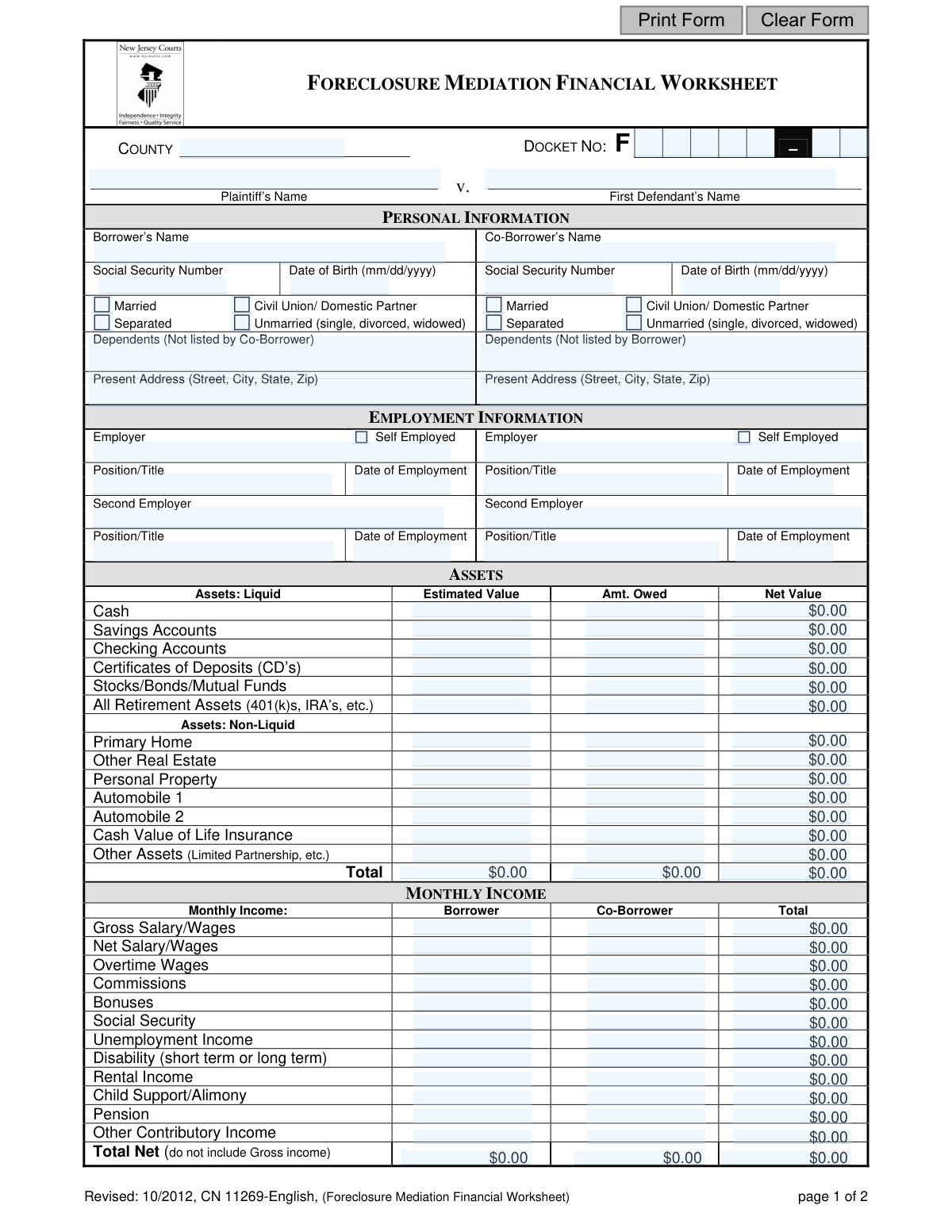
The Foreclosure Mediation Financial Worksheet is a comprehensive document required during foreclosure proceedings to assess a homeowner's financial standing. It gathers detailed information on personal details, employment, assets, income, and liabilities to help mediators and lenders evaluate potential alternatives to foreclosure, such as loan modifications or other workout options. Today, this form can be filled out quickly and accurately using AI-powered services like Instafill.ai, which can also convert non-fillable PDF versions into interactive fillable forms.
CN 11269-English is part of the
New Jersey forms category on Instafill.
Our AI automatically handles information lookup, data retrieval, formatting, and form filling.
It takes less than a minute to fill out CN 11269-English using our AI form filling.
Securely upload your data. Information is encrypted in transit and deleted immediately after the form is filled out.
Form specifications
| Form name: | Foreclosure Mediation Financial Worksheet |
| Number of fields: | 221 |
| Number of pages: | 1 |
| Language: | English |
Instafill Demo: How to fill out PDF forms in seconds with AI
How to Fill Out CN 11269-English Online for Free in 2026
Are you looking to fill out a CN 11269-ENGLISH form online quickly and accurately? Instafill.ai offers the #1 AI-powered PDF filling software of 2026, allowing you to complete your CN 11269-ENGLISH form in just 37 seconds or less.
Follow these steps to fill out your CN 11269-ENGLISH form online using Instafill.ai:
- 1 Navigate to Instafill.ai and upload or select the Foreclosure Mediation Financial Worksheet.
- 2 Provide personal, dependent, and employment information for both the borrower and co-borrower, letting the AI assist with pre-filling known details.
- 3 List all assets, both liquid (like cash and savings) and non-liquid (like real estate and vehicles), including their estimated value and any amounts owed.
- 4 Detail all sources of monthly income for the borrower and co-borrower, such as wages, social security, and any other contributory income.
- 5 Itemize all monthly expenses and liabilities, including mortgage payments, loans, credit card debt, and living expenses.
- 6 Carefully review all the auto-filled information for accuracy, then electronically sign and date the certification at the end of the form.
- 7 Download the completed, signed worksheet to provide to the mediator and the plaintiff's attorney as required for the mediation process.
Our AI-powered system ensures each field is filled out correctly, reducing errors and saving you time.
Why Choose Instafill.ai for Your Fillable CN 11269-English Form?
Speed
Complete your CN 11269-English in as little as 37 seconds.
Up-to-Date
Always use the latest 2026 CN 11269-English form version.
Cost-effective
No need to hire expensive lawyers.
Accuracy
Our AI performs 10 compliance checks to ensure your form is error-free.
Security
Your personal information is protected with bank-level encryption.
Frequently Asked Questions About Form CN 11269-English
This form is used to collect your detailed financial information, including income, assets, and expenses, for a foreclosure mediation session. It provides a complete financial picture to the mediator and lender to help find a potential solution to avoid foreclosure.
The primary borrower and any co-borrower listed on the mortgage loan who are participating in the foreclosure mediation program must complete and sign this form.
You should collect recent pay stubs, bank and retirement account statements, loan and credit card statements, and any other documents that verify your income, assets, debts, and monthly expenses.
Gross salary is your total earnings before any taxes or deductions are taken out. Net salary is your 'take-home pay,' the amount you receive after all deductions have been made.
The 'Net Value' is the asset's current market value ('Estimated Value') minus the amount you still owe on it ('Amt. Owed'). For example, for a home worth $300,000 with a $250,000 mortgage balance, the net value is $50,000.
The form instructs you to add a separate sheet for additional credit cards or installment loans. Be sure to list all debts and attach this extra page to your completed worksheet.
By signing the form, you consent to share this financial worksheet and its attachments with the mediator, the plaintiff (your lender), and the plaintiff's attorney for the purposes of the mediation.
Yes, the form has separate columns for the borrower's and co-borrower's monthly income. You should fill out each column and then provide a total for each income category.
If your PDF is not interactive, you can use a service like Instafill.ai. It can convert flat, non-fillable PDFs into an online form that you can type into directly from your computer.
Yes, you can use AI-powered services like Instafill.ai to help fill out this form. These tools can help auto-fill fields accurately and save you time during the process.
To fill this form online, upload the PDF to the Instafill.ai platform. You can then type your information directly into the interactive fields, save your progress, and download the completed document.
For this line, you must sum all your monthly net income sources (net wages, social security, rental income, etc.). You should not include your gross salary figure in this specific total.
Your signature certifies that all the information provided is true and correct to the best of your knowledge. It also serves as your official consent to release the financial details to the parties involved in the mediation.
This category is for valuable belongings other than real estate or vehicles. This can include items like jewelry, furniture, art, or collectibles that have significant monetary value.
Compliance CN 11269-English
Validation Checks by Instafill.ai
1
Social Security Number Format
This check validates that the Social Security Number for both the borrower and co-borrower is entered in a valid format, such as XXX-XX-XXXX or XXXXXXXXX. This is critical for accurate identification and processing of the financial worksheet. If the format is incorrect, the system should reject the entry and prompt the user to correct it to prevent data corruption and legal complications.
2
Date of Birth Logical Validity
This check ensures the Date of Birth (DOB) for the borrower and co-borrower is a valid date in the past and that the individual is of legal adult age (e.g., over 18). It prevents typographical errors like future dates or impossible dates. An invalid DOB could halt the entire mediation process, so the form should not be submittable until a plausible date is entered.
3
Docket Number Structure
This validation verifies that the Docket Number is entered in the expected format (e.g., 'F-######-##'). This ensures the worksheet can be correctly filed and associated with the corresponding legal case. An incorrect docket number could lead to the document being lost or misfiled, causing significant delays, so the system should enforce the specific format required by the county court.
4
Asset Net Value Calculation
For each asset listed, this check performs a calculation to ensure that the 'Estimated Value' minus the 'Amount Owed' equals the 'Net Value' provided. This cross-references user-entered data to catch mathematical errors and ensure the financial picture is accurate. If the calculation fails, the user should be alerted to review and correct the values in that specific row.
5
Asset Totals Summation
This validation confirms that the 'Total' row in the Assets section correctly sums the values in the 'Estimated Value', 'Amount Owed', and 'Net Value' columns. It serves as a final check on the entire asset section's arithmetic. An incorrect total misrepresents the borrower's overall financial standing, so the system must flag any discrepancy between the individual entries and the calculated total.
6
Monthly Income Row-wise Calculation
For each type of monthly income, this check verifies that the 'Borrower' amount plus the 'Co-Borrower' amount equals the 'Total' amount for that row. This ensures consistency across the income section and prevents simple addition errors. If a row's total is incorrect, it can skew the overall income assessment, so the system should highlight the specific row for correction.
7
Total Net Income Calculation
This check validates that the 'Total Net' income row is the correct sum of all preceding net income sources (Net Salary, Overtime, Commissions, etc.), excluding the Gross Salary/Wages line. It ensures the final net income figure used for assessment is accurate. An error here would fundamentally flaw the analysis of the borrower's repayment ability, so the calculation must be precise.
8
Gross vs. Net Income Logical Check
This validation ensures that the 'Net Salary/Wages' amount is not greater than the 'Gross Salary/Wages' amount for both the borrower and the co-borrower. This is a fundamental logical check, as net income is always a subset of gross income after deductions. An entry failing this check is a clear data entry error and must be corrected before the form can be considered valid.
9
Expense and Liabilities Totals Summation
This check verifies that the 'Total' row in the 'Expense and Liabilities' section is the correct sum of all 'Monthly Payments' and 'Balance Due' amounts listed above it. This ensures the summary of the borrower's debts and monthly obligations is arithmetically correct. An incorrect total would provide a misleading view of the borrower's financial obligations and must be flagged.
10
Required Borrower Information Completeness
This validation ensures that critical personal information for the primary borrower, including 'Borrower’s Name', 'Social Security Number', and 'Date of Birth', is not left blank. This information is the absolute minimum required to identify the individual and process the application. The form submission should be blocked if any of these core fields are missing.
11
Conditional Co-Borrower Information
This check is triggered if the 'Co-Borrower’s Name' field is filled out. It then validates that the co-borrower's 'Social Security Number' and 'Date of Birth' are also provided. This ensures that if a co-borrower is part of the application, their essential identifying information is also captured completely. An incomplete co-borrower profile should prevent submission.
12
Employment Date Logical Check
This validation ensures the 'Date of Employment' is a valid date that occurs after the individual's 'Date of Birth' and is not a future date. This simple logical check prevents data entry errors that would be nonsensical. An invalid employment date could call the provided employment information into question, so it must be corrected.
13
Signature Date Presence
This check verifies that the 'Date' field next to the Borrower's signature is filled out. The signature date is legally important as it certifies when the information was attested to be true and correct. A missing signature date can invalidate the certification, so the form should not be accepted without it.
14
Phone Number Format Validation
This check ensures that the home and cell phone numbers for the borrower and co-borrower are entered in a recognizable, valid format (e.g., 10 digits, with or without parentheses and hyphens). Correctly formatted phone numbers are essential for communication during the mediation process. The system should guide the user to enter a valid number to avoid contact issues later.
Common Mistakes in Completing CN 11269-English
The form asks for both Gross and Net Salary, but the final calculation specifies 'Total Net (do not include Gross income)'. Applicants often mistakenly add their gross salary into the final net total, which dramatically inflates their perceived income. This error leads to an inaccurate financial assessment and can cause the worksheet to be rejected for recalculation, delaying the mediation process. To avoid this, carefully use only take-home (net) pay figures from pay stubs for the final 'Total Net' calculation.
The assets section requires applicants to calculate the 'Net Value' by subtracting the 'Amt. Owed' from the 'Estimated Value'. Simple arithmetic errors are very common here, leading to an incorrect summary of the applicant's financial position. An inaccurate net worth figure can mislead mediators and lenders about the applicant's eligibility for certain workout options. Always use a calculator for each line item and double-check the final totals before submitting.
Applicants frequently underestimate expenses for categories like 'Groceries/Toiletries', 'Auto Expenses', and 'Leisure'. They often enter a low, round number instead of an accurate average, hoping to appear more financially viable. This backfires by creating an unrealistic budget that cannot be sustained, potentially leading to the denial of a loan modification. To prevent this, review the last 3-6 months of bank and credit card statements to calculate a realistic monthly average for these categories.
The form specifies that the 'First Mortgage' payment should include real estate taxes, yet many people only list their principal and interest payment. They forget to include the escrowed amounts for property taxes and homeowner's insurance (PITI). This mistake under-reports their single largest housing expense, skewing the debt-to-income ratio and providing an incomplete picture to the mediator. Always refer to your most recent mortgage statement to find the total monthly payment, including any escrow amounts.
The 'Docket No.' and party names at the top of the form are critical legal identifiers. Applicants often mistype the docket number, forget the 'F-' prefix, or use informal names instead of the exact legal names listed on the foreclosure complaint. These errors can cause significant processing delays or lead to the form being misfiled or rejected. To avoid this, carefully copy all information directly from official court documents.
The form has confusing fields for dependents, asking the borrower to list dependents 'Not listed by Co-Borrower' and vice-versa. This often leads to applicants listing the same children or dependents in both sections, effectively double-counting them. This can create confusion about the actual household size and financial need. To avoid this, the borrower and co-borrower should coordinate to ensure each dependent is listed only once on the entire form.
In the 'Expense and Liabilities' section, it is common for users to confuse the columns and enter a large total loan balance in the 'Monthly Payments' column, or vice-versa. This makes the financial statement nonsensical and completely unusable for assessment, guaranteeing it will be returned. Carefully read each column header to ensure the recurring monthly payment amount and the total outstanding balance are entered in their correct respective fields.
For income sources like 'Overtime', 'Commissions', or 'Bonuses', applicants often provide a figure from a single recent month, which may not be representative. Using a recent high-income month can overstate financial stability, while using a low one can understate it. This can lead to an unsustainable payment plan or an unfair denial. The correct approach is to calculate an average over the past 6-12 months using pay stubs or other documentation to present a more accurate and stable income picture.
Forgetting to sign and date the form is one of the most common and easily avoidable mistakes. An unsigned form is legally invalid and will be immediately rejected, halting the entire mediation process until a properly executed copy is provided. If there is a co-borrower, both signatures are required. Always perform a final review of the completed form, specifically checking that all signature and date fields are filled in correctly before submission.
This form is often provided as a non-fillable PDF, forcing users to print it and fill it out by hand. This frequently results in illegible handwriting, smudges, and data entered in the wrong fields, which can cause processing errors and delays. A messy form reflects poorly on the applicant and can be rejected if it's unreadable. AI-powered tools like Instafill.ai can convert flat PDFs into fillable forms, allowing you to type your answers clearly and ensure all information is legible and correctly placed.
Saved over 80 hours a year
“I was never sure if my IRS forms like W-9 were filled correctly. Now, I can complete the forms accurately without any external help.”
Kevin Martin Green
Your data stays secure with advanced protection from Instafill and our subprocessors

Robust compliance program
Transparent business model
You’re not the product. You always know where your data is and what it is processed for.
ISO 27001, HIPAA, and GDPR
Our subprocesses adhere to multiple compliance standards, including but not limited to ISO 27001, HIPAA, and GDPR.
Security & privacy by design
We consider security and privacy from the initial design phase of any new service or functionality. It’s not an afterthought, it’s built-in, including support for two-factor authentication (2FA) to further protect your account.
Fill out CN 11269-English with Instafill.ai
Worried about filling PDFs wrong? Instafill securely fills foreclosure-mediation-financial-worksheet forms, ensuring each field is accurate.