Yes! You can use AI to fill out Form 1033, Broker Price Opinion/Reconciliation

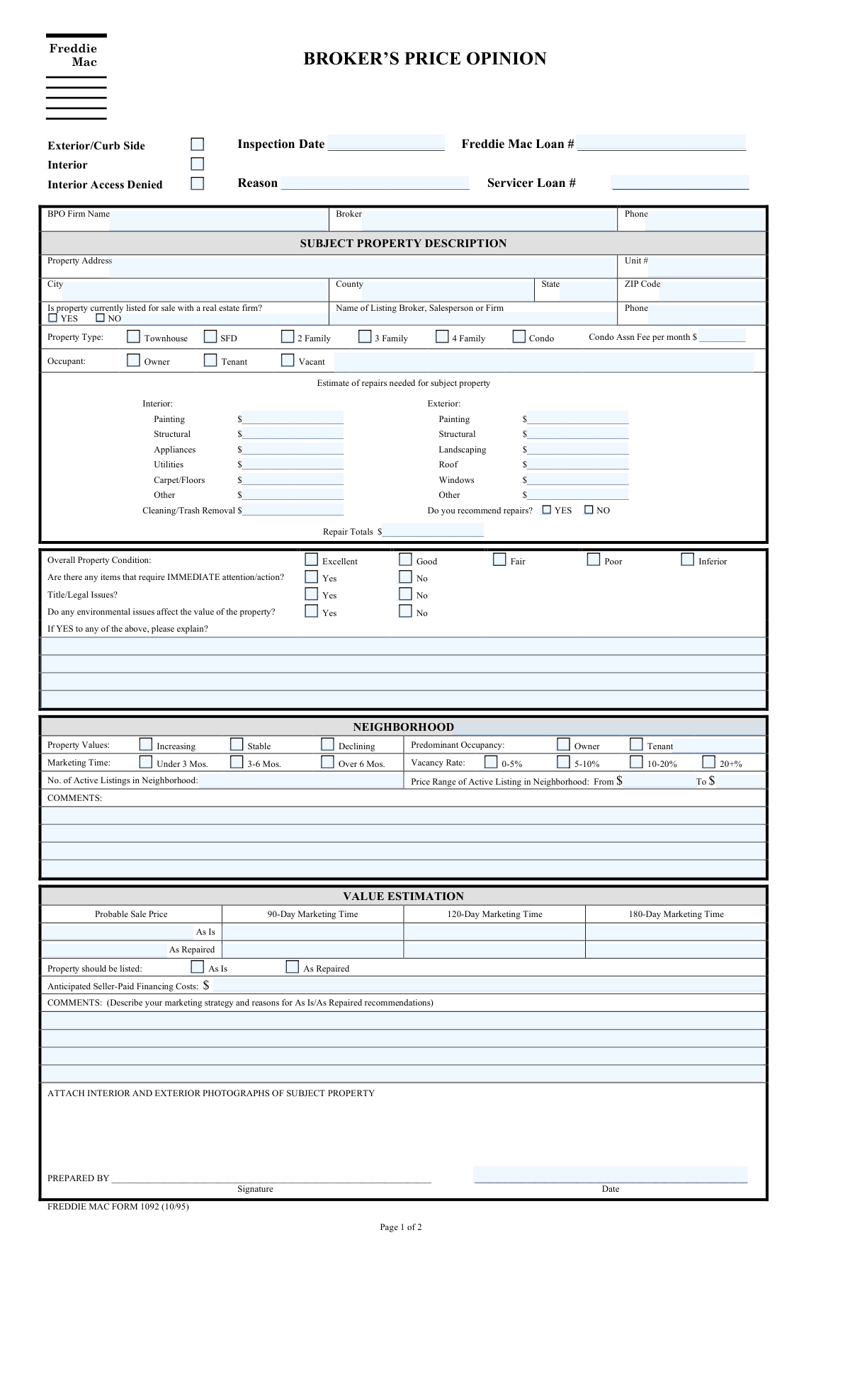
Freddie Mac Form 1033 is a Broker Price Opinion/Reconciliation form used to determine the probable selling price of a property associated with a Freddie Mac loan. Real estate brokers use this form to report on the property's physical condition, estimate necessary repair costs, analyze the local market, and compare the subject property to similar active listings and recently closed sales. Today, this detailed evaluation can be filled out quickly and accurately using AI-powered services like Instafill.ai, which can also convert non-fillable PDF versions into interactive fillable forms for easier completion.
Our AI automatically handles information lookup, data retrieval, formatting, and form filling.
It takes less than a minute to fill out Freddie Mac Form 1033 using our AI form filling.
Securely upload your data. Information is encrypted in transit and deleted immediately after the form is filled out.

Form specifications

Form name: Form 1033, Broker Price Opinion/Reconciliation
Number of fields: 316
Number of pages: 2
Language: English
Categories: broker forms
main-image

Instafill Demo: How to fill out PDF forms in seconds with AI

How to Fill Out Freddie Mac Form 1033 Online for Free in 2026

Are you looking to fill out a FREDDIE MAC FORM 1033 form online quickly and accurately? Instafill.ai offers the #1 AI-powered PDF filling software of 2026, allowing you to complete your FREDDIE MAC FORM 1033 form in just 37 seconds or less.
Follow these steps to fill out your FREDDIE MAC FORM 1033 form online using Instafill.ai:
  1. 1 Navigate to Instafill.ai and upload or select Freddie Mac Form 1033.
  2. 2 Use the AI assistant to automatically fill in loan information, inspection details, and BPO provider information.
  3. 3 Complete the property details section, including address, property type, and current occupancy status.
  4. 4 Document the property's condition, list required interior and exterior repairs with estimated costs, and provide an overall condition rating.
  5. 5 Enter data for the neighborhood analysis, including market trends, vacancy rates, and active listing information.
  6. 6 Provide detailed information for at least three competitive listings and three closed sales, including prices, dates, and value adjustments.
  7. 7 Review the reconciled 'As Is' and 'As Repaired' value estimations, add final comments, and e-sign the document before submission.

Our AI-powered system ensures each field is filled out correctly, reducing errors and saving you time.

Why Choose Instafill.ai for Your Fillable Freddie Mac Form 1033 Form?

Speed

Complete your Freddie Mac Form 1033 in as little as 37 seconds.

Up-to-Date

Always use the latest 2026 Freddie Mac Form 1033 form version.

Cost-effective

No need to hire expensive lawyers.

Accuracy

Our AI performs 10 compliance checks to ensure your form is error-free.

Security

Your personal information is protected with bank-level encryption.

Frequently Asked Questions About Form Freddie Mac Form 1033

This form is a Broker Price Opinion (BPO) used to document a property's condition, estimate necessary repair costs, and determine its market value for a Freddie Mac loan.

A real estate professional, such as a broker or agent, completes this form at the request of a mortgage servicer after conducting an inspection of the subject property.

You should check the 'Interior Access Denied' box and provide the reason in the designated field. Complete the remainder of the form based on an exterior-only, or 'curb side,' inspection.

The 'As Is' price is the estimated value of the property in its current condition. The 'As Repaired' price is the estimated value after all the repairs you've listed have been completed.

These codes are used to compare a feature to the subject property: 'S' stands for Superior, 'E' for Equal, 'I' for Inferior, and 'U' for Unknown.

The 'Competitive Listings' section is for actively listed properties that are comparable to the subject property. The 'Closed Sales' section is for comparable properties that have recently been sold.

First, check the 'Condo' box under 'Property Type'. Then, enter the monthly fee amount in the 'Condo Association Fee' field.

This field requires a detailed explanation if you indicated there are items needing immediate attention, title/legal issues, or environmental issues that affect the property's value.

In the 'Listing Information' section, simply check the box for 'No, property is not listed for sale'. The fields related to listing firm details are only required if the property is listed.

These sections are for providing detailed information on three different properties that are comparable to the subject property. This data is crucial for justifying your valuation.

Yes, services like Instafill.ai use AI to auto-fill form fields accurately and save time. This can help you complete complex reports like this one more efficiently and with fewer errors.

You can upload the form to the Instafill.ai platform, which will make all the fields interactive. The AI helps you quickly populate the information, which the system then places into the correct fields for you.

Services like Instafill.ai can convert flat, non-fillable PDFs into interactive forms. Simply upload your file to the platform to make it fillable online.

Compliance Freddie Mac Form 1033
Validation Checks by Instafill.ai

1
Inspection and Preparation Date Chronology
This check ensures that the 'Inspection Date' is on or before the 'Date Prepared'. An inspection cannot logically occur after the report about it has been prepared. This validation prevents data entry errors and ensures the timeline of events is accurate. If validation fails, the user should be prompted to correct one or both of the dates.
2
Exclusive Inspection Type Selection
This validation verifies that only one of the inspection type checkboxes, 'Exterior/Curb Side' or 'Interior', is selected. A single inspection cannot be both limited to the exterior and also include an interior visit. This check enforces logical consistency in the report. If both are selected, the system should display an error and require the user to choose only one.
3
Conditional Requirement for Listing Information
This check ensures that if 'Yes, property is listed for sale' is checked, then the 'Listing Firm Name' and 'Listing Firm Phone' fields must be filled out. This information is critical for verifying the listing status and contacting the relevant parties. If the property is listed but this information is missing, the form submission should be blocked until the required fields are completed.
4
Exclusive Property Type Selection
This validation ensures that only one property type ('SFD', 'Townhouse', 'Condo', '2 Family', etc.) is selected. A property can only have one primary classification for the purpose of this report. This prevents ambiguous or conflicting data. If a user selects more than one, an error message should appear, forcing them to make a single choice.
5
Conditional Requirement for Condo Association Fee
This check validates that if the 'Condo' property type is selected, the 'Condo Association Fee' field must contain a value. Association fees are a key financial component of a condominium and must be documented for an accurate valuation. If 'Condo' is checked and the fee is missing, the form should be considered incomplete and prompt the user for the information.
6
Repair Costs Summation
This validation verifies that the value in the 'Repair Totals' field is the exact sum of all individual repair cost fields (e.g., 'Interior Painting Cost', 'Exterior Roof Cost'). This check ensures mathematical accuracy and prevents manual calculation errors, which could significantly impact financial decisions based on the report. If the total does not match the sum of its parts, the system should automatically recalculate the total or flag the discrepancy for user correction.
7
Repair Recommendation and Cost Consistency
This check ensures that if 'Yes, recommend repairs' is selected, the 'Repair Totals' field is greater than zero, and if 'No, do not recommend repairs' is selected, the 'Repair Totals' field is zero. This maintains logical consistency between the recommendation and the estimated costs. A mismatch could cause confusion about whether repairs are needed. If inconsistent, the system should alert the user to align the recommendation with the cost total.
8
Conditional Requirement for Property Issues Explanation
This validation ensures that the 'Property Issues Explanation' text area is filled if 'Immediate Attention Items - Yes', 'Title/Legal Issues - Yes', or 'Environmental Issues - Yes' is checked. A simple 'Yes' is insufficient; a detailed explanation is required for due diligence and risk assessment. Failure to provide an explanation when an issue is noted should prevent form submission and prompt the user to provide the necessary details.
9
Neighborhood Price Range Logical Order
This check validates that the 'Price Range From' value is less than or equal to the 'Price Range To' value in the Neighborhood Listing Information section. This ensures the price range is logical and prevents simple data entry mistakes. An inverted range is nonsensical and would corrupt any analysis based on this data. If the 'From' value is greater than the 'To' value, an error should be displayed.
10
Value Estimation Logic Check
This validation ensures that the 'Probable Sale Price As Repaired' is greater than or equal to the 'Probable Sale Price (As Is)'. It is illogical for a property's value to decrease after repairs have been made. This check catches potential typos or flawed estimations. If the 'As Repaired' price is lower than the 'As Is' price, the system should flag the fields for review.
11
Listing Date Chronology for Subject and Comparables
This check verifies that for the subject property and each comparable, the 'Original List Date' is on or before the 'Current List Date'. A property's current listing cannot predate its original listing. This rule maintains the logical timeline of the property's market history. If this rule is violated, the system should prompt the user to correct the dates.
12
Exclusive Selection of Most Comparable Property
This validation ensures that in the 'Most Comparable Property Selection' sections (for both Competitive and Closed Sales), only one of the three comparable properties is selected. The purpose is to identify the single best comparison, and selecting multiple would defeat this purpose. If more than one comparable is checked as 'most comparable', the system should show an error and require the user to select only one.
13
Standard Phone Number Formatting
This check validates that all phone number fields, such as 'Phone Number (BPO Provider Information)' and 'Listing Firm Phone', adhere to a standard format (e.g., 10 digits, optionally with parentheses, spaces, or hyphens). Consistent formatting is crucial for data integrity and for ensuring the numbers can be correctly processed by communication systems. An invalid format should trigger an error message with an example of the expected format.
14
Valid ZIP Code Format
This check ensures the 'ZIP Code' field contains a valid 5-digit or 9-digit (ZIP+4) US postal code. A correct ZIP code is essential for accurate property location, mail delivery, and integration with mapping or demographic services. If the entry does not match a valid format, the submission should be blocked until a correctly formatted ZIP code is provided.

Common Mistakes in Completing Freddie Mac Form 1033

Ignoring Conditional Field Requirements

Users often overlook fields that are only required based on a previous answer, such as filling in the 'Reason for Inspection' only if 'Interior Access Denied' is checked. This mistake happens due to a lack of attention to field instructions, leading to incomplete reports that require follow-up or rejection. To avoid this, carefully read all instructions for each field, or use an AI-powered tool like Instafill.ai which can automatically show or require fields based on your previous answers.

Mismatch Between Repair Recommendation and Costs

A frequent error is checking 'Yes, recommend repairs' but then entering '$0' in the 'Repair Totals' field, or having a total that does not match the sum of the itemized costs. This inconsistency, often caused by manual calculation errors, invalidates the 'As Repaired' valuation and undermines the report's credibility. Using a form filler that can perform automatic calculations helps ensure the total accurately reflects the individual cost entries.

Failing to Provide Required Explanations for Issues

The form requires a detailed entry in the 'Property Issues Explanation' field if 'Yes' is checked for any property, legal, or environmental issues. Users frequently check 'Yes' but forget to provide the mandatory context, making the answer unhelpful and halting the review process. Always double-check that any 'Yes' response to an issue has a corresponding detailed explanation in the appropriate text area.

Confusing Adjustment Codes and Dollar Amounts

In the extensive comparable property grids, the form uses separate fields for adjustment codes (e.g., S, E, I, U) and monetary adjustment amounts. A very common mistake is entering a dollar value in a code field or a letter in a numeric field, which corrupts the valuation data. To prevent this, pay close attention to the field label, which specifies whether a code or an amount is required.

Selecting Contradictory Checkbox Options

Users sometimes select mutually exclusive options, such as checking both 'Yes, property is listed for sale' and 'No, property is not listed for sale'. This type of error usually happens when rushing and results in an ambiguous submission that cannot be processed without clarification. Carefully review all checkbox selections before submitting to ensure they are logical and not contradictory.

Incorrect Formatting for Dates and Loan Numbers

Fields like 'Inspection Date' or 'Freddie Mac Loan Number' require specific data formats (e.g., MM/DD/YYYY) and must not contain extra symbols or characters. Incorrect formatting can cause data import failures and significant processing delays. AI-powered form filling tools like Instafill.ai can help prevent these errors by automatically validating and formatting data correctly as it is entered.

Omitting the Property Unit Number

When evaluating a condominium, townhouse, or unit in a multi-family building, the 'Unit Number' is a critical part of the address that is often forgotten. An incomplete address can lead to the misidentification of the property, resulting in an inaccurate valuation and potential rejection of the form. Always verify the complete address, including the unit number, for all relevant property types.

Providing Illogical 'As Is' vs. 'As Repaired' Values

A significant logical error is to list a 'Probable Sale Price As Repaired' that is lower than or equal to the 'As Is' price, especially when repair costs have been itemized. This indicates a major data entry error or a misunderstanding of the valuation process, which severely damages the report's credibility. Always ensure the 'As Repaired' value logically accounts for the cost and impact of the recommended repairs.

Incomplete Comparable Property Data

The form requires extensive, repetitive details for three competitive listings and three closed sales, which is time-consuming. Consequently, users often leave entire fields or even whole comparable sections blank, which is a primary reason for rejection. If the form is a non-fillable PDF, a tool like Instafill.ai can convert it into a fillable version, making it easier to navigate and complete all required sections without omissions.

Inconsistent Subject Property Address Entry

The subject property's address is requested in multiple sections, such as 'Property Address', 'Subject Listing Details (Competitive)', and 'Subject Sale Details (Closed)'. Users often introduce typos or slight variations when re-entering this information, creating ambiguity. To avoid this, enter the address carefully the first time and then use copy-paste or an autofill tool for subsequent entries to ensure consistency.
Saved over 80 hours a year

“I was never sure if my IRS forms like W-9 were filled correctly. Now, I can complete the forms accurately without any external help.”

Kevin Martin Green

Your data stays secure with advanced protection from Instafill and our subprocessors

Robust compliance program

Transparent business model

You’re not the product. You always know where your data is and what it is processed for.

ISO 27001, HIPAA, and GDPR

Our subprocesses adhere to multiple compliance standards, including but not limited to ISO 27001, HIPAA, and GDPR.

Security & privacy by design

We consider security and privacy from the initial design phase of any new service or functionality. It’s not an afterthought, it’s built-in, including support for two-factor authentication (2FA) to further protect your account.

Fill out Freddie Mac Form 1033 with Instafill.ai

Worried about filling PDFs wrong? Instafill securely fills form-1033-broker-price-opinionreconciliation forms, ensuring each field is accurate.