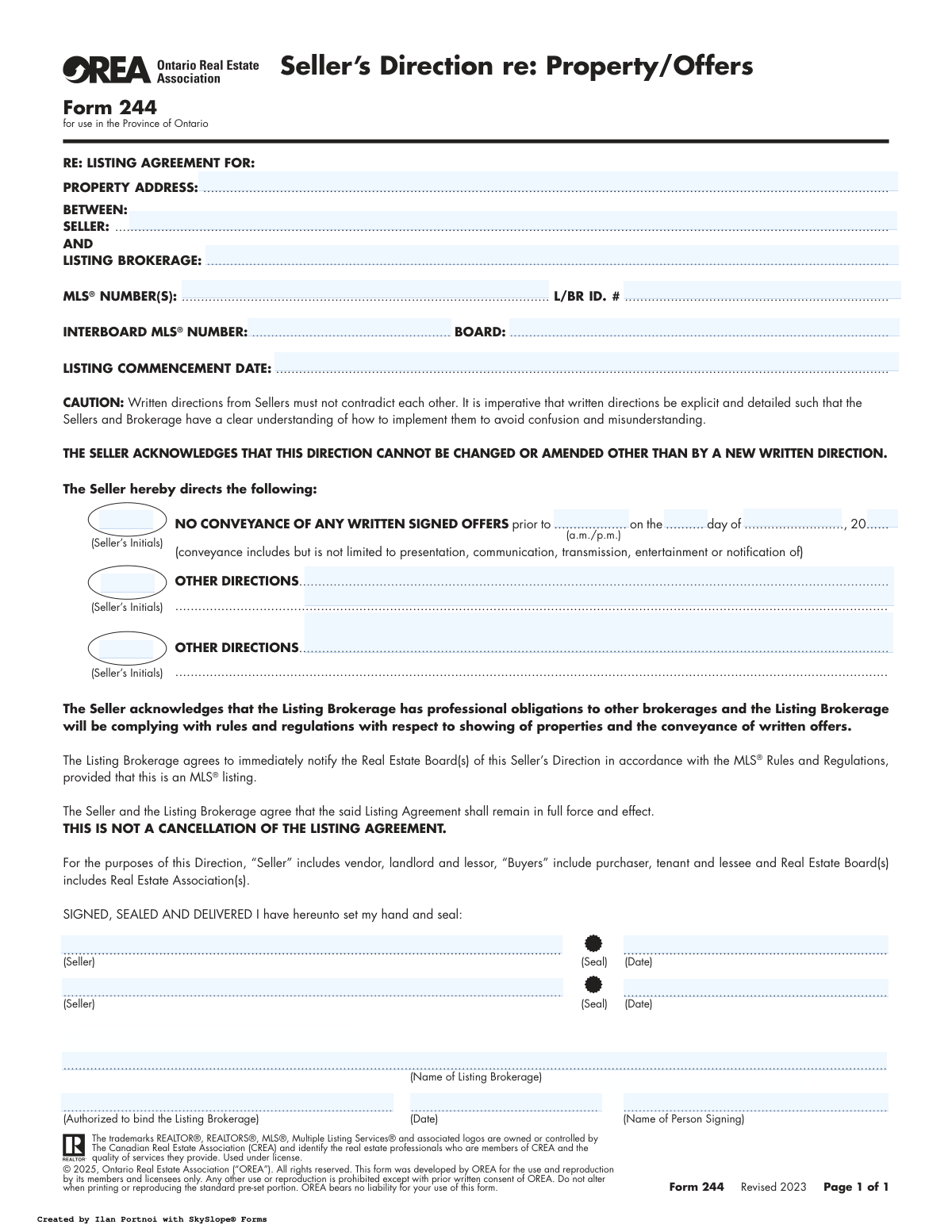
Yes! You can use AI to fill out Form 244, Seller's Direction re: Property/Offers

Form 244, Seller's Direction re: Property/Offers, is a crucial document in Ontario real estate transactions that allows a property seller to give explicit, legally binding instructions to their listing brokerage. It is most commonly used to direct the brokerage to hold off on conveying any offers until a specific date and time, effectively creating a formal offer presentation day. This ensures all interested parties have a fair chance to submit offers and that the seller's strategy is clearly communicated and followed. Today, this form can be filled out quickly and accurately using AI-powered services like Instafill.ai, which can also convert non-fillable PDF versions into interactive fillable forms.
Form 244 is part of the property forms category on Instafill.
Our AI automatically handles information lookup, data retrieval, formatting, and form filling.
It takes less than a minute to fill out Form 244 using our AI form filling.
Securely upload your data. Information is encrypted in transit and deleted immediately after the form is filled out.

Form specifications

Form name: Form 244, Seller's Direction re: Property/Offers
Number of fields: 25
Number of pages: 1
Filled form examples: Form Form 244 Examples
Language: English
main-image

Instafill Demo: How to fill out PDF forms in seconds with AI

How to Fill Out Form 244 Online for Free in 2026

Are you looking to fill out a FORM 244 form online quickly and accurately? Instafill.ai offers the #1 AI-powered PDF filling software of 2026, allowing you to complete your FORM 244 form in just 37 seconds or less.
Follow these steps to fill out your FORM 244 form online using Instafill.ai:
  1. 1 Navigate to Instafill.ai and upload your copy of Form 244, or select it from the template library.
  2. 2 Use the AI-powered tool to fill in the property address, seller names, listing brokerage, and the original listing commencement date.
  3. 3 Enter the relevant MLS® numbers and real estate board information in the designated fields.
  4. 4 Specify the exact date and time before which no written signed offers are to be conveyed, as per your selling strategy.
  5. 5 Add any other specific instructions or conditions for the brokerage in the 'Other Directions' section, if applicable.
  6. 6 Carefully review all entered information for accuracy, then have all sellers and the authorized brokerage representative digitally sign and date the form.
  7. 7 Download and share the completed and signed Form 244 with your listing brokerage to ensure your directions are officially recorded and followed.

Our AI-powered system ensures each field is filled out correctly, reducing errors and saving you time.

Why Choose Instafill.ai for Your Fillable Form 244 Form?

Speed

Complete your Form 244 in as little as 37 seconds.

Up-to-Date

Always use the latest 2026 Form 244 form version.

Cost-effective

No need to hire expensive lawyers.

Accuracy

Our AI performs 10 compliance checks to ensure your form is error-free.

Security

Your personal information is protected with bank-level encryption.

Frequently Asked Questions About Form Form 244

This form is used by a property seller to give their listing brokerage specific, legally binding written instructions, most commonly to delay the presentation of offers until a certain date and time.

A seller who wants to formally instruct their real estate agent to handle offers in a specific way, such as holding all offers until a designated 'offer night,' must fill out this form. It serves as an amendment to the main Listing Agreement.

This is a formal instruction directing your brokerage not to present, communicate, or even notify you of any received offers until the date and time you specify on the form. This strategy is often used to generate interest and potentially receive multiple offers at once.

This section can be used for any other specific instructions, such as how to handle pre-emptive ('bully') offers, restrictions on showing times, or other conditions you want your agent to follow. It is crucial to make these directions clear and unambiguous.

To change your instructions, you must provide a new written direction. This typically means signing a new Form 244 that revokes or amends the previous one, allowing your agent to present an early offer.

No, the form explicitly states it is not a cancellation of the listing agreement. It only adds or modifies specific instructions within your existing agreement with the brokerage.

You will need the full property address, the names of all sellers, the name of your listing brokerage, and the exact date and time before which you do not want to review any offers.

The brokerage must follow your written directions and is required to immediately notify the real estate board(s) of your instructions. This information is then typically displayed on the MLS® listing for other agents to see.

All sellers named on the listing agreement must sign the form to provide the direction. An authorized representative from the listing brokerage must also sign to acknowledge receipt and understanding of the instructions.

Yes, services like Instafill.ai use AI to accurately auto-fill form fields with your information, which saves time and helps prevent errors. It can pull details like your name and property address to populate the form quickly.

Simply upload the form to the Instafill.ai platform. The service will make the document interactive, allowing you to click and fill in all the required fields, add your electronic signature, and then download or share the completed form.

You can use a tool like Instafill.ai, which is designed to convert flat, non-fillable PDFs into interactive forms. Just upload your document, and the platform will automatically detect the fields and allow you to type in your information.

Clear and detailed instructions prevent misunderstandings between you, your brokerage, and potential buyers' agents. Vague directions can lead to confusion about how offers should be handled, potentially harming your negotiating position.

Compliance Form 244
Validation Checks by Instafill.ai

1
Listing Commencement Date Validity
This check ensures the 'Listing Commencement Date' is a valid calendar date and is not in the future. It is crucial for establishing the legal start of the agreement. If the date is invalid or set in the future, the form submission will be rejected to prevent contractual errors regarding the listing's active period.
2
Conveyance Cutoff Date Chronology
Validates that the date specified for 'NO CONVEYANCE OF ANY WRITTEN SIGNED OFFERS' is a future date and occurs after the 'Listing Commencement Date'. This is critical to ensure the seller's direction is logical and legally enforceable. A validation failure would indicate a temporal impossibility, such as holding offers before the listing has even begun, and would require correction.
3
Conditional Requirement for Conveyance Details
This check ensures that if the 'Seller's Initials' are provided for the 'No Conveyance Of Offers Direction', then the corresponding time, day, month, and year fields must all be completed. This prevents an ambiguous instruction where the seller agrees to a holdback on offers but the specific deadline is not defined. Failure to provide the full date and time will result in an error prompting the user to complete the required fields.
4
Brokerage Name Consistency
Verifies that the 'Listing Brokerage' name entered at the top of the form is identical to the 'Name of Listing Brokerage' provided in the signature section. This is important for legal clarity and ensures the correct legal entity is bound by the agreement. A mismatch could lead to contractual disputes and will trigger an error requiring the names to be aligned.
5
Seller Signature Date Requirement
This validation confirms that if a seller's name is entered in either the 'First Seller Signature' or 'Second Seller Name' field, the corresponding signature date field ('First Seller Signature Date' or 'Second Seller Signature Date') must also be filled. A signature without a date is legally incomplete and can invalidate the direction. The system will flag this as an error to ensure the document is properly executed.
6
Brokerage Signature Date Requirement
Ensures that if the 'Authorized Brokerage Representative' field is filled, the 'Brokerage Signature Date' field must also be completed. This is a conditional requirement to certify when the brokerage acknowledged and agreed to the seller's direction. An absent date would make the brokerage's commitment ambiguous, so the form will be rejected until the date is provided.
7
Signature Dates vs. Commencement Date
This logical check verifies that all signature dates ('First Seller Signature Date', 'Second Seller Signature Date', 'Brokerage Signature Date') are on or after the 'Listing Commencement Date'. It is illogical for a party to sign a direction related to a listing agreement before the agreement has officially started. An error will be raised if any signature date precedes the commencement date.
8
Completeness of 'Other Directions'
This rule checks that if any text is entered into the 'Other Directions Content' or 'Second Other Direction Details' fields, the corresponding seller initials field must be filled. This ensures the seller has explicitly acknowledged and authorized any custom instructions. An un-initialed direction is considered invalid, and the system will require initials to proceed.
9
Core Listing Information Completeness
This check verifies that essential fields, specifically 'Property Address', 'Seller Name(s)', and 'Listing Brokerage', are not left blank. These fields are fundamental to identifying the property and the primary parties to the agreement. A submission with missing core information will be rejected to ensure the document is legally sound and properly recorded.
10
Brokerage Signer Name Consistency
Validates that the name entered in the 'Authorized to bind the Listing Brokerage' field is identical to the name in the 'Name of Person Signing' field. This ensures clarity and confirms the identity of the individual signing on behalf of the brokerage. Discrepancies can create ambiguity, so the system will flag this for correction to maintain document integrity.
11
Conveyance Cutoff Time Format
This validation ensures the 'Conveyance Cutoff Time' is entered in a proper time format (e.g., HH:MM) and includes an a.m./p.m. designator. A clear and unambiguous time is essential for compliance with the seller's direction and MLS® rules. An improperly formatted time will be rejected to prevent confusion about the exact moment when offers can be conveyed.
12
Seller Name and Signature Match
This check cross-references the names entered in the 'First Seller Signature' and 'Second Seller Name' fields against the names listed in the 'Seller Name(s)' field at the top. This ensures that the individuals signing the document are the same sellers identified in the agreement. A mismatch will trigger a warning to prevent unauthorized signatures and ensure all legal owners are properly represented.

Common Mistakes in Completing Form 244

Using Incomplete or Non-Legal Seller Names

Sellers often enter their common names instead of their full legal names as they appear on the property's title deed. This mistake occurs due to habit or misunderstanding the legal requirement. It can cause significant delays and legal issues during closing, as the names on all documents must match. To avoid this, always reference the property title or original purchase agreement and enter the full legal names of all registered owners.

Forgetting to Initial Direction Clauses

The form requires sellers to initial specific clauses, such as the 'No Conveyance of Offers' direction, to confirm their acknowledgement. This step is frequently missed, which can render a direction invalid or unenforceable in a dispute. Without initials, it's difficult to prove the seller explicitly agreed to a specific instruction, like holding offers. Always double-check that every required initial box next to a direction has been completed by all sellers.

Specifying an Ambiguous Offer Conveyance Time

When setting the deadline for holding offers, people might write a time like '5 o'clock' without clearly indicating 'a.m.' or 'p.m.', even though the form provides a space for it. This ambiguity creates major confusion and potential disputes among agents about when offers can be presented. To prevent this, always write the time in a clear format and definitively circle or check the 'a.m.' or 'p.m.' designation to ensure there is no misunderstanding.

Writing Vague or Contradictory 'Other Directions'

The 'Other Directions' section is often filled with unclear instructions, such as 'Hold offers, but we will look at strong pre-emptive offers.' This creates confusion for the listing brokerage, who has a professional obligation to follow explicit directions. Such ambiguity can lead to complaints and ethical dilemmas. Directions must be precise and detailed, avoiding any language that contradicts other clauses in the form or the main listing agreement.

Entering the Wrong Listing Commencement Date

Users sometimes enter the current date instead of the original start date of the Listing Agreement this form is amending. This error can create confusion about which agreement the direction applies to, especially if there have been previous listings. To avoid this, refer to the original Listing Agreement and accurately transcribe the commencement date to ensure this direction is correctly associated with the active agreement. Using a tool like Instafill.ai can help by pre-filling this data from the master agreement.

Failing to Obtain Signatures from All Registered Owners

If a property is co-owned, all registered owners must sign this direction form, but often only one owner signs. This can invalidate the direction, as it doesn't represent the consent of all parties on title. This oversight can lead to legal challenges if one owner claims they did not agree to the offer strategy. Ensure all individuals listed on the property's title sign and date the form to make it legally binding.

Inaccurate MLS® or Brokerage ID Numbers

Transposing digits or entering incorrect MLS® or L/BR ID numbers is a frequent data entry error. These numbers are crucial for linking this direction to the correct property listing within the real estate board's system. An incorrect number can result in the direction not being properly recorded, causing confusion for other agents. Carefully verify these numbers against the official listing data to ensure accuracy.

Providing an Incomplete Property Address

People often forget to include the unit number for condominiums or apartments, or they may omit the postal code. An incomplete address can cause administrative delays and confusion, especially in large buildings with multiple listings. Always provide the full, complete municipal address, including any unit or suite number and the correct postal code. AI-powered tools like Instafill.ai can help validate addresses to ensure they are complete and correctly formatted.

Missing Brokerage Representative's Printed Name

The form requires a signature from an authorized brokerage representative, but it also requires their name to be printed below for legibility. An illegible signature without a printed name makes it impossible to identify who signed on behalf of the brokerage. This can be problematic for record-keeping and in case of future disputes. Always ensure the authorized individual signs and clearly prints their full name in the designated space.

Forgetting to Date Signatures

A signature without a corresponding date is a common oversight that can weaken the legal standing of the document. It raises questions about when the direction was given and whether it was in effect at a specific time. All parties must write the date next to their signature to create a clear timeline. If the form is a non-fillable PDF, a tool like Instafill.ai can convert it to a fillable version and use validation rules to ensure date fields are not left empty.
Saved over 80 hours a year

“I was never sure if my IRS forms like W-9 were filled correctly. Now, I can complete the forms accurately without any external help.”

Kevin Martin Green

Your data stays secure with advanced protection from Instafill and our subprocessors

Robust compliance program

Transparent business model

You’re not the product. You always know where your data is and what it is processed for.

ISO 27001, HIPAA, and GDPR

Our subprocesses adhere to multiple compliance standards, including but not limited to ISO 27001, HIPAA, and GDPR.

Security & privacy by design

We consider security and privacy from the initial design phase of any new service or functionality. It’s not an afterthought, it’s built-in, including support for two-factor authentication (2FA) to further protect your account.

Fill out Form 244 with Instafill.ai

Worried about filling PDFs wrong? Instafill securely fills form-244-sellers-direction-re-propertyoffers forms, ensuring each field is accurate.