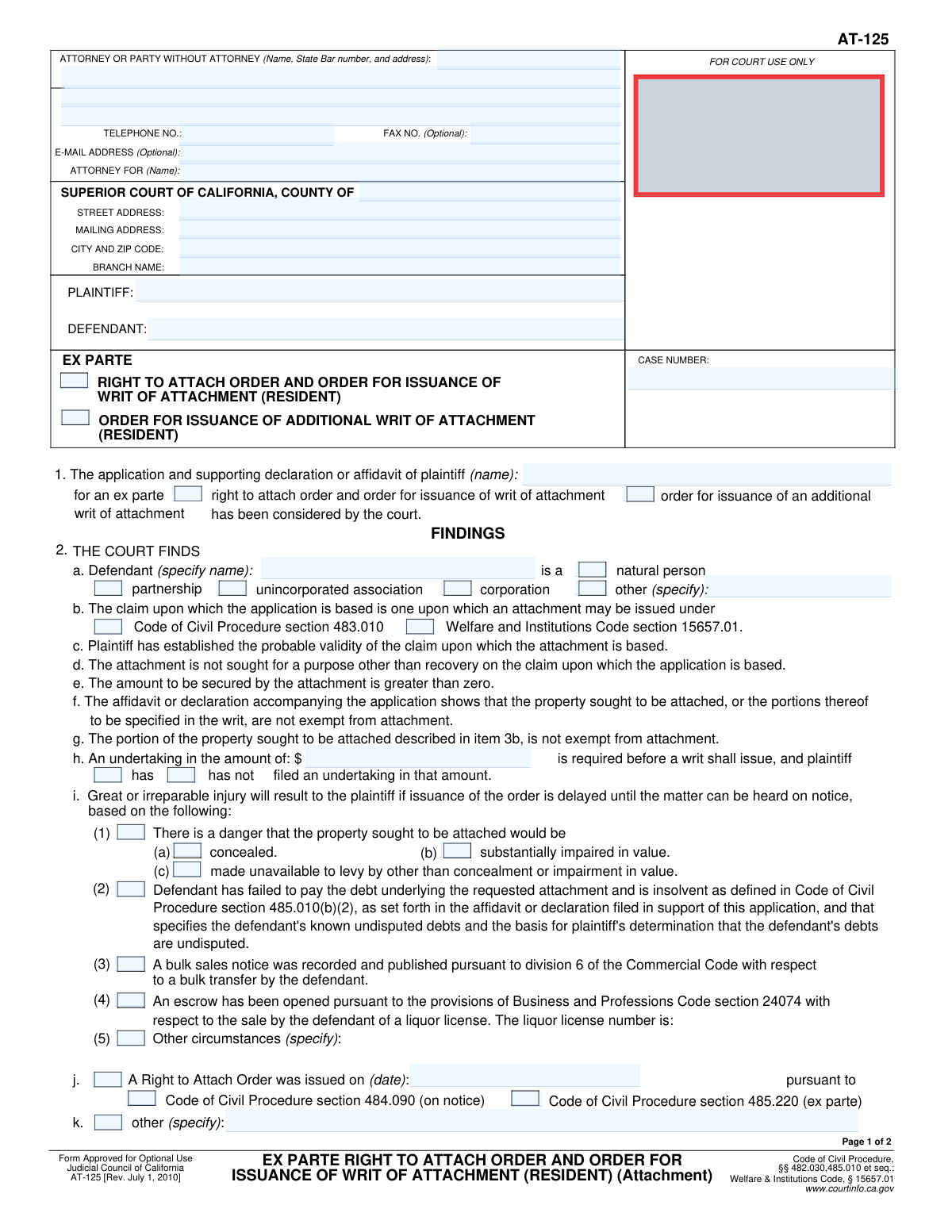
Yes! You can use AI to fill out Form AT-125, Ex Parte Right to Attach Order and Order for Issuance of Writ of Attachment (Resident)

Form AT-125 is a Judicial Council of California form used by a plaintiff to request an immediate court order to attach a resident defendant's assets. This pre-judgment remedy is sought 'ex parte,' meaning without advance notice to the defendant, when there's a risk they might hide or dispose of property before a judgment can be enforced. Obtaining this order is a critical step in securing assets to satisfy a potential future court award. Today, this form can be filled out quickly and accurately using AI-powered services like Instafill.ai, which can also convert non-fillable PDF versions into interactive fillable forms.
Our AI automatically handles information lookup, data retrieval, formatting, and form filling.
It takes less than a minute to fill out AT-125 using our AI form filling.
Securely upload your data. Information is encrypted in transit and deleted immediately after the form is filled out.

Form specifications

Form name: Form AT-125, Ex Parte Right to Attach Order and Order for Issuance of Writ of Attachment (Resident)
Number of fields: 78
Number of pages: 2
Language: English
Categories: ACH forms
main-image

Instafill Demo: How to fill out PDF forms in seconds with AI

How to Fill Out AT-125 Online for Free in 2026

Are you looking to fill out a AT-125 form online quickly and accurately? Instafill.ai offers the #1 AI-powered PDF filling software of 2026, allowing you to complete your AT-125 form in just 37 seconds or less.
Follow these steps to fill out your AT-125 form online using Instafill.ai:
  1. 1 Navigate to Instafill.ai and upload your Form AT-125 or select it from the template library.
  2. 2 Provide attorney, court, and case information, including plaintiff/defendant names and the case number.
  3. 3 Indicate the type of order you are requesting, such as an 'Ex Parte Right to Attach Order' or an 'Additional Writ of Attachment'.
  4. 4 Detail the legal basis for the attachment and provide justification for an ex parte order, such as the danger of the property being concealed or made unavailable.
  5. 5 Specify the amount of the attachment, details of any undertaking filed, and describe the property to be attached.
  6. 6 Use the AI assistant to review all entered information for completeness and accuracy before finalizing the document.
  7. 7 Download the completed Form AT-125, ready for signing and filing with the appropriate California Superior Court.

Our AI-powered system ensures each field is filled out correctly, reducing errors and saving you time.

Why Choose Instafill.ai for Your Fillable AT-125 Form?

Speed

Complete your AT-125 in as little as 37 seconds.

Up-to-Date

Always use the latest 2026 AT-125 form version.

Cost-effective

No need to hire expensive lawyers.

Accuracy

Our AI performs 10 compliance checks to ensure your form is error-free.

Security

Your personal information is protected with bank-level encryption.

Frequently Asked Questions About Form AT-125

This form is a court order, signed by a judge, that grants a plaintiff the right to have a defendant's property seized to secure a potential future judgment. It also directs the court clerk to issue the writ that authorizes a levying officer to take the property.

The plaintiff (the person filing the lawsuit) or their attorney prepares this form as a proposed order. It is then submitted to the court for a judge's review and signature to become legally effective.

The 'Right to Attach Order' is the court's decision granting the legal right to attach assets. The 'Writ of Attachment' is the subsequent document issued by the clerk that formally directs a levying officer, like a sheriff, to actually seize the specified property.

An 'Ex Parte' order is one requested without giving prior notice to the defendant, used in urgent situations. You must prove to the court that there is a danger of 'great or irreparable injury,' such as the defendant hiding assets, if you were to provide notice.

An undertaking is a financial bond that the plaintiff must purchase to protect the defendant. It covers potential damages the defendant might suffer if the court later determines the attachment was wrongful.

The law has different rules for attaching property depending on whether the defendant is an individual or a business entity. This information determines which assets are legally available for attachment under the Code of Civil Procedure.

You would request an additional writ if a Right to Attach Order has already been granted, but you need to attach more of the defendant's property. This may be necessary if you locate new assets or the initial attachment was not enough to cover the claim amount.

This section is for ex parte requests and requires you to state the specific reason for urgency. You must check the box indicating a danger that the property will be concealed, its value impaired, or otherwise made unavailable for levy.

Once signed, the order becomes official, and you can take it to the court clerk. The clerk will then issue the Writ of Attachment, which you provide to a levying officer (e.g., sheriff) to seize the property described in the order.

Yes, services like Instafill.ai use AI to auto-fill form fields accurately and save time. This is especially useful for entering repetitive case information like party names, addresses, and the case number.

To use Instafill.ai, you upload the form to their platform. The AI will identify all the fields, allowing you to enter your information once and have it automatically populated throughout the document correctly.

You can use a service like Instafill.ai, which can convert flat, non-fillable PDFs into interactive forms. Simply upload your scanned document, and the platform will make it fillable online.

This order is based on an application, so it must be accompanied by the 'Application for Right to Attach Order' and supporting declarations. You will also need to file proof that you have obtained the required undertaking (bond).

These sections differentiate the property to be attached based on the defendant's entity type. The rules for what property can be seized from an individual ('natural person') are more restrictive than those for a corporation or partnership.

Compliance AT-125
Validation Checks by Instafill.ai

1
Validates State Bar Number Format
This check ensures the 'State Bar number' field contains a valid numerical format, typically a 6-digit number for the California Bar. This is important for correctly identifying the attorney of record and verifying their standing. If the format is invalid, the form submission will be blocked until a valid number is provided.
2
Ensures Exclusive Defendant Entity Type Selection
This validation confirms that only one checkbox is selected from the defendant entity type group ('Natural Person', 'Partnership', 'Corporation', 'Other'). A defendant can only be one type of legal entity, so selecting multiple would create a logical contradiction in the legal filing. An error will be displayed if more than one option is checked, forcing the user to select only one.
3
Requires 'Other Defendant Type' Specification
This is a conditional check that ensures the 'Other Defendant Type' text field is filled out if the 'Other (Specify)' checkbox is selected. This prevents ambiguity by requiring the user to specify the entity type when a standard option is not chosen. Failure to provide the specification while 'Other' is checked will block form submission.
4
Validates Prior Order Date Presence and Logic
This check verifies that if the 'A Right to Attach Order was issued' box is checked, the 'Order Issue Date' field must be filled with a valid date. The date provided must also be in the past or the current date, not a future date. This ensures the claim of a prior order is substantiated with a plausible and chronologically correct date.
5
Enforces Mutually Exclusive Undertaking Status
This validation ensures that the user cannot select both 'Plaintiff has filed an undertaking' and 'Plaintiff has not filed an undertaking' simultaneously. These two options are mutually exclusive, and selecting both creates a logical impossibility on the form. The system should alert the user to choose only one of these options to proceed.
6
Validates Monetary Format for Undertaking Amount
This check confirms that the value entered in the 'Undertaking Amount' field is a valid positive number, which can be formatted as currency. This is crucial for legal and financial accuracy, as the undertaking amount is a specific monetary value central to the court order. Non-numeric or negative values will be rejected.
7
Verifies Case Number Completeness
This validation ensures that the 'Case Number' field is not empty. The case number is the primary identifier for the legal proceeding in the court's system, and its absence would make the filing impossible to process or associate with the correct case. The form cannot be submitted without this critical piece of information.
8
Cross-Validates Party Name Consistency
This check compares the 'Plaintiff Name (Case Parties)' field with the 'Plaintiff Name for Application' field, and the 'Defendant Name (Case Parties)' with the 'Defendant Name (Defendant Details)' field. Maintaining consistency in party names across the document is essential for legal clarity and to avoid ambiguity. A mismatch will trigger an error requiring correction.
9
Requires Undertaking Amount for Conditional Writ Issuance
This validation ensures that if the 'Upon Filing of Undertaking' checkbox is selected under 'Writ Issuance Condition', the corresponding 'Undertaking Amount' field must be filled. The order is contingent on this amount, so it cannot be left blank when this condition is chosen. The form will be considered incomplete if the amount is missing.
10
Links Defendant Type to Attachable Property Type
This is a logical consistency check that validates the relationship between the defendant's entity type and the type of property being attached. If 'Defendant is a natural person' is checked, the form should only allow selections related to a natural person's property. This enforces legal rules about what property can be attached based on the defendant's status.
11
Requires Description for Specified Attached Property
This conditional validation ensures that if the 'Specified Property' checkbox is checked under 'Property of a Natural Person Defendant', the corresponding text area for describing that property must be filled out. The court order must be specific about which property is to be attached. An empty description would render the order unenforceable.
12
Validates 'Total Boxes Checked' Calculation
This check automatically counts the number of checkboxes selected within item 3 of the form and compares it to the number entered by the user in the 'Total Boxes Checked' field. This validation prevents manual counting errors, which could cause confusion or lead to a rejection of the form by the court clerk. If the numbers do not match, the user is prompted to correct the total.
13
Requires Liquor License Number When Applicable
This check ensures that if the 'Plaintiff's Pro Rata Share from Liquor License Sale' box is checked, the 'Liquor License Number' field must be completed. The license number is a critical identifier needed to process the order against the correct escrow and sale. The form submission will fail without this number if the corresponding option is selected.
14
Conditional Requirement for 'Other Specific Findings'
This validation rule ensures that the 'Other Specific Findings' text area is filled only if the 'Other (specify)' checkbox in the 'Other Findings' section is checked. This prevents users from entering extraneous information in a field that is not applicable. It also ensures that when a user indicates there are other findings, they provide the necessary details.

Common Mistakes in Completing AT-125

Incorrect or Incomplete Court Information

Users often enter a generic county court address instead of the specific street address and branch name for the courthouse handling the case. This happens when filers use a general web search instead of consulting the case file or local court rules for the precise location. Filing at the wrong branch can lead to significant processing delays, rejection of the document, or even having it misfiled and lost, requiring a complete refiling.

Mismatched Case Number or Party Names

Simple typographical errors in the case number or misspellings of the plaintiff or defendant names are frequent. These mistakes can prevent the document from being correctly docketed in the court's system, leading to it being rejected or not associated with the proper case file. It is crucial to double-check these details against existing court documents to ensure accuracy and prevent delays.

Incorrectly Identifying Defendant's Entity Type

Filers may incorrectly classify the defendant, for example, marking 'Natural Person' for a corporation (LLC, Inc.) or vice-versa. This is a critical legal error because the types of property that can be attached and the legal standards differ greatly depending on the defendant's entity status. An incorrect classification can render the entire application legally deficient and lead to its denial by the court.

Failing to Complete 'Specify' Text Fields

A very common oversight is checking a box like 'Other (Specify)' or 'Other Circumstances (Specify)' but then failing to provide the required explanation in the corresponding text field. The court cannot act on an unspecified 'Other' selection, making that part of the application void. This oversight makes the form incomplete and can result in the court disregarding the intended finding or order.

Insufficient Justification for Ex Parte Relief

Applicants often check boxes under 'Irreparable Injury Justification' without providing the necessary detailed facts in a supporting declaration or affidavit. The legal standard for obtaining an order without notice to the other party (ex parte) is very high, and simply checking a box is insufficient. This mistake almost always results in the court denying the ex parte request, forcing the applicant to proceed on a noticed basis and losing the element of surprise.

Vague or Overly Broad Property Descriptions

When describing property to be attached, especially for a natural person, users provide descriptions that are too general, such as 'defendant's bank accounts'. A court order must be specific enough for a levying officer to identify the exact property. Vague descriptions will lead to the court rejecting the application or issuing an order that is practically unenforceable.

Forgetting Attorney State Bar Number

Attorneys or their staff sometimes forget to enter the attorney's State Bar number in the header section. This number is a required unique identifier for practicing attorneys in California, and its absence is a common reason for a court clerk to reject a filing. This simple clerical error can halt the entire filing process until a corrected version is submitted.

Confusion Between Initial and Additional Writs

Users may mistakenly select 'Order for Issuance of Additional Writ of Attachment' when they are filing their first application, or vice-versa. This procedural error indicates a misunderstanding of the case's status and the relief being sought. The court cannot grant an 'additional' writ if an initial one was never issued, leading to rejection of the form and the need to refile with the correct selection.

Ignoring Conditionally Required Fields

This form contains many fields that are only required if a specific checkbox is selected, such as providing the 'Order Issue Date' only if 'A Right to Attach Order was issued' is checked. Filers often check the box but then miss the dependent field that appears or becomes relevant. This leaves the form incomplete and can cause the clerk to return it for correction, delaying the legal process.

Inconsistent Information Regarding the Undertaking

Filers can create confusion by entering an undertaking amount but then checking the wrong box regarding its status (e.g., checking 'Plaintiff has not filed an undertaking' when it has been filed, or vice versa). This inconsistency can cause the clerk to delay issuing the writ of attachment until the status of the undertaking bond is clarified. Using an AI-powered tool like Instafill.ai can help prevent such logical errors by validating related fields against each other.
Saved over 80 hours a year

“I was never sure if my IRS forms like W-9 were filled correctly. Now, I can complete the forms accurately without any external help.”

Kevin Martin Green

Your data stays secure with advanced protection from Instafill and our subprocessors

Robust compliance program

Transparent business model

You’re not the product. You always know where your data is and what it is processed for.

ISO 27001, HIPAA, and GDPR

Our subprocesses adhere to multiple compliance standards, including but not limited to ISO 27001, HIPAA, and GDPR.

Security & privacy by design

We consider security and privacy from the initial design phase of any new service or functionality. It’s not an afterthought, it’s built-in, including support for two-factor authentication (2FA) to further protect your account.

Fill out AT-125 with Instafill.ai

Worried about filling PDFs wrong? Instafill securely fills form-at-125-ex-parte-right-to-attach-order-and-order-for-issuance-of-writ-of-attachment-resident forms, ensuring each field is accurate.