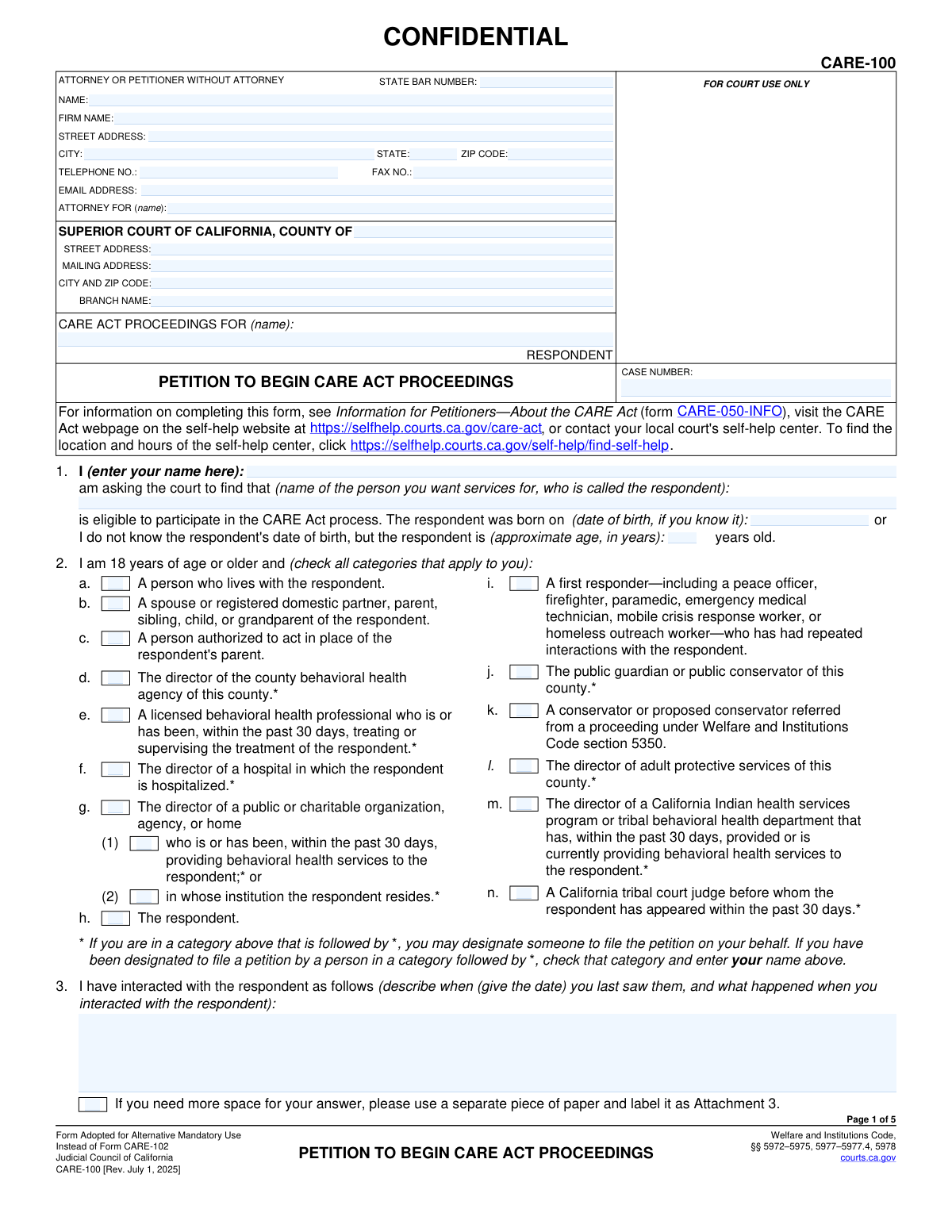
Yes! You can use AI to fill out Form CARE-100, Petition to Begin CARE Act Proceedings

Form CARE-100, Petition to Begin CARE Act Proceedings, is a legal document used in California to request a court's intervention for an individual suffering from an untreated schizophrenia spectrum or other psychotic disorder. Filing this petition initiates the CARE (Community Assistance, Recovery, and Empowerment) Act process, which aims to provide a court-ordered plan for treatment, housing, and support services. This form is crucial for connecting vulnerable individuals with the structured care they need. Today, this form can be filled out quickly and accurately using AI-powered services like Instafill.ai, which can also convert non-fillable PDF versions into interactive fillable forms.
CARE-100 is part of the California court forms category on Instafill.
Our AI automatically handles information lookup, data retrieval, formatting, and form filling.
It takes less than a minute to fill out CARE-100 using our AI form filling.
Securely upload your data. Information is encrypted in transit and deleted immediately after the form is filled out.

Form specifications

Form name: Form CARE-100, Petition to Begin CARE Act Proceedings
Number of fields: 133
Number of pages: 1
Language: English
main-image

Instafill Demo: How to fill out PDF forms in seconds with AI

How to Fill Out CARE-100 Online for Free in 2026

Are you looking to fill out a CARE-100 form online quickly and accurately? Instafill.ai offers the #1 AI-powered PDF filling software of 2026, allowing you to complete your CARE-100 form in just 37 seconds or less.
Follow these steps to fill out your CARE-100 form online using Instafill.ai:
  1. 1 Navigate to Instafill.ai and upload or select the Form CARE-100.
  2. 2 Enter your information as the petitioner, including your name, contact details, and your qualifying relationship to the respondent.
  3. 3 Provide the respondent's personal details, such as their name, date of birth, contact information, and last known location, as prompted by the AI assistant.
  4. 4 Detail the reasons for the petition by checking the appropriate boxes and providing narrative explanations regarding the respondent's diagnosis, condition, and why they meet the CARE Act criteria.
  5. 5 Attach necessary supporting evidence, such as a licensed behavioral health professional's declaration (Form CARE-101) or records of involuntary hospitalizations, by following the platform's upload instructions.
  6. 6 Review the auto-filled petition for completeness and accuracy, making any necessary corrections before finalizing the document.
  7. 7 Sign and date the form, then download the completed petition for filing with the appropriate California Superior Court.

Our AI-powered system ensures each field is filled out correctly, reducing errors and saving you time.

Why Choose Instafill.ai for Your Fillable CARE-100 Form?

Speed

Complete your CARE-100 in as little as 37 seconds.

Up-to-Date

Always use the latest 2026 CARE-100 form version.

Cost-effective

No need to hire expensive lawyers.

Accuracy

Our AI performs 10 compliance checks to ensure your form is error-free.

Security

Your personal information is protected with bank-level encryption.

Frequently Asked Questions About Form CARE-100

This form is a petition to begin CARE Act proceedings. It is used to ask a California court to order services and support for an individual with a severe mental illness, like schizophrenia, who is unable to care for themselves and is not in stable treatment.

A wide range of people can file, including family members, roommates, certain medical and mental health professionals, first responders, and directors of agencies who have had recent contact with the individual. The person filing, or petitioner, must be 18 or older and meet one of the categories in Section 2.

You must provide specific evidence as required in Section 6. This includes either a signed declaration from a licensed behavioral health professional (Form CARE-101) or documents showing the person has been involuntarily hospitalized for a 14-day hold at least twice.

No, the form specifically notes that 'involuntary treatment' refers only to a 14-day hold (Welfare & Institutions Code § 5250). Shorter holds, like a 5150, do not meet the criteria for evidence listed in Section 6b.

If you don't know their address, Section 4 allows you to describe where the person lives, the last place they were staying, or locations where they are frequently found. Provide as much detail as possible to help locate them.

Do your best to describe the situation based on your knowledge. However, if a licensed professional has completed Form CARE-101 on the person's behalf, you can check the box at the top of Section 7, as that form provides the necessary clinical information.

You must file the petition with the Superior Court of California in the county where the person (the respondent) lives or is currently located. Contact the local court's self-help center for specific submission instructions.

After filing, the court reviews the petition. If it meets the requirements, the court will schedule hearings and appoint a lawyer for the respondent to guide them through the process, which may lead to a voluntary or court-ordered CARE plan.

Yes, the form is marked 'CONFIDENTIAL.' CARE Act proceedings are designed to protect the privacy of the individual involved, and access to the case records is restricted by law.

Yes, the law requires the court to appoint a lawyer to represent the respondent (the person the petition is about) throughout the entire CARE Act process to ensure their rights are protected.

Yes, AI-powered services like Instafill.ai can help you fill out this form more efficiently. These tools can accurately populate fields with your information, reducing the time it takes to complete complex paperwork and minimizing errors.

Simply upload the Form CARE-100 PDF to the Instafill.ai platform. The service will convert it into a fillable format, allowing you to type your information directly into the fields before printing for signature and submission.

If you have a non-fillable PDF, you can use a service like Instafill.ai to make it interactive. Upload the file, and the AI will convert it into a fillable form that you can easily complete on your computer.

Compliance CARE-100
Validation Checks by Instafill.ai

1
Petitioner Standing Requirement
This check ensures that at least one checkbox in Section 2, which details the petitioner's relationship to the respondent, is selected. This is crucial for establishing the petitioner's legal standing to file the petition under the CARE Act. A failure to select a category means the petitioner has not demonstrated their eligibility to initiate proceedings, and the petition cannot be accepted.
2
Respondent Age or Date of Birth Exclusivity
Validates that in Section 1, either the respondent's date of birth is provided or an approximate age is given, but not both. If a date of birth is entered, it must be a valid date in the past. This information is required to confirm the respondent is an adult, and the check prevents contradictory or redundant data entry.
3
Mandatory Evidence Selection
This validation confirms that in Section 6, the petitioner has checked at least one of the primary evidence options: either 6a (declaration from a licensed professional) or 6b (history of involuntary hospitalization). The petition is legally insufficient without supporting evidence, so this check is mandatory for the form to be considered complete. Failure means the petition lacks a required foundational element.
4
Conditional Evidence Detail for Hospitalization
If the petitioner selects option 6b (history of hospitalization), this check ensures they have also completed one of the required sub-options: either providing a personal description in 6b(1) or checking the box in 6b(2) to indicate documents are attached. Simply checking 6b without providing the specific details or documentation is insufficient. This ensures the claim of hospitalization is properly substantiated.
5
Respondent Location Mandate
This check verifies that Section 4a, which asks for the respondent's address or last known location, is not empty. Providing this information is critical for the court and service providers to locate the respondent to serve notice and engage them in the process. An empty field would halt the proceedings before they can begin.
6
Respondent Residency Logic
This validation enforces the logic in Section 5. It ensures that if the petitioner selects option 5b, indicating the respondent is not a resident of the filing county, the corresponding text field specifying the respondent's actual county of residence is filled. This is essential for determining correct jurisdiction and potentially transferring the case.
7
Respondent Condition Justification
Verifies that in Section 7, if the 'Check here if all the information...is included in form CARE-101' box is NOT checked, then the petitioner must complete the explanatory fields. Specifically, it ensures that at least one of the two conditions in 7d ('unlikely to survive safely' or 'needs services to prevent relapse') is explained. This justification is the core of the petition's argument.
8
Conditional Language Specification
This check ensures that if any of the assistance checkboxes in Section 4d ('reading,' 'hearing,' 'understanding,' or 'speaking') are marked, the 'respondent's preferred language' text field is also filled out. This is vital for ensuring due process and effective communication by arranging for necessary interpretation or translation services from the outset.
9
Petitioner Interaction Narrative Requirement
This validation ensures that the text field in Section 3, describing the petitioner's last interaction with the respondent, is not left blank. This narrative provides essential context and demonstrates the petitioner's personal knowledge of the respondent's current situation. Without this information, the court lacks a basis for understanding the urgency or nature of the petition.
10
Signature Date Validity
This check validates that the 'Date' field next to the petitioner's signature is filled with a valid date that is not in the future. The signature and date certify that the information provided is true and correct as of that day, under penalty of perjury. An invalid or future date would invalidate this declaration.
11
Conditional Court Referral Details
This validation is triggered if the 'This petition is filed in response to a referral' checkbox in Section 9 is checked. It then ensures that the required details, such as the referring court, case number, and type of proceeding, are provided. This information is critical for linking the CARE Act petition to the prior legal context and ensuring proper judicial handling.
12
Contact Method 'Other' Specification
In Section 4c, if the 'other' checkbox is selected as a method of contacting the respondent, this check ensures the corresponding description field is filled in. This prevents selecting a vague option without providing actionable information. The court needs specific, usable contact methods to proceed with the case.
13
Attachment Count Format
This check ensures that the value entered in Section 10 for 'Number of pages attached' is a non-negative integer. This helps the court clerk quickly verify that all mentioned attachments are present and the submitted document packet is complete. An incorrect or non-numeric value can cause processing delays and confusion.
14
Petitioner and Respondent Name Requirement
This is a fundamental check to ensure that the petitioner's name (Section 1) and the respondent's name (Section 1 and page headers) are provided. These are the primary parties to the action, and their identities are essential for the petition to be valid and for a case to be opened. The form cannot be processed without this information.

Common Mistakes in Completing CARE-100

Misinterpreting 'Involuntary Treatment' Evidence

In Section 6b, petitioners must provide evidence of specific types of involuntary hospitalization. The form narrowly defines this as a 14-day hold (WIC § 5250), explicitly excluding more common 72-hour holds (WIC § 5150). Many filers mistakenly list 5150 holds, which invalidates this crucial section and can lead to the petition's rejection for lack of evidence. To avoid this, carefully verify the legal basis for any prior hospitalizations and only include those that meet the strict § 5250 criteria.

Using Opinions Instead of Factual Descriptions

Sections 3 and 7 require detailed, narrative explanations about the respondent's behavior and condition. A frequent error is using subjective conclusions like 'he is a danger' or 'her condition is getting worse.' The court requires specific, observable facts, dates, and examples to make a legal determination. Failure to provide concrete details weakens the petition significantly and may lead to its dismissal. Always describe what you saw and heard, not just what you believe.

Filing in the Incorrect County Court

The petition must be filed in the Superior Court of the correct county, as determined by the respondent's residence or location (Section 5). Petitioners often mistakenly file in their own county of residence, not the respondent's, which leads to jurisdictional challenges, delays from court transfers, or outright dismissal. Before filling out the court information in the header, carefully review Section 5 to confirm you have selected the correct legal venue.

Insufficient Description of Respondent's Location

Section 4a is critical for locating the respondent to provide legal notice. When a respondent is unhoused or has no fixed address, petitioners often provide vague information like 'downtown,' which is insufficient. This will prevent the case from moving forward. It is essential to provide the most detailed description possible, including cross-streets, landmarks, parks, shelters, or other specific areas where the person is frequently found.

Failure to Attach Mandatory Supporting Documents

Section 6 requires that the petition be accompanied by either a declaration from a licensed professional (Form CARE-101) or specific evidence of prior hospitalizations. A fatal flaw is submitting the petition without one of these required forms of evidence. The court clerk will deem the filing incomplete, causing immediate rejection. Always ensure you have obtained and attached all necessary supporting documents before submitting the petition.

Incomplete Petitioner Standing Information

Section 2 requires the petitioner to establish their legal right (standing) to file by checking one or more categories describing their relationship to the respondent. People sometimes forget to check a box or select a category that doesn't apply, which can cause the petition to be rejected at intake. Carefully review each option to ensure you qualify and accurately represent your relationship to the respondent.

Overlooking Respondent's Communication Needs

Sections 4d and 8a ask about the respondent's need for language interpretation or disability accommodations. This information is often overlooked but is vital for protecting the respondent's due process rights. Failing to report a known need can cause significant delays and procedural problems. Always fill out this section to the best of your ability to ensure the court can make the necessary arrangements.

Missing Signature and Date

An unsigned or undated petition is invalid and will be rejected by the court clerk. It is a surprisingly common error for petitioners to print the form and forget to sign, or to sign on the line designated for an attorney. Always double-check that you have signed and dated the petition in the correct petitioner signature block on page 5 before filing. AI-powered tools like Instafill.ai can help by highlighting required signature fields to prevent such omissions.

Inconsistent Naming of the Respondent

The respondent's full legal name must be entered consistently on every page in the header, as well as in Section 1. Petitioners sometimes use nicknames or initials, or make spelling errors that create inconsistencies across the document. This can cause confusion and lead to problems with official court records and legal notices. Using a tool like Instafill.ai can prevent this by auto-populating the name consistently across all relevant fields after the first entry.

Inadequate Justification for 'Least Restrictive Alternative'

Section 7e asks why a CARE plan is the 'least restrictive alternative,' a key legal standard. Many petitioners struggle with this concept and either leave it blank or provide a weak answer. This can be grounds for the court to deny the petition. The explanation must detail why less intrusive options, like voluntary services, have failed or would be insufficient to ensure the respondent's safety and stability. It's crucial to explain why this specific level of intervention is necessary.
Saved over 80 hours a year

“I was never sure if my IRS forms like W-9 were filled correctly. Now, I can complete the forms accurately without any external help.”

Kevin Martin Green

Your data stays secure with advanced protection from Instafill and our subprocessors

Robust compliance program

Transparent business model

You’re not the product. You always know where your data is and what it is processed for.

ISO 27001, HIPAA, and GDPR

Our subprocesses adhere to multiple compliance standards, including but not limited to ISO 27001, HIPAA, and GDPR.

Security & privacy by design

We consider security and privacy from the initial design phase of any new service or functionality. It’s not an afterthought, it’s built-in, including support for two-factor authentication (2FA) to further protect your account.

Fill out CARE-100 with Instafill.ai

Worried about filling PDFs wrong? Instafill securely fills form-care-100-petition-to-begin-care-act-proceedings forms, ensuring each field is accurate.