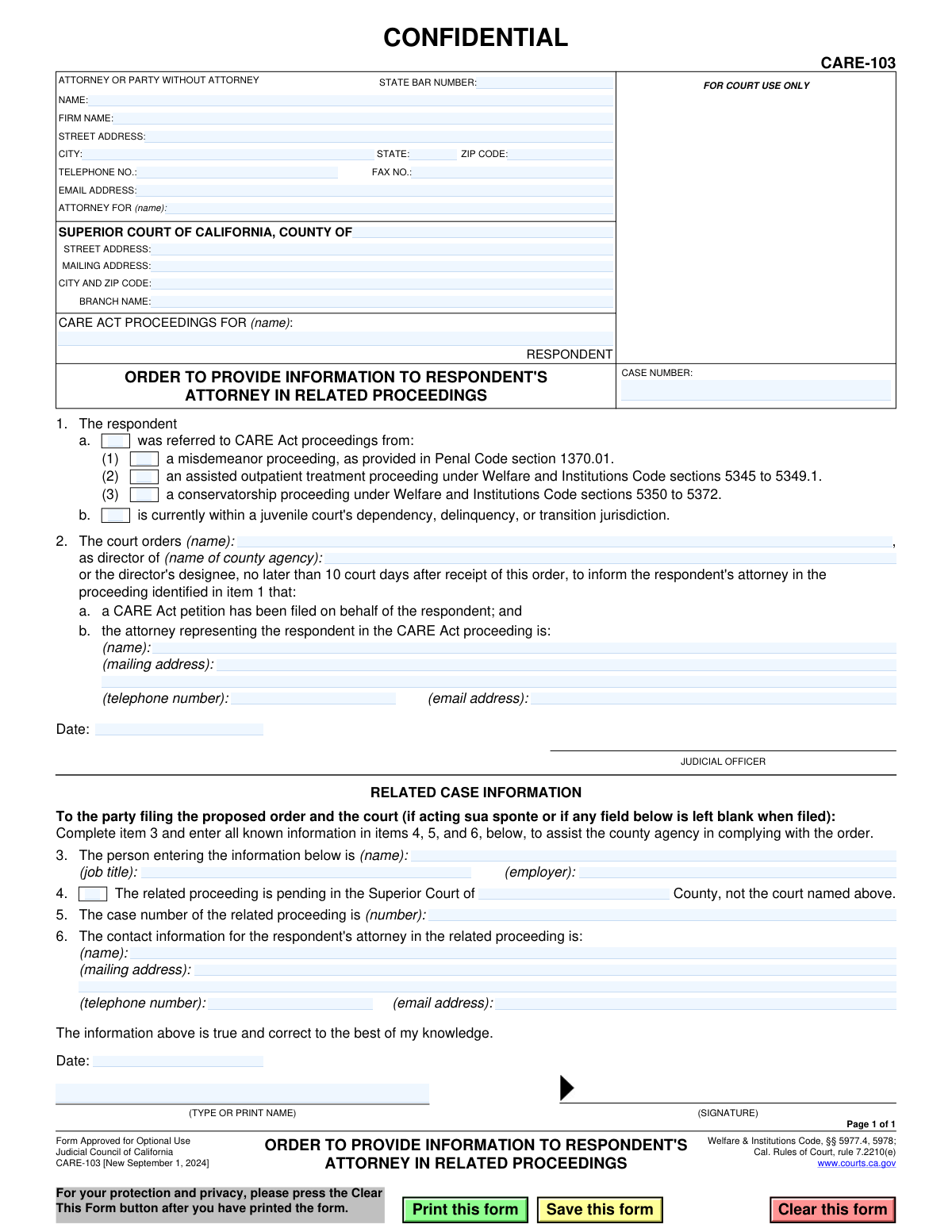
Yes! You can use AI to fill out Form CARE-103, Order to Provide Information to Respondent's Attorney in Related Proceedings

This form, officially titled 'Order to Provide Information to Respondent's Attorney in Related Proceedings,' is a court order used in California's CARE Act proceedings. Its purpose is to mandate that a designated county agency informs an attorney representing the respondent in a separate, related legal matter (such as a conservatorship or misdemeanor case) about the initiation of CARE Act proceedings. This ensures that all legal parties involved with the respondent are aware of the concurrent cases. Today, this form can be filled out quickly and accurately using AI-powered services like Instafill.ai, which can also convert non-fillable PDF versions into interactive fillable forms.
CARE-103 is part of the California court forms category on Instafill.
Our AI automatically handles information lookup, data retrieval, formatting, and form filling.
It takes less than a minute to fill out CARE-103 using our AI form filling.
Securely upload your data. Information is encrypted in transit and deleted immediately after the form is filled out.

Form specifications

Form name: Form CARE-103, Order to Provide Information to Respondent's Attorney in Related Proceedings
Number of fields: 48
Number of pages: 1
Language: English
main-image

Instafill Demo: How to fill out PDF forms in seconds with AI

How to Fill Out CARE-103 Online for Free in 2026

Are you looking to fill out a CARE-103 form online quickly and accurately? Instafill.ai offers the #1 AI-powered PDF filling software of 2026, allowing you to complete your CARE-103 form in just 37 seconds or less.
Follow these steps to fill out your CARE-103 form online using Instafill.ai:
  1. 1 Navigate to Instafill.ai and upload or select Form CARE-103 from their library of official documents.
  2. 2 Use the AI-assisted tool to fill in the header information, including your details as the attorney or party, and the specific Superior Court information.
  3. 3 Enter the respondent's name and the case number. In section 1, check the box that correctly identifies the related proceeding from which the respondent was referred.
  4. 4 In section 2, provide the name of the county agency director being ordered and the contact information for the attorney representing the respondent in the CARE Act proceeding.
  5. 5 Complete the 'RELATED CASE INFORMATION' section (items 3-6) by providing your details and all known information about the related case, including its case number and the other attorney's contact information.
  6. 6 Review all the information entered for accuracy. Once verified, date the document and provide a signature where indicated before filing it with the court for the judicial officer's review and signature.

Our AI-powered system ensures each field is filled out correctly, reducing errors and saving you time.

Why Choose Instafill.ai for Your Fillable CARE-103 Form?

Speed

Complete your CARE-103 in as little as 37 seconds.

Up-to-Date

Always use the latest 2026 CARE-103 form version.

Cost-effective

No need to hire expensive lawyers.

Accuracy

Our AI performs 10 compliance checks to ensure your form is error-free.

Security

Your personal information is protected with bank-level encryption.

Frequently Asked Questions About Form CARE-103

This form is a court order that directs a county agency to inform an attorney in a separate, related legal case that their client is now also involved in a CARE Act proceeding.

This form is used by a party in a CARE Act proceeding, typically an attorney, to request that the court order communication between legal counsels when the respondent has another ongoing case.

A related proceeding is another legal case involving the respondent, such as a misdemeanor case, an assisted outpatient treatment proceeding, a conservatorship, or a juvenile court matter.

The person proposing the order fills out the top caption and the 'RELATED CASE INFORMATION' section (items 3-6). A judicial officer completes and signs the main order section (item 2).

The signed order is sent to the specified county agency director, who then has 10 court days to notify the respondent's attorney in the related case about the CARE Act proceeding.

You need the case number for the related proceeding and the name, mailing address, phone number, and email address for the attorney representing the respondent in that other case.

You should fill in all the information you have to the best of your ability. The form requires you to certify that the information is true and correct to the best of your knowledge.

The 'respondent' is the individual for whom the CARE Act proceedings have been initiated and who is the subject of this court order.

The form is confidential because it contains sensitive personal and legal information about the respondent's multiple court proceedings, which is protected under privacy rules.

The person who provides the information for items 3 through 6, such as the filing attorney or party, must sign and date the bottom of the form to attest to its accuracy.

Yes, services like Instafill.ai use AI to accurately auto-fill form fields, which can save you time and help prevent errors when completing the form.

You can upload the PDF of Form CARE-103 to a platform like Instafill.ai. The service will make the form fillable online, allowing you to type your information directly into the fields and then save or print it.

If you have a non-fillable or 'flat' PDF, you can use a service like Instafill.ai to convert it into an interactive, fillable form that you can complete on your computer.

Compliance CARE-103
Validation Checks by Instafill.ai

1
Ensures Respondent Name is Provided
This check verifies that the respondent's name field, 'CARE ACT PROCEEDINGS FOR (name)', is not empty. The respondent's name is the primary identifier for the individual at the center of the proceedings. Without this name, the order is ambiguous and cannot be correctly filed or acted upon, making it legally ineffective.
2
Validates Case Number Presence
This validation ensures the 'CASE NUMBER' field is filled. The case number is the unique identifier for this specific CARE Act proceeding within the court system. A missing case number makes it impossible to associate the order with the correct legal file, which would halt all processing.
3
Exclusive Referral Source Selection
This check confirms that exactly one checkbox is selected in item 1, which specifies the origin of the respondent's referral. A respondent can only be referred from one source (e.g., a misdemeanor proceeding or juvenile court), not multiple. This validation prevents logical contradictions and ensures the legal basis for the proceeding is clearly and accurately stated.
4
Mandatory County Agency Information
This validation ensures that the name of the director and the name of the county agency in item 2 are both provided. The court order is directed at this specific agency, so this information is critical for enforceability. If these fields are blank, the order is unactionable as there is no identified entity to carry out the directive.
5
Complete CARE Act Attorney Contact Details
This check verifies that the name, mailing address, telephone number, and email for the CARE Act attorney in item 2.b are all present. The purpose of the order is to facilitate communication between legal parties. Incomplete contact information would prevent the county agency from successfully notifying the attorney, thereby defeating the purpose of the order.
6
Mandatory Related Case Number
This validation confirms that the 'case number of the related proceeding' in item 5 is filled out. This number is essential for the county agency to locate the correct external case file and identify the corresponding attorney. Without this number, the agency cannot comply with the order, as they would have no way to find the related proceeding.
7
Complete Related Attorney Contact Details
This check ensures that the name, mailing address, telephone, and email for the attorney in the related proceeding (item 6) are all provided. This information is the primary deliverable of this form. If any part of this contact information is missing, the order fails its core function of connecting the two legal proceedings.
8
Valid Email Address Format
This rule scrutinizes all email address fields on the form to ensure they conform to a standard '[email protected]' format. This is crucial for ensuring that official electronic communications are deliverable. An invalid email format would lead to communication failures and significant delays in the legal process.
9
Valid Phone Number Format
This check verifies that all telephone number fields contain a valid, standard format, such as 10 digits with optional parentheses and hyphens. This ensures the phone numbers are legitimate and can be used for timely communication. An incorrectly formatted number could prevent urgent contact between parties.
10
Conditional County Name Entry
This validation rule enforces that if the checkbox in item 4 ('The related proceeding is pending in the Superior Court of... a different county') is checked, the corresponding text field for the county name must be filled. This logic is essential for correctly identifying the jurisdiction of the related case. Failure to provide the county name when checked makes the information incomplete and ambiguous.
11
Filer Information and Signature Presence
This check confirms that the name of the person providing the information (item 3) and the name and date in the final signature block are all present. This information authenticates the source of the data and serves as an attestation to its accuracy. Missing signature information can call the document's validity into question.
12
State Bar Number Format and Requirement
This validation checks that the 'STATE BAR NUMBER' field, if filled, contains only numeric characters. Furthermore, it should be required if the 'ATTORNEY FOR' field is completed, indicating a lawyer is filing the form. This ensures data integrity and proper identification of legal counsel involved in the case.

Common Mistakes in Completing CARE-103

Confusing Attorney Information Between Sections

Users frequently mix up the attorney information required in Section 2b and Section 6. Section 2b requires contact details for the attorney in the new CARE Act proceeding, while Section 6 requires details for the attorney in the pre-existing related proceeding. This error undermines the entire purpose of the form, which is to connect these two legal representatives, leading to failed communication and non-compliance with the court order. Double-check that the CARE Act attorney is listed in Section 2b and the related case attorney is in Section 6.

Entering the Wrong Case Number in Section 5

A common mistake is entering the new CARE Act case number from the top of the form into Section 5. Section 5 specifically asks for the case number of the 'related proceeding' (e.g., the misdemeanor or conservatorship case). Entering the wrong number makes it difficult or impossible for the county agency to locate the correct related case file and notify the appropriate attorney. Always verify you are using the case number for the proceeding identified in Section 1.

Leaving the 'Related Case Information' Section Blank

Parties filing the proposed order often overlook the 'RELATED CASE INFORMATION' section (items 3-6), assuming it's for court use only. The instructions clearly state the filing party must complete this section to assist the county agency. Submitting the form with this section blank will likely lead to rejection or an inability for the county agency to execute the order, causing significant delays. AI-powered tools like Instafill.ai can highlight required sections to prevent such omissions.

Missing Signature on the Filer's Declaration

The person providing the information in items 3-6 must sign and date the declaration at the bottom of the page. Forgetting this signature invalidates the sworn statement that the information is true and correct. A court may refuse to issue the order based on unverified information, or the county agency may decline to act on it. Always perform a final review for all required signatures before filing.

Incorrectly Identifying the County Agency or Director

In Section 2, filers may enter a generic agency name like 'Social Services' or misidentify the specific director responsible for CARE Act notifications. Each county has a designated agency, and an incorrect name can cause the order to be misrouted or ignored. This results in the respondent's other attorney never being notified. Research the correct, official name of the county agency and director responsible for CARE Act proceedings before filling out the form.

Omitting Court Details for the Related Proceeding

When the related proceeding is in a different county, filers often forget to check the box in Section 4 and write in the name of the correct county. This omission forces the county agency to guess where the related case is located, which can be impossible if the case number format isn't unique. This leads to delays while the agency attempts to track down the correct court. If the form is a non-fillable PDF, a tool like Instafill.ai can convert it to a fillable version, making it easier to complete all necessary fields accurately.

Invalid or Missing Attorney State Bar Number

Attorneys sometimes enter their State Bar Number incorrectly, or a self-represented party mistakenly fills in the field. An incorrect number can cause filing delays as the court clerk must verify the attorney's status. It's crucial for attorneys to enter their number accurately and for parties without an attorney to leave this field blank as instructed. Using a form-filling tool like Instafill.ai can help by saving and auto-populating correct attorney information, reducing data entry errors.

Inconsistent Respondent Name

The respondent's name may be entered with slight variations (e.g., missing middle initial, misspelled name) between the main caption and how it appears in the related case documents. This inconsistency can create confusion and hinder the process of linking the CARE Act case with the related proceeding. To avoid this, use the full, correct legal name of the respondent as it appears on official court documents for the related case.

Incorrect Selection of Originating Proceeding

In Section 1, the filer might guess or incorrectly select the type of proceeding from which the respondent was referred (misdemeanor, AOT, conservatorship). This information is critical legal context for the order and for all parties involved. An incorrect selection can lead to confusion and misinterpretation of the case's history. Always confirm the exact nature of the related proceeding before checking a box in this section.

Ambiguous 'Attorney For' Designation

In the header, the 'ATTORNEY FOR (name):' field is sometimes filled out ambiguously, for example, with just 'Petitioner'. While the form is for the respondent, the filing party is often the petitioner. Clearly stating the full name and status of the party being represented (e.g., 'Jane Smith, Petitioner') prevents any confusion for court staff and other parties reviewing the document. This ensures the record is clear about who is submitting the proposed order.
Saved over 80 hours a year

“I was never sure if my IRS forms like W-9 were filled correctly. Now, I can complete the forms accurately without any external help.”

Kevin Martin Green

Your data stays secure with advanced protection from Instafill and our subprocessors

Robust compliance program

Transparent business model

You’re not the product. You always know where your data is and what it is processed for.

ISO 27001, HIPAA, and GDPR

Our subprocesses adhere to multiple compliance standards, including but not limited to ISO 27001, HIPAA, and GDPR.

Security & privacy by design

We consider security and privacy from the initial design phase of any new service or functionality. It’s not an afterthought, it’s built-in, including support for two-factor authentication (2FA) to further protect your account.

Fill out CARE-103 with Instafill.ai

Worried about filling PDFs wrong? Instafill securely fills form-care-103-order-to-provide-information-to-respondents-attorney-in-related-proceedings forms, ensuring each field is accurate.