Yes! You can use AI to fill out Form CARE-120, Request for New Order and Hearing—CARE Act Proceedings
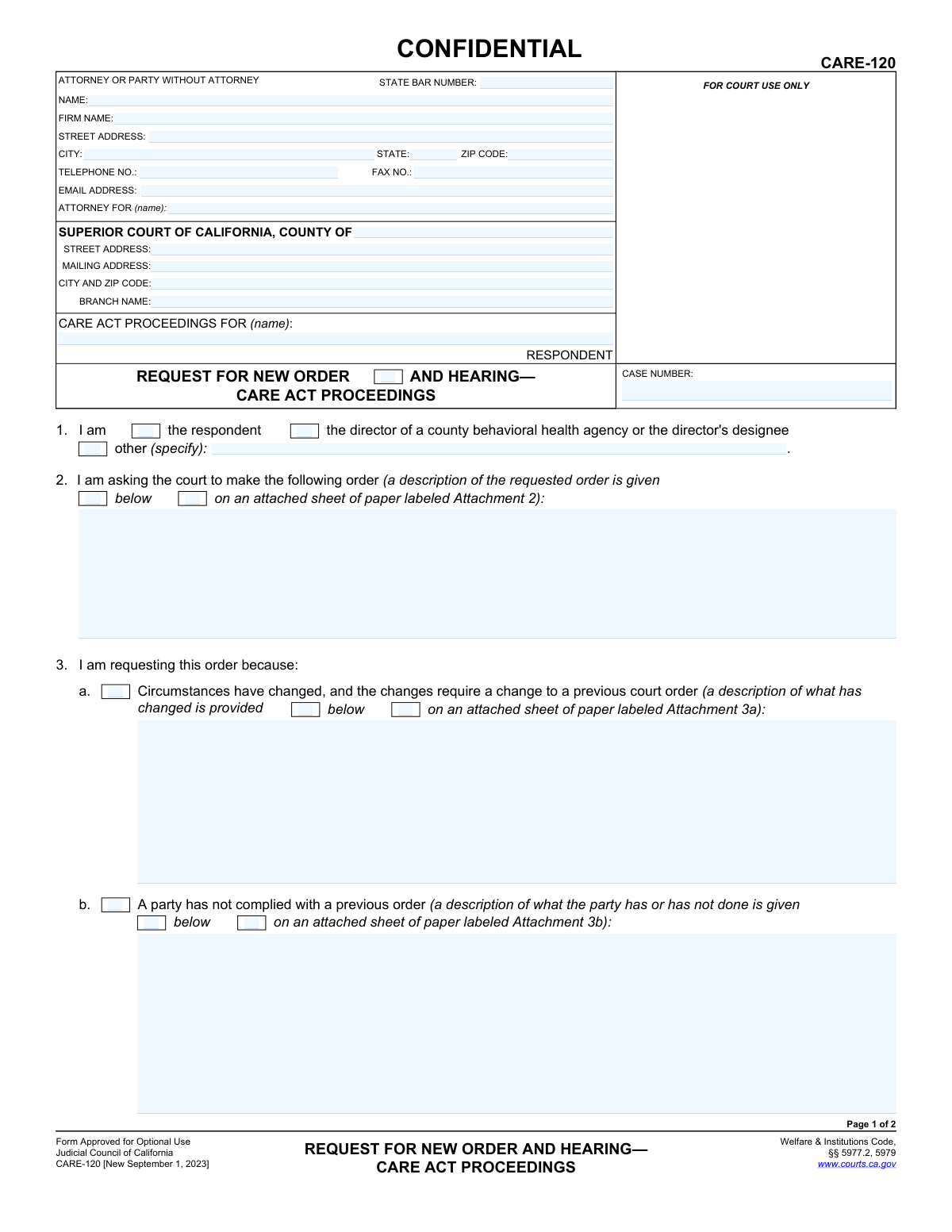
Form CARE-120, Request for New Order and Hearing—CARE Act Proceedings, is a legal document filed with the Superior Court of California to formally ask a judge for a new order or a hearing within an existing CARE Act case. It is used by parties to address changed circumstances, report non-compliance with previous orders, or raise other issues that require judicial intervention, ensuring the CARE plan remains effective. Today, this form can be filled out quickly and accurately using AI-powered services like Instafill.ai, which can also convert non-fillable PDF versions into interactive fillable forms.
CARE-120 is part of the
California court forms category on Instafill.
Our AI automatically handles information lookup, data retrieval, formatting, and form filling.
It takes less than a minute to fill out CARE-120 using our AI form filling.
Securely upload your data. Information is encrypted in transit and deleted immediately after the form is filled out.
Form specifications
| Form name: | Form CARE-120, Request for New Order and Hearing—CARE Act Proceedings |
| Number of fields: | 54 |
| Number of pages: | 1 |
| Language: | English |
Instafill Demo: How to fill out PDF forms in seconds with AI
How to Fill Out CARE-120 Online for Free in 2026
Are you looking to fill out a CARE-120 form online quickly and accurately? Instafill.ai offers the #1 AI-powered PDF filling software of 2026, allowing you to complete your CARE-120 form in just 37 seconds or less.
Follow these steps to fill out your CARE-120 form online using Instafill.ai:
- 1 Navigate to Instafill.ai and upload or select the CARE-120 form.
- 2 Enter the attorney or party information, court details, respondent's name, and case number in the top section.
- 3 In Section 1, identify who is making the request (e.g., the respondent, a county behavioral health agency director, or other specified party).
- 4 In Section 2, clearly describe the new order you are requesting from the court.
- 5 Complete Section 3 by explaining the reason for the request, such as changed circumstances, non-compliance with a previous order, or other reasons.
- 6 In Sections 4 and 5, provide the justification for the requested order and state if you would like the court to hold a hearing, explaining the reasons.
- 7 Review all entered information for accuracy, then use the AI tool to securely e-sign and date the declaration before downloading or filing the completed form.
Our AI-powered system ensures each field is filled out correctly, reducing errors and saving you time.
Why Choose Instafill.ai for Your Fillable CARE-120 Form?
Speed
Complete your CARE-120 in as little as 37 seconds.
Up-to-Date
Always use the latest 2026 CARE-120 form version.
Cost-effective
No need to hire expensive lawyers.
Accuracy
Our AI performs 10 compliance checks to ensure your form is error-free.
Security
Your personal information is protected with bank-level encryption.
Frequently Asked Questions About Form CARE-120
This form is used to ask the court for a new order, modify an existing order, or request a hearing within an ongoing CARE Act case. It is not used to start a new case.
The form can be filed by the respondent (the person the case is about), the director of a county behavioral health agency, their designee, or another involved party as specified in item 1.
You should use this form if circumstances have changed, if a party is not complying with a previous court order, or for any other reason that requires a new or changed order from the court in your CARE Act case.
You need to provide your personal or attorney contact information, the specific Superior Court details for your case, the respondent's name, and the case number.
In Section 2, you must clearly and concisely describe the specific action you want the court to take. If you need more space, you can write the details on a separate page and label it 'Attachment 2'.
Section 3 is for stating the factual reason for your request (e.g., 'circumstances have changed'). Section 4 is where you provide the legal or logical argument for why the court should grant the order you are requesting.
Requesting a hearing is optional. If you want to appear before the judge to argue your request, you should check the box in Section 5 and explain why a hearing is necessary.
The form allows you to use attachments. Simply check the box for 'on an attached sheet of paper', write your detailed explanation on a new page with the corresponding attachment number (e.g., 'Attachment 3a'), and note the total number of attached pages in item 6.
CARE Act proceedings involve sensitive health and personal information. The 'CONFIDENTIAL' marking indicates that the document is protected to safeguard the respondent's privacy.
You must file the completed and signed form with the clerk's office of the Superior Court where your CARE Act case is being heard. The court's address should be filled in at the top of the form.
Yes, services like Instafill.ai use AI to help you accurately auto-fill form fields with your information, which can save time and help prevent common errors.
You can upload the CARE-120 PDF to the Instafill.ai platform. The service will make the document interactive, allowing you to easily type your information into the fields before downloading the completed form for submission.
If you have a non-fillable or 'flat' PDF, you can use a tool like Instafill.ai. It can convert the static document into an interactive, fillable form that you can complete on your computer.
By signing the form, you are legally declaring that all the information you have provided is true and correct to the best of your knowledge. Providing false information can have serious legal consequences.
Compliance CARE-120
Validation Checks by Instafill.ai
1
Exclusive Filer Identity Selection
Validates that exactly one checkbox is selected in item 1 to identify the filer ('the respondent', 'the director...', or 'other'). This is crucial for establishing the filer's standing and relationship to the case. If 'other' is selected, the corresponding text field specifying the filer's role must be completed, otherwise the submission is ambiguous and cannot be processed correctly.
2
Case Number Consistency and Format
Ensures the 'CASE NUMBER' field is populated on both page 1 and page 2 and that the values are identical. The system should also check that the number conforms to the expected format for the specified court county. This prevents document misfiling and ensures the request is associated with the correct existing case file.
3
Respondent Name Consistency
Verifies that the respondent's name under 'CARE ACT PROCEEDINGS FOR (name)' is filled out on both page 1 and page 2 and that the names are identical. Consistent and accurate identification of the respondent is fundamental for legal validity and proper notification. A mismatch could lead to the document being rejected or applied to the wrong case.
4
At Least One Reason for Request Required
Checks that at least one of the circumstances in item 3 ('Circumstances have changed', 'A party has not complied', or 'Other') is selected and explained. A request for a new order must be based on a specific reason as outlined in the statute. A failure to provide a reason makes the request legally insufficient and will result in its rejection.
5
Conditional Description for Reasons
For each checkbox selected in items 2, 3, 4, and 5, this validates that a corresponding description is provided, either in the text box or by checking the 'on an attached sheet' box. The court requires a detailed explanation for the request, the reasons, and the justification. If a box is checked without an explanation, the filing is incomplete and lacks the necessary information for the court to act.
6
Attachment Count Logic
Validates that the 'Number of pages attached' is a non-negative integer. It also performs a logical check: if the number of pages is greater than zero, at least one 'on an attached sheet' checkbox must be ticked. Conversely, if any 'on an attached sheet' box is ticked, the number of pages must be greater than zero. This ensures consistency between the stated attachments and the form content, preventing confusion about missing documents.
7
Signature Date Validation
Ensures the 'Date' field in the signature block is a valid, properly formatted date that is not in the future. The date of signature is legally significant as it establishes when the declaration was made. An invalid or future date would render the perjury declaration invalid and cause the form to be rejected by the court clerk.
8
Signature Name Presence and Match
Verifies that the printed name of the signatory is present below the signature line. It should also check that this printed name matches the name of the 'ATTORNEY OR PARTY WITHOUT ATTORNEY' listed at the top of the form. This confirms the identity of the person making the declaration under penalty of perjury.
9
State Bar Number Format
If the filer is an attorney, this check validates that the 'STATE BAR NUMBER' field contains only numbers and conforms to the expected length and format of a California State Bar number. An incorrect or missing bar number can delay processing as the court clerk must verify the attorney's status and eligibility to practice. This ensures the attorney is properly identified in the court record.
10
Email Address Format Validation
Checks that the value entered in the 'EMAIL ADDRESS' field follows the standard '[email protected]' format. As email is a primary method for court notices and communication, ensuring the address is syntactically correct is vital. An invalid email format would lead to failed communications and missed deadlines.
11
Conditional 'Attorney For' Requirement
This validation ensures that if a 'STATE BAR NUMBER' is provided, the 'ATTORNEY FOR (name)' field is also completed. It is a procedural requirement for an attorney to declare which party they are representing. Failure to specify the client makes the representation unclear and the filing defective.
12
Completeness of Filer Contact Information
Verifies that the filer's Name, Street Address, City, State, and ZIP Code are all filled in. This information is mandatory for official court records and for sending legal notices via mail. Incomplete address information can lead to the rejection of the filing or critical communication failures.
13
Completeness of Requested Order (Item 2)
Ensures that a description of the requested order is provided in item 2, either in the text area or via an indicated attachment. The form's primary purpose is to request a specific court order, and without this information, the request is meaningless. The court cannot act on a request that does not specify the desired outcome.
14
Completeness of Justification (Item 4)
Validates that the reasons why the court should make the requested order are provided in item 4, either in the text area or via an indicated attachment. This section contains the legal or factual argument for the request. Without a justification, the request lacks a basis for the court to consider and will be denied.
Common Mistakes in Completing CARE-120
The case number is the unique identifier for the court proceeding and is required on both pages. Filers often forget to enter it, especially on the second page, or make typographical errors. An incorrect or missing case number will cause the court clerk to reject the filing or will lead to significant delays as they cannot associate the document with the correct case file. Always double-check the case number from previous court documents and ensure it is entered accurately on all pages before submission.
The 'ATTORNEY FOR (name)' field often confuses individuals representing themselves (in pro per). They may leave it blank, write 'Self', or incorrectly repeat their own name, creating ambiguity about their representation status. This can delay processing while the court clarifies the filer's role. To avoid this, if you are not an attorney, you should enter your own name followed by 'In Pro Per' or 'Self-Represented' to make your status clear to the court.
Sections 2, 3, and 4 require clear, factual descriptions of the requested order, the change in circumstances, and the reasons for the request. A common mistake is to provide emotional, vague, or incomplete statements that lack the necessary detail for a judge to act upon. This can lead to the request being denied for failing to state a valid cause. Be specific and objective, clearly stating what you want the court to do and the precise facts that support your request.
The form allows for detailed explanations on attached pages, but filers often manage this poorly. Common errors include checking the 'on an attached sheet' box but forgetting the attachment, failing to label attachments correctly (e.g., 'Attachment 3a'), or not updating the 'Number of pages attached' field in section 6. This creates confusion and may result in an incomplete filing. Ensure every attachment is clearly labeled, referenced correctly on the form, and included in the final page count.
An unsigned or undated legal document is invalid and will be rejected by the court. This is a frequent oversight made in haste, but it has serious consequences, as it requires a complete refiling and can cause you to miss critical deadlines. The signature, made under penalty of perjury, is a declaration that the information is true and correct. Always perform a final check to ensure you have signed and dated the form in the designated area on page 2.
Filers must provide the specific address and branch name of the Superior Court handling the case. People often use a generic county courthouse address or are unaware of the correct department for CARE Act proceedings. Filing at the wrong location will cause the document to be rejected or significantly delayed while it is rerouted. To prevent this, verify the precise court address and branch name on the court's official website or from prior case documents.
Section 1 requires the filer to state their relationship to the case. If selecting 'other,' it is crucial to specify your role (e.g., 'Spouse of Respondent,' 'Legal Guardian'). A common error is checking 'other' but leaving the specification line blank. This makes it impossible for the court to determine if the filer has legal standing to make the request, likely leading to rejection. Always provide a clear, specific description of your role if you are not the respondent or a county director.
This form is often distributed as a non-fillable PDF, requiring it to be completed by hand. Illegible handwriting can render names, case numbers, and critical details unreadable, leading to data entry errors by court staff or outright rejection of the form. To avoid this, print clearly in block letters using black ink. AI-powered tools like Instafill.ai can convert flat PDFs into fillable versions, allowing you to type your answers for maximum clarity and professionalism.
The respondent's name and the case number must be entered at the top of both page 1 and page 2. It is a frequent mistake to fill out the first page completely but forget to add this identifying information to the second page. This can cause the pages to be separated or lead the clerk to question the document's integrity, resulting in processing delays. Before filing, review both pages to ensure the header information is present and identical.
Section 5 asks for the reasons a hearing should be held. Many filers either leave this blank, assuming a hearing is automatic, or provide a weak justification like 'to discuss the matter.' The court has discretion on whether to grant a hearing, and failing to provide a compelling reason—such as the need to present testimony or complex evidence—may result in the judge deciding the issue based only on the submitted papers. Clearly explain why a live hearing is necessary to fairly resolve your request.
Saved over 80 hours a year
“I was never sure if my IRS forms like W-9 were filled correctly. Now, I can complete the forms accurately without any external help.”
Kevin Martin Green
Your data stays secure with advanced protection from Instafill and our subprocessors
Robust compliance program
Transparent business model
You’re not the product. You always know where your data is and what it is processed for.
ISO 27001, HIPAA, and GDPR
Our subprocesses adhere to multiple compliance standards, including but not limited to ISO 27001, HIPAA, and GDPR.
Security & privacy by design
We consider security and privacy from the initial design phase of any new service or functionality. It’s not an afterthought, it’s built-in, including support for two-factor authentication (2FA) to further protect your account.
Fill out CARE-120 with Instafill.ai
Worried about filling PDFs wrong? Instafill securely fills form-care-120-request-for-new-order-and-hearingcare-act-proceedings forms, ensuring each field is accurate.