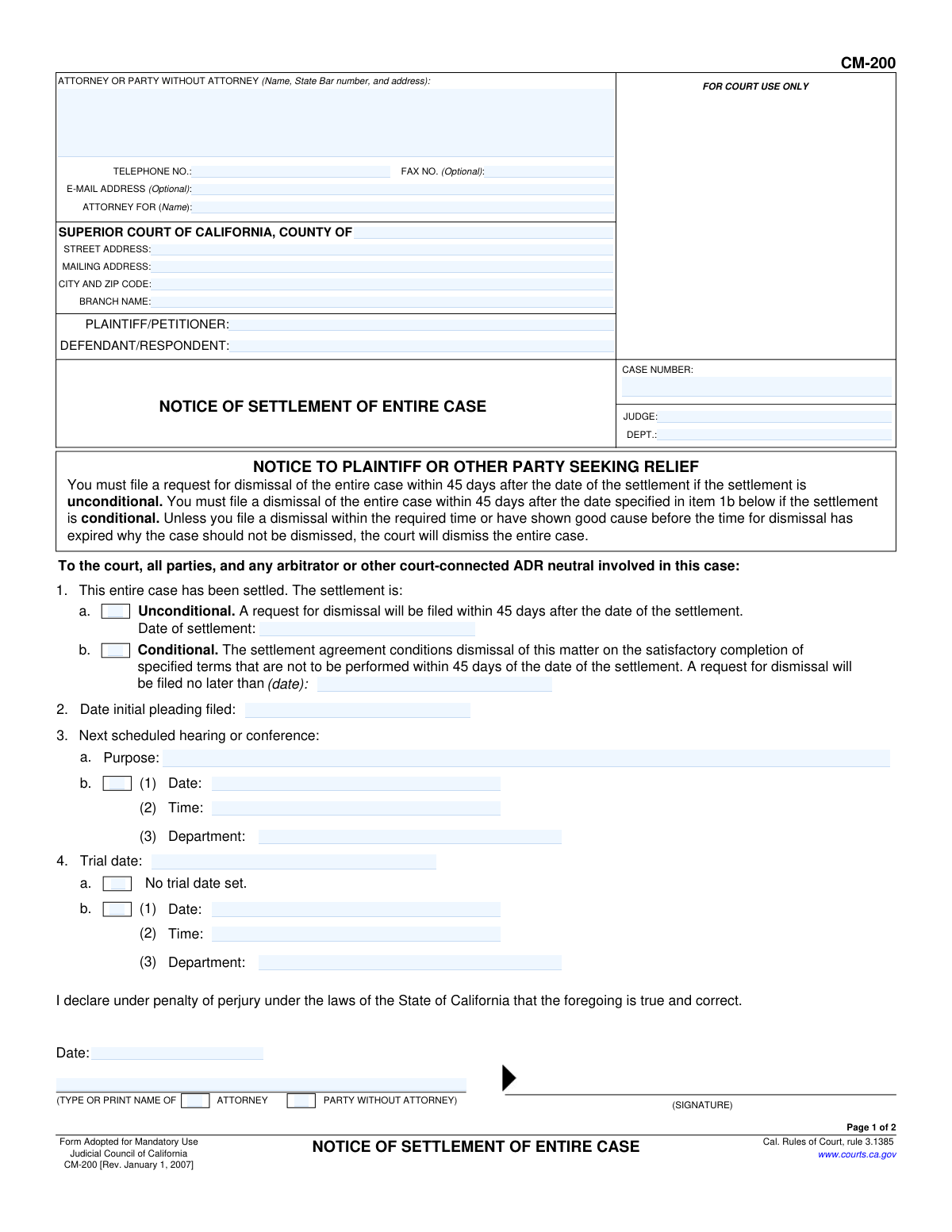
Yes! You can use AI to fill out Form CM-200, Notice of Settlement of Entire Case
Form CM-200, Notice of Settlement of Entire Case, is a mandatory legal document filed in the Superior Court of California to formally notify the court and all parties that a lawsuit has been resolved through settlement. Filing this form is a critical step to stop further court proceedings and manage the case's dismissal timeline, indicating whether the settlement is conditional or unconditional. Today, this form can be filled out quickly and accurately using AI-powered services like Instafill.ai, which can also convert non-fillable PDF versions into interactive fillable forms.
CM-200 is part of the
California court forms category on Instafill.
Our AI automatically handles information lookup, data retrieval, formatting, and form filling.
It takes less than a minute to fill out CM-200 using our AI form filling.
Securely upload your data. Information is encrypted in transit and deleted immediately after the form is filled out.
Form specifications
| Form name: | Form CM-200, Notice of Settlement of Entire Case |
| Number of fields: | 68 |
| Number of pages: | 1 |
| Language: | English |
Instafill Demo: How to fill out PDF forms in seconds with AI
How to Fill Out CM-200 Online for Free in 2026
Are you looking to fill out a CM-200 form online quickly and accurately? Instafill.ai offers the #1 AI-powered PDF filling software of 2026, allowing you to complete your CM-200 form in just 37 seconds or less.
Follow these steps to fill out your CM-200 form online using Instafill.ai:
- 1 Navigate to Instafill.ai and upload or select the CM-200, Notice of Settlement of Entire Case form.
- 2 Provide the case information, including the court, county, case number, and names of the plaintiff and defendant.
- 3 Indicate whether the settlement is unconditional or conditional, and provide the date of settlement or the date by which a dismissal will be filed.
- 4 Enter the date the initial pleading was filed and details of any next scheduled hearing or trial date that will be vacated.
- 5 The filing party or their attorney must date and sign the declaration under penalty of perjury.
- 6 Complete the Proof of Service section on page 2, detailing how and when the notice was served to all other parties in the case.
- 7 Review the entire document for accuracy, then download the completed form for filing with the court and service to all parties.
Our AI-powered system ensures each field is filled out correctly, reducing errors and saving you time.
Why Choose Instafill.ai for Your Fillable CM-200 Form?
Speed
Complete your CM-200 in as little as 37 seconds.
Up-to-Date
Always use the latest 2026 CM-200 form version.
Cost-effective
No need to hire expensive lawyers.
Accuracy
Our AI performs 10 compliance checks to ensure your form is error-free.
Security
Your personal information is protected with bank-level encryption.
Frequently Asked Questions About Form CM-200
This form is used to officially notify the California Superior Court, all parties, and any arbitrators that the entire lawsuit has been resolved through a settlement agreement.
The plaintiff or the party who initiated the legal action is typically responsible for filing the Notice of Settlement with the court and serving it on all other parties.
An unconditional settlement is final immediately, requiring a dismissal to be filed within 45 days. A conditional settlement means the dismissal depends on future actions (like payments), and you must state the date by which the dismissal will be filed.
After filing this notice, you are required to file a Request for Dismissal to formally close the case. If you don't file the dismissal within the specified time, the court may dismiss the case on its own initiative.
For an unconditional settlement, you must file a dismissal within 45 days of the settlement date. For a conditional settlement, you must file the dismissal by the specific date you list in item 1b of the form.
You must provide information on any future court dates so the court can remove them from its calendar. This helps the court manage its schedule efficiently now that the case is settled.
The Proof of Service is a sworn declaration that a copy of the Notice of Settlement has been properly mailed to all other parties in the case. It must be filled out by the person who performed the mailing.
No, the form explicitly states that a party to the action cannot serve the notice. The Proof of Service must be completed and signed by a non-party who is at least 18 years old.
Yes, services like Instafill.ai use AI to auto-fill form fields accurately and save time. This can help ensure your case information is entered correctly and consistently.
You can use a service like Instafill.ai to upload the PDF, fill it out in an interactive online interface, and then download the completed document for printing and filing.
If you have a non-fillable or 'flat' PDF, you can use a tool like Instafill.ai to instantly convert it into an interactive, fillable form. This allows you to easily type your information into the correct fields before printing.
You will need your case number, court information, names of all parties, the date of settlement, and any upcoming hearing or trial dates. You will also need the names and addresses of all parties for the Proof of Service.
Compliance CM-200
Validation Checks by Instafill.ai
1
Case Number Presence and Consistency
Validates that the 'CASE NUMBER' field is populated on both page 1 and page 2. It also checks that the value entered is identical on both pages. This is critical for associating the notice with the correct court file and ensuring document integrity; a mismatch or missing number will lead to rejection by the court clerk.
2
Settlement Condition Exclusivity
Ensures that in Item 1, either checkbox 'a' (Unconditional) or 'b' (Conditional) is selected, but not both. This choice is fundamental to the notice's purpose, dictating the subsequent dismissal timeline. An ambiguous or dual selection makes the notice legally unclear and would require correction.
3
Conditional Settlement Dismissal Date
Checks that if Item 1b (Conditional settlement) is selected, a valid future date is entered. The form requires a specific date by which dismissal will be filed. Failure to provide a valid, future date makes the conditional settlement terms unenforceable by the court and renders the notice incomplete.
4
Unconditional Settlement Date Requirement
Verifies that if Item 1a (Unconditional settlement) is selected, the 'Date of settlement' is provided. This date starts a 45-day clock for filing a dismissal. Without this date, the court cannot track the deadline, potentially leading to an unintended dismissal of the case or rejection of the notice.
5
Chronological Date Integrity
Validates that the 'Date initial pleading filed' (Item 2) is a date that occurs before the 'Date of settlement' (Item 1a) and the form's signature date. A case cannot be settled before it has been officially filed with the court. This check prevents logical impossibilities that would invalidate the legal document.
6
Trial Date Selection Logic
Ensures that in Item 4, the user selects either checkbox 'a' (No trial date set) or provides details in 'b', but not both. This prevents contradictory information about the case's trial status. Providing clear information is essential for the court to correctly vacate or maintain the trial date on its calendar.
7
Filer Information Completeness
Requires that the 'ATTORNEY OR PARTY WITHOUT ATTORNEY' section contains at least a name and address. This information identifies the filing party to the court and all other parties. A notice without clear filer identification is invalid and cannot be processed.
8
Proof of Service Declarant Eligibility
Cross-references the name of the declarant on the Proof of Service (Page 2) against the 'PLAINTIFF/PETITIONER' and 'DEFENDANT/RESPONDENT' names. The declarant cannot be a party to the action, as stated on the form. A violation of this rule invalidates the proof of service, which could have serious legal consequences for the case.
9
Proof of Service Mailing Date Logic
Checks that the mailing date in Item 3a on page 2 is on or after the main declaration signature date on page 1. A document cannot be mailed before it is officially signed and declared true. This chronological check ensures the sequence of events is logical and legally sound.
10
Proof of Service Declaration Date Logic
Verifies that the signature date on the Proof of Service (Page 2) is on or after the mailing date specified in Item 3a. The declarant is attesting under penalty of perjury that the mailing occurred on a certain date, so they must sign on or after that date. An incorrect sequence invalidates the declaration.
11
Service Recipient Requirement
Ensures that at least one complete recipient (name and full address) is entered in Item 4 of the Proof of Service. The entire purpose of this section is to prove that other parties were notified. A proof of service that does not list anyone served is meaningless and will be rejected.
12
Court County Specification
Validates that the 'COUNTY OF' field is filled out under the 'SUPERIOR COURT OF CALIFORNIA' heading. This specifies the exact court jurisdiction, which is non-negotiable for proper filing. Omitting the county means the document cannot be routed to the correct courthouse and will be rejected.
13
Service Method Selection
Requires that in Item 2 of the Proof of Service, exactly one checkbox ('a' or 'b') is selected to indicate the method of mailing. This detail is a required element of a valid proof of service under court rules. Failure to specify the method could be grounds for another party to challenge the validity of the service.
14
Party Identification
Ensures that both the 'PLAINTIFF/PETITIONER' and 'DEFENDANT/RESPONDENT' fields are populated. These fields are the primary identifiers for the case, alongside the case number. The form is invalid without clear identification of the involved parties, as it would be impossible to know which case is being settled.
Common Mistakes in Completing CM-200
This is a critical error where a party to the case (plaintiff or defendant) fills out and signs the Proof of Service on page 2. The form explicitly states that the server must be a non-party adult. This mistake invalidates the service, meaning the court will not recognize that other parties were properly notified, potentially delaying the case dismissal and causing the notice to be rejected.
Filers often incorrectly select between an 'Unconditional' (1a) and 'Conditional' (1b) settlement or omit the required dates. An unconditional settlement requires dismissal within 45 days, while a conditional one has a specific future date. Choosing the wrong option or forgetting the date can lead to the court automatically dismissing the case prematurely or rejecting the notice for being incomplete, disrupting the agreed-upon settlement terms.
Parties often forget to list all scheduled hearings, conferences, or trial dates in sections 3 and 4. The purpose of this notice is to inform the court that these dates can be vacated from its calendar. Failing to do so can result in the court issuing sanctions or an order to show cause when the parties inevitably fail to appear for a hearing they thought was cancelled.
Filers frequently neglect to repeat the Case Number, Plaintiff/Petitioner, and Defendant/Respondent names at the top of the second page (Proof of Service). This happens because they see it as redundant, but it is essential for court processing. An 'orphan' second page without identifying case information can become separated or cause confusion for the clerk, delaying the filing of the notice.
The attorney or self-represented party filing the notice sometimes forgets to sign or date the declaration on page 1. A typed name is not a valid signature unless filed electronically through a system that permits it. Since this is a declaration under penalty of perjury, a missing signature renders the entire notice invalid and will lead to its rejection by the court clerk.
The Proof of Service section requires listing the name and address of every person or attorney served, but filers often miss one or more parties. Proper service requires notifying all other parties in the action. An incomplete list means service is defective, which can invalidate the notice and create grounds for another party to challenge the settlement process.
Typographical errors in the Case Number, Judge's name, or Department number are very common due to manual data entry. Likewise, listing the wrong court branch address can cause the document to be misrouted or rejected. This leads to unnecessary delays and requires refiling, and AI-powered tools like Instafill.ai can help prevent these errors by auto-filling and validating case information from a central record.
While the party signs page 1, the non-party individual who actually mailed the notice (the 'declarant') must sign and date the Proof of Service on page 2. It is common for the attorney's office to prepare the form but forget to have the actual server (e.g., a secretary or paralegal) sign it. Without the declarant's signature, the proof of service is invalid, and the court will not consider the notice properly served.
In the top section, filers may just list their name in the 'ATTORNEY FOR' field without specifying which party they represent (e.g., 'Plaintiff John Smith'). This ambiguity creates extra work for the court clerk, who must cross-reference the information with the case file. To avoid this, clearly state the party's name and their role in the lawsuit.
Often, legal forms are only available as flat, non-fillable PDFs, leading to illegible handwritten entries or formatting issues when people try to type over the document. This can cause the form to be rejected by the court clerk. Tools like Instafill.ai can convert such documents into interactive, fillable forms, ensuring all entries are neat, properly placed, and legible.
Saved over 80 hours a year
“I was never sure if my IRS forms like W-9 were filled correctly. Now, I can complete the forms accurately without any external help.”
Kevin Martin Green
Your data stays secure with advanced protection from Instafill and our subprocessors
Robust compliance program
Transparent business model
You’re not the product. You always know where your data is and what it is processed for.
ISO 27001, HIPAA, and GDPR
Our subprocesses adhere to multiple compliance standards, including but not limited to ISO 27001, HIPAA, and GDPR.
Security & privacy by design
We consider security and privacy from the initial design phase of any new service or functionality. It’s not an afterthought, it’s built-in, including support for two-factor authentication (2FA) to further protect your account.
Fill out CM-200 with Instafill.ai
Worried about filling PDFs wrong? Instafill securely fills form-cm-200-notice-of-settlement-of-entire-case forms, ensuring each field is accurate.