Yes! You can use AI to fill out Form CR-100, Fingerprint Form

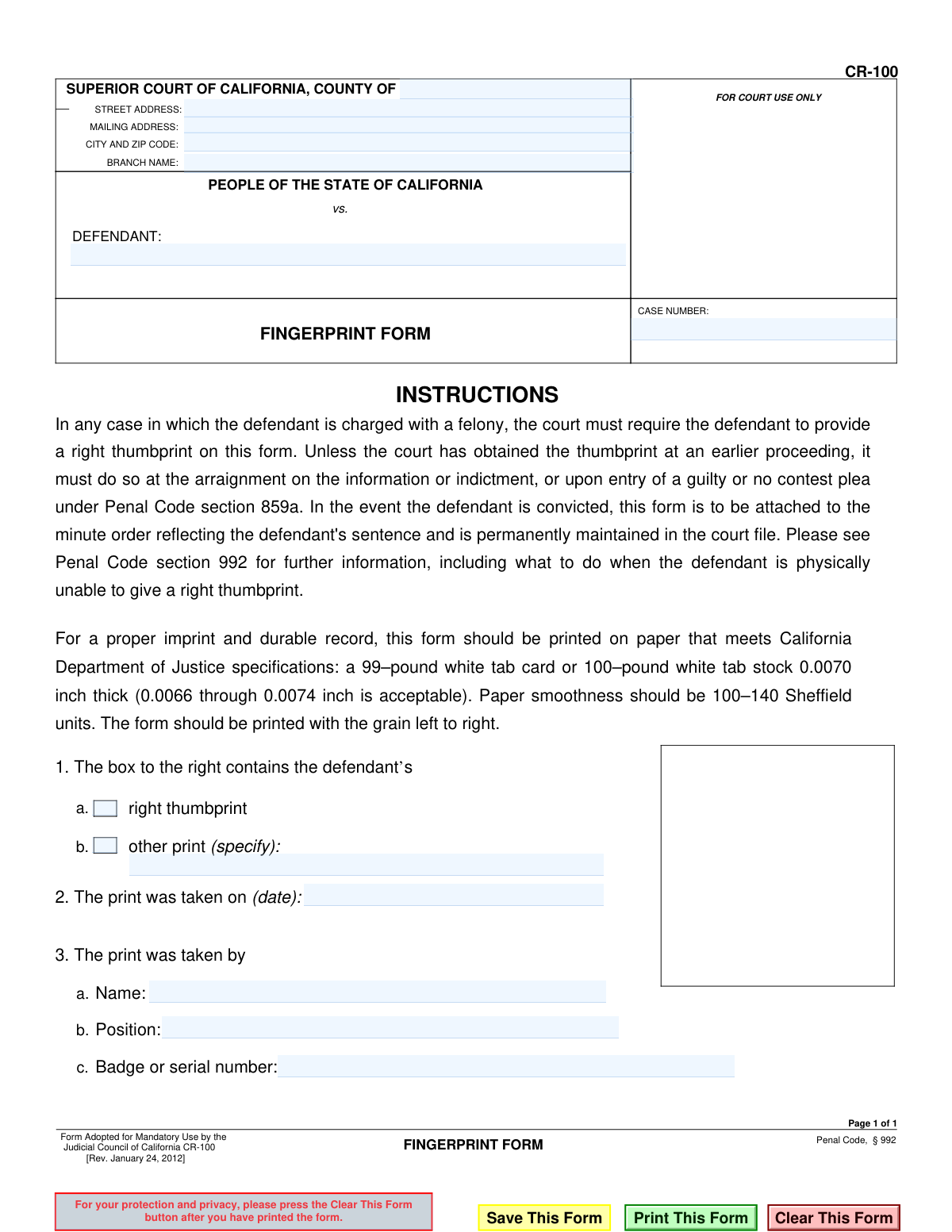
Form CR-100, the Fingerprint Form, is a legal document required by the California court system in all felony cases to obtain the defendant's right thumbprint for identification. This ensures an accurate and permanent record of the defendant's identity, which is attached to the minute order upon conviction as per Penal Code section 992. Today, this form can be filled out quickly and accurately using AI-powered services like Instafill.ai, which can also convert non-fillable PDF versions into interactive fillable forms.
CR-100 is part of the California court forms category on Instafill.
Our AI automatically handles information lookup, data retrieval, formatting, and form filling.
It takes less than a minute to fill out CR-100 using our AI form filling.
Securely upload your data. Information is encrypted in transit and deleted immediately after the form is filled out.

Form specifications

Form name: Form CR-100, Fingerprint Form
Number of fields: 18
Number of pages: 1
Language: English
main-image

Instafill Demo: How to fill out PDF forms in seconds with AI

How to Fill Out CR-100 Online for Free in 2026

Are you looking to fill out a CR-100 form online quickly and accurately? Instafill.ai offers the #1 AI-powered PDF filling software of 2026, allowing you to complete your CR-100 form in just 37 seconds or less.
Follow these steps to fill out your CR-100 form online using Instafill.ai:
  1. 1 Navigate to Instafill.ai and upload or select the CR-100 Fingerprint Form.
  2. 2 Allow the AI to automatically identify and label fields for the court's address, defendant's name, and case number.
  3. 3 Review the auto-filled court information and enter the defendant's details and case number.
  4. 4 Input the date the print was taken and the name, position, and badge number of the official who took the print.
  5. 5 Indicate whether a right thumbprint or another specified print was taken.
  6. 6 After filling the textual data, print the form for the physical application of the thumbprint as required by the court.
  7. 7 Securely save the digital record and file the physical copy with the court as instructed.

Our AI-powered system ensures each field is filled out correctly, reducing errors and saving you time.

Why Choose Instafill.ai for Your Fillable CR-100 Form?

Speed

Complete your CR-100 in as little as 37 seconds.

Up-to-Date

Always use the latest 2026 CR-100 form version.

Cost-effective

No need to hire expensive lawyers.

Accuracy

Our AI performs 10 compliance checks to ensure your form is error-free.

Security

Your personal information is protected with bank-level encryption.

Frequently Asked Questions About Form CR-100

This form is used by the California Superior Court to collect a defendant's right thumbprint in felony cases. It serves as a permanent biometric identifier linked to the court case file.

Any defendant charged with a felony must provide a thumbprint on this form. This is a mandatory requirement under California Penal Code section 992.

The court typically collects the thumbprint at the arraignment on the information or indictment, or upon the entry of a guilty or no contest plea. It may be done at an earlier proceeding if not already completed.

If you cannot provide a right thumbprint, the court will take a print from another finger or thumb. The form has a section to specify which alternative print was taken.

A court official, such as a clerk or bailiff, will take your thumbprint and complete the section with their name, position, and badge or serial number. The court clerk will fill in the case and court information.

If the defendant is convicted, the form is attached to the minute order reflecting the sentence. It is then permanently maintained in the court file.

The form requires the court's location, the defendant's name, the case number, the defendant's thumbprint, and the details of the official who took the print.

No, in any case where a defendant is charged with a felony, the court must require a thumbprint. It is not optional.

While the court staff typically completes this form during the proceeding, you can use online tools to pre-fill the text fields for your own records. The official form and fingerprint will be handled in court.

Yes, services like Instafill.ai use AI to accurately auto-fill form fields like your name, case number, and court details, which can save time and help you prepare. However, the actual fingerprint must be physically provided in court.

You can use Instafill.ai to upload the CR-100 form, and its AI will help you populate the text-based fields. You can then download or print the partially completed form for your reference.

If you have a non-fillable or 'flat' PDF, you can upload it to a service like Instafill.ai. It can convert the document into an interactive, fillable form that you can complete on your computer.

Compliance CR-100
Validation Checks by Instafill.ai

1
Defendant Name Completeness
Ensures the 'DEFENDANT' field is not empty and contains at least two words, likely a first and last name. This is crucial for accurately identifying the individual associated with the fingerprint record. If the field is empty or appears incomplete, the submission should be rejected with a prompt to enter the defendant's full name.
2
Case Number Presence and Format
Verifies that the 'CASE NUMBER' field is filled out and follows a standard court format (e.g., alphanumeric characters, possibly with dashes). The case number is the primary identifier for linking this form to the correct legal proceedings. A missing or improperly formatted number makes the form unfileable and could prevent it from being associated with the correct court record.
3
Print Type Selection Requirement
Validates that one of the two options in section 1 ('right thumbprint' or 'other print') has been selected. The form is fundamentally incomplete without specifying which print was taken, as this is a core requirement of the process. The user must be prompted to make a selection before the form can be considered complete.
4
Conditional 'Other Print' Specification
This is a conditional logic check that ensures the 'specify' text field (1.b) is filled out if the 'other print' option is selected. It is critical for the record to be clear about what alternative biometric identifier was used when a right thumbprint was not available. If 'other print' is checked and the specification is empty, the submission should fail.
5
Print Date Presence
Confirms that the date field in section 2, 'The print was taken on (date)', is not empty. The date of the fingerprinting is a vital piece of the evidentiary record, establishing the timeline of events for the court. A submission without this date would be considered incomplete and legally insufficient.
6
Print Date Logicality
Validates that the 'print was taken on' date is a valid, real date and is not set in the future. This check prevents nonsensical data entry and ensures the record is chronologically accurate and credible. A future date is impossible and would invalidate the document's authenticity.
7
Print Taker Name Requirement
Ensures the 'Name' field in section 3.a, for the person who took the print, is not empty. This information is required for accountability and to establish a clear chain of custody for the biometric evidence. The form should not be accepted without identifying the official who performed the action.
8
Print Taker Position Requirement
Checks that the 'Position' field (3.b) is filled out when the Print Taker's name is provided. Knowing the official's position (e.g., 'Court Clerk,' 'Bailiff') provides context and confirms their authority to take the fingerprint. This adds to the legal weight and verifiability of the document.
9
Print Taker Badge Number Validation
Validates that the 'Badge or serial number' field (3.c) contains alphanumeric characters and is not empty. This unique identifier is crucial for unambiguously identifying the official who took the print, especially in large departments. This check prevents the entry of invalid or junk data and ensures the record is auditable.
10
Court County Validation
Verifies that the 'COUNTY OF' field is not empty and, ideally, matches an entry from a predefined list of California counties. This ensures the form is filed in the correct jurisdiction and prevents errors due to typos. An incorrect county could lead to the form being rejected or lost in the system.
11
Court Address Completeness
Checks that the primary court address fields ('STREET ADDRESS', 'CITY AND ZIP CODE') are filled out. A complete address is essential for identifying the specific court location where the action took place. This information is vital for official records, correspondence, and archival purposes.
12
ZIP Code Format
Validates the ZIP code entered in the 'CITY AND ZIP CODE' field. The check should ensure the value is a 5-digit or 9-digit (ZIP+4) number. This improves data quality and is essential for any mail-related processing or location verification for the court branch.
13
Prohibit Unnecessary 'Other Print' Specification
This is the inverse of the conditional check, ensuring that if 'right thumbprint' is selected, the 'specify other print' field (1.b) is empty. This prevents contradictory or confusing information on the final record, making the document clearer and less prone to misinterpretation. The system should ideally clear or disable this field automatically when 'right thumbprint' is chosen.

Common Mistakes in Completing CR-100

Entering Incorrect Court Details

Users often get confused by the multiple court branches within a large county and enter the wrong street address, mailing address, or branch name for the specific courthouse handling the case. This error can cause the document to be misfiled, lost, or significantly delayed in reaching the correct department. To avoid this, always verify the exact court location and address from official case documents before filling out the form.

Inaccurate or Incomplete Case Number

The case number is the single most important identifier on the form, but its complex format often leads to errors like transposed digits, missing characters, or using an old case number. An incorrect case number can cause the fingerprint record to be linked to the wrong file or be rejected entirely, halting case progress. Always double-check each character of the case number against the official court record.

Providing a Poor Quality Thumbprint

The primary purpose of the form is a clear fingerprint, but often the print is smudged, too light, or too dark, rendering it useless for identification. This happens due to improper technique or insufficient ink and results in the form being rejected, requiring the defendant to repeat the process. To prevent this, the finger should be rolled firmly and evenly from one side of the nail to the other to capture a complete, clear impression.

Failing to Specify 'Other Print' Type

When a right thumbprint isn't possible, the form allows for an 'other print.' A critical mistake is checking this box but failing to specify which finger was used (e.g., 'Left Thumbprint,' 'Right Index Finger') in the provided space. This omission creates an ambiguous legal record and may require the form to be re-done. Always be precise and document the exact print that was taken as an alternative.

Incorrect or Missing Date of Print

The date field must reflect the exact day the fingerprint was physically taken, not the date the form was prepared or filed. People often enter the current date out of habit, which can create legal challenges regarding the document's timeline and validity. The official taking the print must fill in the date immediately after the print is captured to ensure accuracy.

Incomplete 'Taken By' Section

The section identifying the person who took the print (Name, Position, Badge Number) is crucial for establishing a chain of custody and is often rushed or left incomplete. Missing a badge number or having an illegible name can invalidate the form as evidence, as it breaks the verifiable link between the defendant and the print. The official taking the print must legibly fill out all three fields completely.

Using an Outdated Version of the Form

Courts periodically update their forms, and the revision date (e.g., 'Rev. January 24, 2012') is noted at the bottom. Using an obsolete version of the CR-100 can lead to automatic rejection by the court clerk, causing unnecessary delays. Always obtain the most current version from the official Judicial Council of California website before submission.

Illegible Handwritten Information

Many court forms are only available as non-fillable PDFs, forcing users to complete them by hand, which often results in illegible entries. Poor handwriting for names, case numbers, and addresses can lead to critical data entry errors by court staff. AI-powered tools like Instafill.ai can convert these flat PDFs into digitally fillable versions, allowing you to type information clearly and prevent legibility issues.

Using an Incomplete Defendant Name

The form requires the defendant's full legal name as it appears in the court record, but people sometimes use nicknames, aliases not listed in the case file, or make spelling errors. This creates a mismatch with the official case file, leading to filing confusion and potential rejection. The name must be copied exactly from the indictment or other official court documents to ensure it is correctly filed.

Failing to Check a Print Type Box

A frequent oversight is providing the thumbprint but failing to check either the 'right thumbprint' box or the 'other print' box. This simple mistake leaves the record ambiguous as to what print was provided, even if it seems obvious. This can cause the form to be returned for correction, delaying the legal process until the ambiguity is resolved.
Saved over 80 hours a year

“I was never sure if my IRS forms like W-9 were filled correctly. Now, I can complete the forms accurately without any external help.”

Kevin Martin Green

Your data stays secure with advanced protection from Instafill and our subprocessors

Robust compliance program

Transparent business model

You’re not the product. You always know where your data is and what it is processed for.

ISO 27001, HIPAA, and GDPR

Our subprocesses adhere to multiple compliance standards, including but not limited to ISO 27001, HIPAA, and GDPR.

Security & privacy by design

We consider security and privacy from the initial design phase of any new service or functionality. It’s not an afterthought, it’s built-in, including support for two-factor authentication (2FA) to further protect your account.

Fill out CR-100 with Instafill.ai

Worried about filling PDFs wrong? Instafill securely fills form-cr-100-fingerprint-form forms, ensuring each field is accurate.