Yes! You can use AI to fill out Form CR-104, Findings and Orders for Pretrial Release or Detention

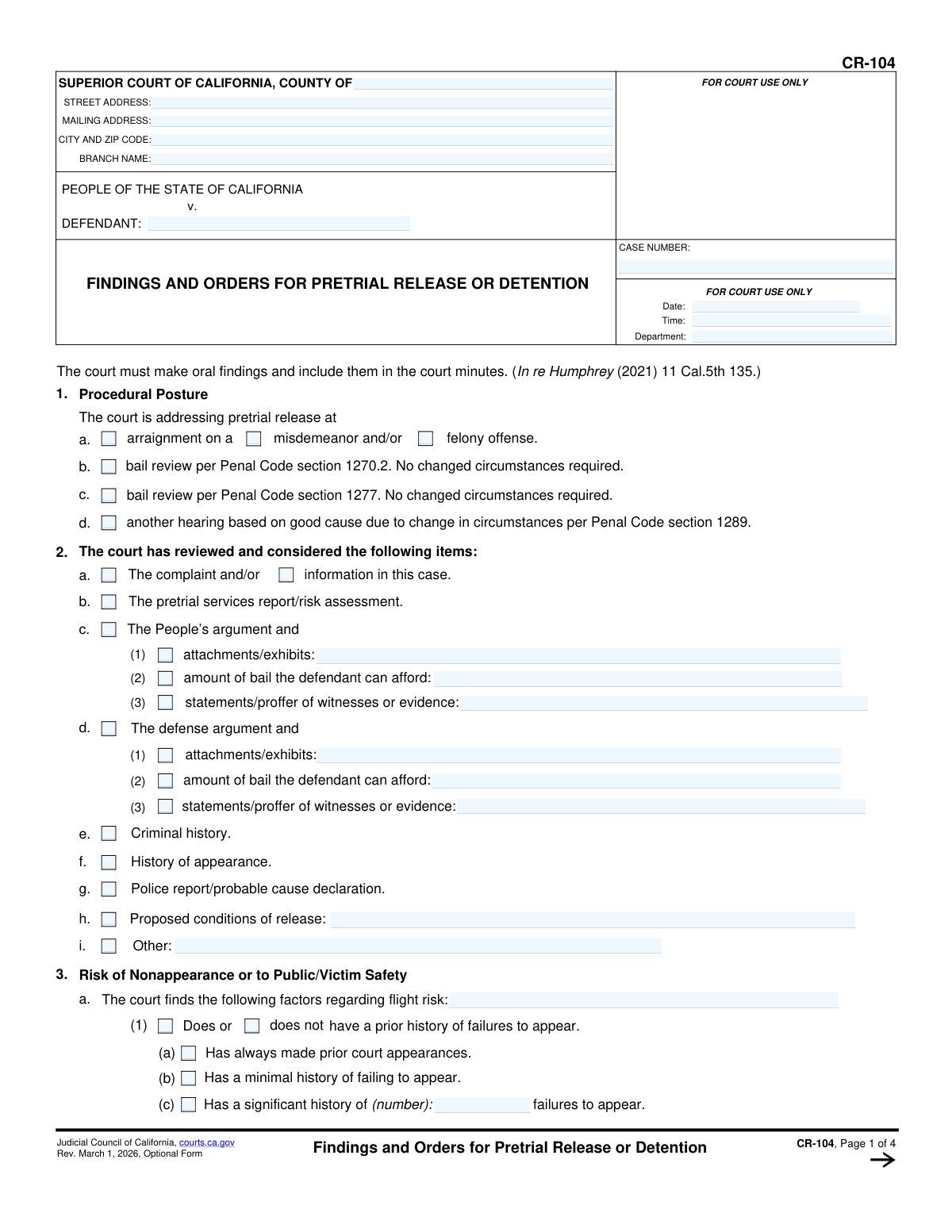
This form, issued by the Judicial Council of California, is used by superior courts to formalize decisions made about a defendant's status pending trial. It details the court's evaluation of flight risk, danger to the public, and the reasoning behind ordering release on recognizance, setting bail, or ordering detention. Today, this form can be filled out quickly and accurately using AI-powered services like Instafill.ai, which can also convert non-fillable PDF versions into interactive fillable forms.
CR-104 is part of the California court forms category on Instafill.
Our AI automatically handles information lookup, data retrieval, formatting, and form filling.
It takes less than a minute to fill out CR-104 using our AI form filling.
Securely upload your data. Information is encrypted in transit and deleted immediately after the form is filled out.

Form specifications

Form name: Form CR-104, Findings and Orders for Pretrial Release or Detention
Number of fields: 163
Number of pages: 1
Language: English
main-image

Instafill Demo: How to fill out PDF forms in seconds with AI

How to Fill Out CR-104 Online for Free in 2026

Are you looking to fill out a CR-104 form online quickly and accurately? Instafill.ai offers the #1 AI-powered PDF filling software of 2026, allowing you to complete your CR-104 form in just 37 seconds or less.
Follow these steps to fill out your CR-104 form online using Instafill.ai:
  1. 1 Navigate to Instafill.ai and upload or select Form CR-104.
  2. 2 Use the AI assistant to automatically populate court and case information, including the county, branch, case number, and defendant's name.
  3. 3 Indicate the procedural posture of the hearing and check the boxes for all documents and arguments the court considered.
  4. 4 Detail the court's findings on flight risk and public safety by selecting the appropriate checkboxes and filling in specific details as ordered by the judicial officer.
  5. 5 Select the final finding for release or detention and specify any nonfinancial or financial conditions being imposed, including bail amounts.
  6. 6 Review all entered information for accuracy, ensuring it perfectly reflects the court's oral findings and orders.
  7. 7 The judicial officer can then digitally sign the form, and the completed document can be saved and filed with the court clerk.

Our AI-powered system ensures each field is filled out correctly, reducing errors and saving you time.

Why Choose Instafill.ai for Your Fillable CR-104 Form?

Speed

Complete your CR-104 in as little as 37 seconds.

Up-to-Date

Always use the latest 2026 CR-104 form version.

Cost-effective

No need to hire expensive lawyers.

Accuracy

Our AI performs 10 compliance checks to ensure your form is error-free.

Security

Your personal information is protected with bank-level encryption.

Frequently Asked Questions About Form CR-104

Form CR-104, 'Findings and Orders for Pretrial Release or Detention,' is a legal document used by a California judge to officially record their decision and reasoning for either releasing a defendant or keeping them in custody before their trial.

A judicial officer (a judge) completes and signs this form after a pretrial release hearing. It is a court order and is not filled out by the defendant, attorneys, or the general public.

As listed in Section 2, the judge considers the criminal complaint, pretrial services reports, arguments from both the prosecution and defense, the defendant's criminal history, and their record of appearing in court.

A 'flight risk' is the likelihood a defendant will not return for court dates, while a 'danger to public safety' is the risk they might harm others if released. Section 3 of the form outlines the specific factors the judge evaluates to make this determination, such as past failures to appear and history of violence.

The potential outcomes, found in Section 4, include being released on your own recognizance (OR), release with nonfinancial conditions, release after posting bail, or being held in custody without bail (preventive detention).

Nonfinancial conditions are rules you must follow that do not involve money, as detailed in Section 5. Examples include electronic monitoring, checking in with a pretrial services officer, or obeying a restraining order.

Yes. Section 6 of the form requires the court to find that the defendant has the ability to pay the bail amount set, based on evidence or statements presented during the hearing.

If you are released, you must comply with the mandatory conditions listed in Section 7. This includes appearing at all court dates, obeying all laws, and not leaving the state without the court's permission.

A judge orders detention without bail, as explained in Section 8, only after finding clear and convincing evidence that no other conditions can ensure the defendant's return to court or protect the public's safety.

While defendants do not fill out this form, legal professionals can use AI services like Instafill.ai to manage and auto-fill case information accurately into a copy for their records, saving time on administrative tasks.

Your legal team can use Instafill.ai to upload the CR-104 form. The platform's AI can then help auto-fill known case details like the defendant's name and case number into the correct fields for efficient record-keeping.

If you have a flat, non-fillable PDF, you can use a service like Instafill.ai. It can convert the document into an interactive, fillable form for easier digital use and annotation.

Compliance CR-104
Validation Checks by Instafill.ai

1
Case Identifier Consistency Across Pages
Validates that the 'DEFENDANT' and 'CASE NUMBER' fields are populated on page 1 and that their values are identical in the header of all subsequent pages (2, 3, and 4). This is crucial for maintaining document integrity and ensuring all pages belong to the same case file, especially if pages are separated. A mismatch could lead to incorrect filing and legal confusion.
2
Judicial Officer Signature Date Logic
Ensures the 'Date' next to the 'JUDICIAL OFFICER' signature on page 4 is a valid date and is on or after the 'Date' of the hearing specified on page 1. An order cannot be legally signed before the hearing occurs. This validation prevents logical and chronological errors in the court record.
3
Mutually Exclusive Finding for Release or Detention
Verifies that only one checkbox from the options in item 4 ('Finding for Release or Detention', options a-g) is selected. These findings are mutually exclusive and determine the entire outcome of the hearing. Selecting more than one would create a logically incoherent and unenforceable order.
4
Conditional Requirement for Financial Condition Details
If checkbox 4e is selected (imposing a financial condition), this check ensures that the monetary amount in 4e is specified and that Section 6 ('Imposition of Financial Condition of Release') is fully completed. The order is incomplete and invalid without the specific bail amount and the court's findings regarding the defendant's ability to pay.
5
Conditional Requirement for Preventive Detention Findings
If checkbox 4f is selected (ordering preventive detention), this validation confirms that Section 8 ('Preventive Detention') is filled out with the required clear and convincing evidence. A detention order is a significant deprivation of liberty and is legally invalid without the explicit justifications required in this section.
6
Contradiction Check for Release on Recognizance
If checkbox 4a is selected (release on own recognizance), this check ensures that Section 6 (Financial Condition) and Section 8 (Preventive Detention) are left blank. Filling out these sections would directly contradict the finding of release on recognizance, creating a legally ambiguous and flawed order.
7
Required Explanation for 'Other' Fields
Validates that if any checkbox labeled 'Other' is checked (e.g., in items 2i, 3a(10), 3b(11)), the corresponding text field for explanation is not empty. An 'Other' selection is meaningless without clarification and would result in an incomplete and ambiguous record of the court's findings.
8
Numeric Field Integrity for Failure to Appear History
Ensures that if checkbox 3a(1)(c) is selected ('Has a significant history of... failures to appear'), the associated 'number' field contains a valid, non-negative integer. This maintains data integrity and ensures the finding is based on a specific, quantifiable history rather than an abstract claim. Failure would prevent proper data entry and analysis.
9
Conditional Bail Review Date and Amount
If checkbox 4g is selected (setting provisional bail), this check verifies that both the provisional bail amount and the 'bail review hearing on (date)' fields are populated. The order is functionally incomplete without both of these elements, as it fails to specify the terms of the provisional bail and the date for the next action.
10
Required Header Information
Ensures that the essential header fields on page 1, including 'COUNTY OF', 'DEFENDANT', and 'CASE NUMBER', are not empty. These fields are the primary identifiers for the case and the jurisdiction. An omission makes the document untraceable and invalid for official court records.
11
Mutually Exclusive Procedural Posture
Verifies that in Section 1 ('Procedural Posture'), only one of the checkboxes (a, b, c, or d) is selected. Each option represents a distinct legal basis for the hearing. Selecting multiple options would create a conflict regarding the procedural grounds for the court's action.
12
Conditional Justification for Insufficient Conditions
If checkbox 5b is selected ('nonfinancial conditions are insufficient'), this validation requires that the explanation in Section 6b ('Reasons the court finds they are insufficient') must be filled out. The court must provide a clear record of why less restrictive options were rejected, and failing to do so can be grounds for appeal.
13
Valid Hearing Date and Time Format
Checks that the 'Date' and 'Time' fields on page 1 are entered in a valid, recognizable format (e.g., MM/DD/YYYY, HH:MM AM/PM). This is essential for accurate court scheduling, record-keeping, and establishing the official timeline of events. An invalid format could lead to clerical errors and scheduling conflicts.
14
Conditional Weapon Description
If the checkbox in item 3b(2)(b) is selected, indicating a deadly weapon was used, the corresponding description field must be filled out. The finding is incomplete without specifying the type of weapon involved. This detail is critical for assessing the level of danger and the nature of the alleged crime.

Common Mistakes in Completing CR-104

Incomplete Repetitive Case Information

Users often fill out the defendant's name and case number on the first page but forget to repeat this information in the headers of pages 2, 3, and 4. This happens due to oversight or the assumption that the first page is sufficient. If the pages of the order are separated, it can lead to significant administrative delays, filing errors, and confusion in the defendant's official record. To prevent this, always double-check that the header information is present on every single page of the final document.

Inconsistent Findings and Conclusions

A critical error is selecting checkboxes in Section 3 that detail significant flight or safety risks, but then checking a contradictory conclusion in Section 4, such as 4a ('defendant does not pose a...risk'). This mistake often stems from a simple clerical error or mis-click under time pressure. The consequence is a legally incoherent order that is unsupported by its own findings, making it highly vulnerable to being overturned on appeal and potentially leading to the improper release or detention of the defendant.

Insufficient Justification for Restrictive Conditions

This form requires written justification for imposing restrictive conditions, such as in sections 5a, 6b, and 8b. A common mistake is leaving these explanation fields blank or providing a simple conclusory statement like 'necessary for public safety.' This fails to create the detailed record required by law, as the court must explain why less restrictive alternatives are inadequate. An order lacking this specific justification is legally deficient and can be easily challenged, potentially leading to the modification of release conditions.

Improperly Setting Bail Without Ability-to-Pay Finding

When setting a financial condition (bail) in section 4e or 6c, users frequently fail to properly document the court's finding regarding the defendant's ability to pay. This oversight violates constitutional requirements established in cases like *In re Humphrey*. The consequence is an unlawful bail order that amounts to wealth-based detention and is subject to immediate legal challenge. To avoid this, one must explicitly address the defendant's ability to pay and check the corresponding box in 6d if applicable.

Vague Descriptions in Risk Factor Fields

In Section 3, many fields require a description of specific facts (e.g., 3a(1)(g) 'subvert the criminal process by...'). A frequent error is using generic or conclusory language instead of providing concrete details, such as 'provided a false name to officers.' This happens when rushing to summarize complex oral findings. This weakens the order by failing to establish a clear, reviewable factual record, making the court's decision appear arbitrary and harder to defend on appeal.

Ordering Detention Without 'Clear and Convincing' Findings

For the most severe outcome, preventive detention (Section 8), the form requires explicit findings by 'clear and convincing evidence.' A grave error is to order detention by checking a box in 8c without first detailing the evidence and considered alternatives in 8a and 8b. This often results from a misunderstanding of the high legal standard for denying bail. This mistake leads to unlawful detention, a serious constitutional violation that will be reversed upon review.

Selecting Contradictory Factual Findings

Within a single section, users sometimes check boxes that are mutually exclusive, such as checking both 3a(1)(a) 'Has always made prior court appearances' and 3a(1)(c) 'Has a significant history of...failures to appear.' This is a classic clerical error caused by haste and lack of review. It creates an ambiguous and nonsensical record, rendering the court's factual findings unreliable and the entire order internally inconsistent.

Omitting Specific Numbers in Factual Findings

The form includes fields for specific numbers, such as the number of prior failures to appear in 3a(1)(c) or outstanding warrants in 3a(6). Users often check the box but neglect to enter the corresponding number. This omission transforms a concrete, verifiable fact into a subjective statement, weakening the finding's power and specificity. To create a strong record, always fill in the numerical data when it is requested.

Incomplete Paired Entry (Checkbox without Description)

Many items on the form pair a checkbox with a mandatory description field, such as 3b(10) 'Mitigating factors were present.' A common mistake is to check the box but leave the description field empty. This renders the finding incomplete and unsupported, as an appellate court cannot guess what factors the trial court considered. To avoid this, treat the checkbox and its description field as a single, inseparable unit that must be completed together.

Incorrect Case-Identifying Information

Simple data entry errors in the case number or defendant's name in the main header are frequent and cause major problems. A single transposed digit in the case number can cause the order to be misfiled in the court's electronic system, delaying its processing and creating confusion for jail staff and attorneys. Using an AI-powered tool like Instafill.ai can help prevent these errors by auto-filling recurring information accurately across all pages, ensuring consistency and preventing downstream administrative chaos. If the form is a non-fillable PDF, Instafill.ai can also convert it into an interactive, fillable version to streamline data entry.
Saved over 80 hours a year

“I was never sure if my IRS forms like W-9 were filled correctly. Now, I can complete the forms accurately without any external help.”

Kevin Martin Green

Your data stays secure with advanced protection from Instafill and our subprocessors

Robust compliance program

Transparent business model

You’re not the product. You always know where your data is and what it is processed for.

ISO 27001, HIPAA, and GDPR

Our subprocesses adhere to multiple compliance standards, including but not limited to ISO 27001, HIPAA, and GDPR.

Security & privacy by design

We consider security and privacy from the initial design phase of any new service or functionality. It’s not an afterthought, it’s built-in, including support for two-factor authentication (2FA) to further protect your account.

Fill out CR-104 with Instafill.ai

Worried about filling PDFs wrong? Instafill securely fills form-cr-104-findings-and-orders-for-pretrial-release-or-detention forms, ensuring each field is accurate.