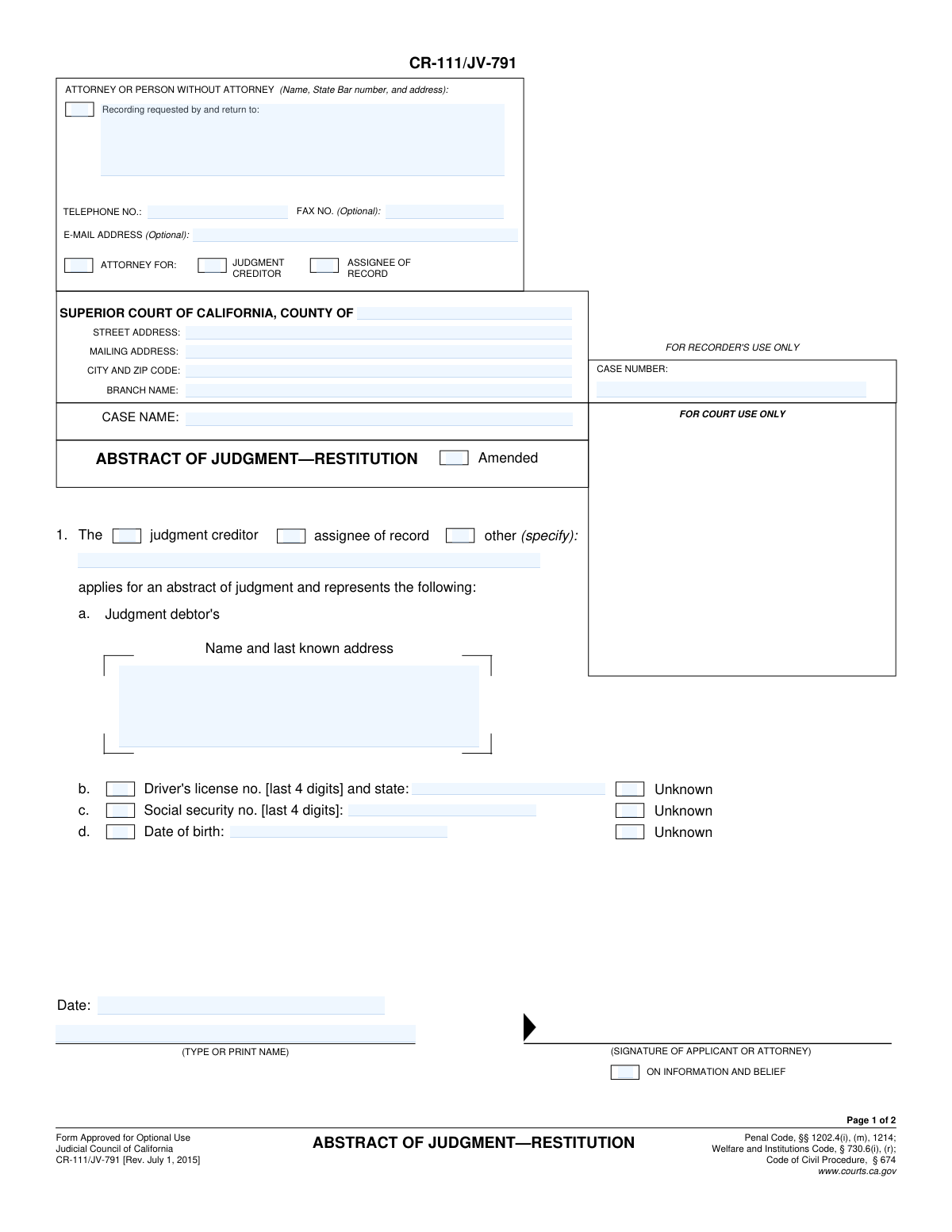
Yes! You can use AI to fill out Form CR-111/JV-791, Abstract of Judgment—Restitution

Form CR-111/JV-791, Abstract of Judgment—Restitution, is a legal document used in California to summarize a court's judgment ordering a defendant (judgment debtor) to pay restitution to a victim (judgment creditor). Filing this abstract with a county recorder creates a lien on the debtor's real property, helping to enforce the collection of the owed restitution. Today, this form can be filled out quickly and accurately using AI-powered services like Instafill.ai, which can also convert non-fillable PDF versions into interactive fillable forms.
CR-111/JV-791 is part of the California court forms category on Instafill.
Our AI automatically handles information lookup, data retrieval, formatting, and form filling.
It takes less than a minute to fill out CR-111/JV-791 using our AI form filling.
Securely upload your data. Information is encrypted in transit and deleted immediately after the form is filled out.

Form specifications

Form name: Form CR-111/JV-791, Abstract of Judgment—Restitution
Number of fields: 49
Number of pages: 1
Language: English
main-image

Instafill Demo: How to fill out PDF forms in seconds with AI

How to Fill Out CR-111/JV-791 Online for Free in 2026

Are you looking to fill out a CR-111/JV-791 form online quickly and accurately? Instafill.ai offers the #1 AI-powered PDF filling software of 2026, allowing you to complete your CR-111/JV-791 form in just 37 seconds or less.
Follow these steps to fill out your CR-111/JV-791 form online using Instafill.ai:
  1. 1 Navigate to Instafill.ai and upload or select the CR-111/JV-791 form.
  2. 2 Provide your information as the applicant, indicating whether you are the judgment creditor, attorney, or other party, and include your contact details.
  3. 3 Enter the specific court information, including the county, branch, and full case number and name.
  4. 4 Input the full name and last known address of the judgment debtor, along with their date of birth and the last four digits of their Social Security or driver's license number, if known.
  5. 5 Detail the judgment information, including the name of the judgment creditor, the date the judgment was entered, and the total amount of the judgment.
  6. 6 Indicate whether a stay of enforcement has been ordered by the court and provide the effective dates if applicable.
  7. 7 Review all entered information for accuracy, then sign and date the application before submitting it to the court for certification and issuance.

Our AI-powered system ensures each field is filled out correctly, reducing errors and saving you time.

Why Choose Instafill.ai for Your Fillable CR-111/JV-791 Form?

Speed

Complete your CR-111/JV-791 in as little as 37 seconds.

Up-to-Date

Always use the latest 2026 CR-111/JV-791 form version.

Cost-effective

No need to hire expensive lawyers.

Accuracy

Our AI performs 10 compliance checks to ensure your form is error-free.

Security

Your personal information is protected with bank-level encryption.

Frequently Asked Questions About Form CR-111/JV-791

This form is used to create an official summary of a court-ordered restitution judgment. Once certified by the court and recorded with a county recorder, it creates a lien on the judgment debtor's real property, helping the victim (judgment creditor) collect the money owed.

The judgment creditor (the person or entity owed restitution, typically the victim) or their attorney should complete the top portion of the form (Section 1). The court clerk will then complete the certification section.

The 'judgment creditor' is the person who is owed money as a result of the court's judgment. The 'judgment debtor' is the person the court has ordered to pay the money.

You must provide the judgment debtor's full name and last known address. If you have it, you should also include the last four digits of their Social Security number, driver's license number, and their date of birth, as this helps ensure proper identification.

No, the form only asks for the last four digits of the judgment debtor's Social Security number and driver's license number for privacy and security reasons.

The 'CERTIFICATION' section is completed by the Clerk of the Court. They will verify the information against the court record, sign, and apply the court seal to make the document official.

After you complete Section 1, you must submit the form to the clerk of the superior court where the judgment was originally entered. The clerk will then complete the certification process.

Once the form is certified by the court clerk, you must take it to the County Recorder's Office to have it recorded. You should record it in any county where you believe the judgment debtor owns or may own real property.

This information can be found on the original restitution order or other official court documents from your case. If you cannot find these documents, you may need to contact the court clerk for assistance.

This means there is no court order preventing you from immediately taking steps to collect the judgment, such as recording this abstract. If a stay was ordered, you would have to wait until the stay period ends.

Yes, services like Instafill.ai use AI to accurately auto-fill form fields from your saved information, which can save you time and help prevent errors.

You can use a service like Instafill.ai to fill out the form online. Simply upload the PDF, and the platform's AI will help you complete the necessary fields interactively and accurately.

If you have a non-fillable or 'flat' PDF, you can use a tool like Instafill.ai. It can convert the non-fillable PDF into an interactive form that you can easily complete and print from your browser.

Compliance CR-111/JV-791
Validation Checks by Instafill.ai

1
Case Number Consistency Across Pages
This validation ensures that the 'CASE NUMBER' entered on Page 1 is identical to the 'CASE NUMBER' entered in the header of Page 2. Maintaining consistency is critical for document integrity, as mismatched numbers could lead to the abstract being misfiled or rejected. If the numbers do not match, the system should flag an error and require the user to correct the discrepancy before submission.
2
Case Name Consistency Across Pages
This check verifies that the 'CASE NAME' on Page 1 exactly matches the 'CASE NAME' on Page 2. The case name is a primary identifier for the legal action, and any inconsistency can cause confusion and processing delays. A validation failure should prevent form submission until the names are aligned.
3
Judgment Debtor Name Consistency
Validates that the judgment debtor's name provided in Section 1.a ('Judgment debtor's Name and last known address') is the same as the name in Section 4 ('Judgment debtor (full name as it appears in judgment)'). This is crucial to ensure the abstract of judgment is correctly recorded against the right individual. A mismatch could render the abstract unenforceable or incorrectly applied.
4
Social Security Number Last 4 Digits Format
This check ensures that the value entered for 'Social security no. [last 4 digits]' in Section 1.c consists of exactly four numeric digits. This validation prevents the entry of incomplete, extended, or non-numeric data, which is essential for correct identification and data privacy. An invalid format should trigger an error message prompting the user for correction.
5
Driver's License Last 4 Digits Format
Verifies that the 'Driver's license no. [last 4 digits]' field in Section 1.b contains exactly four numeric digits. This rule maintains data integrity and ensures the field conforms to the form's explicit instructions. The system should reject any input that is not four digits long or contains non-numeric characters.
6
Date of Birth Validity
This validation confirms that the 'Date of birth' in Section 1.d is a valid calendar date and occurs in the past. It prevents the entry of impossible dates (e.g., February 30) or future dates, which are logically incorrect for a date of birth. A failure would indicate a data entry error that must be corrected to ensure the debtor's identity is accurately recorded.
7
Judgment Amount Validation
Ensures the 'Total amount of judgment as entered or last renewed' in Section 6 is a valid, positive numerical value. The amount cannot be zero, negative, or contain non-numeric text. This is a critical field for determining the value of the lien, and incorrect data would make the abstract invalid.
8
Logical Date Chronology
This check verifies the logical sequence of dates on the form, specifically that the 'Judgment entered on' date (Section 5) is on or before the 'This abstract of judgment was issued on' date (Section 7). An abstract cannot be issued before the judgment it represents has been entered. A validation failure indicates a significant logical error that must be resolved.
9
Conditional Requirement for 'Other' Applicant
In Section 1, if the checkbox for 'other (specify)' is marked to identify the applicant, this validation ensures the corresponding text field is not empty. This prevents incomplete submissions where the specific type of 'other' applicant is not defined. The system should prompt the user to specify the applicant type if the checkbox is selected but the field is blank.
10
Stay of Enforcement Date Logic
This validation applies to the 'Stay of enforcement' section on Page 2. If the checkbox 'A stay of enforcement was ordered on:' is selected, the system must verify that both the start date ('ordered on') and end date ('effective until') are provided and are valid dates. Furthermore, it should check that the start date is on or before the end date.
11
Judgment Debtor Address Completeness
This check ensures that the 'last known address' field for the judgment debtor in Section 1.a is filled out. However, the validation should be bypassed if the 'Unknown' checkbox next to the address field is marked. This ensures that required information is provided unless explicitly declared as unknown, preventing accidental omissions.
12
Applicant Signature Date Requirement
Verifies that the 'Date' field next to the applicant's signature line in Section 1 is filled with a valid, non-future date. A signature on a legal document is almost always accompanied by a date to establish when it was signed. A missing or invalid date could call the document's execution into question, so the system should require a valid date for completion.
13
Court County Requirement
This validation ensures that the 'COUNTY OF' field in the court address block is not empty. Specifying the county is mandatory for identifying the correct jurisdiction and ensuring the document is filed with the proper court. The system should flag this as a required field and prevent submission if it is left blank.
14
Telephone Number Format
Checks that the 'TELEPHONE NO.' field follows a standard North American phone number format (e.g., 10 digits, possibly with parentheses, dashes, or spaces). While not a legally critical field, a valid phone number is important for communication if questions arise about the filing. This validation improves data quality and ensures contact information is usable.

Common Mistakes in Completing CR-111/JV-791

Incorrect or Incomplete Judgment Debtor Name

Users often enter a nickname or a slightly different version of the judgment debtor's name in Section 4. This field must contain the debtor's full legal name exactly as it appears on the original court judgment to be legally effective. Any discrepancy can render the abstract of judgment invalid and unenforceable, as it may fail to properly attach a lien to the debtor's property.

Exposing Full Personal Identification Numbers

The form specifically requests only the last 4 digits for the judgment debtor's Social Security Number (Section 1c) and Driver's License Number (Section 1b). A common mistake is entering the full numbers, which creates a significant privacy risk and can lead to the form's rejection for non-compliance with privacy rules. It is crucial to only provide the last four digits as instructed to protect the debtor's sensitive information.

Forgetting to Complete Page 2 Header

Many people focus on the main body of the form and forget to fill out the header information on the second page. The 'CASE NAME' and 'CASE NUMBER' fields at the top of Page 2 are required and must match the information on Page 1. Omitting this information can cause the pages to be separated or lead to processing delays and rejection by the court clerk or county recorder.

Missing Applicant Signature or Date

An unsigned or undated application in Section 1 is invalid and will be immediately rejected. Applicants sometimes print the form and forget to physically sign and date it before submission. This oversight requires the entire submission process to be restarted, causing significant delays in the enforcement of the judgment.

Incorrect Judgment Amount in Section 6

The amount entered in Section 6, 'Total amount of judgment as entered or last renewed,' must be precise. People may mistakenly enter only the principal restitution amount, forgetting to include accrued interest, fees, or costs as allowed by the judgment. This error can result in the applicant being unable to collect the full amount they are legally owed.

Using the Wrong Date of Judgment

In Section 5, 'Judgment entered on (date),' users sometimes incorrectly enter the date they are filling out the form, rather than the specific date the judgment was officially entered by the court. The correct date is found on the original judgment order. Using the wrong date can cause a mismatch with court records and lead to the rejection of the abstract.

Inaccurate or Incomplete Court Information

The fields for 'SUPERIOR COURT OF CALIFORNIA, COUNTY OF,' 'STREET ADDRESS,' and 'BRANCH NAME' must be filled out with the details of the specific court that issued the judgment. Applicants may enter a generic county court name or a different branch, leading to filing errors. The case number must also be entered perfectly, as it is the primary identifier for the legal action.

Confusing the Applicant with the Judgment Creditor

The information in the top-left box ('ATTORNEY OR PERSON WITHOUT ATTORNEY') is for the person completing and filing the form, who might be an attorney or assignee. This can be different from the 'Judgment creditor' listed in Section 3, who is the original party owed the money. It's crucial to correctly identify the filer in the header and the official creditor in Section 3 to avoid confusion and ensure legal standing.

Failing to Specify Applicant Status

In Section 1, the applicant must check a box to identify their status as 'judgment creditor,' 'assignee of record,' or 'other.' Leaving these boxes unchecked creates ambiguity about the filer's authority to request the abstract. This omission forces court clerks to return the form for correction, delaying the process of creating a lien against the debtor.

Illegible Handwriting on Printed Forms

This form is a fillable PDF, but users sometimes print it and complete it by hand. Poor handwriting can make critical information like names, case numbers, and dollar amounts impossible to read accurately. This leads to data entry errors by the clerk's office or outright rejection of the form. Using a tool like Instafill.ai can convert even a non-fillable PDF into a fillable version, ensuring all entries are typed, legible, and professional.
Saved over 80 hours a year

“I was never sure if my IRS forms like W-9 were filled correctly. Now, I can complete the forms accurately without any external help.”

Kevin Martin Green

Your data stays secure with advanced protection from Instafill and our subprocessors

Robust compliance program

Transparent business model

You’re not the product. You always know where your data is and what it is processed for.

ISO 27001, HIPAA, and GDPR

Our subprocesses adhere to multiple compliance standards, including but not limited to ISO 27001, HIPAA, and GDPR.

Security & privacy by design

We consider security and privacy from the initial design phase of any new service or functionality. It’s not an afterthought, it’s built-in, including support for two-factor authentication (2FA) to further protect your account.

Fill out CR-111/JV-791 with Instafill.ai

Worried about filling PDFs wrong? Instafill securely fills form-cr-111jv-791-abstract-of-judgmentrestitution forms, ensuring each field is accurate.