Yes! You can use AI to fill out Form CR-138, Notice of Waiver of Oral Argument (Misdemeanor)
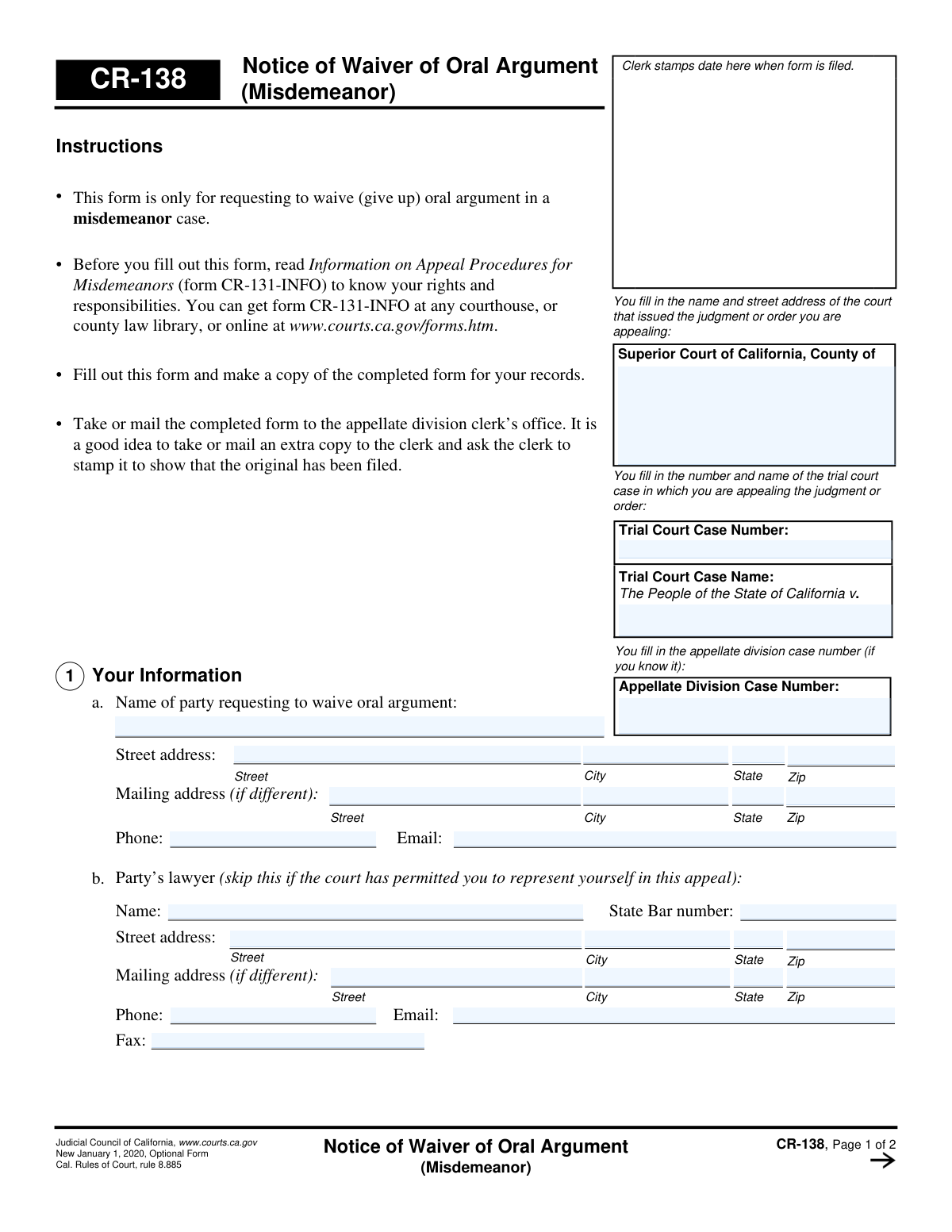
Form CR-138, the Notice of Waiver of Oral Argument (Misdemeanor), is a California Judicial Council form used by a party in a misdemeanor appeal to inform the court that they are giving up their right to present their case verbally. When filed, it allows the court to decide the appeal based solely on the written briefs and the case record, potentially speeding up the decision process. Today, this form can be filled out quickly and accurately using AI-powered services like Instafill.ai, which can also convert non-fillable PDF versions into interactive fillable forms.
CR-138 is part of the
California court forms category on Instafill.
Our AI automatically handles information lookup, data retrieval, formatting, and form filling.
It takes less than a minute to fill out CR-138 using our AI form filling.
Securely upload your data. Information is encrypted in transit and deleted immediately after the form is filled out.
Form specifications
| Form name: | Form CR-138, Notice of Waiver of Oral Argument (Misdemeanor) |
| Number of fields: | 38 |
| Number of pages: | 1 |
| Language: | English |
Instafill Demo: How to fill out PDF forms in seconds with AI
How to Fill Out CR-138 Online for Free in 2026
Are you looking to fill out a CR-138 form online quickly and accurately? Instafill.ai offers the #1 AI-powered PDF filling software of 2026, allowing you to complete your CR-138 form in just 37 seconds or less.
Follow these steps to fill out your CR-138 form online using Instafill.ai:
- 1 Navigate to Instafill.ai and upload or select the Form CR-138, Notice of Waiver of Oral Argument (Misdemeanor).
- 2 Use the AI assistant to accurately fill in the court information, including the Superior Court county, trial court case number, and appellate division case number.
- 3 Provide the information for the party waiving oral argument, such as the name, contact details, and State Bar number if you are an attorney.
- 4 On page two, check the box that applies to your situation, either as a self-represented party or as an attorney.
- 5 Review all the information you have entered to ensure it is correct and complete.
- 6 Electronically sign and date the form in the designated fields.
- 7 Download the completed form to print and file with the appropriate appellate division clerk's office.
Our AI-powered system ensures each field is filled out correctly, reducing errors and saving you time.
Why Choose Instafill.ai for Your Fillable CR-138 Form?
Speed
Complete your CR-138 in as little as 37 seconds.
Up-to-Date
Always use the latest 2026 CR-138 form version.
Cost-effective
No need to hire expensive lawyers.
Accuracy
Our AI performs 10 compliance checks to ensure your form is error-free.
Security
Your personal information is protected with bank-level encryption.
Frequently Asked Questions About Form CR-138
This form is used to notify the court that you are waiving, or giving up, your right to an oral argument in a misdemeanor appeal. By filing it, you are requesting that the court decide the appeal based on the written briefs and case record alone.
Only parties in a misdemeanor appeal (or their attorneys) who wish to waive their right to oral argument should fill out this form. It is an optional form and not required for every case.
Oral argument is a proceeding where attorneys or self-represented parties appear before the appellate judges to present their arguments and answer questions about the issues in the appeal.
If not all parties waive oral argument, the court will likely proceed with the scheduled hearing. You will still be able to participate in the oral argument even if you previously submitted this waiver form.
You must file the Notice of Waiver of Oral Argument within 7 days after the court sends the notice of the scheduled oral argument.
These numbers can be found on previous documents you have received from the court regarding your case and appeal. The Trial Court Case Number is from the original case, and the Appellate Division Case Number is assigned for the appeal.
You must take or mail the completed form to the appellate division clerk’s office. It is recommended to keep a file-stamped copy for your records.
If all parties waive oral argument and the court accepts the waivers, the oral argument will be taken off the calendar and you will be notified. Otherwise, the oral argument will proceed as scheduled.
Check box 2a if you are representing yourself in the appeal. Check box 2b if you are an attorney filing the waiver on behalf of your client.
Yes, the instructions state you should read the 'Information on Appeal Procedures for Misdemeanors' (CR-131-INFO) before filling out this form. It explains your rights and responsibilities during the appeal process.
The form does not specify a process for retracting a waiver. However, if the oral argument is not cancelled because other parties did not waive, you will still be allowed to participate.
Yes, services like Instafill.ai use AI to accurately auto-fill form fields with your information, which can save time and help prevent errors.
You can use a service like Instafill.ai to fill out this form online. Simply upload the PDF, and the platform will allow you to type your information directly into the fields before printing for submission.
If you have a non-fillable or 'flat' PDF, you can use a tool like Instafill.ai. It can convert the non-fillable PDF into an interactive form that you can easily complete on your computer.
Compliance CR-138
Validation Checks by Instafill.ai
1
Exclusive Waiver Choice Selection
This check ensures that exactly one of the two waiver request checkboxes (2a for self-represented party or 2b for attorney) is selected. The filer must declare their representation status for this waiver, and they cannot be both self-represented and represented by an attorney simultaneously. If zero or both boxes are checked, the form is logically inconsistent and should be rejected to prevent ambiguity.
2
Attorney Representation Consistency
This validation triggers if checkbox 2b (attorney waiver) is selected. It verifies that the attorney information section (1a), including the attorney's name, State Bar number, and street address, is completely filled out. This is critical to confirm the identity and contact information of the attorney making the waiver on behalf of their client. A failure indicates missing information required to process an attorney-led request.
3
Self-Representation Consistency
This check is performed if checkbox 2a (self-represented party) is selected. It validates that the attorney information section (1a) is left blank. This enforces the declaration that the party is representing themselves and prevents conflicting information from being submitted. If attorney data is present, it suggests a user error that must be corrected.
4
State Bar Number Format and Presence
If the attorney name field is filled, this check verifies that the 'State Bar number' field is also filled and contains a valid, numeric-only value. California State Bar numbers are unique identifiers, and their presence is essential for verifying an attorney's credentials and good standing. A missing or improperly formatted number could indicate an error or an unauthorized filer.
5
Case Number Consistency Across Pages
This validation compares the 'Appellate Division Case Number' entered on page 1 with the 'Appellate Division Case Number' on page 2. Both fields must contain the exact same value to ensure the entire document pertains to a single, correct case. A mismatch could lead to the waiver being filed for the wrong case or the second page being disregarded.
6
Required Case Information Presence
This check ensures that the 'Superior Court of California, County of' and 'Trial Court Case Number' fields are not empty. These fields are the primary identifiers for the case's origin and are fundamental for the clerk's office to locate the correct record. Without this information, the form cannot be correctly filed or associated with the ongoing appeal.
7
Signature Name and Filer Identity Match
This validation verifies that the 'Type or print your name' field in the signature block matches the name of the person filing the form. If filed by an attorney (checkbox 2b), it should match the attorney's name in section 1a. If filed by a self-represented party (checkbox 2a), it should match the party's name in section 1b. This confirms that the person signing the document is the one declared as the filer.
8
Signature Date Validity
This check ensures the 'Date' field in the signature block is present, formatted correctly (e.g., MM/DD/YYYY), and represents a valid, non-future date. The signature date is a critical piece of metadata that establishes when the waiver was executed. An invalid or future date would compromise the legal validity of the document and must be corrected before filing.
9
Filing Party Name Requirement
This validation ensures that the 'Name of party requesting to waive oral argument' field (section 1b) is always filled out. This field identifies the actual appellant in the case, which is necessary information regardless of whether they are represented by an attorney or not. A blank field would create ambiguity about whose rights are being waived.
10
Contact Information Presence
This check verifies that for the person filing the form (either the attorney in 1a or the party in 1b), at least one method of contact—a phone number or an email address—is provided. The court needs a reliable way to communicate about the status of the waiver and other case matters. A lack of contact information can delay proceedings and cause critical notices to be missed.
11
Email Address Format Validation
This check inspects all email address fields to ensure they conform to a standard format (e.g., '[email protected]'). As courts increasingly rely on electronic communication, having a valid email address is crucial for timely and efficient notification. An improperly formatted email address will result in delivery failure, so this check prevents bad data from being entered.
12
ZIP Code Format Validation
This validation ensures that all ZIP code fields contain either a 5-digit or 9-digit (ZIP+4) numeric format. Correct ZIP codes are essential for the accurate and timely delivery of any physical mail sent by the court. An invalid format could lead to returned mail and significant delays in communication.
Common Mistakes in Completing CR-138
The form requires both the Trial Court and Appellate Division case numbers. Filers often transpose digits, confuse the two numbers, or leave the appellate number blank. An incorrect number can cause the waiver to be misfiled or rejected, leading to significant processing delays and potentially causing the oral argument to remain on the calendar. Always double-check these numbers against official court documents before submitting.
The form has separate sections for a party's lawyer (1a) and a self-represented party (1b). A common error is for a self-represented individual to fill out the attorney section, or vice-versa. This creates confusion about who is filing the waiver and their authority to do so, which can lead to the form being returned. Carefully read the instructions for each part of Section 1 to ensure you are completing the correct fields for your situation.
The top of page two requires the Appellate Division Case Name and Number to be entered again. Filers frequently overlook this, assuming the information from page one is sufficient. If the pages become separated, the second page, which contains the critical waiver request and signature, becomes unidentifiable. Always fill out all header fields on every page to ensure the document is complete and can be processed correctly.
Section 2 requires the filer to check box (a) or (b) to indicate their status as either self-represented or an attorney. Forgetting to check a box makes the request invalid because the basis for the waiver is unclear to the court. This will likely result in the form's rejection and the oral argument will proceed as scheduled, defeating the purpose of the filing. Always review Section 2 to ensure the correct box is checked.
An unsigned or undated form is legally ineffective and will be rejected by the court clerk. This is a simple but very common oversight that completely invalidates the waiver request, meaning the oral argument will not be waived. Before filing, always perform a final check to ensure you have signed, dated, and legibly printed your name in the designated area on page two.
The court uses the address, phone, and email provided to send crucial notifications, such as confirmation that oral argument is vacated. Using outdated or incomplete information means you may not receive these notices, causing you to miss important case updates. Ensure all contact details are current and accurate, including a separate mailing address if needed. AI-powered tools like Instafill.ai can help prevent this by storing and auto-filling correct, validated contact information.
The form requires the name of the county for the Superior Court that issued the original judgment. Filers sometimes mistakenly write the name of a specific courthouse branch, a city, or the appellate court itself. This error can cause the document to be misrouted or delayed in processing. To avoid this, refer to your original trial court documents and enter the official county name precisely as it appears there.
Filers may sign this form without fully grasping that they are giving up the important right to argue their case in person before the judges. The form clearly states that if the waiver is accepted, the appeal will be decided based only on the written briefs and the record. This mistake happens when filers don't read the 'NOTICE' section or the referenced 'Information on Appeal Procedures' (CR-131-INFO). Before submitting, be certain you are comfortable with the court deciding the appeal without your oral presentation.
Many individuals print the form and fill it out by hand, but illegible writing for names, case numbers, or addresses can lead to critical data entry errors by court staff. This can result in misfiled documents, correspondence sent to the wrong address, or a rejected filing. To prevent this, type directly into the form before printing. If the form is a non-fillable PDF, a tool like Instafill.ai can convert it into a fillable version to ensure all entries are clear and legible.
Saved over 80 hours a year
“I was never sure if my IRS forms like W-9 were filled correctly. Now, I can complete the forms accurately without any external help.”
Kevin Martin Green
Your data stays secure with advanced protection from Instafill and our subprocessors
Robust compliance program
Transparent business model
You’re not the product. You always know where your data is and what it is processed for.
ISO 27001, HIPAA, and GDPR
Our subprocesses adhere to multiple compliance standards, including but not limited to ISO 27001, HIPAA, and GDPR.
Security & privacy by design
We consider security and privacy from the initial design phase of any new service or functionality. It’s not an afterthought, it’s built-in, including support for two-factor authentication (2FA) to further protect your account.
Fill out CR-138 with Instafill.ai
Worried about filling PDFs wrong? Instafill securely fills form-cr-138-notice-of-waiver-of-oral-argument-misdemeanor forms, ensuring each field is accurate.