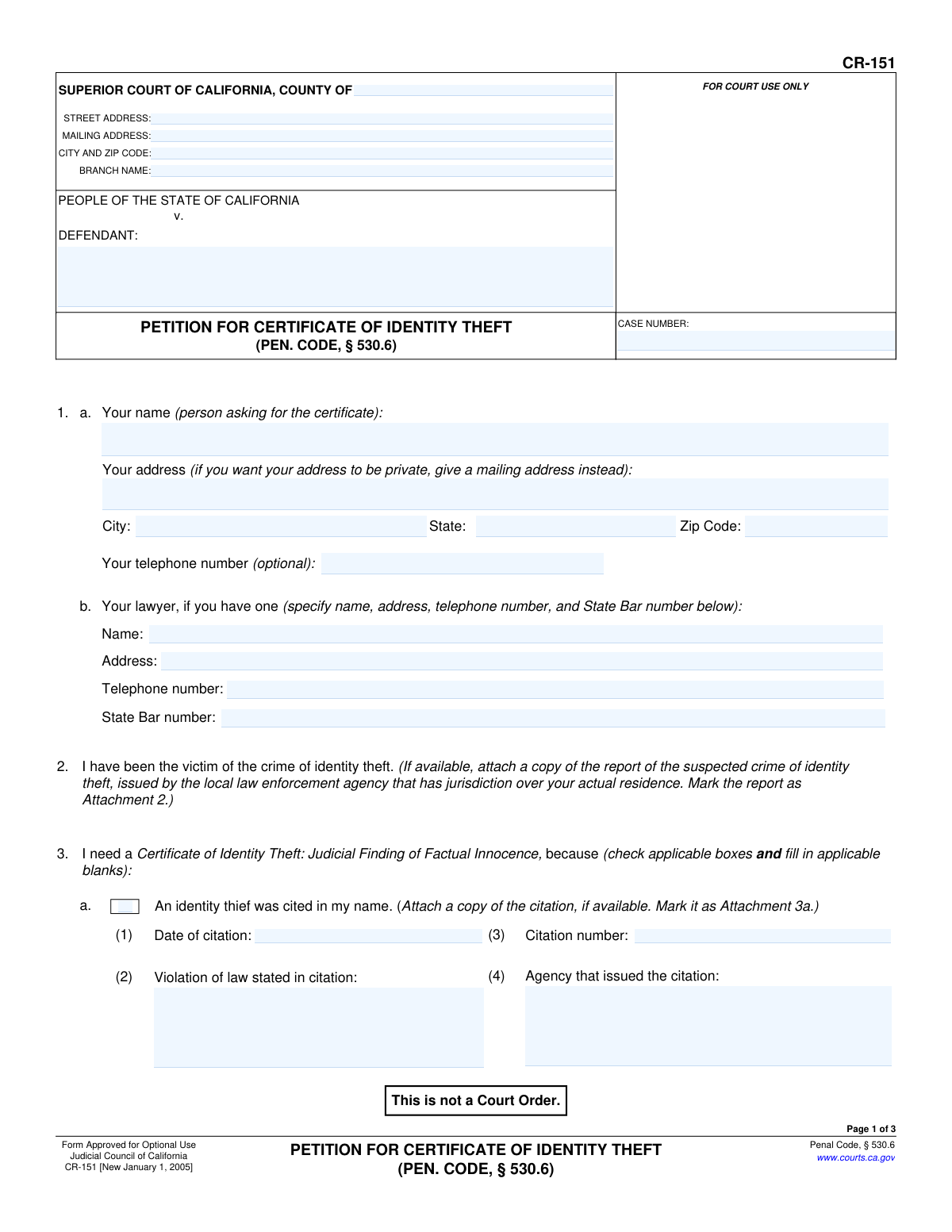
Yes! You can use AI to fill out Form CR-151, Petition for Certificate of Identity Theft (Pen. Code, § 530.6)

California Form CR-151, Petition for Certificate of Identity Theft, is a legal document filed with the Superior Court by an individual whose identity has been wrongfully used in a crime. Its purpose is to ask the court for a judicial finding of factual innocence and to issue a certificate that can be used to correct public and private records. This official document is crucial for victims to reclaim their identity and clear their name from fraudulent charges or convictions. Today, this form can be filled out quickly and accurately using AI-powered services like Instafill.ai, which can also convert non-fillable PDF versions into interactive fillable forms.
CR-151 is part of the California court forms category on Instafill.
Our AI automatically handles information lookup, data retrieval, formatting, and form filling.
It takes less than a minute to fill out CR-151 using our AI form filling.
Securely upload your data. Information is encrypted in transit and deleted immediately after the form is filled out.

Form specifications

Form name: Form CR-151, Petition for Certificate of Identity Theft (Pen. Code, § 530.6)
Number of fields: 59
Number of pages: 1
Language: English
main-image

Instafill Demo: How to fill out PDF forms in seconds with AI

How to Fill Out CR-151 Online for Free in 2026

Are you looking to fill out a CR-151 form online quickly and accurately? Instafill.ai offers the #1 AI-powered PDF filling software of 2026, allowing you to complete your CR-151 form in just 37 seconds or less.
Follow these steps to fill out your CR-151 form online using Instafill.ai:
  1. 1 Navigate to an AI-powered form-filling service like Instafill.ai and upload or select Form CR-151.
  2. 2 Provide your personal information, including your name, address, and contact details, in the petitioner section.
  3. 3 Use the guided interface to detail the circumstances of the identity theft, checking the appropriate boxes for being cited, arrested, or convicted in your name, and fill in the corresponding details like dates and agency names.
  4. 4 Follow the AI assistant's prompts to attach necessary supporting documents, such as police reports, citations, or judgments, marking them as attachments as required.
  5. 5 Review all the information auto-filled by the AI for accuracy and completeness, ensuring all facts are correctly represented.
  6. 6 Electronically sign and date the petition under penalty of perjury to certify that the information provided is true and correct.
  7. 7 Download the completed, signed petition and follow the instructions for filing it with the correct Superior Court of California.

Our AI-powered system ensures each field is filled out correctly, reducing errors and saving you time.

Why Choose Instafill.ai for Your Fillable CR-151 Form?

Speed

Complete your CR-151 in as little as 37 seconds.

Up-to-Date

Always use the latest 2026 CR-151 form version.

Cost-effective

No need to hire expensive lawyers.

Accuracy

Our AI performs 10 compliance checks to ensure your form is error-free.

Security

Your personal information is protected with bank-level encryption.

Frequently Asked Questions About Form CR-151

This form is used by victims of identity theft to ask a California court for a Certificate of Identity Theft. This certificate is a legal document that confirms you are factually innocent of crimes committed by someone else using your identity.

You should fill out this form if you have been a victim of identity theft and, as a result, your name was wrongfully used in a criminal proceeding, such as being cited, arrested, or convicted for a crime you did not commit.

It is an official court order that clears your name from a specific criminal record created by an identity thief. You can present this certificate to law enforcement, credit agencies, and employers to prove your innocence and correct the fraudulent records.

You must attach a copy of the police report for the identity theft, if available. You should also attach copies of any relevant documents like citations, arrest warrants, or court judgments that were issued in your name, as detailed in Section 3 of the form.

The form requests these documents "if available." You should make every effort to obtain them, but if you cannot, you can still file the petition and explain in Section 6 why the documents are unavailable.

In Section 3, you must check the box for each situation that applies to you (e.g., an identity thief was cited or arrested in your name). Fill in all the details for each checked item, such as dates and case numbers, and attach the corresponding proof.

This is to protect your privacy and prevent your sensitive data, like your date of birth or driver's license number, from becoming a public record. You will provide this information directly to the court as instructed, not on the publicly filed petition.

You must file the petition with the Superior Court of California in the county where the wrongful criminal action (citation, arrest, etc.) occurred. The court's address should be written at the top of page 1.

A judge will review your petition and the supporting evidence you provided. If the judge finds there is no reasonable cause to believe you committed the offense, they will grant your petition and issue the Certificate of Identity Theft.

You must sign the petition under penalty of perjury. If the court finds that you included any material misrepresentations or fraud, it can cancel your certificate, and you could face serious legal penalties.

Yes, services like Instafill.ai use AI to accurately auto-fill form fields, which can save you time and help prevent errors. These tools streamline the process of entering your information into the correct fields.

You can use a service like Instafill.ai to upload the PDF and fill it out on your computer or phone. The platform makes the form interactive, allowing you to type your answers directly into the fields before printing for signature and submission.

If you have a non-fillable or 'flat' PDF, you can use a tool like Instafill.ai to convert it into an interactive, fillable form. This allows you to easily type your information instead of having to print the form and complete it by hand.

Compliance CR-151
Validation Checks by Instafill.ai

1
Petitioner Name Presence
Checks that the petitioner's name in Section 1a ('Your name') is not empty. This is the primary identifier for the person filing the petition and is essential for the court to process the request. If the name is missing, the petition cannot be filed as the court would not know who is making the request.
2
Reason for Petition Selection
Validates that at least one checkbox from Section 3 (options 'a' through 'f') has been selected. The petitioner must specify the reason they need a Certificate of Identity Theft, as this forms the legal basis for their request. A petition without a selected reason is incomplete and cannot be evaluated by the court.
3
Conditional Requirement for Citation Details
Ensures that if checkbox 3a ('An identity thief was cited in my name') is selected, all corresponding details (Date of citation, Violation, Citation number, and Agency) are provided. This information is necessary for the court to verify the claim against official records. Failure to provide these details will result in an incomplete and potentially rejected section.
4
Valid Date Formatting
Verifies that all date fields across the form (e.g., Date of citation, Date of arrest, Date of conviction, Signature Date) are entered in a valid format like MM/DD/YYYY and represent a plausible, non-future date. Correct date formatting is crucial for record-keeping and for establishing a clear timeline of events for the court. Invalid dates would prevent the system from processing the information correctly.
5
Logical Date Sequence for Arrest Petition
Performs a logical check on the dates provided in Section 3f. It ensures the 'Date of arrest' is on or before the 'Date I submitted my petition,' which in turn must be on or before the 'Date the arresting agency denied that petition.' This validation prevents illogical or impossible timelines, ensuring the sequence of events presented to the court is coherent.
6
California State Bar Number Format
Checks that the 'State Bar number' provided in Section 1b for the petitioner's lawyer is a valid format, typically a numerical value of up to 6 digits. This is important for verifying the lawyer's credentials and ensuring they are licensed to practice in the state. An invalid number would prevent the court from confirming the attorney's standing.
7
Attachment Count Numeric Value
Validates that the entry in Section 8, 'Number of pages attached,' is a non-negative integer (0 or greater). This field helps the court clerk verify that all intended attachments have been received with the petition. Non-numeric or negative values would cause confusion and processing errors.
8
Case Number Consistency Across Pages
Verifies that the 'CASE NUMBER' entered at the top of each page is identical. Maintaining consistency is critical for ensuring all pages of the document are correctly associated with the same court case file. Mismatched case numbers could lead to pages being misfiled or the entire document being rejected.
9
Signature Date Presence and Logic
Confirms that the 'Date' field in the signature block is filled out with a valid date that is not in the future. The signature date legally attests to when the declaration was made under penalty of perjury. A missing or future date would invalidate the declaration and render the petition legally insufficient.
10
Printed Name for Signature Requirement
Ensures the 'Print your name' field accompanying the signature is completed. This field clarifies the identity of the signatory, as a handwritten signature may be illegible. It is a standard legal requirement for verifying the petitioner's identity and intent.
11
Conditional Requirement for Conviction Details
Ensures that if checkbox 3c ('An identity thief was convicted of a crime in my name') is selected, all corresponding details (Date of conviction, Crime, Name of court, and Case number) are provided. This specific information is mandatory for the court to locate and review the official conviction record being disputed. Without these details, the petitioner's claim cannot be substantiated.
12
Petitioner Address Completeness
Checks that the petitioner's address fields in Section 1a (Address, City, State, Zip Code) are all filled in. A complete address is required for the court to send official correspondence and notices regarding the petition. If the address is incomplete, the petitioner may not receive critical communications, jeopardizing their case.
13
Zip Code Format
Validates that the 'Zip Code' field in the petitioner's address (Section 1a) conforms to a standard 5-digit or 9-digit (ZIP+4) format. Proper formatting ensures mailability and accurate jurisdictional data processing. An invalid format could lead to returned mail and delays in the legal process.
14
Court County Specification
Validates that the 'COUNTY OF' field in the main court header is filled out. This field is critical for routing the document to the correct Superior Court jurisdiction within California. A missing county name would make it impossible to file the petition in the correct venue, causing an immediate rejection.

Common Mistakes in Completing CR-151

Incorrect Court and Case Information

Petitioners often enter the wrong Superior Court information or miscopy the case number. This happens because they may be unsure which court has jurisdiction or make a simple transcription error. An incorrect case number or court name will prevent the clerk from filing the petition, causing significant delays or outright rejection until the information is corrected.

Misidentifying the 'Defendant'

A common point of confusion is the 'DEFENDANT' field, where the victim (petitioner) may incorrectly write their own name. This field should contain the name of the person charged with the crime (the identity thief) or, if the victim was wrongly charged, the victim's name as it appears on the criminal case file. This error can create serious confusion in the court record, potentially linking the victim to the crime they are trying to disassociate from.

Forgetting or Mislabelling Attachments

The form requires specific attachments, such as the police report (Attachment 2) and citation or warrant copies (Attachments 3a, 3b, etc.), to be included and clearly labeled. People frequently forget to include these documents or fail to label them as instructed. An incomplete petition lacking the required, properly marked evidence will likely be returned or denied, as the court cannot verify the claims made.

Incomplete Details for Checked Items

In Section 3, petitioners will check a box indicating the type of incident (e.g., 'cited in my name') but then fail to fill out the corresponding details like the date, citation number, or issuing agency. This oversight renders the selection useless, as the court has no specific information to act upon. To avoid this, double-check that every checked box has all its associated sub-fields completed with accurate information.

Data Transcription Errors

Manually entering long strings of numbers, such as a citation number (Sec 3a), arrest warrant number (Sec 3b), or court case number (Sec 3c), often leads to typos. A single incorrect digit can make it impossible for the court to locate the corresponding record, halting the entire process. Using a tool like Instafill.ai can help prevent these errors by validating data formats and ensuring accuracy when populating fields from source documents.

Missing or Incorrect Attachment Count

Section 8 asks for the 'Number of pages attached,' a field that is very easy to overlook. Petitioners either leave it blank or miscount the pages, especially after adding or removing documents. An incorrect count can lead court clerks to believe documents are missing, causing processing delays while they attempt to verify the contents of the submission.

Invalid or Missing Signature

A petition is not legally valid without a proper, dated signature. Common mistakes include forgetting to sign the form, neglecting to date the signature, or printing a name on the signature line instead of providing a handwritten signature. Any of these errors will result in the immediate rejection of the petition, as it fails the basic legal requirement for attestation.

Improperly Disclosing Personal Information

Section 5 explicitly states that sensitive personal identification information (like date of birth or driver's license number) is not to be included in the petition itself. However, some individuals mistakenly write this information in Section 6 ('Additional facts') or on an attachment. This creates a permanent public record of their private data, increasing their risk of further identity theft.

Incomplete Headers on Subsequent Pages

The 'DEFENDANT' and 'CASE NUMBER' fields appear at the top of all three pages, but filers often only complete them on the first page. If the pages of the document become separated during processing, the un-labeled pages cannot be identified or re-associated with the correct case. It is crucial to repeat this information on every page to ensure the integrity of the document. AI-powered tools like Instafill.ai can automatically populate these repeating fields across all pages, preventing this error.

Failing to Use a Fillable Version

This form is often found as a flat, non-fillable PDF, leading to illegible handwritten entries that can be misinterpreted by court staff. This can cause errors in data entry on the court's side or result in the form being rejected. To ensure clarity and professionalism, it's best to use a fillable version. Services like Instafill.ai can convert non-fillable PDFs into interactive forms, preventing legibility issues and streamlining the process.
Saved over 80 hours a year

“I was never sure if my IRS forms like W-9 were filled correctly. Now, I can complete the forms accurately without any external help.”

Kevin Martin Green

Your data stays secure with advanced protection from Instafill and our subprocessors

Robust compliance program

Transparent business model

You’re not the product. You always know where your data is and what it is processed for.

ISO 27001, HIPAA, and GDPR

Our subprocesses adhere to multiple compliance standards, including but not limited to ISO 27001, HIPAA, and GDPR.

Security & privacy by design

We consider security and privacy from the initial design phase of any new service or functionality. It’s not an afterthought, it’s built-in, including support for two-factor authentication (2FA) to further protect your account.

Fill out CR-151 with Instafill.ai

Worried about filling PDFs wrong? Instafill securely fills form-cr-151-petition-for-certificate-of-identity-theft-pen-code-5306 forms, ensuring each field is accurate.