Yes! You can use AI to fill out Form CR-168, Batterer Intervention Program Progress Report

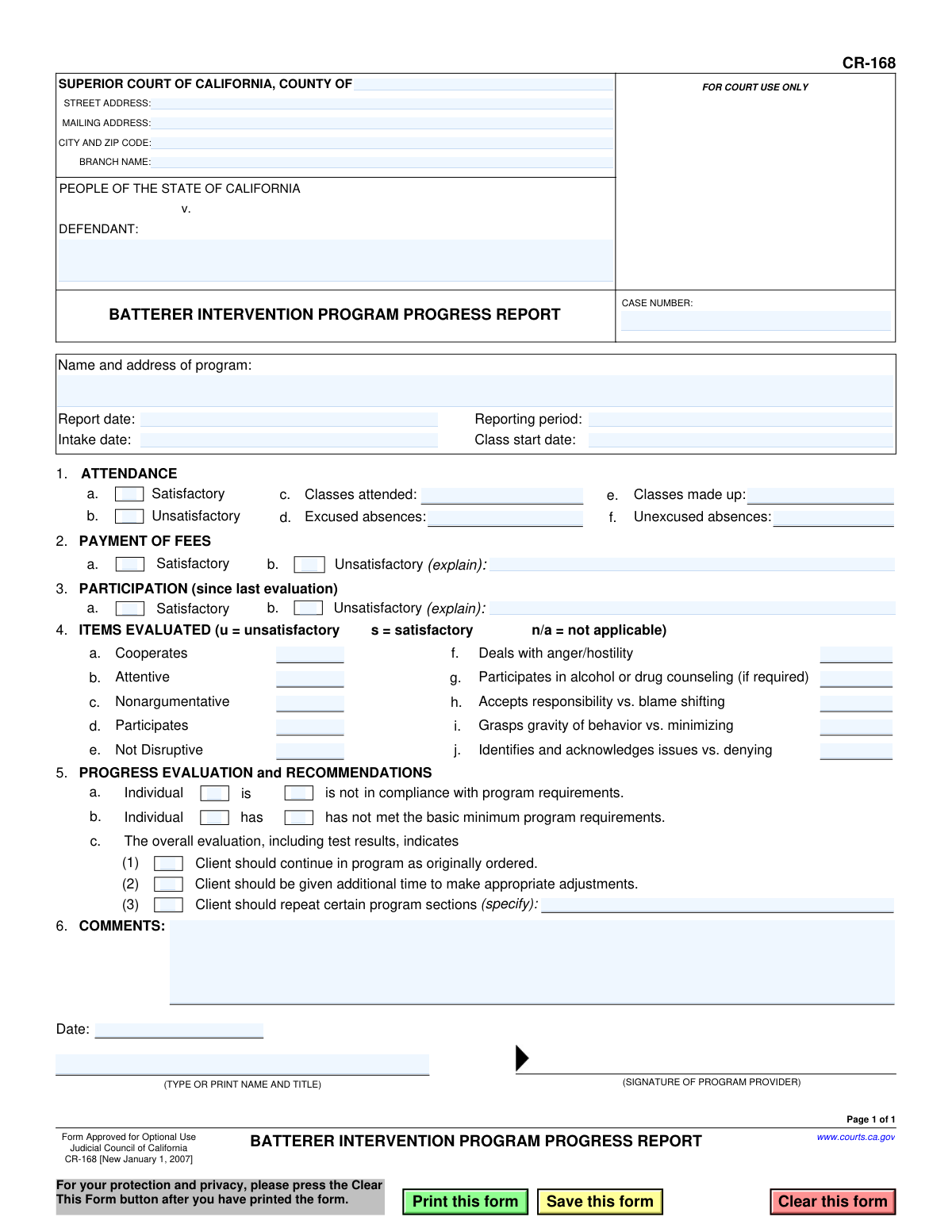
The Batterer Intervention Program Progress Report, Form CR-168, is a legal document used within the Superior Court of California. Program providers use it to formally report a defendant's attendance, fee payment status, participation level, and overall progress in a court-mandated batterer intervention program. This report is crucial for the court to monitor compliance and make informed decisions regarding the case. Today, this form can be filled out quickly and accurately using AI-powered services like Instafill.ai, which can also convert non-fillable PDF versions into interactive fillable forms.
CR-168 is part of the California court forms category on Instafill.
Our AI automatically handles information lookup, data retrieval, formatting, and form filling.
It takes less than a minute to fill out CR-168 using our AI form filling.
Securely upload your data. Information is encrypted in transit and deleted immediately after the form is filled out.

Form specifications

Form name: Form CR-168, Batterer Intervention Program Progress Report
Number of fields: 50
Number of pages: 1
Language: English
main-image

Instafill Demo: How to fill out PDF forms in seconds with AI

How to Fill Out CR-168 Online for Free in 2026

Are you looking to fill out a CR-168 form online quickly and accurately? Instafill.ai offers the #1 AI-powered PDF filling software of 2026, allowing you to complete your CR-168 form in just 37 seconds or less.
Follow these steps to fill out your CR-168 form online using Instafill.ai:
  1. 1 Navigate to Instafill.ai and upload or select the Form CR-168, Batterer Intervention Program Progress Report.
  2. 2 Provide the court and case information, including the county, case number, and defendant's name in the designated fields.
  3. 3 Enter the program's name and address, the report date, intake date, and the specific reporting period.
  4. 4 Complete the 'Attendance' section by marking it as satisfactory or unsatisfactory and detailing the number of classes attended, excused absences, and unexcused absences.
  5. 5 Fill out the 'Payment of Fees' and 'Participation' sections, providing explanations for any unsatisfactory ratings.
  6. 6 Use the 'Items Evaluated' checklist to rate the defendant's cooperation, attentiveness, acceptance of responsibility, and other key metrics.
  7. 7 Provide a final 'Progress Evaluation and Recommendations', add any necessary comments, then review, sign, and download the completed form for submission.

Our AI-powered system ensures each field is filled out correctly, reducing errors and saving you time.

Why Choose Instafill.ai for Your Fillable CR-168 Form?

Speed

Complete your CR-168 in as little as 37 seconds.

Up-to-Date

Always use the latest 2026 CR-168 form version.

Cost-effective

No need to hire expensive lawyers.

Accuracy

Our AI performs 10 compliance checks to ensure your form is error-free.

Security

Your personal information is protected with bank-level encryption.

Frequently Asked Questions About Form CR-168

This form is used by providers of Batterer Intervention Programs to report a defendant's attendance, participation, and overall progress to the Superior Court of California as part of a court-ordered requirement.

The program provider, such as a counselor or administrator of the intervention program the defendant is attending, is responsible for completing, signing, and submitting this report to the court.

You will need the court case number, the defendant's name, and the defendant's records, including their program intake date, attendance log, fee payment history, and notes on their participation and behavior.

In Sections 2 and 3, check the 'Unsatisfactory' box and use the provided line to briefly explain the reason. For more detailed explanations, you can use the 'Comments' section at the bottom of the form.

Being 'in compliance' refers to the defendant's current adherence to program rules, while 'has met the basic minimum program requirements' indicates they have completed the total number of sessions or duration. A defendant can be in compliance but not yet have finished the entire program.

These codes are used to rate the defendant's behavior: 'u' stands for unsatisfactory, 's' stands for satisfactory, and 'n/a' means the item is not applicable to the evaluation period.

The completed and signed form should be submitted to the Superior Court of California for the county and branch listed at the top of the form, for the specific case number noted.

Use the 'Comments' section to provide any additional context or details that are not captured elsewhere on the form, such as specific examples of behavior, reasons for unsatisfactory progress, or positive developments.

Yes, you can use services like Instafill.ai, which leverage AI to help you accurately auto-fill form fields like court information, names, and dates, saving you time and reducing potential errors.

If you have a non-fillable PDF, you can use a service like Instafill.ai. It can convert flat PDFs into interactive, fillable forms that you can easily complete on your computer.

To fill out this form online, you can upload the PDF to a platform like Instafill.ai. The service will make the document interactive, allowing you to type in all the necessary information, save, and print the completed report.

If you check box 5.c.(3), you must specify which sections need to be repeated. This recommendation informs the court that the defendant requires more time and work in specific areas to successfully meet the program's objectives.

Compliance CR-168
Validation Checks by Instafill.ai

1
Case Number Presence and Format
This check ensures the 'CASE NUMBER' field is not empty and optionally validates it against a known court case number format. The case number is a critical identifier linking the report to the correct legal proceeding. A missing or malformed case number will prevent the report from being correctly filed and associated with the defendant's record.
2
Date Chronology Validation
Verifies the logical sequence of dates on the form, ensuring the 'Report date' is on or after both the 'Intake date' and the 'Class start date'. This prevents illogical reporting timelines, such as a progress report being dated before the defendant even started the program. If this validation fails, it indicates a data entry error that compromises the report's timeline integrity.
3
Signature Date Consistency
Ensures the final 'Date' in the signature block is on or after the 'Report date' at the top of the form. A report cannot be signed before it is generated. This check maintains the document's chronological and legal integrity, confirming the provider signed off on the information as of a specific date.
4
Required Defendant Name
Validates that the 'DEFENDANT' field is not empty. The defendant's name is the primary identifier for the individual being reported on. Without this information, the entire report is meaningless and cannot be processed or filed correctly.
5
Conditional Explanation for Unsatisfactory Fees
This check makes the explanation text field mandatory if 'Unsatisfactory' is selected for 'PAYMENT OF FEES'. The court needs to understand the reason for non-payment, such as refusal to pay or financial hardship, to make an informed decision. Failure to provide an explanation leaves the court with incomplete information for judging compliance.
6
Conditional Explanation for Unsatisfactory Participation
Ensures that if 'Unsatisfactory' is selected for 'PARTICIPATION', the corresponding explanation field is filled out. A simple 'Unsatisfactory' rating is insufficient; the provider must detail the specific issues, like being disruptive or non-communicative. This context is crucial for the court to understand the nature of the defendant's non-compliance.
7
Attendance Count Numeric Validation
Verifies that the fields for 'Classes attended', 'Excused absences', 'Classes made up', and 'Unexcused absences' contain only non-negative whole numbers. These fields are quantitative measures of attendance and must be numeric for accurate record-keeping and calculation. Text or negative values would render the attendance summary invalid.
8
Mutually Exclusive Status Selection
Confirms that for each pair of 'Satisfactory'/'Unsatisfactory' or 'is'/'is not' options, only one choice is selected. This applies to Attendance, Payment, Participation, and Compliance status sections. Selecting both options creates a contradiction, making it impossible to determine the defendant's actual status.
9
Evaluation Item Value Restriction
Validates that each item in the 'ITEMS EVALUATED' section (4a-4j) contains only one of the allowed characters: 's' (satisfactory), 'u' (unsatisfactory), or 'n/a' (not applicable). This ensures the data is standardized and easily interpretable. Any other character or a blank entry would be an invalid response.
10
Conditional Specification for Program Repetition
This rule requires the 'specify' text field in section 5c to be completed if the option 'Client should repeat certain program sections' is checked. The court must know which specific parts of the program need to be repeated to issue a clear and enforceable order. Without this specification, the recommendation is incomplete and unactionable.
11
Required Provider Name and Title
Ensures the 'TYPE OR PRINT NAME AND TITLE' field in the signature block is not empty. This identifies the authorized individual from the intervention program who is submitting the report. A missing name and title invalidates the report's authenticity and accountability.
12
Required Program Information
Validates that the 'Name and address of program' field is filled out. This information is essential for the court to verify the legitimacy of the reporting entity and to contact the program for follow-up if necessary. An anonymous report from an unidentified program would be rejected.
13
Compliance Status Consistency Check
Performs a logical check to suggest that if the overall compliance in section 5a is marked 'is not in compliance', then at least one of the 'Attendance', 'Payment', or 'Participation' sections should be marked 'Unsatisfactory'. This cross-field validation helps ensure the final summary is supported by the detailed evaluations in the report. A mismatch would trigger a warning to review the form for consistency.
14
Valid Date Format Enforcement
This check ensures that all date fields ('Report date', 'Intake date', 'Class start date', 'Date' of signature) are entered in a valid and consistent format, such as MM/DD/YYYY. This prevents data entry errors and ensures the dates are machine-readable and unambiguous. An invalid format like 'Next Tuesday' or '02-30-2023' would cause processing to fail.
15
Recommendation Selection Requirement
Verifies that exactly one of the three recommendation options in section 5c has been selected. The report must conclude with a clear recommendation for the court regarding the defendant's continuation in the program. Failing to select an option or selecting multiple options leaves the court without a clear path forward.

Common Mistakes in Completing CR-168

Incorrect Case Number or Defendant Name

This critical error often happens due to a simple typo or referencing the wrong client file. An incorrect case number can cause the report to be misfiled or completely lost within the court system, leading to serious delays and potentially negative legal consequences for the defendant if the court assumes non-compliance. To avoid this, always double-check the case number and the defendant's full legal name against the official court order before submission.

Omitting Required Explanations for Unsatisfactory Ratings

The form explicitly requires a written explanation for unsatisfactory ratings in sections like 'Payment of Fees' (2b) and 'Participation' (3b). Providers frequently check the 'Unsatisfactory' box but neglect to fill in the corresponding text field. This renders the rating unsubstantiated, forcing the court to request clarification, which delays judicial action and creates unnecessary administrative work.

Inconsistent or Inaccurate Attendance Data

In Section 1, providers must report the number of classes attended, excused, unexcused, and made up. A common mistake is providing numbers that are mathematically inconsistent or do not align with the total number of sessions held during the reporting period. This undermines the report's credibility and suggests poor record-keeping, potentially leading the court to question the validity of the entire document.

Ambiguous Selections in Progress Evaluation

Section 5 uses 'is / is not' and 'has / has not' checkboxes to indicate compliance. A frequent error is failing to make a clear selection, either by leaving both options blank or marking them ambiguously. This makes the defendant's status unclear to the court, preventing them from making an informed decision. It is crucial to make one, definitive selection for each item to provide a clear and actionable report.

Using Incorrect Codes in the Evaluation Grid

Section 4 specifies using 'u' (unsatisfactory), 's' (satisfactory), or 'n/a' (not applicable) for evaluation. Many users mistakenly use checkmarks, X's, or simply leave fields blank instead of using the required letter codes. This non-standard entry can lead to misinterpretation by court clerks and data entry systems, potentially recording the defendant's progress incorrectly.

Submitting an Unsigned or Undated Report

Forgetting to sign and date the form in the final section is a critical error that invalidates the entire document. An unsigned report is legally non-binding and will be rejected by the court, which can halt case progress. This oversight often happens in a rush, so it's essential to perform a final review specifically to confirm the presence of a signature and the correct date before submission.

Incomplete Court and Branch Information

Providers who work with multiple jurisdictions often forget to specify the exact county and branch name of the Superior Court for a given case. They might default to their most common courthouse, causing the report to be sent to the wrong location. This leads to significant processing delays as the document must be rerouted. Verifying the correct court branch from the case file is essential for every report.

Failing to Specify Details for Recommendations

In Section 5c, if the provider recommends that the 'Client should repeat certain program sections,' the form requires them to specify which sections. A common oversight is checking this option without providing the necessary details in the '(specify)' field. This leaves the court with an incomplete recommendation, requiring further communication and delaying the implementation of the new order.

Using Informal Names Instead of Official Identifiers

Providers may list their program by a common acronym or use a nickname for the defendant instead of the full legal names as they appear on court documents. This creates a mismatch with official records, complicating the filing process and potentially raising questions about the report's validity. To ensure accuracy, AI-powered form-filling tools like Instafill.ai can store and auto-populate correct, official names, ensuring consistency across all documents.

Submitting an Illegible or Non-Fillable Document

When this form is filled out by hand and scanned, it can suffer from illegible handwriting and poor scan quality. This slows down court processing and can lead to data entry errors. If the official form is only available as a non-fillable PDF, tools like Instafill.ai can convert it into a fillable version, allowing for clear, typed entries that eliminate legibility issues and ensure the court receives a clean, professional document.
Saved over 80 hours a year

“I was never sure if my IRS forms like W-9 were filled correctly. Now, I can complete the forms accurately without any external help.”

Kevin Martin Green

Your data stays secure with advanced protection from Instafill and our subprocessors

Robust compliance program

Transparent business model

You’re not the product. You always know where your data is and what it is processed for.

ISO 27001, HIPAA, and GDPR

Our subprocesses adhere to multiple compliance standards, including but not limited to ISO 27001, HIPAA, and GDPR.

Security & privacy by design

We consider security and privacy from the initial design phase of any new service or functionality. It’s not an afterthought, it’s built-in, including support for two-factor authentication (2FA) to further protect your account.

Fill out CR-168 with Instafill.ai

Worried about filling PDFs wrong? Instafill securely fills form-cr-168-batterer-intervention-program-progress-report forms, ensuring each field is accurate.