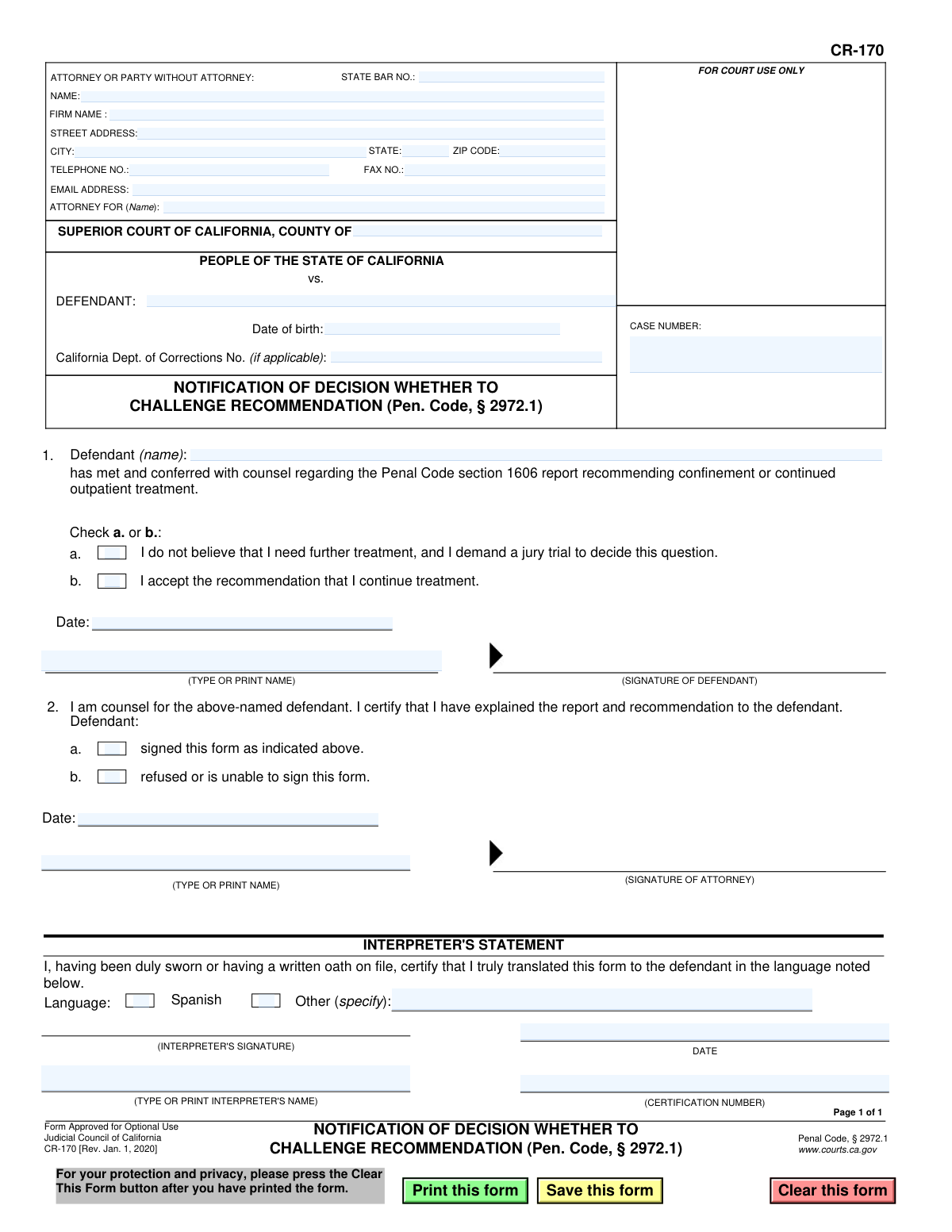
Yes! You can use AI to fill out Form CR-170, Notification of Decision Whether to Challenge Recommendation (Pen. Code, § 2972.1)
Form CR-170, Notification of Decision Whether to Challenge Recommendation, is a crucial legal document within the California judicial system, specifically under Penal Code § 2972.1. It is used by a defendant, after consulting with their attorney, to officially declare their decision regarding a recommendation for continued mental health treatment—either accepting it or demanding a jury trial to contest it. Today, this form can be filled out quickly and accurately using AI-powered services like Instafill.ai, which can also convert non-fillable PDF versions into interactive fillable forms.
CR-170 is part of the
California court forms category on Instafill.
Our AI automatically handles information lookup, data retrieval, formatting, and form filling.
It takes less than a minute to fill out CR-170 using our AI form filling.
Securely upload your data. Information is encrypted in transit and deleted immediately after the form is filled out.
Form specifications
| Form name: | Form CR-170, Notification of Decision Whether to Challenge Recommendation (Pen. Code, § 2972.1) |
| Number of fields: | 35 |
| Number of pages: | 1 |
| Language: | English |
Instafill Demo: How to fill out PDF forms in seconds with AI
How to Fill Out CR-170 Online for Free in 2026
Are you looking to fill out a CR-170 form online quickly and accurately? Instafill.ai offers the #1 AI-powered PDF filling software of 2026, allowing you to complete your CR-170 form in just 37 seconds or less.
Follow these steps to fill out your CR-170 form online using Instafill.ai:
- 1 Navigate to Instafill.ai and upload or select Form CR-170.
- 2 Provide your attorney's information, including name, bar number, and contact details, along with the court and case number.
- 3 Enter the defendant's full name, date of birth, and California Department of Corrections number if applicable.
- 4 In consultation with your attorney, check the box indicating your decision: either to accept the recommendation for continued treatment or to demand a jury trial.
- 5 The defendant and their attorney must date and sign the form in the designated sections.
- 6 If an interpreter was used, they must complete the Interpreter's Statement section with their details and signature.
- 7 Review the entire form for accuracy, then download the completed document to file with the Superior Court.
Our AI-powered system ensures each field is filled out correctly, reducing errors and saving you time.
Why Choose Instafill.ai for Your Fillable CR-170 Form?
Speed
Complete your CR-170 in as little as 37 seconds.
Up-to-Date
Always use the latest 2026 CR-170 form version.
Cost-effective
No need to hire expensive lawyers.
Accuracy
Our AI performs 10 compliance checks to ensure your form is error-free.
Security
Your personal information is protected with bank-level encryption.
Frequently Asked Questions About Form CR-170
This form is used to officially document a defendant's decision on whether to accept or challenge a recommendation for continued mental health treatment under Penal Code § 2972.1. It informs the court if the defendant agrees to treatment or demands a jury trial.
The defendant makes the decision and signs in Section 1, while their attorney signs in Section 2 to certify they have explained the report and the defendant's rights. It is a joint effort between the defendant and their legal counsel.
The defendant must choose between option 'a', accepting the recommendation to continue treatment, or option 'b', stating they do not believe they need further treatment and demanding a jury trial to decide the issue.
By demanding a jury trial, you are formally challenging the recommendation for continued treatment. The court will schedule a trial where a jury will hear evidence and decide whether you meet the legal criteria for continued involuntary treatment.
The recommendation comes from a Penal Code section 1606 report, typically prepared by a treatment facility or psychiatrist. It advises the court on whether the defendant should be confined or continue outpatient treatment as a Mentally Disordered Offender (MDO).
Your attorney must explain the treatment recommendation report to you, discuss your options, and then certify on the form that they have done so. They also indicate whether you signed the form or refused/were unable to sign.
If a defendant refuses or is unable to sign, their attorney will check the appropriate box in Section 2. The attorney's signature still certifies that the defendant was consulted, ensuring the court is aware of the situation.
You have the right to have the form translated for you. The 'Interpreter's Statement' section is for a certified interpreter to sign, confirming they have accurately translated the form's content for you in your language.
Form CR-170 is filed with the Superior Court of California in the county where the defendant's case is being heard. The defendant's attorney is typically responsible for submitting the completed form to the court.
Yes, services like Instafill.ai use AI to accurately auto-fill your personal and case information, saving time and reducing errors. However, the critical decision in Section 1 must be made by you after careful consultation with your attorney.
You can use a service like Instafill.ai to upload the form and fill it out electronically. The platform allows you to type directly into the fields, add digital signatures, and then download the completed document for filing.
If you have a non-fillable or 'flat' PDF, you can use a tool like Instafill.ai. It can convert the static PDF into an interactive, fillable form that you can easily complete on your computer.
You will need your attorney's contact information, the court and case number, and your personal details like name, date of birth, and Department of Corrections number if applicable. The most important part is your decision in Section 1.
Compliance CR-170
Validation Checks by Instafill.ai
1
Defendant Decision Completeness
Validates that one of the two checkboxes in Section 1 ('I accept the recommendation' or 'I demand a jury trial') has been selected. This decision is the primary purpose of the form and must be indicated. If neither is selected, the form is incomplete and cannot be processed.
2
Defendant Decision Mutual Exclusivity
Ensures that only one checkbox in Section 1 is selected, as the defendant cannot simultaneously accept the recommendation and demand a trial. This check prevents logical contradictions in the defendant's response. An error should be flagged if both options are checked.
3
Attorney Certification Completeness
Verifies that the attorney has checked one of the two boxes in Section 2, indicating whether the defendant 'signed this form' or 'refused or is unable to sign'. This certification is required to confirm the circumstances of the defendant's signature. The form is invalid without this attestation.
4
Signature Logic Consistency
Checks for logical consistency between the defendant's action in Section 1 and the attorney's certification in Section 2. If the defendant's signature is present, the attorney must check box 2a ('signed this form'). If the signature is absent, the attorney must check box 2b ('refused or is unable to sign').
5
Case Number Presence and Format
Ensures the 'CASE NUMBER' field is not empty and follows the expected format for the specified court county. The case number is a critical identifier for filing and associating the document with the correct legal proceedings. A missing or malformed case number would cause the filing to be rejected.
6
Defendant Name Consistency
Validates that the defendant's name is consistent across all fields where it appears (e.g., in the header and in the main body). This prevents ambiguity and ensures the document is correctly associated with the single, correct individual. Mismatches could lead to clerical errors and legal complications.
7
Date of Birth Validity
Checks that the 'Date of birth' field contains a valid date in a recognized format (e.g., MM/DD/YYYY) and that the date is logically possible (i.e., in the past and indicates a reasonable age for a defendant). This helps ensure the correct individual is identified and prevents data entry errors. An invalid or future date should be rejected.
8
State Bar Number Format
Validates that the 'STATE BAR NO.' field, if filled, contains a numeric value that conforms to the format of a California State Bar number. This ensures the attorney is properly identified and their credentials can be verified. An incorrectly formatted number could indicate a data entry error or an invalid attorney.
9
Attorney Email Address Format
Ensures that the value provided in the 'EMAIL ADDRESS' field for the attorney follows the standard format for an email address (e.g., '[email protected]'). This is important for ensuring that electronic communications and notifications regarding the case are deliverable. The validation should flag any entries that do not match this pattern.
10
Attorney Signature and Date Requirement
Verifies that the attorney's signature and the date in Section 2 are both present. The attorney's signature certifies that they have explained the report to the defendant, making it a mandatory element. Failure to sign and date invalidates the certification and the form itself.
11
Interpreter 'Other' Language Specification
If the 'Other' checkbox is selected in the 'INTERPRETER'S STATEMENT' section, this check ensures the adjacent text field specifying the language is not empty. This is necessary to properly document the language into which the form was translated. A checked 'Other' box without a specified language is incomplete.
12
County Name Validation
Checks that the 'COUNTY OF' field under 'SUPERIOR COURT OF CALIFORNIA' contains a valid California county name. This is essential for routing the document to the correct court jurisdiction. An invalid or misspelled county name will result in filing rejection or delays.
13
General Date Field Logic
Performs a check on all date fields on the form (e.g., date in Section 1, date in Section 2) to ensure they are not set to a future date. These dates record when an action occurred, so they must be on or before the current date. This prevents logical impossibilities and ensures the timeline of events is accurately recorded.
Common Mistakes in Completing CR-170
This is a frequent data entry error caused by haste or misreading documents, where digits are transposed or omitted. An incorrect case number is a primary reason for filing rejection by the court clerk, as the document cannot be matched to the correct case file, leading to critical delays. Always double-check the case number against official court documents before submission. AI-powered form filling tools like Instafill.ai can help prevent this by reducing manual entry and validating data formats.
The defendant's name is often misspelled or written differently across the form—in the case caption, the 'ATTORNEY FOR' line, and in Section 1. This inconsistency creates confusion for court clerks and can lead to filing errors or delays in processing. To avoid this, use the defendant's full, official name as it appears on other legal documents and ensure it is identical in all fields. Using a tool to auto-populate recurring information can ensure consistency.
A critical error is either checking both boxes (accepting treatment AND demanding a trial) or checking neither box in Section 1. This happens due to misunderstanding or oversight and renders the form's primary purpose void, as the defendant's decision is unclear. The form will be rejected, requiring a new, corrected submission. Ensure the defendant understands the choice and that only one box is checked to reflect their final decision.
This mistake occurs when the attorney's certification in Section 2 contradicts the defendant's action in Section 1. For example, the attorney checks box 2a ('defendant signed') when there is no defendant signature, or 2b ('defendant refused to sign') when the defendant did sign. This invalidates the attorney's certification and can cause the entire filing to be questioned, necessitating a do-over. The attorney must review the entire form, especially Section 1, immediately before signing their own certification.
The defendant makes a selection in Section 1 but forgets to sign or date the form, or the attorney forgets to obtain the signature. A missing signature completely invalidates the defendant's declaration, making the form useless for legal purposes and leading to its rejection by the court. Always establish a clear workflow where the defendant signs and dates immediately after making their selection.
Attorneys or their staff often rush through the top-left information box and forget to include their State Bar Number, firm name, or full contact details. A missing State Bar Number can lead to filing rejection, while incorrect contact information can prevent the court or opposing counsel from making contact, causing critical communication breakdowns. To prevent this, carefully proofread all contact information. AI tools like Instafill.ai can store and auto-fill this data accurately every time.
After ensuring the rest of the form is complete, the attorney themselves may forget to sign and date their certification in Section 2. An unsigned attorney certification makes the form incomplete and unacceptable for filing, as it lacks the required attestation that counsel has conferred with the defendant. Creating a final review checklist that includes all required signature fields can easily prevent this oversight.
If an interpreter is used to help the defendant understand the form, they are required to complete the 'Interpreter's Statement' section. Forgetting to have the interpreter sign, date, and provide their certification number can create grounds for a future legal challenge based on the defendant not understanding the document. If an interpreter is present, ensuring they complete their section is a critical step to validate the defendant's informed consent.
Parties sometimes leave the defendant's Date of Birth or California Department of Corrections (CDCR) number blank in Section 1. While the CDCR number is only 'if applicable,' both identifiers are crucial for the court and other agencies to distinguish the defendant from other individuals with similar names. Omitting this data can slow down processing while the clerk attempts to verify the person's identity. Gather all necessary information before starting the form to ensure completeness.
This form is often available as a non-fillable PDF, leading people to print it and fill it out by hand. Illegible handwriting can cause clerks to misinterpret names, case numbers, or the defendant's decision, leading to data entry errors or rejection. To avoid this, always print clearly in block letters. A better solution is to use a tool like Instafill.ai, which can convert flat PDFs into fillable forms that can be typed into, ensuring perfect legibility and professionalism.
Saved over 80 hours a year
“I was never sure if my IRS forms like W-9 were filled correctly. Now, I can complete the forms accurately without any external help.”
Kevin Martin Green
Your data stays secure with advanced protection from Instafill and our subprocessors
Robust compliance program
Transparent business model
You’re not the product. You always know where your data is and what it is processed for.
ISO 27001, HIPAA, and GDPR
Our subprocesses adhere to multiple compliance standards, including but not limited to ISO 27001, HIPAA, and GDPR.
Security & privacy by design
We consider security and privacy from the initial design phase of any new service or functionality. It’s not an afterthought, it’s built-in, including support for two-factor authentication (2FA) to further protect your account.
Fill out CR-170 with Instafill.ai
Worried about filling PDFs wrong? Instafill securely fills form-cr-170-notification-of-decision-whether-to-challenge-recommendation-pen-code-29721 forms, ensuring each field is accurate.