
Instafill.ai
7 days free
AI form filling · 20 fields · 1 page · done in seconds

Yes! You can use AI to fill out Form CR-173, Order for Commitment (Sexually Violent Predator)

Don't type 20 fields by hand. Tell our AI about yourself, or upload a document you already have, and it fills every field in seconds. You check it, then download, print or sign.
7 days free, then $19.99/month · Cancel anytime
AI fills it, no typingEncrypted, never used to train AICancel in two clicks
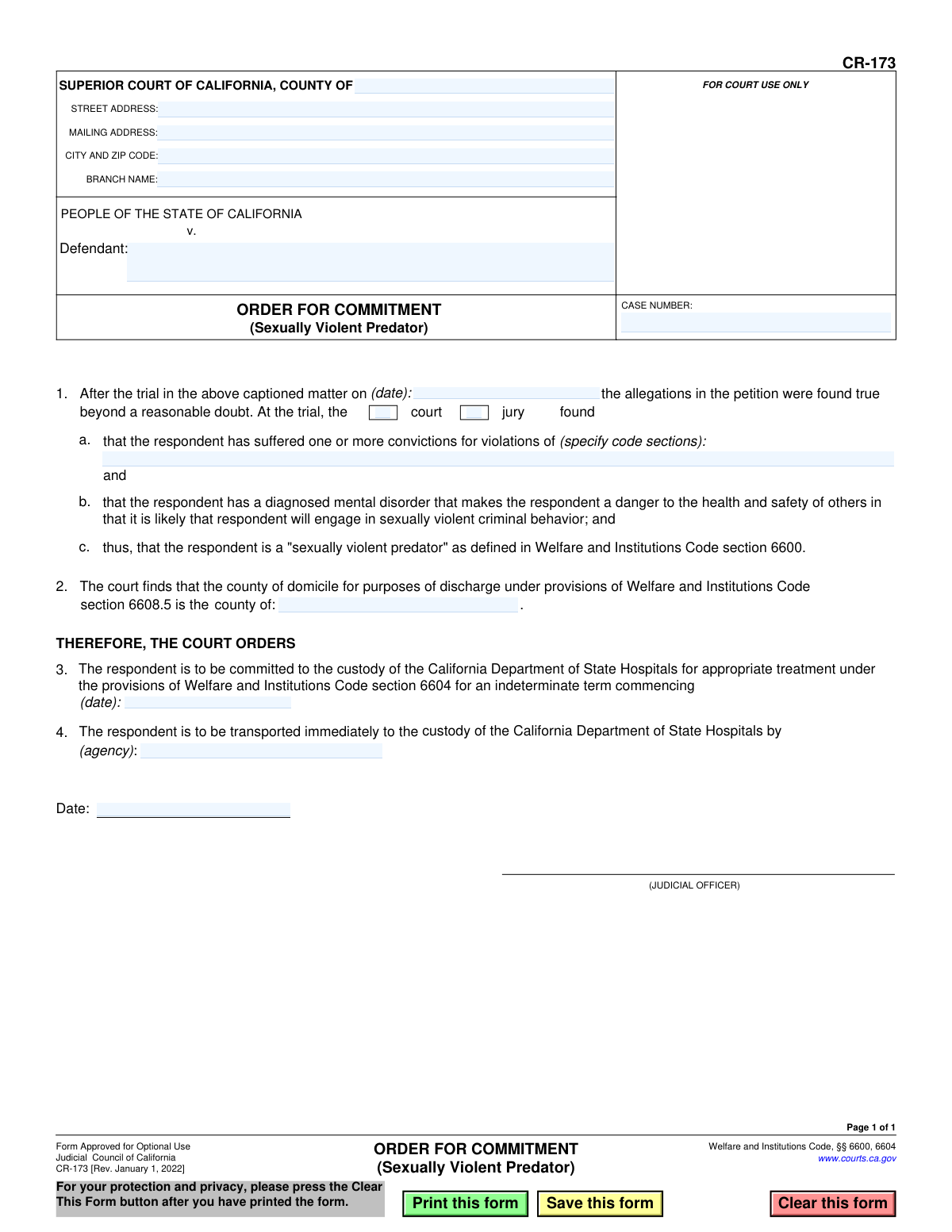
Form CR-173, Order for Commitment (Sexually Violent Predator), page 1
Simple · 27/100Form Complexity Index

The AI does the filling. You just check it.

No typing into boxes, nothing to install.

Tell the AI about youAnswer a few questions in plain words, or upload a document you already have. That is all the typing there is.
AI fills every field in secondsIt puts each answer in the right box on every page, checkboxes included.
Check it and downloadReview every field, change anything, then download, print or sign the PDF.

What this form asks for

The AI fills all of it, from your answers or your documents.

Form CR-173, Order for Commitment (Sexually Violent Predator), is a legal document issued by the Superior Court of California. It formalizes the court's decision to commit an individual, who has been found to be a 'sexually violent predator' under Welfare and Institutions Code section 6600, to the custody of the California Department of State Hospitals for an indeterminate term. This order is issued after a trial where it was proven beyond a reasonable doubt that the person meets the legal criteria for this designation. Today, this form can be filled out quickly and accurately using AI-powered services like Instafill.ai, which can also convert non-fillable PDF versions into interactive fillable forms.
Fillable fields20
Pages1
Form Complexity IndexSimple, 27/100

The AI checks your answers before you download

13 checks built for this form, so a wrong date or a missing answer is caught before anyone else sees it.

Ensures Case Number is Provided

This check verifies that the 'Case Number' field is not empty. The case number is a unique identifier for the legal proceeding and is essential for filing the order correctly and linking it to the case file in the court's record-keeping system. If the case number is missing, the form cannot be processed or filed.

Validates Defendant's Name is Entered

This validation ensures that the 'Defendant' field contains a name. An order of commitment is legally binding against a specific individual, so the defendant's name is a mandatory piece of information. Failure to provide a name renders the entire order unenforceable and invalid.

Requires Selection of Finder of Fact

This check confirms that either the 'court' or 'jury' checkbox in section 1 is selected. The order must specify whether the findings were made by a judge in a court trial or by a jury. Omitting this information creates legal ambiguity about the trial proceedings, and the form should prompt the user to make a selection.

Verifies Trial Date is a Valid Past or Present Date

This validation checks that the trial date in section 1 is a validly formatted date and that it is not in the future. The trial must have already occurred for an order to be issued based on its findings. This prevents logical impossibilities and ensures the chronological integrity of the legal record.

Ensures Conviction Code Sections are Specified

This check verifies that the text field in section 1a, for specifying code sections, is not empty. The finding that the respondent is a sexually violent predator is predicated on prior convictions. Listing the specific code sections for these convictions is a mandatory legal requirement for the order's validity.

Requires County of Domicile

This validation ensures the 'county of domicile' in section 2 is specified. This information is required under Welfare and Institutions Code section 6608.5 for determining future responsibilities regarding the individual's potential discharge. An omission would complicate future legal and administrative processes.

And 7 more checks
  • Verifies Commitment Commencement Date
  • Logical Check for Commitment Date
  • Requires Transporting Agency Name
  • Validates Signature Date
  • Logical Check for Signature Date vs. Trial Date
  • Validates Court County Name
  • Court Header Completeness Check

Let AI fill out your CR-173

No typing. Every field filled in seconds, checked, ready to sign.

7 days free, then $19.99/month · Cancel anytime

How to Fill Out CR-173 Online for Free in 2026

What the AI walks you through.

  1. Navigate to Instafill.ai and upload or select Form CR-173.
  2. Enter the court information, including the county, address, and branch name, along with the case number.
  3. Identify the defendant in the case.
  4. Detail the trial findings, specifying the trial date, whether it was a court or jury trial, and the code sections violated.
  5. Specify the county of domicile for discharge purposes as determined by the court.
  6. Input the details of the commitment order, including the commencement date and the agency responsible for transporting the respondent.
  7. Review all entered information for accuracy before the judicial officer signs and dates the order to finalize the commitment.

Common Mistakes in Completing CR-173

The ones the AI is built to catch.

Incorrect or Incomplete Case Number
Users often mistype the case number or omit required prefixes or suffixes, which are crucial for court filing systems. This error can happen due to simple typographical mistakes or misunderstanding the full case number format. An incorrect case number can lead to the order being rejected by the court clerk, misfiled with the wrong case, or significant delays in processing, jeopardizing the legal timeline. To avoid this, meticulously double-check the case number against the official petition and other court documents. AI-powered tools like Instafill.ai can help by storing and auto-filling correct case information, reducing the risk of manual entry errors.
Incomplete Court Address and Branch Name
Filling out the street address but omitting the specific branch name of the Superior Court is a common oversight. Many counties have multiple court locations, and the branch name is essential for routing the document correctly. This mistake leads to documents being sent to the wrong courthouse, causing processing delays and potential misplacement. Always verify and include the full, official name of the court branch handling the case. If the form is a non-fillable PDF, tools like Instafill.ai can convert it into a fillable version and use saved court profiles to populate the complete and accurate address automatically.
Misspelling or Using an Alias for the Defendant's Name
Entering a misspelled name or a known alias instead of the defendant's full legal name as it appears on official court records is a critical error. This can create legal ambiguity regarding the identity of the person subject to the order. Such a mistake could be grounds for a future legal challenge and complicates record-keeping for state and hospital systems. To prevent this, use the exact full legal name from the charging documents or the case caption. Using a form-filling tool can ensure consistency by auto-populating the name across all related documents.
Forgetting to Select 'Court' or 'Jury' in Item 1
The form requires the user to specify whether the court (a bench trial) or a jury made the findings of fact. It is easy to overlook this simple checkbox, leaving the order incomplete. An order with this information missing is legally deficient and will likely be returned by the clerk for correction, delaying the commitment process. To avoid this, perform a final review of the form specifically to check that all required boxes are marked. AI-powered form fillers can often highlight required fields, including checkboxes, to ensure they are not missed before submission.
Improperly Citing Code Sections in Item 1a
This field requires listing the specific code sections for the prior convictions that serve as the basis for the SVP finding. Users may list them incompletely, use incorrect numbering, or omit the code name (e.g., 'Penal Code'). This creates an inaccurate legal record and could weaken the order if challenged on appeal. The code sections must be transcribed with absolute precision from the official trial findings. To ensure accuracy, refer directly to the verdict form or the court's statement of decision when filling out this section.
Omitting the County of Domicile in Item 2
Failing to specify the respondent's county of domicile is a significant error, as this information is legally required for managing future discharge proceedings. This oversight often happens because the information may not be immediately available or is simply forgotten during the drafting of the order. The consequence is major administrative and legal complications years later when discharge is considered, as jurisdiction for community placement is unclear. Ensure the court makes a specific finding on this matter and that it is explicitly recorded on the form before the judicial officer signs.
Leaving the Commitment Commencement Date Blank in Item 3
The order requires a specific date for when the indeterminate commitment term begins. Leaving this date blank creates ambiguity about when the commitment is legally effective and can cause problems for the Department of State Hospitals in calculating review dates and managing the case. This mistake often occurs when the form is prepared in advance of the final hearing. To prevent this, the judicial officer or their clerk must fill in the date of the order, or another specified date, to make the commitment legally sound and clear. Using form validation features can flag this empty required field before finalization.
Failing to Identify the Transporting Agency in Item 4
The order must specify which agency is responsible for transporting the respondent to the Department of State Hospitals. Forgetting to fill in this field (e.g., 'County Sheriff's Department') creates immediate logistical confusion and can delay the transfer. Without a clear directive, there is no designated authority to execute the transport, potentially leaving the respondent in a local facility for an extended period. To avoid this, confirm the responsible agency during the proceedings and ensure its name is clearly written on the order. AI tools like Instafill.ai can use templates with pre-filled common agency names to speed up this process.
Using the Wrong Date in Item 1
This field is for the date the trial concluded and the findings were made, not the date the form is being filled out. Entering the current date instead of the historical trial date creates an inaccurate record of the proceedings. This can cause confusion when reviewing the case history and may conflict with other court records. To avoid this error, carefully check the court record or minutes for the specific date on which the 'true' finding was officially entered and use that date in Item 1. Digital form-filling tools can help by using date pickers and clear field labels to reduce confusion between different date fields on the form.

Frequently Asked Questions About CR-173


Is it really free for 7 days?
Yes. You pay $0 today. Cancel before Nov 1 and you are never charged. Keep it, and it is $19.99 a month for 5 fills of your CR-173.
Can I fill other forms too?
This plan is for your CR-173: your own AI agent fills it as often as 5 times a month. To fill other forms and upload your own, choose a Professional plan from your account.
How do I cancel?
From your account, in two clicks, any time. No email, no call.
How does the AI fill out CR-173?
You answer a few questions in plain words, or upload a document you already have. The AI reads what you give it and puts each answer into the right field of CR-173, on every page, in seconds. It checks the answers against the form's own rules, and you review and change anything before you download, print or sign.
What happens to my information?
It is encrypted in transit and at rest, and it is never used to train AI.
How complex is CR-173 to fill out?
CR-173 has a Form Complexity Index of 27 out of 100, in the simple tier: 20 fillable fields across 1 page. Instafill.ai's AI fills it in under a minute, with every field there for you to review before you download.
What is the purpose of Form CR-173, Order for Commitment?
This form is a court order used by a California judge to officially commit an individual to the custody of the Department of State Hospitals after they have been found to be a 'Sexually Violent Predator' (SVP) in a trial.
Who is responsible for filling out this form?
A judicial officer (a judge) completes and signs this form. It is not an application for the public, but rather a legal order documenting a court's decision.
What has to happen before this order is issued?
Before this order is issued, a trial must be held where a court or jury finds beyond a reasonable doubt that the individual meets the legal definition of a Sexually Violent Predator.
What does 'indeterminate term' mean in Section 3 of the form?
An indeterminate term means the commitment does not have a set end date. The individual is committed for treatment until they are determined to no longer be a danger through a separate legal process.
What kind of information is needed for Section 1?
Section 1 requires the date of the trial, whether the finding was made by a court or jury, and the specific code sections of the prior convictions that led to the SVP determination.
Why is the 'county of domicile' important to identify on this form?
The county of domicile is recorded for the purpose of future proceedings related to the individual's potential discharge or conditional release, as specified in the Welfare and Institutions Code.
What happens immediately after the judge signs this order?
Once signed, the agency named in Section 4 is ordered to immediately transport the individual to the custody of the California Department of State Hospitals for treatment.
Is this commitment the same as a prison sentence?
No, this is a civil commitment for treatment of a diagnosed mental disorder, not a criminal sentence for punishment. The commitment is to a state hospital, not a prison.
Who gets a copy of the completed Form CR-173?
Copies of the signed order are typically provided to the court, the committed individual and their attorney, the district attorney, and the California Department of State Hospitals.
Can AI tools help court staff prepare this form?
Yes, services like Instafill.ai can help court staff by using AI to accurately auto-fill standard information like the court address, case number, and party names, saving time and ensuring accuracy.
How can court staff use Instafill.ai to complete this form online?
Court staff can upload Form CR-173 to Instafill.ai, which will make all fields interactive. They can then quickly populate the necessary case details before presenting the completed order to the judge for review and signature.
What should I do if I have a non-fillable PDF of Form CR-173?
You can use a service like Instafill.ai, which can convert flat, non-fillable PDFs into interactive forms. This allows you to easily type information directly into the required fields online.
Encrypted in transit and at restNever used to train AIDelete your forms any time

Get your CR-173 filled out by AI

$0 today. Cancel before Nov 1 and you pay nothing.

7 days free, then $19.99/month · Cancel anytime