Yes! You can use AI to fill out Form CR-181, Order for Dismissal
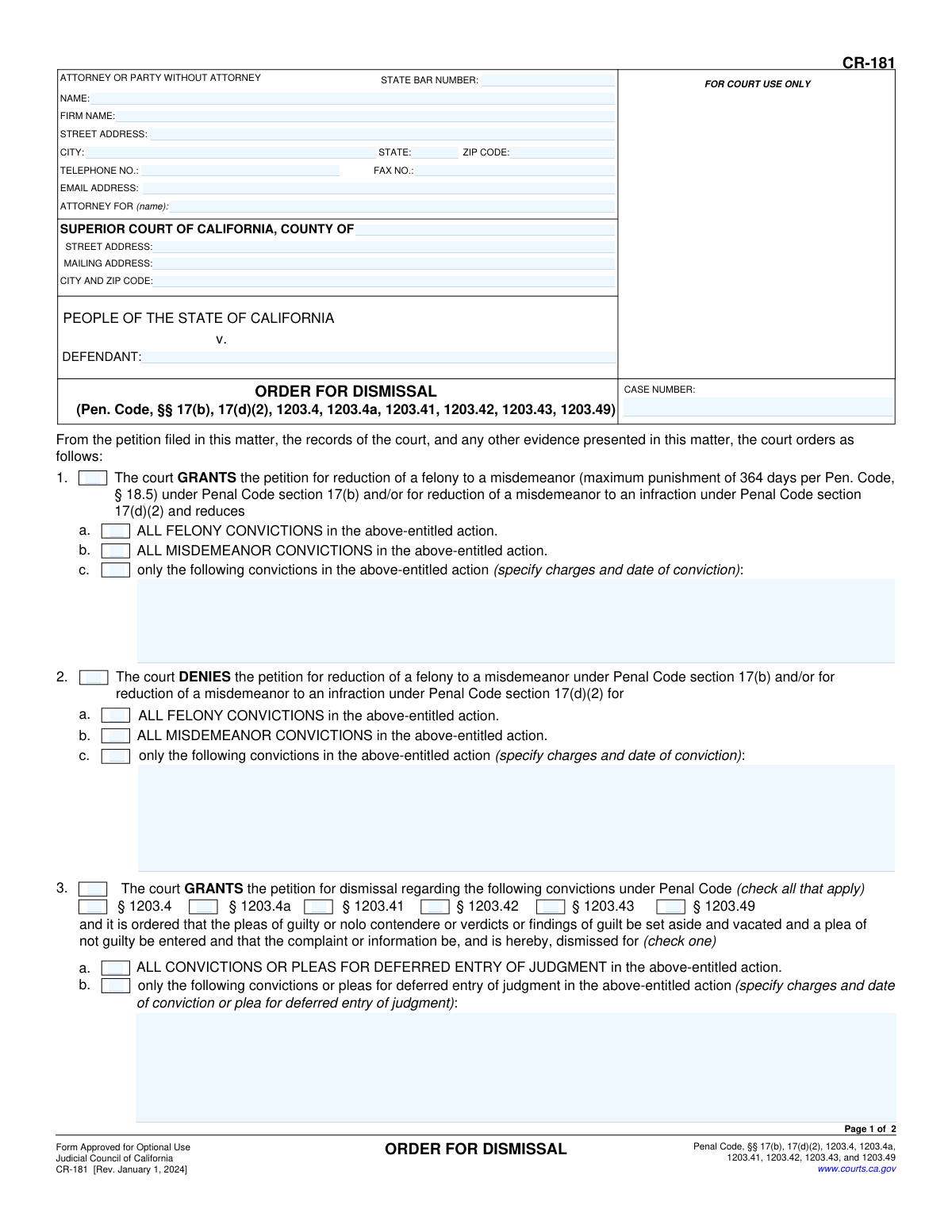
Form CR-181, the Order for Dismissal, is a legal document used in the California Superior Court system to formalize a judge's decision on a petition to dismiss a criminal conviction. This order can also reduce a felony to a misdemeanor or a misdemeanor to an infraction under various sections of the Penal Code. It is a crucial document that officially alters an individual's criminal record, providing relief from certain penalties and disabilities. Today, this form can be filled out quickly and accurately using AI-powered services like Instafill.ai, which can also convert non-fillable PDF versions into interactive fillable forms.
CR-181 is part of the
California court forms category on Instafill.
Our AI automatically handles information lookup, data retrieval, formatting, and form filling.
It takes less than a minute to fill out CR-181 using our AI form filling.
Securely upload your data. Information is encrypted in transit and deleted immediately after the form is filled out.
Form specifications
| Form name: | Form CR-181, Order for Dismissal |
| Number of fields: | 58 |
| Number of pages: | 1 |
| Language: | English |
Instafill Demo: How to fill out PDF forms in seconds with AI
How to Fill Out CR-181 Online for Free in 2026
Are you looking to fill out a CR-181 form online quickly and accurately? Instafill.ai offers the #1 AI-powered PDF filling software of 2026, allowing you to complete your CR-181 form in just 37 seconds or less.
Follow these steps to fill out your CR-181 form online using Instafill.ai:
- 1 Navigate to Instafill.ai and upload or select Form CR-181, Order for Dismissal.
- 2 Provide the case number and the specific Superior Court information, including county and address.
- 3 Enter the details for the attorney or party without an attorney, including name, address, and contact information.
- 4 Use the AI-powered checkboxes to indicate the court's decision: whether the petition for reduction and/or dismissal is granted or denied.
- 5 Specify the relevant Penal Code sections (e.g., 1203.4, 1203.4a) and list the specific convictions if the order does not apply to all charges.
- 6 Review all auto-filled sections, including any special findings or required disclosures, to ensure accuracy before the form is presented to the judicial officer for signature.
Our AI-powered system ensures each field is filled out correctly, reducing errors and saving you time.
Why Choose Instafill.ai for Your Fillable CR-181 Form?
Speed
Complete your CR-181 in as little as 37 seconds.
Up-to-Date
Always use the latest 2026 CR-181 form version.
Cost-effective
No need to hire expensive lawyers.
Accuracy
Our AI performs 10 compliance checks to ensure your form is error-free.
Security
Your personal information is protected with bank-level encryption.
Frequently Asked Questions About Form CR-181
This is the official court order that documents a judge's decision to either grant or deny a petition to reduce a felony, reduce a misdemeanor, or dismiss a conviction. It is filled out by the court, not the person who requested the dismissal.
No, you do not fill out this form. The CR-181 is completed and signed by a judicial officer after they have reviewed a petition you filed, such as Form CR-180, Petition for Dismissal.
You must first file a petition with the court (e.g., Form CR-180) asking for your conviction to be reduced or dismissed. A judge will then review your request and issue their decision using this CR-181 order form.
A reduction changes a felony to a misdemeanor or a misdemeanor to an infraction, which can be less serious on your record. A dismissal (expungement) sets aside your original plea and dismisses the case, offering broader relief for things like employment and housing.
No, a dismissal does not completely erase the conviction from your record. It remains visible to law enforcement and must be disclosed when applying for public office or certain state licenses, as noted in Section 6 of the form.
Not necessarily. Section 7 of the form clearly states that a dismissal does not restore firearm rights if you are otherwise prohibited from owning one due to the conviction.
Generally, for private employers in California, you do not have to disclose a conviction that has been dismissed under Penal Code §1203.4. However, you must still disclose it when applying for government jobs or professional licenses.
If the judge checks a box in Section 2 (Denies petition for reduction) or Section 4 (Denies petition for dismissal), it means your request has been denied. You may need to consult with an attorney to understand the reason for the denial and any possible next steps.
This section is used when the court finds that the person committed the crime as a direct result of being a victim of human trafficking. This special finding can lead to specific relief and notifies the Department of Justice.
Processing times vary widely depending on the county court's caseload. It can take anywhere from several weeks to a few months to receive the judge's decision on the CR-181 form after you have submitted your petition.
While you don't fill out the CR-181 order itself, AI-powered services like Instafill.ai are extremely helpful for completing the petition form (like CR-180) that you must file with the court. These tools use AI to auto-fill your information accurately, saving time and preventing errors.
You would upload the petition form you need to file, such as the CR-180, to the Instafill.ai platform. The service will help you fill in your personal details, case number, and other required fields before you print and file it with the court.
Services like Instafill.ai can solve this issue. You can upload the non-fillable PDF, and the platform's technology will convert it into an interactive, fillable form that you can easily complete online.
Compliance CR-181
Validation Checks by Instafill.ai
1
Case Number Presence and Consistency
This check ensures that the 'CASE NUMBER' field is populated on both page 1 and page 2 of the form. It then verifies that the value entered in 'CR-181[0].Page1[0]...CaseNumber2[0]' is identical to the value in 'CR-181[0].Page2[0]...CaseNumber2[0]'. This is critical for maintaining document integrity and ensuring all pages correctly correspond to the same legal case.
2
State Bar Number Format
Validates that the 'STATE BAR NUMBER' field, if populated, contains only numeric digits. This check ensures the data is in the correct format for a California State Bar number, which is essential for correctly identifying the attorney of record. An invalid format could lead to processing delays or incorrect attorney identification.
3
Email Address Format
Verifies that the value entered in the 'EMAIL ADDRESS' field conforms to a standard email format (e.g., '[email protected]'). This is important for ensuring that electronic communications from the court or other parties can be successfully delivered. A validation failure would prompt the user to correct the email address before submission.
4
Mutually Exclusive Reduction Order
This validation checks that only one of the main checkboxes for Section 1 ('GRANTS the petition for reduction') or Section 2 ('DENIES the petition for reduction') is selected. An order cannot simultaneously grant and deny the same petition for reduction. If both are checked, the form is logically inconsistent and an error should be flagged to force a choice.
5
Exclusive Choice within Reduction Order
If Section 1 or Section 2 is selected, this check ensures that only one of the sub-options ('a. ALL FELONY', 'b. ALL MISDEMEANOR', or 'c. only the following convictions') is checked. These options are mutually exclusive ways of defining the scope of the order. Selecting more than one would create ambiguity and make the order unenforceable.
6
Conditional Text for Specific Reduction
Ensures that if checkbox '1c' or '2c' ('only the following convictions') is selected, the corresponding text field for specifying charges and dates is not empty. This is a critical completeness check, as failing to specify the convictions would render the order meaningless. The system should prevent submission until the required details are provided.
7
Mutually Exclusive Dismissal Order
This validation ensures that the user selects either Section 3 ('GRANTS the petition for dismissal') or Section 4 ('DENIES the petition for dismissal'), but not both. These actions are contradictory and cannot coexist on a single order. This check prevents the creation of a logically flawed and invalid legal document.
8
Required Penal Code for Dismissal
If Section 3 ('GRANTS') or Section 4 ('DENIES') is checked, this validation verifies that at least one of the Penal Code section checkboxes (e.g., § 1203.4, § 1203.4a) is also checked. The order must specify the legal basis for the dismissal action. Failure to select a Penal Code section makes the order incomplete and legally insufficient.
9
Exclusive Choice within Dismissal Order
Within Section 3 or Section 4, this check confirms that only one of the sub-options ('a. ALL CONVICTIONS' or 'b. only the following convictions') is selected. These choices are mutually exclusive. This validation prevents ambiguity about which convictions the order applies to.
10
Conditional Text for Specific Dismissal
Verifies that if sub-option '3b' or '4b' ('only the following convictions') is checked, the associated text field to specify the charges is filled out. An order that applies to specific convictions without listing them is incomplete and invalid. This check ensures the order is precise and actionable.
11
Human Trafficking Prerequisite Check
This is a logical consistency check that verifies if Section 5 (regarding human trafficking) is checked, then the Penal Code section '§ 1203.49' checkbox must also be checked in Section 3. The findings in Section 5 are only legally relevant under the provisions of § 1203.49. This prevents the creation of an order with a finding that lacks the required statutory basis.
12
Conditional Text for Human Trafficking Exceptions
If Section 5 is active and sub-option 'a(2)' ('the relief described in section 1203.4, with the following exceptions') is checked, this validation ensures the corresponding text field is not empty. The order must specify what the exceptions are. An empty field would create an ambiguous order, and this check enforces completeness.
13
Valid Judicial Order Date
This check validates that the 'Date' field near the judicial officer's signature line contains a valid date in a recognized format (e.g., MM/DD/YYYY). It also ensures the date is not set in the future. An invalid or future date would call the authenticity and timing of the court order into question.
Common Mistakes in Completing CR-181
Users often enter the case number incorrectly, use a number from a different case, or forget to enter it on the second page. The case number is the primary identifier for the legal action, and an error can lead to the order being filed in the wrong case or rejected by the court clerk, causing significant delays. Always double-check the case number against official court documents and ensure it is identically entered at the top of both page 1 and page 2.
A person filing without an attorney (in 'pro per') may get confused by the 'ATTORNEY OR PARTY WITHOUT ATTORNEY' section. They might leave fields blank or incorrectly fill the 'ATTORNEY FOR (name)' line. This can cause confusion about who is submitting the document. If you are representing yourself, you should enter your own name and contact information, leave the State Bar Number blank, and write 'Defendant' or 'In Pro Per' in the 'ATTORNEY FOR (name)' field.
Filers frequently list only the county name or a general mailing address for the court instead of the specific street address of the courthouse and department handling the case. Large counties have multiple courthouses, and filing at the wrong one will result in rejection and delays. You must use the full street address of the specific superior court branch where the original conviction occurred to ensure the document is routed correctly.
When selecting options like 1(c), 2(c), 3(b), or 4(b) to address specific convictions, people often forget to list the exact charges and dates of conviction. An order without this specific information is ambiguous and cannot be properly executed by the court or recognized by other agencies. If you are not requesting relief for all convictions in the case, you must meticulously detail each charge and its conviction date in the provided text fields.
A common error is checking conflicting boxes, such as checking both 'GRANTS' (item 1) and 'DENIES' (item 2) for the same petition, or checking both 'ALL CONVICTIONS' (item 3a) and 'only the following convictions' (item 3b). This renders the proposed order nonsensical and guarantees it will be rejected by the judge or clerk. Carefully review the form to ensure you have only selected one logical and complete path for the court's order.
In sections 3 and 4, the form lists multiple Penal Code sections (e.g., § 1203.4, § 1203.4a). Each section has different eligibility requirements based on the type of sentence and conviction. A filer who does not understand these distinctions may check the wrong box, leading to the denial of their petition or the creation of an invalid order. It is crucial to understand the legal basis for your petition and select the corresponding code section on the order form.
This form, CR-181, is an 'Order for Dismissal,' which is a document signed by a judge to grant or deny a request. A frequent and critical mistake is for a petitioner to fill this out thinking it is the request itself, instead of filling out the 'Petition for Dismissal' (CR-180). Submitting a proposed order without the underlying petition will result in immediate rejection, as there is no request for the court to rule on.
Parties sometimes mistakenly write in the areas marked 'FOR COURT USE ONLY,' such as the case number box at the very top right, or the date and signature line at the bottom of page 2. These sections are reserved for court staff and the judicial officer. Writing in these areas can cause the form to be rejected, requiring you to submit a clean copy and delaying the process.
A simple typographical error in the defendant's name in the 'PEOPLE v. DEFENDANT' section can create serious issues. An order with a misspelled name may not be correctly linked to the individual's record in various databases, potentially nullifying the benefit of the dismissal. The name must be spelled exactly as it appears on all other official court documents for the case. AI-powered tools like Instafill.ai can help prevent this by storing and auto-filling names consistently across documents.
This form is often found online as a flat, non-fillable PDF, leading people to print it and fill it out by hand. Handwritten forms can be difficult to read, leading to data entry errors by court clerks and potential rejection. Using a tool like Instafill.ai can convert the non-fillable PDF into an interactive, fillable form, ensuring all entries are typed, legible, and professional, which increases the likelihood of it being processed smoothly.
Saved over 80 hours a year
“I was never sure if my IRS forms like W-9 were filled correctly. Now, I can complete the forms accurately without any external help.”
Kevin Martin Green
Your data stays secure with advanced protection from Instafill and our subprocessors
Robust compliance program
Transparent business model
You’re not the product. You always know where your data is and what it is processed for.
ISO 27001, HIPAA, and GDPR
Our subprocesses adhere to multiple compliance standards, including but not limited to ISO 27001, HIPAA, and GDPR.
Security & privacy by design
We consider security and privacy from the initial design phase of any new service or functionality. It’s not an afterthought, it’s built-in, including support for two-factor authentication (2FA) to further protect your account.
Fill out CR-181 with Instafill.ai
Worried about filling PDFs wrong? Instafill securely fills form-cr-181-order-for-dismissal forms, ensuring each field is accurate.