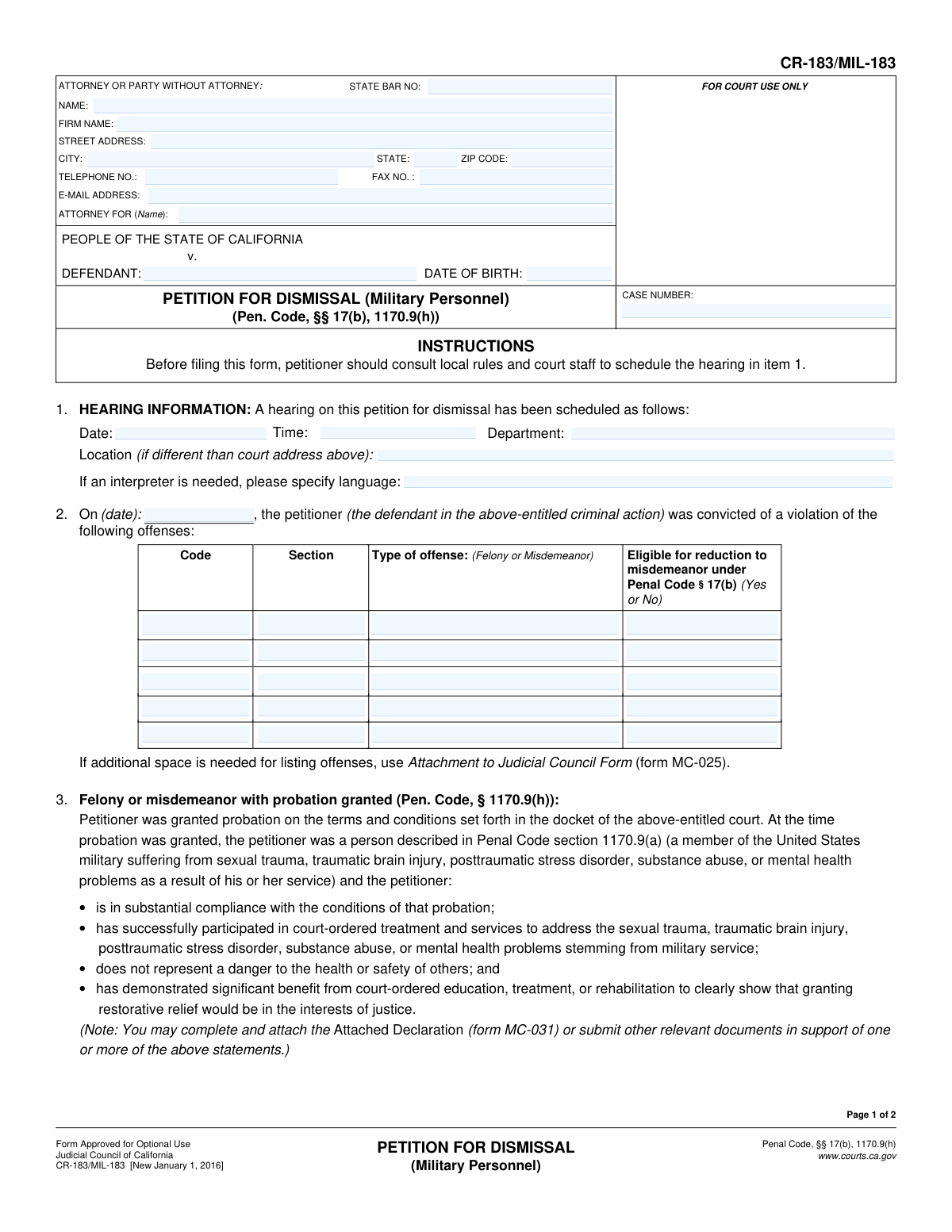
Yes! You can use AI to fill out Form CR-183/MIL-183, Petition for Dismissal (Military Personnel)
Form CR-183/MIL-183 is a legal document used in California by eligible military personnel to petition the court for the dismissal of a criminal conviction. It applies to service members who suffer from conditions like PTSD, traumatic brain injury, or substance abuse as a result of their service and have met specific probationary and rehabilitative requirements. This petition is crucial for seeking restorative justice, potentially reducing a felony to a misdemeanor, and sealing arrest records. Today, this form can be filled out quickly and accurately using AI-powered services like Instafill.ai, which can also convert non-fillable PDF versions into interactive fillable forms.
CR-183/MIL-183 is part of the
California court forms category on Instafill.
Our AI automatically handles information lookup, data retrieval, formatting, and form filling.
It takes less than a minute to fill out CR-183/MIL-183 using our AI form filling.
Securely upload your data. Information is encrypted in transit and deleted immediately after the form is filled out.
Form specifications
| Form name: | Form CR-183/MIL-183, Petition for Dismissal (Military Personnel) |
| Number of fields: | 60 |
| Number of pages: | 1 |
| Language: | English |
Instafill Demo: How to fill out PDF forms in seconds with AI
How to Fill Out CR-183/MIL-183 Online for Free in 2026
Are you looking to fill out a CR-183/MIL-183 form online quickly and accurately? Instafill.ai offers the #1 AI-powered PDF filling software of 2026, allowing you to complete your CR-183/MIL-183 form in just 37 seconds or less.
Follow these steps to fill out your CR-183/MIL-183 form online using Instafill.ai:
- 1 Navigate to Instafill.ai and upload or select the CR-183/MIL-183 Petition for Dismissal form.
- 2 Provide your personal details, attorney information (if any), and the court case number and defendant information.
- 3 Enter the hearing information if it has been scheduled, and specify details of the conviction, including the offense code, section, and date.
- 4 Affirm your eligibility by confirming you meet the criteria outlined in Penal Code § 1170.9(h), such as compliance with probation and participation in court-ordered treatment.
- 5 Indicate the specific relief you are requesting by checking the appropriate boxes, such as reducing a felony, terminating probation, or dismissing the action.
- 6 Review all the information populated by the AI for accuracy, then electronically or manually sign and date the declaration.
- 7 Download the completed form to print and file with the appropriate California court as per local rules.
Our AI-powered system ensures each field is filled out correctly, reducing errors and saving you time.
Why Choose Instafill.ai for Your Fillable CR-183/MIL-183 Form?
Speed
Complete your CR-183/MIL-183 in as little as 37 seconds.
Up-to-Date
Always use the latest 2026 CR-183/MIL-183 form version.
Cost-effective
No need to hire expensive lawyers.
Accuracy
Our AI performs 10 compliance checks to ensure your form is error-free.
Security
Your personal information is protected with bank-level encryption.
Frequently Asked Questions About Form CR-183/MIL-183
This form is used by eligible military personnel and veterans in California to ask the court to dismiss a criminal case for which they received probation. It's specifically for individuals whose criminal conduct was related to service-related issues like PTSD, traumatic brain injury, or sexual trauma.
You may be eligible if you are a current or former member of the U.S. military who was granted probation for a crime. You must also demonstrate that you suffer from a service-related condition, have substantially complied with probation, and benefited from court-ordered treatment.
Yes, the form requires you to schedule a hearing and fill in the date, time, and department in Section 1 before filing. You should contact the court clerk where you were convicted to get a hearing date for your petition.
You should attach documents proving your military service, successful participation in treatment programs, and anything else showing your rehabilitation. The form suggests you can use an Attached Declaration (form MC-031) to provide more detailed information.
Yes, if your conviction was for an offense that is eligible for reduction under Penal Code § 17(b), you can check box 5(a) to request the court reduce the felony to a misdemeanor as part of your petition.
Yes, you can file this petition while still on probation. In Section 5, you can even request that the court terminate your probation early as part of the relief granted.
If the court grants your request to seal your records, the police records of the arrest and the court records for the dismissed case will be hidden from public view. This provides a significant level of privacy beyond just a dismissal.
You will need to list the code and section for each offense you were convicted of, the date of conviction, and whether it was a felony or misdemeanor. This information can be found in your original court case file.
While you can file the form yourself, this is a legal proceeding with specific requirements. It is highly recommended to consult with an attorney, especially one familiar with veterans' legal issues, to ensure your petition is as strong as possible.
Yes, services like Instafill.ai use AI to help you accurately fill out forms like the CR-183/MIL-183. It can help you input your case information, personal details, and other data quickly and correctly, saving you time and reducing errors.
Simply upload the CR-183/MIL-183 PDF to the Instafill.ai platform. The AI will make the form interactive, allowing you to easily click on any field to fill it in or use the AI to autofill information for you.
If you have a non-fillable or 'flat' PDF, you can upload it to Instafill.ai. The service will automatically convert it into an interactive, fillable form that you can complete, download, and print.
Compliance CR-183/MIL-183
Validation Checks by Instafill.ai
1
Case Number Presence and Consistency
This check ensures that the 'CASE NUMBER' field is populated on both page 1 and page 2. It also verifies that the case number entered on page 2 matches the one on page 1. This is critical for ensuring the document is correctly filed and associated with the proper court case, preventing misfiling or rejection.
2
Valid Defendant Date of Birth
Validates that the 'DATE OF BIRTH' field for the defendant contains a complete and logical date that is in the past. An invalid or future date would indicate a data entry error. This information is essential for correctly identifying the defendant in court records.
3
Future Hearing Date Required
Ensures the 'Date' field under 'HEARING INFORMATION' is a valid date that occurs in the future. A hearing cannot be scheduled for a past date. This validation prevents logistical errors and ensures the petition is set for a valid court appearance.
4
Past Conviction Date Required
This check verifies that the conviction date listed in item 2 is a valid date that occurred in the past, and also precedes the hearing date. A petition to dismiss a conviction cannot be filed before the conviction itself has occurred. This maintains the logical timeline of events.
5
At Least One Offense Listed
Validates that at least one offense is detailed in the table under item 2, including the Code, Section, and Type of offense. A petition for dismissal is meaningless without specifying which conviction(s) it applies to. Failure to list an offense would make the petition incomplete and unactionable.
6
Valid Offense Type
This check ensures that the 'Type of offense' field for each listed offense contains either 'Felony' or 'Misdemeanor'. This classification is fundamental to the petition, as it determines eligibility for certain types of relief, such as reduction under Penal Code § 17(b).
7
Logical Consistency for Felony Reduction Request
If the petitioner checks box 5a to 'reduce the eligible felony offenses', this validation confirms that at least one offense listed in item 2 is marked as a 'Felony' and is also marked 'Yes' for being 'Eligible for reduction'. This prevents illogical requests where the petitioner asks for felony reduction without having any eligible felonies listed.
8
At Least One Relief Request Selected
Ensures that at least one of the checkboxes in item 5 ('The petitioner requests that the court order...') is selected. The petitioner must clearly state the specific legal relief they are seeking from the court. An empty request section makes the petition's purpose unclear and would likely lead to its rejection.
9
At Least One Rehabilitation Factor Selected
Verifies that at least one checkbox is marked in item 4 ('The petitioner has...'). The purpose of this section is to demonstrate to the court that the petitioner has made significant progress in rehabilitation. Submitting the petition without this evidence weakens the argument that relief is in the interests of justice.
10
Valid Attorney State Bar Number
Checks if the 'STATE BAR NO.' field contains only numeric characters. While the form is for optional use by a party without an attorney, if an attorney's name is provided, their bar number is required for verification. This ensures the person filing is a licensed attorney in good standing.
11
Valid Email Address Format
This validation checks that the value entered in the 'E-MAIL ADDRESS' field follows the standard '[email protected]' format. A valid email is crucial for the court and other parties to send electronic notices and communications. An invalid format could lead to missed correspondence.
12
Execution Date Validity
Ensures the 'Executed on' date is a valid, complete date that is not in the future. This date signifies when the petitioner or their attorney signed the document, attesting to its truthfulness. A future date is logically impossible and would invalidate the declaration.
13
Attorney Representation Consistency
This check verifies that the name entered in the 'ATTORNEY FOR (Name):' field matches the name in the 'DEFENDANT:' field. This confirms that the attorney is explicitly stating they represent the defendant named in this specific petition, preventing ambiguity about legal representation.
14
Valid ZIP Code Format
Validates that the 'ZIP CODE' field in the attorney/party address block contains a valid 5-digit or 9-digit (ZIP+4) numerical format. This is a standard data quality check to ensure the address is correct and can be used for mailing official documents if necessary.
Common Mistakes in Completing CR-183/MIL-183
Petitioners often overlook the instruction in Section 1 to schedule a hearing with the court *before* filing the form. They fill out the entire petition but leave the hearing date, time, and department blank, assuming the court will schedule it for them. This leads to the petition being rejected by the clerk or significantly delayed, as the court requires a set date to place the matter on its calendar. To avoid this, always contact the court clerk to schedule a hearing date and fill in Section 1 completely before submitting the petition.
A frequent error is failing to enter the Case Number and Defendant name identically on both page 1 and page 2. People often forget to fill out the header on the second page entirely. This oversight can cause processing delays or lead to the second page being misfiled, potentially jeopardizing the entire petition. It is crucial to double-check that all identifying information is present and consistent across all pages of the document.
In Section 2, petitioners often make mistakes when listing their offenses, such as entering the wrong Penal Code and section number, or misidentifying an offense as a felony when it was a misdemeanor. This incorrect information can lead the judge or prosecutor to question the petition's accuracy and may require amendments, causing delays. To prevent this, carefully copy the information directly from official court records or the original judgment. AI-powered tools like Instafill.ai can help by cross-referencing and validating data from court documents.
Many petitioners check the boxes in Sections 3 and 4 but fail to attach the suggested declarations (like form MC-031) or other evidence to support their claims. A petition without proof of military service-related issues, treatment participation, or rehabilitation efforts is significantly weaker and less likely to be granted. To strengthen the petition, always attach supporting documents such as military records, letters from therapists, certificates of completion for programs, and personal statements.
Forgetting to sign and date the petition on page 2 is a critical and common mistake. An unsigned petition is legally invalid and will be immediately rejected by the court, forcing the petitioner to refile. The signature confirms that the information is true and correct under penalty of perjury. Always perform a final review of the form before filing, paying special attention to the signature and date fields to ensure they are completed.
In Section 5, petitioners may not understand the full scope of relief available and fail to check all applicable boxes. For example, a petitioner might request a dismissal (5c) but forget to also request that the felony be reduced to a misdemeanor (5a) or that their records be sealed (5d). This oversight can result in a less favorable outcome, requiring a separate petition later to obtain the additional relief. It is vital to carefully read and select all options that apply to your situation.
The column in Section 2 asking if an offense is 'Eligible for reduction to misdemeanor under Penal Code § 17(b)' is often filled out incorrectly. This is a legal determination that depends on whether the felony is a 'wobbler' offense. Answering 'Yes' for an ineligible offense or 'No' for an eligible one can undermine the petitioner's credibility and complicate the proceedings. Petitioners should consult with an attorney or conduct legal research to accurately determine eligibility before completing this section.
Individuals representing themselves (in 'pro per') often get confused by this section, either leaving it blank or writing 'N/A'. This section must be completed with the petitioner's own name, address, and contact information if they do not have an attorney. Leaving it blank means the court has no way to contact the primary party, leading to missed notices and potential dismissal of the case for failure to appear. Always fill this section out with your own information if you are self-represented.
When a form is only available as a non-fillable PDF, people often print it and fill it out by hand, which can result in illegible entries for case numbers, dates, and names. Poor handwriting can lead to data entry errors by court clerks, causing notices to be sent to the wrong address or the case to be misidentified. To avoid this, it's best to use a fillable PDF or a service like Instafill.ai, which can convert flat PDFs into fillable forms, ensuring all entries are clear, legible, and correctly formatted.
Petitioners who require language assistance often forget to specify their need for an interpreter and the required language in Section 1. The court does not automatically provide interpreters; they must be requested in advance. Failing to make this request can result in the hearing being postponed until an interpreter can be made available, causing unnecessary delays and requiring another trip to the courthouse. If you need an interpreter, always complete this part of Section 1.
Saved over 80 hours a year
“I was never sure if my IRS forms like W-9 were filled correctly. Now, I can complete the forms accurately without any external help.”
Kevin Martin Green
Your data stays secure with advanced protection from Instafill and our subprocessors
Robust compliance program
Transparent business model
You’re not the product. You always know where your data is and what it is processed for.
ISO 27001, HIPAA, and GDPR
Our subprocesses adhere to multiple compliance standards, including but not limited to ISO 27001, HIPAA, and GDPR.
Security & privacy by design
We consider security and privacy from the initial design phase of any new service or functionality. It’s not an afterthought, it’s built-in, including support for two-factor authentication (2FA) to further protect your account.
Fill out CR-183/MIL-183 with Instafill.ai
Worried about filling PDFs wrong? Instafill securely fills form-cr-183mil-183-petition-for-dismissal-military-personnel forms, ensuring each field is accurate.