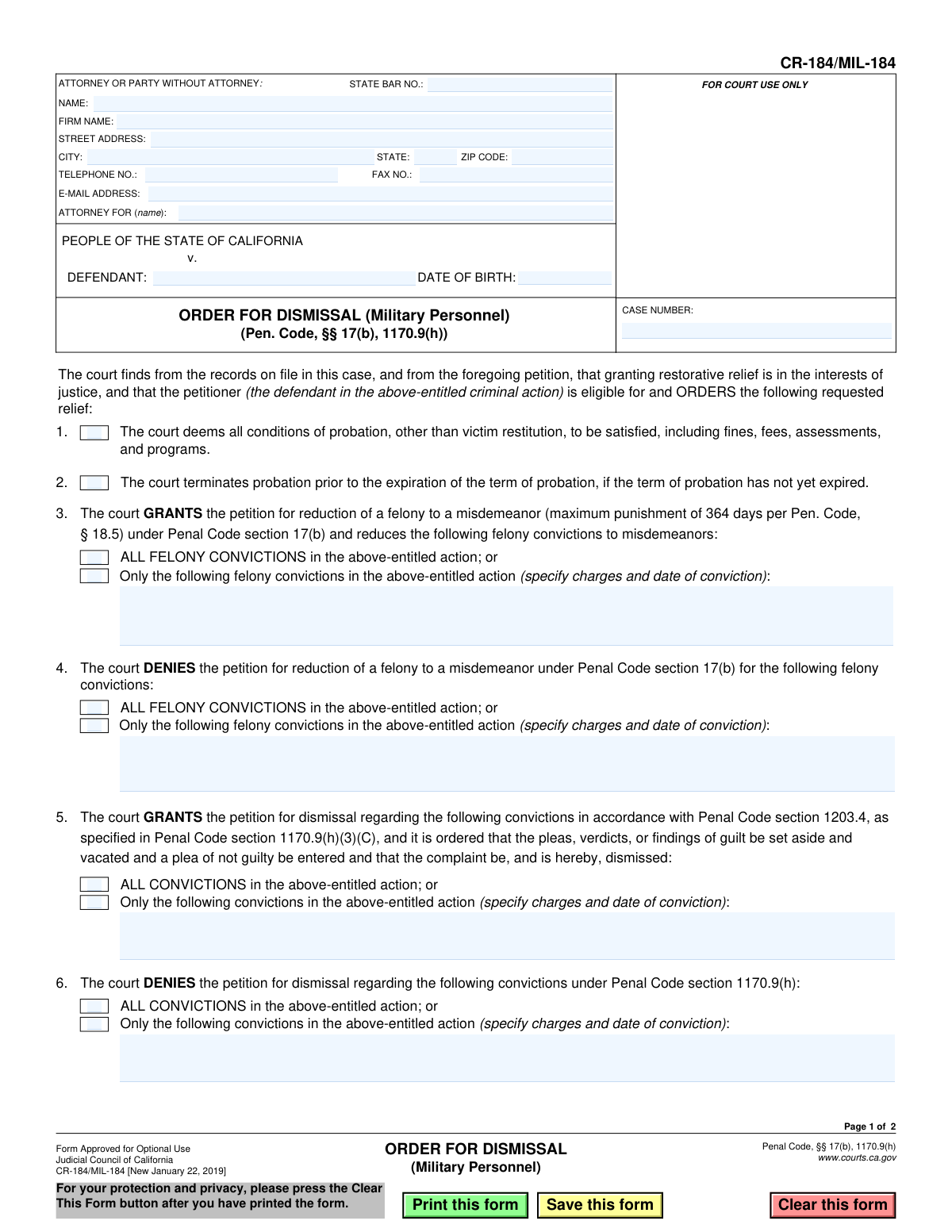
Yes! You can use AI to fill out Form CR-184/MIL-184, Order for Dismissal (Military Personnel)

Form CR-184/MIL-184, Order for Dismissal (Military Personnel), is a legal document issued by the Judicial Council of California to formalize a court's decision on a petition for restorative relief filed by military personnel. This order specifies whether the court grants or denies requests to reduce felony convictions to misdemeanors, dismiss convictions, terminate probation, and seal records under specific sections of the Penal Code. Today, this form can be filled out quickly and accurately using AI-powered services like Instafill.ai, which can also convert non-fillable PDF versions into interactive fillable forms.
CR-184/MIL-184 is part of the California court forms category on Instafill.
Our AI automatically handles information lookup, data retrieval, formatting, and form filling.
It takes less than a minute to fill out CR-184/MIL-184 using our AI form filling.
Securely upload your data. Information is encrypted in transit and deleted immediately after the form is filled out.

Form specifications

Form name: Form CR-184/MIL-184, Order for Dismissal (Military Personnel)
Number of fields: 41
Number of pages: 1
Language: English
main-image

Instafill Demo: How to fill out PDF forms in seconds with AI

How to Fill Out CR-184/MIL-184 Online for Free in 2026

Are you looking to fill out a CR-184/MIL-184 form online quickly and accurately? Instafill.ai offers the #1 AI-powered PDF filling software of 2026, allowing you to complete your CR-184/MIL-184 form in just 37 seconds or less.
Follow these steps to fill out your CR-184/MIL-184 form online using Instafill.ai:
  1. 1 Navigate to Instafill.ai and upload the CR-184/MIL-184 form or select it from the template library.
  2. 2 Enter the attorney or party information, including name, address, and contact details, in the top section.
  3. 3 Input the defendant's name, date of birth, and the corresponding case number in the caption area.
  4. 4 Indicate the court's orders by checking the appropriate boxes for satisfying probation conditions, terminating probation, granting or denying felony reduction, and granting or denying dismissal.
  5. 5 If specific convictions are affected, use the provided text fields to list the charges and dates of conviction as ordered by the court.
  6. 6 Check the boxes if the court orders the sealing of records and notification to the Department of Justice.
  7. 7 Once all court orders are accurately reflected, the judicial officer can date and sign the form before you download, save, or print the completed document.

Our AI-powered system ensures each field is filled out correctly, reducing errors and saving you time.

Why Choose Instafill.ai for Your Fillable CR-184/MIL-184 Form?

Speed

Complete your CR-184/MIL-184 in as little as 37 seconds.

Up-to-Date

Always use the latest 2026 CR-184/MIL-184 form version.

Cost-effective

No need to hire expensive lawyers.

Accuracy

Our AI performs 10 compliance checks to ensure your form is error-free.

Security

Your personal information is protected with bank-level encryption.

Frequently Asked Questions About Form CR-184/MIL-184

This form is a court order used by a judge to either grant or deny a petition from military personnel for restorative relief. This relief can include reducing a felony to a misdemeanor, dismissing a conviction, and sealing the related records.

While the petitioner (the defendant or their attorney) will fill in the case information at the top, the main body of the form is completed and signed by a judicial officer. It documents the court's decision on a previously filed petition.

Reducing a felony changes the conviction to a misdemeanor on your record. Dismissing a conviction sets aside the finding of guilt, a 'not guilty' plea is entered, and the complaint is dismissed, though some penalties and disabilities may remain.

No, a dismissal does not completely erase the conviction. As stated in Section 9, it can still be used as a prior conviction in future prosecutions and for certain administrative actions like suspending a driver's license.

No, it will not. Section 9(h) of the form explicitly states that a dismissal does not authorize a petitioner to own, possess, or have custody of any firearm.

Generally, you are not obligated to disclose the arrest or dismissed conviction. The only exception is if you are asked a direct question on a questionnaire or application for a law enforcement position.

Sealing your records means the police records of the arrest and court records of the case are no longer viewable by the general public. Access would require a specific court order.

Your DNA sample and profile will not be removed from the DNA data bank. Section 9(g) and Section 10 clarify that a dismissal does not release you from this requirement if you were convicted of a qualifying offense.

This form is the result of a petition, not the petition itself. You must first file a petition with the court under Penal Code section 1170.9, requesting this relief as a current or former member of the military.

You or your attorney must provide the case caption information at the top of the form. This includes your name, date of birth, case number, and your attorney's contact details.

Yes, services like Instafill.ai use AI to accurately auto-fill form fields with your personal and case information, which can save time and reduce errors.

You can use a service like Instafill.ai to fill out the form online. Simply upload the PDF, and the platform's AI will help you populate the required fields before you print it for submission.

If you have a non-fillable or 'flat' PDF, you can use a tool like Instafill.ai. It can convert the document into an interactive, fillable form that you can easily complete on your computer.

Compliance CR-184/MIL-184
Validation Checks by Instafill.ai

1
Case Number Consistency Across Pages
Checks that the 'CaseNumber_ft' field on page 1 is identical to the 'CaseNumber_ft' field on page 2. This is critical to ensure all pages of the order belong to the same legal case and prevents misfiling. If the numbers do not match, the document is considered corrupted or improperly assembled.
2
Defendant Name Completeness
Verifies that the 'Defendant_ft' field is not empty. The defendant's name is the primary identifier for the subject of the court order, and its absence makes the order legally unenforceable and invalid. Failure means the form cannot be processed until the defendant is identified.
3
Valid Defendant Date of Birth
Ensures the 'DefendantDOB_dt' field contains a valid date in a recognized format (e.g., MM/DD/YYYY). The validation should also check that the date is in the past and within a reasonable human lifespan to prevent data entry errors. An invalid date can cause issues with record matching and identity verification.
4
State Bar Number Format
Validates that the 'AttyBarNo_dc' field contains only numeric digits, as State Bar numbers are unique numerical identifiers for attorneys. Ensuring the correct format helps maintain accurate records of legal representation. An incorrectly formatted number could lead to misidentification of the attorney of record.
5
Mutually Exclusive Order for Reduction (Grant vs. Deny)
This check ensures the court's decision on the petition for reduction is unambiguous by verifying that Section 3 (GRANTS) and Section 4 (DENIES) are not selected simultaneously. An order cannot both grant and deny the same petition, as this creates a logical contradiction rendering the order void. If both are checked, the form is invalid.
6
Mutually Exclusive Order for Dismissal (Grant vs. Deny)
This check ensures the court's decision on the petition for dismissal is clear by verifying that Section 5 (GRANTS) and Section 6 (DENIES) are not selected at the same time. An order that both grants and denies the dismissal is logically inconsistent and legally invalid. The user must choose one or the other, but not both.
7
Conditional Requirement for Specific Convictions Text
Verifies that if the checkbox for 'Only the following...' is selected in sections 3, 4, 5, or 6, the corresponding text field for specifying charges is not empty. Without this specification, the order is incomplete and ambiguous about which convictions it applies to. Failure to provide details makes the order unenforceable.
8
Internal Exclusivity of 'All' vs. 'Specific' Convictions
Within any given section (3, 4, 5, or 6), this validation ensures that the 'ALL CONVICTIONS' checkbox and the 'Only the following...' checkbox are mutually exclusive. Selecting both would be contradictory, as the order cannot apply to both all convictions and only a specific subset. This prevents ambiguity in the scope of the court's order.
9
Order Date Validity
Validates that the 'Signature_dt' field, representing the date the judicial officer signs the order, is a valid date. It should not be a future date, as an order cannot be signed prospectively. This ensures the chronological accuracy and legal validity of the document's execution.
10
Minimum Order Selection
Checks that at least one of the primary order checkboxes (items 1 through 8) has been selected. A form submitted with no orders selected is an empty, meaningless document that serves no purpose. This validation ensures that the form represents an actual, affirmative decision by the court.
11
Attorney Email Address Format
Ensures the value entered in the 'Email_ft' field conforms to the standard format of an email address (e.g., '[email protected]'). This is important for ensuring that electronic communications and notifications regarding the case can be successfully delivered to the attorney. An invalid email address will result in communication failures.
12
Attorney ZIP Code Format
Validates that the 'AttyZip_ft' field contains a valid 5-digit or 9-digit (ZIP+4) US postal code. Correctly formatted ZIP codes are essential for the reliable delivery of physical mail and for data consistency in the court's record-keeping system. An invalid ZIP code will cause mail to be returned or misdirected.

Common Mistakes in Completing CR-184/MIL-184

Entering an Incorrect Case Number

Users frequently mistype or transpose digits in the case number. Since this number is the primary identifier for the entire legal action, even a small error can cause the order to be rejected or, worse, filed in the wrong case. To avoid this, meticulously double-check the case number against official court documents. AI-powered tools like Instafill.ai can help by saving case information and auto-populating it correctly on all required pages, reducing the risk of manual typos.

Misunderstanding the Form's Purpose

This is an 'Order' to be signed by a judge, not a 'Petition' to request action. A common mistake is for a self-represented litigant to fill this out and file it, believing they are asking for a dismissal. This will be rejected by the court clerk because it is not the correct initiating document. To avoid this, understand that this form is a proposed order that should accompany a formal petition (e.g., Form CR-180) which actually requests the relief.

Making Contradictory Selections

People sometimes check both a 'GRANT' box and a 'DENY' box for the same type of relief (e.g., checking boxes in both section 3 and 4). This is often due to confusion or rushing and makes the order legally ambiguous and invalid. A judge cannot sign a contradictory order, so it will be returned, causing significant delays. To prevent this, carefully read each section and select only the options that correspond to the single, desired outcome.

Forgetting to Fill the Header on Page 2

It is a very common oversight to leave the case number and defendant name fields in the header of the second page blank. Filers often focus on the main content and forget to repeat this information. If the pages of the document are separated during processing, the second page becomes an anonymous, unusable document, which can lead to the entire filing being rejected. Using a tool like Instafill.ai can prevent this by automatically populating recurring information across all pages of a form after it is entered once.

Failing to Specify Charges When Required

Sections 3, 4, 5, and 6 have an option to select 'Only the following...convictions' which requires the user to list the specific charges in a text box. A frequent error is checking this box but then failing to write in the charges. This renders the order incomplete and unenforceable, as the court does not know which convictions the order applies to. Always double-check that any selection requiring specification is followed by the necessary detailed information.

Using Vague Charge Descriptions

When required to specify charges, users may write something generic like 'the felony charge' instead of the required legal citation. This creates ambiguity and can lead to rejection or future legal challenges. The description must be precise to be effective for agencies like the Department of Justice. Always use the full Penal Code section, count number, and date of conviction as listed on the official judgment of conviction.

Forgetting to Request Record Sealing

A petitioner may successfully have their conviction dismissed (Section 5) but fail to have the corresponding proposed order include a request to seal the records (Sections 7 and 8). Many people assume dismissal automatically seals the record, which is not true. This oversight means the arrest and court records can remain publicly visible on background checks, defeating a primary benefit of the dismissal. To avoid this, ensure the boxes for sealing are explicitly checked if that is part of the desired relief.

Incomplete or Incorrect Attorney/Party Information

The top section for the attorney or party's information is often filled out hastily, leading to missing State Bar numbers, incorrect phone numbers, or typos in the address. This can delay the process, as court clerks may be unable to contact the filer with questions or may reject the document for being incomplete. To avoid this, carefully proofread all contact information before submission. If the form is a non-fillable PDF, a tool like Instafill.ai can convert it to a fillable version and help store and populate this information accurately.

Incorrectly Identifying the 'Attorney For' Party

In the 'ATTORNEY FOR (name):' field, attorneys sometimes mistakenly write their own name or their firm's name instead of the name of their client (the Defendant). This is a common slip-up caused by the field's placement within the attorney information block. While a minor clerical error, it appears unprofessional and can cause confusion for court staff, potentially requiring correction. The field should always contain the name of the party being represented.

Entering Incorrect Defendant Information

Misspelling the defendant's name or entering an incorrect date of birth is a critical error. This information is used to update the person's official criminal record with agencies like the DOJ. An incorrect name or DOB on the order can cause it to fail to match the proper record, meaning the dismissal may not be correctly applied, and the conviction could still appear on background checks. Always verify the defendant's full legal name and date of birth from official source documents.
Saved over 80 hours a year

“I was never sure if my IRS forms like W-9 were filled correctly. Now, I can complete the forms accurately without any external help.”

Kevin Martin Green

Your data stays secure with advanced protection from Instafill and our subprocessors

Robust compliance program

Transparent business model

You’re not the product. You always know where your data is and what it is processed for.

ISO 27001, HIPAA, and GDPR

Our subprocesses adhere to multiple compliance standards, including but not limited to ISO 27001, HIPAA, and GDPR.

Security & privacy by design

We consider security and privacy from the initial design phase of any new service or functionality. It’s not an afterthought, it’s built-in, including support for two-factor authentication (2FA) to further protect your account.

Fill out CR-184/MIL-184 with Instafill.ai

Worried about filling PDFs wrong? Instafill securely fills form-cr-184mil-184-order-for-dismissal-military-personnel forms, ensuring each field is accurate.