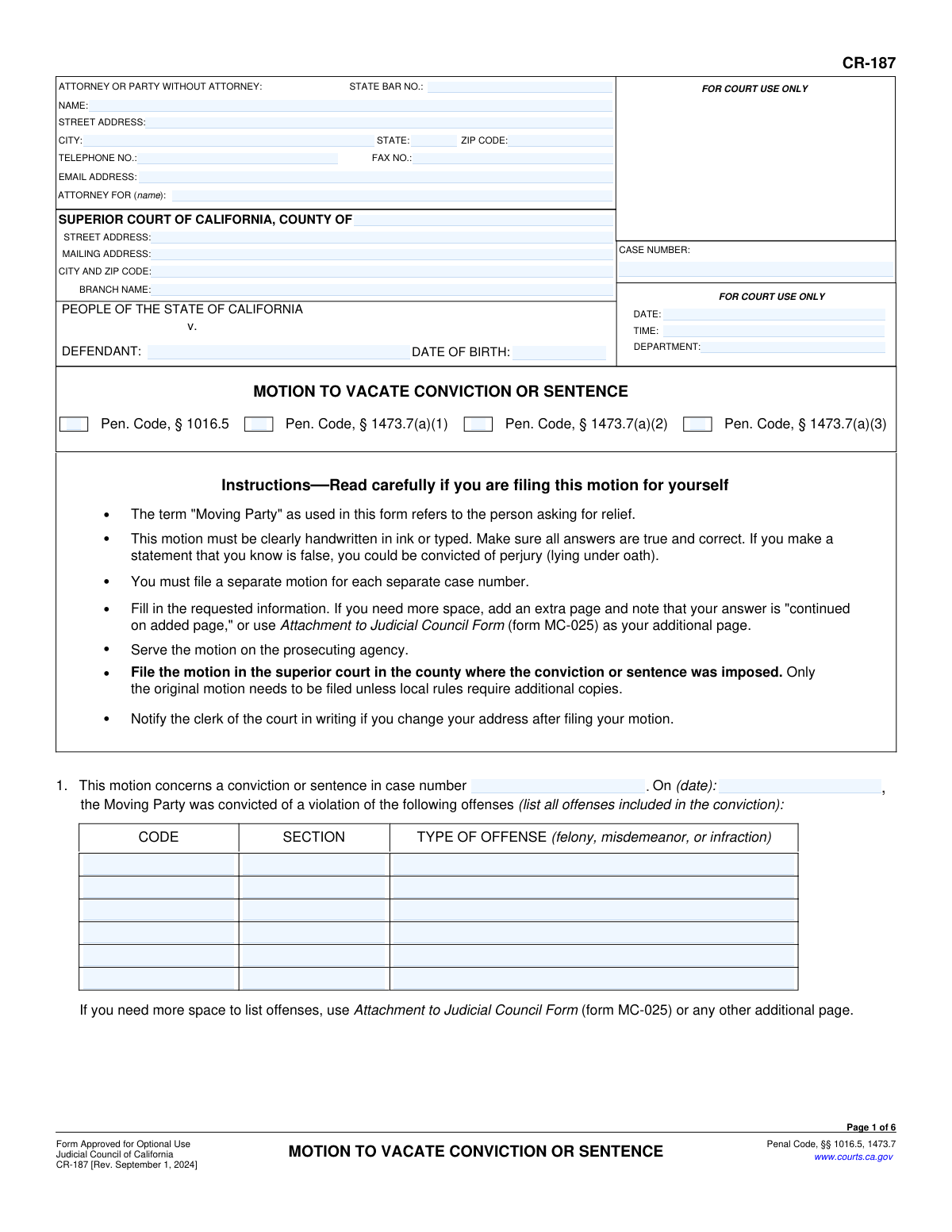
Yes! You can use AI to fill out Form CR-187, Motion to Vacate Conviction or Sentence

Form CR-187 is a legal document used in California for a person to petition the court to cancel (vacate) a prior criminal conviction or sentence. It is essential for individuals who are no longer in custody but are facing consequences, such as immigration issues, due to a conviction they believe was legally invalid, resulted from prejudicial error, or where new evidence of innocence has emerged. Today, this form can be filled out quickly and accurately using AI-powered services like Instafill.ai, which can also convert non-fillable PDF versions into interactive fillable forms.
CR-187 is part of the California court forms category on Instafill.
Our AI automatically handles information lookup, data retrieval, formatting, and form filling.
It takes less than a minute to fill out CR-187 using our AI form filling.
Securely upload your data. Information is encrypted in transit and deleted immediately after the form is filled out.

Form specifications

Form name: Form CR-187, Motion to Vacate Conviction or Sentence
Number of fields: 102
Number of pages: 1
Language: English
main-image

Instafill Demo: How to fill out PDF forms in seconds with AI

How to Fill Out CR-187 Online for Free in 2026

Are you looking to fill out a CR-187 form online quickly and accurately? Instafill.ai offers the #1 AI-powered PDF filling software of 2026, allowing you to complete your CR-187 form in just 37 seconds or less.
Follow these steps to fill out your CR-187 form online using Instafill.ai:
  1. 1 Navigate to Instafill.ai and upload or select Form CR-187, Motion to Vacate Conviction or Sentence.
  2. 2 Enter your personal details, attorney information (if any), and the specific court and case information into the designated fields.
  3. 3 Select the appropriate grounds for your motion by checking the boxes for the relevant Penal Code sections, such as § 1016.5, § 1473.7(a)(1), (a)(2), or (a)(3).
  4. 4 Carefully provide the detailed 'Supporting Facts' for your claim, explaining the circumstances, any prejudicial errors, new evidence, or immigration consequences as required by the form.
  5. 5 Complete the sections regarding reasonable diligence, requests for counsel, and your presence at the hearing, attaching any necessary supporting documents or forms like CR-105.
  6. 6 Review all entered information for accuracy and completeness before generating the final document.
  7. 7 Download the completed form, sign and date it, then serve it on the prosecuting agency and file it with the superior court where the conviction occurred.

Our AI-powered system ensures each field is filled out correctly, reducing errors and saving you time.

Why Choose Instafill.ai for Your Fillable CR-187 Form?

Speed

Complete your CR-187 in as little as 37 seconds.

Up-to-Date

Always use the latest 2026 CR-187 form version.

Cost-effective

No need to hire expensive lawyers.

Accuracy

Our AI performs 10 compliance checks to ensure your form is error-free.

Security

Your personal information is protected with bank-level encryption.

Frequently Asked Questions About Form CR-187

This form is used to formally ask a California court to cancel (vacate) a prior criminal conviction or sentence. It is intended for individuals who are no longer in custody for that case but believe the conviction is legally invalid for specific reasons outlined in the form.

You should file this motion if you have a past California conviction that you believe is legally invalid due to issues like improper advice on immigration consequences, newly discovered evidence of innocence, or racial bias in your case.

The form covers several grounds, including the court's failure to advise on immigration consequences (Penal Code § 1016.5), legal invalidity due to prejudicial error (§ 1473.7(a)(1)), newly discovered evidence of actual innocence (§ 1473.7(a)(2)), and convictions based on racial bias (§ 1473.7(a)(3)).

You must provide a detailed, factual story explaining your situation, not just legal conclusions. For example, state exactly what happened, who was involved, and how it led to the error or injustice you are claiming.

Yes, you should attach any available documents that support your claim, such as declarations, court transcripts, notices from immigration authorities, or any other relevant records. If you are requesting a lawyer, you must also attach Form CR-105.

You must file the motion in the superior court in the county where the conviction was originally imposed. You are also required to serve a copy of the motion on the prosecuting agency, such as the District Attorney's office.

No, the instructions clearly state that you must file a separate motion for each separate case number you wish to challenge.

You can request a court-appointed lawyer by checking the box in Section 6. To qualify, you must also complete and attach Defendant's Financial Statement (Form CR-105) to demonstrate to the court that you are indigent.

Not necessarily. In Section 7, you can request that the court hold the hearing without your personal presence if you are in custody, outside the U.S., or for another specified reason.

While there isn't a strict deadline, the court can deny your motion if there has been an unreasonable delay in filing it. You should be prepared to explain why you could not have brought the motion earlier.

A motion under § 1016.5 is specifically for when the court failed to advise you about immigration consequences. A motion under § 1473.7(a)(1) is broader, covering any prejudicial error that affected your ability to understand the immigration consequences, which can include ineffective assistance from your attorney.

Yes, services like Instafill.ai use AI to accurately auto-fill form fields with your basic information, which saves time and helps avoid mistakes. You will still need to provide the specific facts and arguments for your case.

Simply upload the CR-187 PDF to the Instafill.ai platform. The AI will make the form interactive, allowing you to fill it out online, save your progress, and download the completed document.

If you have a non-fillable or 'flat' PDF, you can use a service like Instafill.ai. It can convert the static document into an interactive, fillable form that you can easily complete on your computer.

Compliance CR-187
Validation Checks by Instafill.ai

1
Case Number Consistency
Ensures the case number entered in the main header ('CaseNumber_ft') is present and matches the case number entered in the body of the form (item 1, 'MotionCaseno'). This is critical for ensuring the motion is filed and associated with the correct legal case. A mismatch could lead to rejection of the filing or significant delays.
2
Mandatory Grounds for Motion
Verifies that at least one of the primary motion grounds checkboxes is selected (Pen. Code, § 1016.5, § 1473.7(a)(1), § 1473.7(a)(2), or § 1473.7(a)(3)). A motion cannot proceed without a stated legal basis. If no ground is selected, the form is incomplete and cannot be processed by the court.
3
Conditional Requirement for Supporting Facts
Checks that if a motion ground checkbox (e.g., section 2, 3, 4, or 5) is selected, the corresponding 'Supporting Facts' text area is not empty. This validation ensures that every claim is substantiated with a narrative explanation as required by the form. Failure to provide facts for a selected ground makes the claim unsubstantiated.
4
Conviction Date Logical Validity
Validates that the conviction date entered in item 1 ('DateField7') is a valid date in the past and occurs before the form's signature date ('DateField8'). This check prevents data entry errors like future dates or impossible timelines. An invalid conviction date would call the entire motion into question.
5
Defendant Date of Birth Format
Ensures the 'DefendantDOB_dt' field contains a valid and plausible date in MM/DD/YYYY format. The validation should check that the date is not in the future and represents a reasonable age for an adult defendant. This is important for correct identification of the party.
6
State Bar Number for Attorneys
If the 'ATTORNEY FOR' field ('Attyforname') or the attorney name field ('AttyName_ft') is filled, this check ensures the 'STATE BAR NO.' field is also filled and contains a numeric value. This is crucial for verifying the credentials and good standing of the legal professional submitting the form. An invalid or missing number could lead to rejection.
7
Mutually Exclusive Notice Selections in Section 3c
In section 3c, this check ensures that a user does not select both the 'a' and 'b' options within the same item (e.g., checking both '3c(1)(a)' and '3c(1)(b)'). These options are contradictory. This validation prevents logical inconsistencies in the filer's declaration about receiving immigration notices.
8
Conditional Date Entry for Immigration Notices
Verifies that if checkbox '3c(1)(a)' is checked, the corresponding date field ('DateField5') is filled. Likewise, if '3c(2)(a)' is checked, its date field ('DateField6') must be filled. This ensures that when a user claims to have received a notice, they provide the mandatory date of receipt.
9
Conditional Requirement for Judge's Name in Section 5e
If the 'Judicial Conflict' checkbox ('judicialconflict') in section 5e is checked, this validation confirms that the 'judge's name' text field ('judgename') is populated. A claim of judicial bias is incomplete and unactionable without identifying the specific judge in question.
10
Conditional Requirement for 'Other' Hearing Presence
In section 7, if the 'other' checkbox (7d) is selected as the reason for not being present at the hearing, the corresponding 'Specifyreason' text field must be filled out. This prevents an ambiguous selection and ensures the court receives a clear explanation for the request.
11
Completeness of Offense Details Table
For each row in the offense table in section 1, if any one of the fields (Code, Section, Type of Offense) is filled, this check ensures all three fields in that same row are also filled. This rule enforces the submission of complete data for each offense being challenged, preventing ambiguity.
12
Mandatory Signature Date and Name
Validates that the signature date ('DateField8') and the printed name of the moving party or attorney ('TypeName') are both filled out at the end of the form. These fields are legally required to execute the document. The form is invalid without a signature date and the signer's name.
13
Newly Discovered Evidence Date Logic
Ensures the date of evidence discovery in section 4a(2) ('evidenceDate') is logically sound. The date must be on or after the conviction date from section 1 ('DateField7') and on or before the form's signature date ('DateField8'). This prevents contradictory or impossible timelines in the motion's narrative.
14
Racial Justice Act Section Completeness
If the main checkbox for a Racial Justice Act claim (section 5) is checked, this validation verifies that at least one 'Filing Date' checkbox (5a) and at least one 'Grounds for Relief' checkbox (5b) are also selected. This ensures the claim is properly framed with both its timeliness and legal basis clearly stated.

Common Mistakes in Completing CR-187

Using an Incorrect or Incomplete Case Number

Filers often enter the case number with typos, omit characters, or use a number from a different legal matter. The form explicitly requires a separate motion for each case number, a rule people frequently miss. An incorrect case number will cause the court clerk to reject the filing or lead to significant processing delays as the court cannot locate the correct record. To avoid this, carefully transcribe the full case number from official court documents for the conviction you are challenging.

Providing Conclusions Instead of Supporting Facts

The form asks filers to 'Tell your story' but cautions them to 'state facts, not conclusions.' Many people write legal arguments or emotional statements like 'my attorney was ineffective' instead of detailing the specific facts, actions, or conversations that support this claim. The court needs a factual basis (who, what, when, where) to grant relief, and failing to provide one can cause the motion to be denied for being unsubstantiated. Focus on a clear, chronological account of events.

Listing Incomplete or Vague Offense Information

In Section 1, the form requires the specific code, section, and type (felony/misdemeanor) for each offense. Filers often provide generic descriptions like 'drug charge' instead of the required 'Health & Safety Code 11350(a)'. This ambiguity forces the court and prosecution to waste time identifying the conviction in question. This can delay the case or lead to confusion if there are multiple similar charges in the record. Always refer to the original Judgment of Conviction to get the exact statutory details.

Selecting Inapplicable or Contradictory Grounds for Relief

The motion provides several distinct legal grounds (e.g., §1016.5, §1473.7) for vacating a conviction, each with specific requirements. A common error is checking a box that does not align with the facts provided in the narrative sections. For example, checking the box for 'newly discovered evidence' when the narrative only discusses ineffective assistance of counsel. This mismatch can lead to a summary denial of the motion because the stated facts do not legally support the chosen grounds.

Incorrectly Identifying the Superior Court

People often mistakenly enter the details of the court in their current county of residence, rather than the county where the conviction occurred. They may also be unsure of the correct branch name or mailing address versus the street address. Filing a motion in the wrong court jurisdiction will result in an automatic rejection, wasting time and filing fees. The motion must be filed in the superior court where the original sentence was imposed.

Ignoring the 'Reasonable Diligence' Requirement

Section 3c asks the filer to explain any delay in bringing the motion, which is a critical legal requirement. Many people either skip this section or provide a vague answer, not realizing that an unreasonable delay can be grounds for denial. The court needs to know why the motion could not have been brought sooner after the filer became aware of the grounds for it. Failing to adequately address this can cause an otherwise meritorious motion to be denied as untimely.

Requesting Counsel Without Attaching the Required Financial Form

Section 6 allows the filer to request a court-appointed attorney, but it explicitly requires attaching a completed Form CR-105 (Defendant's Financial Statement). A frequent mistake is checking the box to request counsel but failing to find, complete, and attach this separate, mandatory form. This oversight will cause the request for counsel to be denied or ignored, forcing the filer to proceed without legal representation or causing major delays while they correct the error.

Failing to Attach Supporting Evidence and Declarations

Multiple sections of the form instruct the filer to attach 'declarations, relevant records, transcripts, or other documents,' yet many filers rely solely on the narrative they write in the text boxes. A motion without supporting evidence is just an unverified claim and is far less persuasive to a judge. Forgetting to attach immigration notices, letters from attorneys, or sworn declarations from witnesses severely weakens the motion's chance of success. AI-powered tools like Instafill.ai can help manage and attach these documents to the correct submission.

Submitting an Unsigned or Undated Form

In the process of completing a complex, multi-page legal document, it is surprisingly common for the filer to forget the final step: signing and dating the form on page 6. An unsigned motion is legally invalid and has no effect. The court clerk will reject it immediately, halting the entire process and potentially causing the filer to miss important deadlines. Always perform a final review of the entire document, with special attention to the signature block, before filing.

Using a Non-Fillable PDF and Submitting Illegible Handwriting

This form is often found online as a non-fillable PDF, forcing people to print it and fill it out by hand. This frequently leads to illegible handwriting, which can cause the clerk to misenter critical data like names or case numbers, or make it impossible for the judge to understand the supporting facts. If the court cannot read the motion, it may be rejected or denied. To avoid this, use a tool like Instafill.ai that can convert a flat PDF into a fillable version, allowing you to type your answers clearly and professionally.
Saved over 80 hours a year

“I was never sure if my IRS forms like W-9 were filled correctly. Now, I can complete the forms accurately without any external help.”

Kevin Martin Green

Your data stays secure with advanced protection from Instafill and our subprocessors

Robust compliance program

Transparent business model

You’re not the product. You always know where your data is and what it is processed for.

ISO 27001, HIPAA, and GDPR

Our subprocesses adhere to multiple compliance standards, including but not limited to ISO 27001, HIPAA, and GDPR.

Security & privacy by design

We consider security and privacy from the initial design phase of any new service or functionality. It’s not an afterthought, it’s built-in, including support for two-factor authentication (2FA) to further protect your account.

Fill out CR-187 with Instafill.ai

Worried about filling PDFs wrong? Instafill securely fills form-cr-187-motion-to-vacate-conviction-or-sentence forms, ensuring each field is accurate.