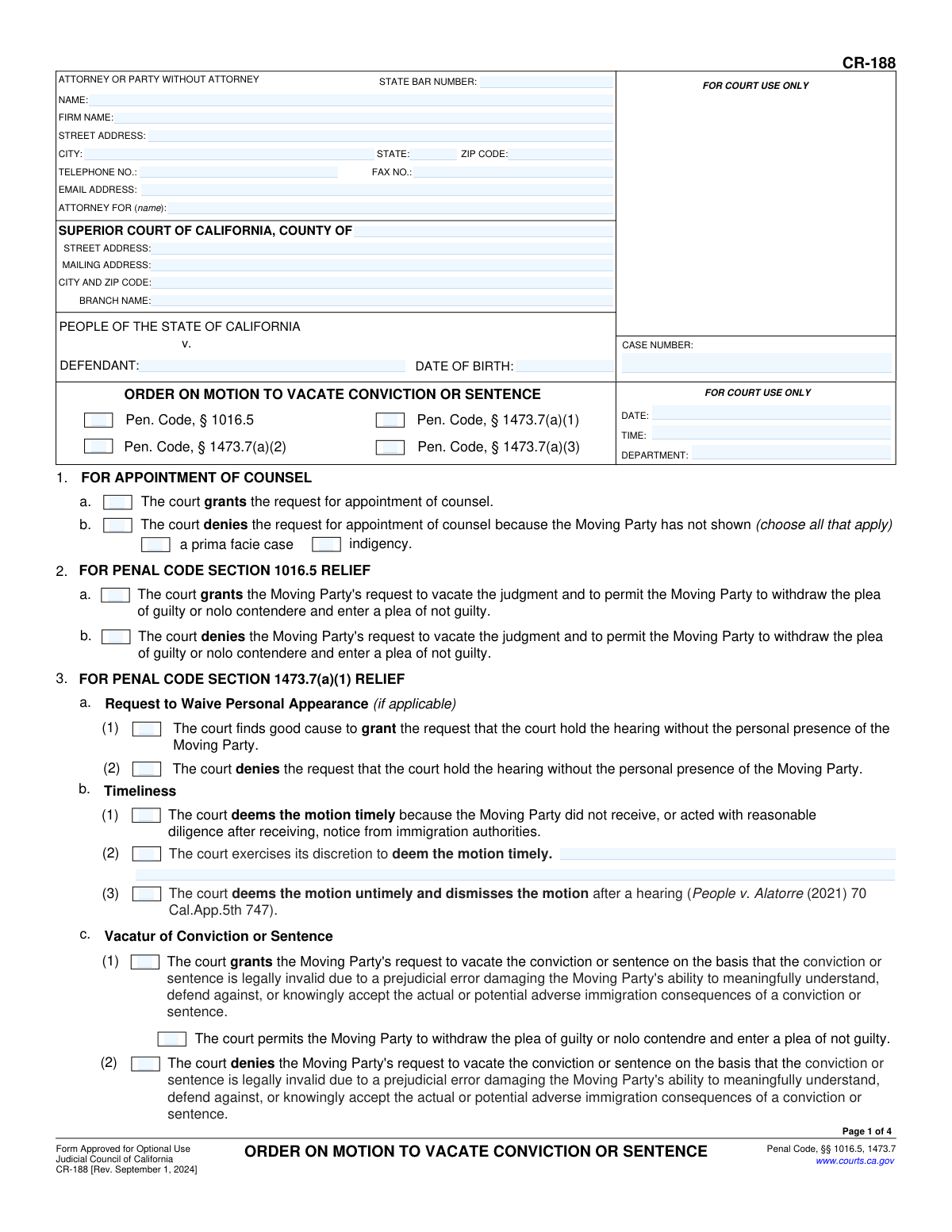
Yes! You can use AI to fill out Form CR-188, Order on Motion to Vacate Conviction or Sentence

Form CR-188, Order on Motion to Vacate Conviction or Sentence, is a legal document used by California courts to formalize a judge's decision on a request to overturn a criminal conviction or sentence. This order is crucial as it documents whether the motion is granted or denied based on specific legal grounds, such as prejudicial error related to immigration consequences, new evidence of innocence, or findings of racial bias. Today, this form can be filled out quickly and accurately using AI-powered services like Instafill.ai, which can also convert non-fillable PDF versions into interactive fillable forms.
CR-188 is part of the California court forms category on Instafill.
Our AI automatically handles information lookup, data retrieval, formatting, and form filling.
It takes less than a minute to fill out CR-188 using our AI form filling.
Securely upload your data. Information is encrypted in transit and deleted immediately after the form is filled out.

Form specifications

Form name: Form CR-188, Order on Motion to Vacate Conviction or Sentence
Number of fields: 101
Number of pages: 1
Language: English
main-image

Instafill Demo: How to fill out PDF forms in seconds with AI

How to Fill Out CR-188 Online for Free in 2026

Are you looking to fill out a CR-188 form online quickly and accurately? Instafill.ai offers the #1 AI-powered PDF filling software of 2026, allowing you to complete your CR-188 form in just 37 seconds or less.
Follow these steps to fill out your CR-188 form online using Instafill.ai:
  1. 1 Navigate to Instafill.ai and upload or select the CR-188 form.
  2. 2 Provide the case information, including attorney details, court name, case number, and defendant information, in the designated fields at the top of the form.
  3. 3 Indicate the court's ruling on the appointment of counsel by checking the appropriate box in section 1.
  4. 4 Select the relevant Penal Code section(s) under which the motion was decided and fill out the corresponding sections (2, 3, 4, or 5).
  5. 5 For the applicable section, check the boxes to accurately reflect the court's findings on timeliness, personal appearance waivers, and the final decision to grant or deny the motion.
  6. 6 If the motion is granted, specify the details of the vacatur and any remedies ordered, such as allowing a plea withdrawal or modifying the judgment.
  7. 7 Once all rulings are recorded, have the judicial officer date and sign the form, then review the entire document for accuracy before finalizing.

Our AI-powered system ensures each field is filled out correctly, reducing errors and saving you time.

Why Choose Instafill.ai for Your Fillable CR-188 Form?

Speed

Complete your CR-188 in as little as 37 seconds.

Up-to-Date

Always use the latest 2026 CR-188 form version.

Cost-effective

No need to hire expensive lawyers.

Accuracy

Our AI performs 10 compliance checks to ensure your form is error-free.

Security

Your personal information is protected with bank-level encryption.

Frequently Asked Questions About Form CR-188

Form CR-188, 'Order on Motion to Vacate Conviction or Sentence,' is a legal document used by a California judge to record their decision on a motion to cancel a prior conviction or sentence. It is not the motion itself, but the official court order that results from the hearing.

A judicial officer (a judge) fills out and signs this form after a hearing. The defendant or their attorney files the initial motion, and this form documents the court's final ruling on that motion.

No, this is the order form the judge uses to state their decision. To start the process, you or your attorney must file a separate motion, such as Form CR-185 ('Motion to Vacate Conviction or Sentence'), to request that the court consider your case.

To 'vacate' a conviction means to legally cancel or set it aside, as if it never happened. If the court grants the motion, it may allow the person to withdraw their original guilty plea and enter a new plea of not guilty.

These sections represent different legal grounds for vacating a conviction. For example, §1016.5 and §1473.7(a)(1) relate to immigration consequences, §1473.7(a)(2) is for newly discovered evidence of innocence, and §1473.7(a)(3) addresses racial bias in the case.

This means the court has found that you cannot afford an attorney (are indigent) and have presented a basic case, so the court will appoint a lawyer to represent you in your motion to vacate the conviction.

Both relate to immigration consequences of a plea. Section 1016.5 is for when the court failed to advise you of these consequences, while Section 1473.7(a)(1) is broader and covers prejudicial errors that prevented you from understanding the immigration risks, which could include ineffective advice from your lawyer.

This allows the court to hold the hearing on your motion without you being physically present. This is crucial for individuals who may be out of the state or country, or are in custody elsewhere and cannot attend.

The court must determine if you filed your motion with reasonable diligence after learning of the grounds for it, such as receiving a notice from immigration authorities or discovering new evidence. Failing to file promptly without a good reason can cause your motion to be dismissed.

You will need your personal information, the case number of the conviction you want to vacate, the date of the conviction, and the specific legal reasons and facts that support your request to have the conviction vacated.

The judge will check the appropriate boxes on Form CR-188 to grant your request, and the conviction will be legally invalidated. The court may then allow you to withdraw your original plea, dismiss the charges, or order other remedies depending on your case.

No, because this form is completed by the court, not the defendant. However, AI-powered services like Instafill.ai can be very helpful in preparing the initial motion you must file to start this process, saving time by accurately auto-filling your information.

While you can't use it for this specific order form, Instafill.ai can help you prepare the necessary motion forms online. It allows you to easily enter your case information and other required data to generate a completed motion ready for filing with the court.

Services like Instafill.ai can convert flat, non-fillable PDFs into interactive, fillable forms. This allows you to type your information directly into the fields online, ensuring a clean, legible, and professional-looking document for the court.

Compliance CR-188
Validation Checks by Instafill.ai

1
Case Number Format and Presence
This check verifies that the Case Number field is not empty and conforms to the standard format for the specific California Superior Court. It is a critical identifier for linking the order to the correct legal case. If the case number is missing or malformed, the document cannot be correctly filed or processed, leading to significant administrative delays and potential legal complications.
2
Header and Footer Data Consistency
Validates that the 'DEFENDANT' name and 'CASE NUMBER' are identical across all pages where they appear (Pages 1, 2, 3, and 4). This is crucial for data integrity and ensures that if pages are separated, they can still be correctly associated with the case. A mismatch could lead to incorrect filing or misinterpretation of the document.
3
State Bar Number Validation
Ensures the 'STATE BAR NUMBER' field, if provided, contains only numeric digits and is a plausible length for a California State Bar number. This validates the identity and credentials of the attorney submitting the form. An invalid number could indicate a data entry error or an unauthorized person attempting to file, so the system should flag it for review.
4
Defendant Date of Birth Validity
This check ensures the 'DATE OF BIRTH' field contains a valid date in a recognized format (e.g., MM/DD/YYYY) and that the date is logically sound, meaning it is in the past and not a future date. This helps confirm the identity of the defendant and prevents data entry errors. An invalid or future date would be rejected, requiring the user to correct the entry.
5
Conditional Requirement for Counsel Denial Reason
This validation checks that if '1.b. The court denies the request for appointment of counsel' is selected, at least one of the subsequent reason checkboxes ('a prima facie case' or 'indigency') must also be checked. This ensures the order is legally complete by providing the required basis for the denial. Failure to provide a reason would render the order incomplete and require correction.
6
Mutually Exclusive Ruling Selection
Verifies that for any given section with a grant/deny option (e.g., section 2.a and 2.b), only one of the two checkboxes is selected. The court cannot simultaneously grant and deny the same request. This check prevents logical contradictions in the court's order. If both are selected, an error message should prompt the user to choose only one.
7
Conditional Text for Granted Disclosure
If checkbox '5.d.(1)' is selected, granting a request for disclosure of records, this validation ensures the associated text field is not empty. The order must specify what records or information are to be disclosed. An empty field would make the order unenforceable, so the system must require this information to be entered before submission.
8
Conditional Date for Minute Order Reference
This check ensures that if checkbox '5.e.(2)(a)' or '5.e.(3)(a)' is selected, which refers to a court minute order, the corresponding date field must be populated with a valid date. The date is essential for locating the referenced order. If the checkbox is marked but the date is missing, the form submission should be blocked until the date is provided.
9
Logical Dependency for Sentence Severity Finding
Validates that if checkbox '5.e.(1)(d)' is selected (regarding a longer or more severe sentence), at least one of its sub-options, '(i)' or '(ii)', must also be checked. The main finding requires a specific basis to be legally sufficient. This check ensures the order is precise and complete in its reasoning, preventing an ambiguous ruling.
10
Overall Ruling Completeness
Ensures that at least one dispositive ruling checkbox from sections 1, 2, 3, 4, or 5 has been selected on the form. As this is an 'Order,' it must contain a decision from the court. A form with no rulings checked is incomplete and serves no purpose, so this check prevents the submission of a blank or non-dispositive order.
11
Judicial Officer Signature Date Logic
Verifies that the final 'Date' field next to the Judicial Officer's signature line is populated and is not a date in the future. This date signifies when the order was officially made. The system should flag a missing date or a future date as an error, as it is a critical component for establishing the order's effective date.
12
Mutually Exclusive Timeliness Ruling
For section '3.b. Timeliness,' this validation ensures that only one of the three possible rulings—(1) timely, (2) discretionarily timely, or (3) untimely—is selected. These are mutually exclusive legal findings. The system should prevent the user from selecting more than one of these options to avoid creating a logically inconsistent court order.

Common Mistakes in Completing CR-188

Inaccurate Case or Court Information

Filers often enter the wrong case number, misspell the defendant's name, or list an incorrect court branch. These errors occur due to typos or referencing the wrong document. This is a critical mistake that can lead to the order being rejected by the clerk, misfiled in the wrong case, or being voided, causing significant delays in the legal process. Always double-check the case number and defendant's name against the original court filings.

Forgetting to Populate Headers on Subsequent Pages

The 'DEFENDANT' and 'CASE NUMBER' fields are repeated at the top of pages 2, 3, and 4, but are frequently left blank after the first page. This happens because filers focus on the body of the form and forget these repetitive elements. If the pages become separated, the document becomes incomplete and can be rejected, delaying the judge's signing of the order. Using a tool like Instafill.ai can prevent this by automatically populating recurring information across all pages.

Contradictory Checkbox Selections

This form contains many mutually exclusive options, such as granting (e.g., 2a) and denying (e.g., 2b) the same relief. Filers sometimes check both boxes out of confusion or haste, making the proposed order ambiguous and legally unenforceable. An order with contradictory instructions requires correction and resubmission, wasting time for both the filer and the court. Carefully read each section to ensure you are only selecting one option where choices are mutually exclusive.

Incomplete Conditional Selections

Many sections require a secondary selection after a primary checkbox is marked. For instance, checking box 5e(2) to grant a request requires also checking at least one of the sub-options (a-e) to specify the remedy. People often check the main box but forget the required follow-up, rendering the order incomplete. This forces the court to return the document for clarification, halting progress on the case.

Leaving Required Explanation Fields Blank

The form includes several text fields where the court's basis for a ruling or specific remedies must be detailed (e.g., 4c(3), 5e(5)). Parties preparing a proposed order may leave these blank, assuming the judge will fill them in. However, a proposed order should be complete, and leaving these fields empty makes the order legally insufficient and likely to be rejected. Ensure all required narrative fields are filled with precise, legally sound language.

Incorrectly Identifying the Filing Party

In the top section, a person representing themselves (in pro per) may get confused, putting 'N/A' in the State Bar Number field and leaving the 'ATTORNEY FOR' line blank. This can cause processing confusion. A self-represented party should enter their own name and contact information, and write 'In Pro Per' or their own name on the 'ATTORNEY FOR' line to make their status clear. AI-powered tools like Instafill.ai can help correctly format this section based on user type.

Filling Out Irrelevant Penal Code Sections

The form is divided into sections for different types of relief under Penal Code §§ 1016.5, 1473.7(a)(1), (a)(2), and (a)(3). A common error is to fill out parts of a section that does not apply to the motion being ruled on. This happens from a misunderstanding of the form's structure. A proposed order should only address the specific legal grounds raised in the motion, and filling in extra sections creates confusion and requires correction.

Omitting Defendant's Date of Birth

The 'DATE OF BIRTH' field on the first page is often overlooked but is a crucial identifier for the defendant. Its absence can slow down processing and accurate record-keeping, especially in a system with many individuals who may have similar names. This simple omission can lead to administrative delays in linking the order to the correct person's file. Always ensure this basic but vital piece of data is entered correctly.

Misunderstanding the Form's Purpose

Because this is an 'Order,' it is meant to be signed by a judge to formalize a court ruling. However, parties or their attorneys often prepare it as a 'Proposed Order.' A mistake occurs when a party fills it out as if it were their initial motion, checking boxes to argue their case rather than to reflect a potential ruling. This results in a document that is not useful to the court and demonstrates a misunderstanding of the legal process.

Failing to Select a Timeliness Finding

Sections 3b, 4b, and 5c require the court to make a specific finding on whether the motion was filed in a timely manner. Preparers of a proposed order sometimes skip over these procedural checkboxes, focusing only on the merits of the case. An order that lacks a required finding on a procedural prerequisite like timeliness is legally defective and will not be signed by the judge until it is corrected.
Saved over 80 hours a year

“I was never sure if my IRS forms like W-9 were filled correctly. Now, I can complete the forms accurately without any external help.”

Kevin Martin Green

Your data stays secure with advanced protection from Instafill and our subprocessors

Robust compliance program

Transparent business model

You’re not the product. You always know where your data is and what it is processed for.

ISO 27001, HIPAA, and GDPR

Our subprocesses adhere to multiple compliance standards, including but not limited to ISO 27001, HIPAA, and GDPR.

Security & privacy by design

We consider security and privacy from the initial design phase of any new service or functionality. It’s not an afterthought, it’s built-in, including support for two-factor authentication (2FA) to further protect your account.

Fill out CR-188 with Instafill.ai

Worried about filling PDFs wrong? Instafill securely fills form-cr-188-order-on-motion-to-vacate-conviction-or-sentence forms, ensuring each field is accurate.