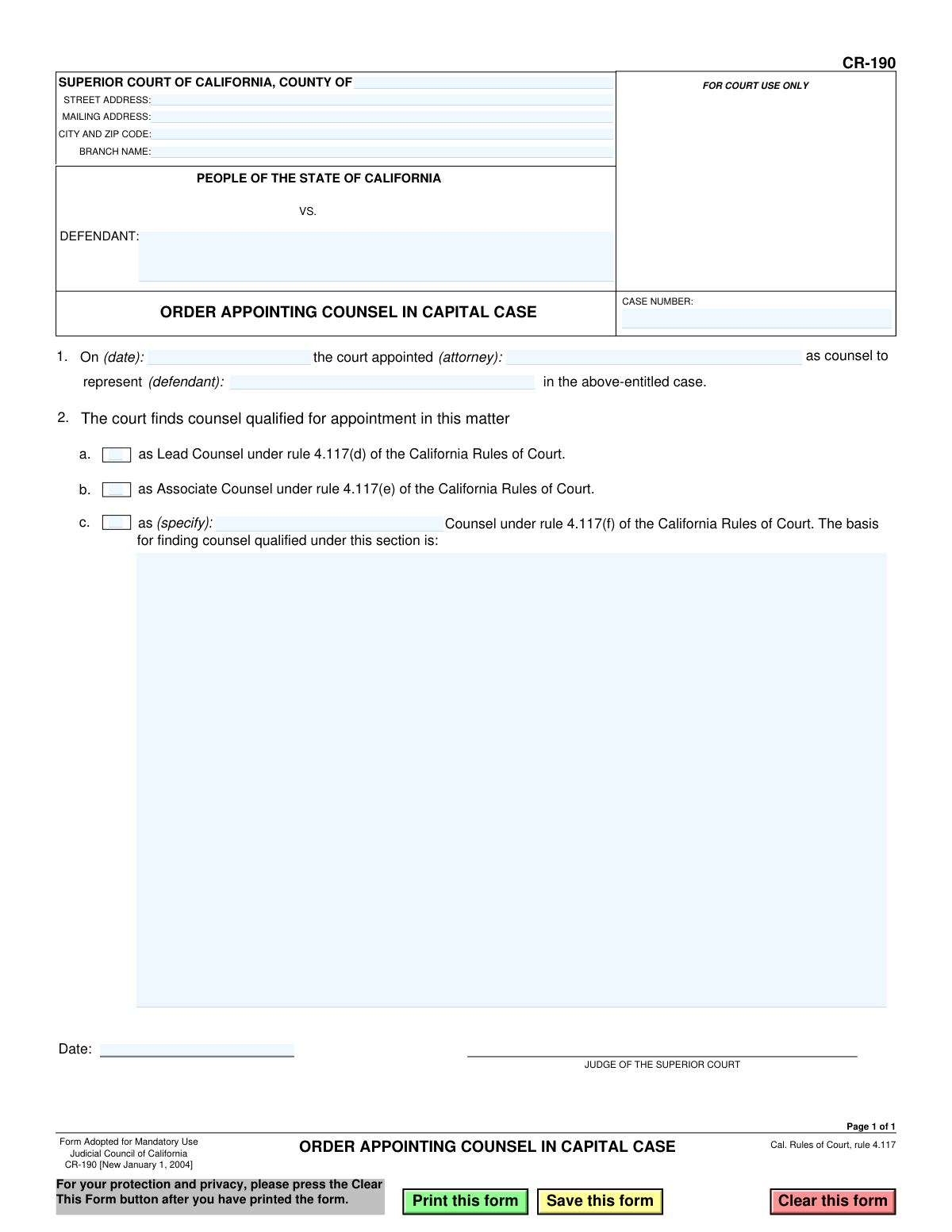
Yes! You can use AI to fill out Form CR-190, Order Appointing Counsel in Capital Case
Form CR-190, Order Appointing Counsel in Capital Case, is a mandatory legal document used by the Superior Court of California to formalize the appointment of an attorney for a defendant in a death penalty case. It specifies the attorney's name, the defendant they will represent, and confirms the counsel's qualifications as either Lead, Associate, or other counsel under the California Rules of Court. Today, this form can be filled out quickly and accurately using AI-powered services like Instafill.ai, which can also convert non-fillable PDF versions into interactive fillable forms.
CR-190 is part of the
California court forms category on Instafill.
Our AI automatically handles information lookup, data retrieval, formatting, and form filling.
It takes less than a minute to fill out CR-190 using our AI form filling.
Securely upload your data. Information is encrypted in transit and deleted immediately after the form is filled out.
Form specifications
| Form name: | Form CR-190, Order Appointing Counsel in Capital Case |
| Number of fields: | 20 |
| Number of pages: | 1 |
| Language: | English |
Instafill Demo: How to fill out PDF forms in seconds with AI
How to Fill Out CR-190 Online for Free in 2026
Are you looking to fill out a CR-190 form online quickly and accurately? Instafill.ai offers the #1 AI-powered PDF filling software of 2026, allowing you to complete your CR-190 form in just 37 seconds or less.
Follow these steps to fill out your CR-190 form online using Instafill.ai:
- 1 Navigate to Instafill.ai and upload or select the Form CR-190.
- 2 Use the AI assistant to input the court information, including the county, court address, and case number.
- 3 Enter the name of the defendant as listed in the case.
- 4 Provide the date of the appointment and the full name of the attorney being appointed as counsel.
- 5 Select the appropriate checkbox to indicate the counsel's qualification (Lead, Associate, or other) as found by the court.
- 6 If applicable, provide a written basis for the counsel's qualification under rule 4.117(f).
- 7 Review all entered information for accuracy before the judge signs and dates the order to finalize the appointment.
Our AI-powered system ensures each field is filled out correctly, reducing errors and saving you time.
Why Choose Instafill.ai for Your Fillable CR-190 Form?
Speed
Complete your CR-190 in as little as 37 seconds.
Up-to-Date
Always use the latest 2026 CR-190 form version.
Cost-effective
No need to hire expensive lawyers.
Accuracy
Our AI performs 10 compliance checks to ensure your form is error-free.
Security
Your personal information is protected with bank-level encryption.
Frequently Asked Questions About Form CR-190
Form CR-190, the 'Order Appointing Counsel in Capital Case,' is a legal document used by a California Superior Court judge to officially appoint a qualified attorney to represent a defendant in a case where the death penalty is a potential outcome.
This form is an official court order, so it is typically prepared by court staff or a judicial assistant and then must be signed by the presiding judge to be valid. It is not filled out by the defendant or the appointed attorney.
You will need the full court details, including the county, street address, and branch name, as well as the specific case number and the defendant's full name.
In Section 1, you must enter the date the court made the appointment, the full name of the attorney being appointed, and the full name of the defendant they will represent.
Lead Counsel has primary responsibility for the case and meets higher experience requirements under rule 4.117(d). Associate Counsel assists the lead counsel and has different, though still rigorous, qualification standards under rule 4.117(e).
Section 2c is used when appointing counsel under a different provision, such as rule 4.117(f). You must specify the type of counsel and provide the basis for the court's finding that the attorney is qualified for that specific role.
Once signed by the judge, the order is filed with the court clerk and becomes part of the official case record. Copies are then distributed to the appointed counsel, the defendant, and the prosecution.
No, Form CR-190 is specifically for capital cases only, due to the unique legal complexities and the severity of the potential penalty. Other forms are used for appointing counsel in non-capital cases.
Rule 4.117 outlines the specific qualifications and standards that attorneys must meet to be appointed as counsel in capital cases in California. The form uses this rule to certify that the appointed attorney is qualified for their designated role.
Yes, AI-powered tools like Instafill.ai can help court staff accurately and quickly pre-fill the form with case information, attorney details, and defendant data. The final document must still be reviewed and signed by the judge.
If you have a non-fillable or 'flat' PDF, you can use a service like Instafill.ai to convert it into an interactive, fillable form. This allows you to easily type information into the fields before printing.
Simply upload Form CR-190 to the Instafill.ai platform. The AI will identify all the form fields, allowing you to click and type your information directly into the document online, then save or print the completed form.
Compliance CR-190
Validation Checks by Instafill.ai
1
Case Number Presence and Format
This validation ensures the 'CaseNumber' field is not empty and conforms to the standard format for California court case numbers. The case number is a critical unique identifier for the legal proceeding, and its absence or incorrect format would make the order impossible to file and track. If the field is empty or malformed, the user should be prompted to enter a valid case number.
2
Defendant Name Consistency
This check compares the defendant's name in the case caption ('Party2') with the name entered in the body of the order ('FillText3'). Both fields must contain the exact same name to avoid ambiguity regarding the subject of the order. A mismatch could lead to legal challenges or render the appointment invalid, so the system should flag any discrepancy for correction.
3
Exclusive Counsel Role Selection
This validation verifies that exactly one of the three counsel role checkboxes ('CheckBox1', 'CheckBox2', 'CheckBox3') is selected. An attorney must be appointed to a single, specific role (Lead, Associate, or Other) as defined by court rules. Selecting zero or multiple roles would create ambiguity about the attorney's responsibilities and qualifications, making the order defective.
4
Conditional Requirement for 'Other' Counsel Specification
This rule ensures that if the 'Other' counsel role ('CheckBox3') is selected, the corresponding text field ('FillText4') specifying the role must be filled out. Rule 4.117(f) allows for other types of counsel, but the specific role must be explicitly defined on the order. The validation prevents an incomplete order by requiring this clarification when the standard roles are not used.
5
Conditional Requirement for Qualification Basis
This check validates that if the 'Other' counsel role ('CheckBox3') is selected, the text area for the 'Basis for finding counsel qualified' ('FillText6') is also completed. The court must provide a reason for the appointment under this specific section of the rule. An order is legally insufficient if it appoints counsel under this provision without the required judicial finding and explanation.
6
Logical Date Chronology
This validation compares the appointment date ('FillText1') with the judge's signature date ('Date12'). The signature date must be on or after the appointment date. It is logically and legally impossible for a judge to sign an order memorializing an event that has not yet occurred. This check prevents paradoxical or invalid dates from being entered.
7
Appointment Date Format and Validity
This check ensures the appointment date ('FillText1') is a valid, correctly formatted date (e.g., MM/DD/YYYY) and is not a future date. This date is legally significant as it marks the official start of the attorney's representation. An invalid or future date would cause confusion and could impact procedural timelines and billing.
8
Judge's Signature Date Presence
This validation confirms that the judge's signature date ('Date12') has been entered. The judge's dated signature is what gives the order its legal authority and effect. An order without a signature date is considered incomplete and not yet in force.
9
Attorney Name Presence
This check verifies that the name of the appointed attorney ('FillText2') has been entered. The entire purpose of the form is to appoint a specific individual as counsel. The form is fundamentally incomplete and serves no purpose if the attorney's name is missing.
10
Court County Completeness
This validation ensures the 'CrtCounty' field, identifying the county of the Superior Court, is not empty. Specifying the county is essential for establishing the correct jurisdiction and is a mandatory part of the court's official name. Without this information, the document is legally ambiguous and cannot be properly filed.
11
Defendant Name Presence in Caption
This check ensures the defendant's name ('Party2') is filled in the main case caption. Every court order must clearly identify the parties involved. An order that does not name the defendant in the caption is defective and unenforceable.
12
Unnecessary Basis for Lead/Associate Counsel
This validation ensures the 'Basis for finding counsel qualified' text area ('FillText6') is empty if 'Lead Counsel' or 'Associate Counsel' is selected. The qualifications for these roles are predefined in the rules and do not require a custom explanation. This check prevents the entry of superfluous information that could create confusion.
13
Court City and ZIP Code Format
This check validates that the 'CrtCityZip' field contains a recognizable city name followed by a valid 5-digit or 9-digit ZIP code. Accurate address information is crucial for mailing, record-keeping, and properly identifying the court's location. This validation helps ensure the address data is structured and correct.
Common Mistakes in Completing CR-190
Users often transpose digits, omit leading zeros, or use an incorrect format when entering the case number. Since this number is the primary identifier for the court file, any error can lead to the order being misfiled or rejected, causing significant delays in the legal process. Always double-check the case number against official court documents for accuracy. AI-powered tools like Instafill.ai can help by saving and reusing validated case information across multiple forms.
The defendant's name is required in both the header and in section 1. A common mistake is to spell the name differently, use a nickname, or omit a middle initial in one of the fields. This inconsistency creates ambiguity in a critical legal document and can be grounds for rejection. The name must be entered exactly as it appears on the official charging documents in all instances.
People frequently enter the main county courthouse address but fail to specify the correct branch name where the case is actually being heard (e.g., 'Central Justice Center'). This can cause confusion and routing errors within the court's filing system, delaying the order from reaching the correct department. Always verify the specific branch name from the case file and ensure it corresponds with the address provided.
Forgetting to check any of the boxes in section 2 (a, b, or c) is a critical omission that renders the order defective. This section represents the court's official finding that the appointed counsel is qualified for a capital case under the California Rules of Court. An order lacking this finding is invalid and will be returned, halting the formal appointment of counsel until corrected.
When appointing counsel under the 'other' category (2c), the form requires a specific basis for the qualification. A common error is providing a vague justification like 'experienced' or 'as requested.' The explanation must be detailed and clearly articulate how the attorney meets the specific criteria of rule 4.117(f), referencing their unique expertise or the particular needs of the case.
The appointment date in section 1 is often entered in a numerically ambiguous format (e.g., '02/03/24'). This can lead to confusion over whether the month or day comes first, which is problematic for a legal record. To prevent misinterpretation, always write out the full date (e.g., 'February 3, 2024'). Using a form-filling tool like Instafill.ai can help enforce a standardized, unambiguous date format.
The form requires the appointed attorney's name, but users sometimes provide only a partial name. For unambiguous identification, it is crucial to enter the attorney's full legal name and State Bar number. Omitting this information can delay the verification of the attorney's qualifications and good standing with the bar, which is a prerequisite for appointment in a capital case.
The final date field is reserved for when the judge actually signs the order, making it effective. A frequent mistake made by administrative staff is filling in the date the form was prepared, not the date of signing. An incorrectly dated order can create procedural and legal challenges regarding the official start of the attorney's appointment and responsibilities.
If this form is printed and filled out by hand, illegible writing is a major source of error. Names, dates, and case numbers that are hard to read can be misinterpreted by court clerks during data entry, leading to filing errors and delays. To avoid this, it is best to fill the form out electronically. If the original is a non-fillable PDF, a tool like Instafill.ai can convert it into a fillable version to ensure all entries are typed and perfectly legible.
Saved over 80 hours a year
“I was never sure if my IRS forms like W-9 were filled correctly. Now, I can complete the forms accurately without any external help.”
Kevin Martin Green
Your data stays secure with advanced protection from Instafill and our subprocessors
Robust compliance program
Transparent business model
You’re not the product. You always know where your data is and what it is processed for.
ISO 27001, HIPAA, and GDPR
Our subprocesses adhere to multiple compliance standards, including but not limited to ISO 27001, HIPAA, and GDPR.
Security & privacy by design
We consider security and privacy from the initial design phase of any new service or functionality. It’s not an afterthought, it’s built-in, including support for two-factor authentication (2FA) to further protect your account.
Fill out CR-190 with Instafill.ai
Worried about filling PDFs wrong? Instafill securely fills form-cr-190-order-appointing-counsel-in-capital-case forms, ensuring each field is accurate.