
Instafill.ai
7 days free
AI form filling · 50 fields · 2 pages · done in seconds

Yes! You can use AI to fill out Form CR-221, Order to Install Ignition Interlock Device

Don't type 50 fields by hand. Tell our AI about yourself, or upload a document you already have, and it fills every field in seconds. You check it, then download, print or sign.
7 days free, then $19.99/month · Cancel anytime
AI fills it, no typingEncrypted, never used to train AICancel in two clicks
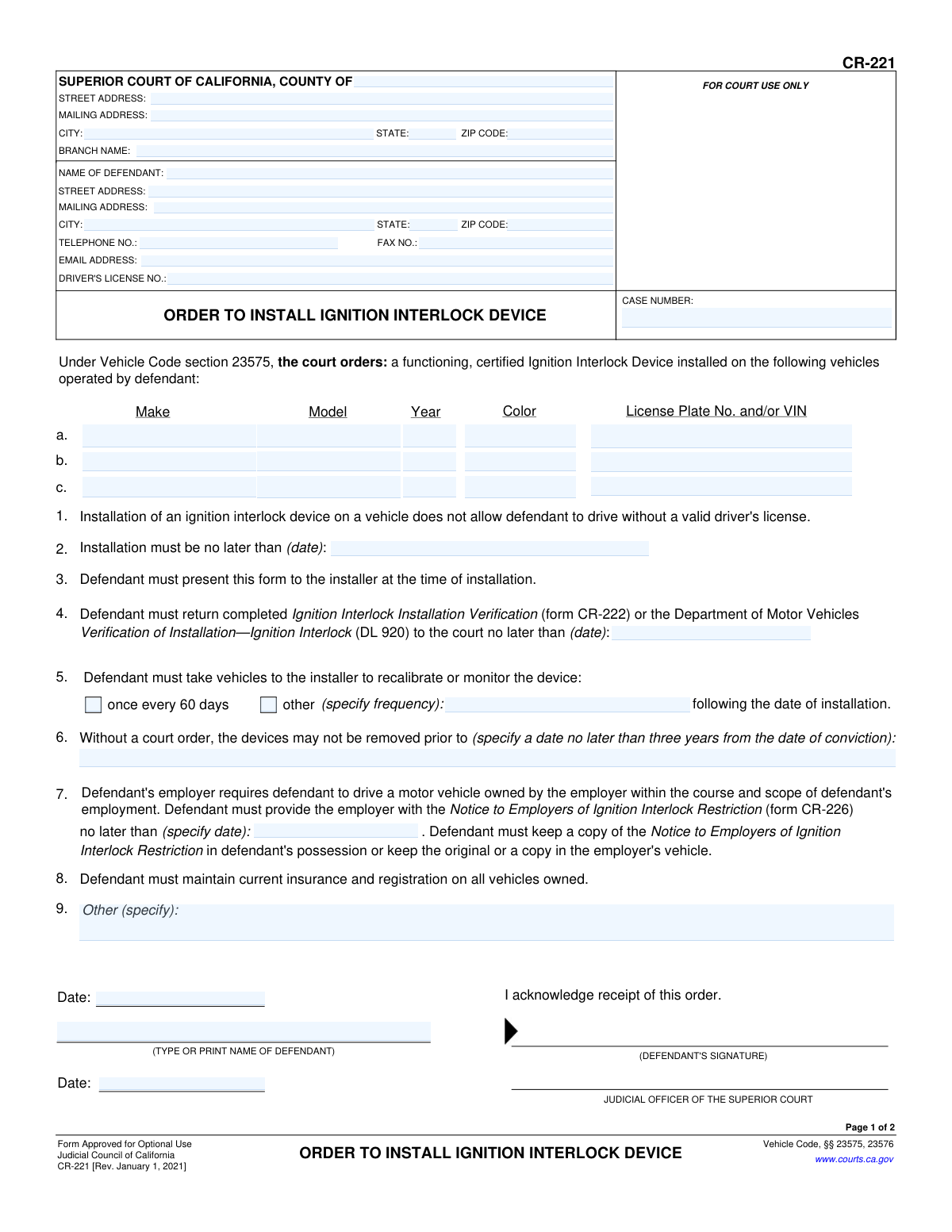
Form CR-221, Order to Install Ignition Interlock Device, page 1
Basic · 39/100Form Complexity Index

The AI does the filling. You just check it.

No typing into boxes, nothing to install.

Tell the AI about youAnswer a few questions in plain words, or upload a document you already have. That is all the typing there is.
AI fills every field in secondsIt puts each answer in the right box on every page, checkboxes included.
Check it and downloadReview every field, change anything, then download, print or sign the PDF.

What this form asks for

The AI fills all of it, from your answers or your documents.

This form, officially known as CR-221, is a legal order issued by the Superior Court of California. It compels a defendant, typically following a DUI conviction, to install a certified Ignition Interlock Device on specified vehicles and outlines the terms of compliance, including installation deadlines and monitoring requirements. Today, this form can be filled out quickly and accurately using AI-powered services like Instafill.ai, which can also convert non-fillable PDF versions into interactive fillable forms.
Fillable fields50
Pages2
Form Complexity IndexBasic, 39/100

The AI checks your answers before you download

14 checks built for this form, so a wrong date or a missing answer is caught before anyone else sees it.

Case Number Consistency Across Pages

This check verifies that the 'CASE NUMBER' entered on page 1 is identical to the 'CASE NUMBER' on page 2. This is crucial for ensuring that all pages of the document are correctly associated with the same legal case. A mismatch could lead to filing errors or the document being rejected, invalidating the order.

California Driver's License Format

Validates that the 'DRIVER'S LICENSE NO.' field follows the standard California format, which is typically a letter followed by seven digits. Proper formatting is essential for correct identification of the defendant within the Department of Motor Vehicles (DMV) system. An invalid format would prevent the DMV from correctly applying the restriction to the defendant's driving record.

Installation Deadline Chronology

Ensures the installation deadline date in section 2 is a future date that occurs after the Judicial Officer's signature date. An order cannot mandate an action to be completed before the order itself is officially signed and dated. This validation prevents logically impossible or back-dated requirements.

Verification Submission Deadline Logic

This check confirms that the date for returning the 'Ignition Interlock Installation Verification' form (section 4) is on or after the installation deadline date (section 2). The defendant needs time to complete the installation before they can submit proof of it. This validation ensures the deadlines are logical and achievable for the defendant.

Conditional Recalibration Specification

If the 'other' checkbox is selected for device recalibration frequency in section 5, this validation ensures the corresponding text field specifying the frequency is not empty. This prevents an ambiguous order where a non-standard frequency is chosen but not defined. Failure to specify the frequency would make the order unenforceable.

Device Removal Prohibition Date Validity

Validates that the date specified in section 6, before which the device cannot be removed, is a valid future date. The form notes this should be no later than three years from the conviction date, so this check ensures the entered date is plausible and complies with the order's long-term nature. An invalid or past date would nullify this critical part of the order.

And 8 more checks
  • Minimum Vehicle Requirement
  • Vehicle Identification Number (VIN) Format
  • Vehicle Model Year Sanity Check
  • Judicial Officer Signature Date Presence
  • Defendant Name Consistency
  • Mutually Exclusive Recalibration Selection
  • Defendant Email Address Format
  • Zip Code Format Validation

Let AI fill out your CR-221

No typing. Every field filled in seconds, checked, ready to sign.

7 days free, then $19.99/month · Cancel anytime

How to Fill Out CR-221 Online for Free in 2026

What the AI walks you through.

  1. Navigate to Instafill.ai and upload or select the CR-221 form.
  2. Enter the court and case information, including the county, court address, and case number, in the header section.
  3. Provide the defendant's full name, address, contact information, and driver's license number.
  4. List the details of each vehicle requiring an ignition interlock device, including make, model, year, color, and license plate or VIN.
  5. Fill in the court-mandated dates for installation, proof of installation, and the earliest date the device can be removed.
  6. Indicate the required frequency for device calibration and specify any orders related to employer-owned vehicles.
  7. Review all entered information for accuracy before the defendant and judicial officer sign and date the form to make it a legally binding order.

Common Mistakes in Completing CR-221

The ones the AI is built to catch.

Entering an Incorrect or Incomplete Case Number
The case number is the primary identifier linking this order to your court file. People often make typos, transpose digits, or leave this field blank, which can cause the document to be rejected or misfiled. A misfiled form can lead to the court thinking you are non-compliant, resulting in further legal penalties. Always double-check the case number against other official court documents from your case to ensure it is 100% accurate.
Providing Inaccurate Vehicle Information (VIN/License Plate)
Defendants frequently enter incorrect information for their vehicle's Make, Model, Year, License Plate, or VIN. This often happens from memory rather than checking official documents, leading to transposed numbers or incomplete details. An incorrect VIN means the order is not properly tied to the vehicle, which can cause major issues with the DMV and law enforcement, and could be considered a violation. Always use your vehicle's registration card to meticulously copy this information.
Misunderstanding or Missing Critical Deadlines
This form contains multiple crucial deadlines, including the final date for device installation (Item 2) and the date to submit proof of installation to the court (Item 4). It is a common and serious error to misread, forget, or ignore these dates. Missing a deadline constitutes a direct violation of the court order, which will be reported to the DMV and can lead to license suspension or other penalties. Immediately record these dates in a calendar with reminders to avoid this.
Failing to List All Operated Vehicles
The order requires an Ignition Interlock Device (IID) on all vehicles the defendant operates, but the form only provides three lines. A common mistake is failing to list a secondary family car or work vehicle, assuming the order only applies to a primary car. Driving any unlisted vehicle without an IID is a violation of the order and can lead to a misdemeanor charge. If you operate more vehicles than there are lines for, you must attach an addendum with the additional vehicle information.
Misinterpreting the Employer Vehicle Exemption
Defendants often misunderstand the strict rules for the employer vehicle exemption (Item 7). A frequent error is assuming a vehicle from their own business qualifies, which it does not if the defendant owns or controls the business. Another mistake is failing to provide the employer with the required notice (form CR-226) by the court-ordered date. These mistakes can void the exemption and result in penalties for driving a non-compliant vehicle.
Submitting an Unsigned or Undated Form
In the rush to complete paperwork, defendants sometimes forget to physically sign and date the form in the designated 'DEFENDANT'S SIGNATURE' section. An unsigned or undated form is legally invalid and will be rejected by the court. This simple oversight can be treated as a failure to comply with the order's requirements, leading to unnecessary complications. Always perform a final check to ensure your signature and the correct date are present before submission.
Using Nicknames or Incomplete Personal Details
Legal documents require your full, legal name and current address as they appear on official records like your driver's license. Using a nickname, an old address, or an abbreviated name can cause the form to be rejected or lead to important notices from the court or DMV being sent to the wrong location. This can result in missed deadlines and unintended legal consequences. AI-powered tools like Instafill.ai can help prevent this by populating fields with your verified, official information.
Illegible Handwriting on a Printed Form
This form is often provided as a non-fillable PDF, forcing individuals to print it and complete it by hand. Rushed or poor handwriting can make critical data like a VIN, driver's license number, or case number unreadable to the court clerk. An illegible form is likely to be rejected, delaying the process and risking non-compliance. To prevent this, it is best to use a tool like Instafill.ai that can convert the document into a digitally fillable version, ensuring all entries are clear and legible.
Failing to Return Proof of Installation to the Court
After successfully installing the IID, some individuals forget the second crucial step: returning the completed 'Ignition Interlock Installation Verification' (form CR-222) or DMV form DL 920 to the court by the deadline in Item 4. The court does not automatically know the installation is complete; you must provide this specific proof. Failure to do so is a violation of the order and will be reported to the DMV, even if the device was installed on time.

Frequently Asked Questions About CR-221


Is it really free for 7 days?
Yes. You pay $0 today. Cancel before Nov 1 and you are never charged. Keep it, and it is $19.99 a month for 5 fills of your CR-221.
Can I fill other forms too?
This plan is for your CR-221: your own AI agent fills it as often as 5 times a month. To fill other forms and upload your own, choose a Professional plan from your account.
How do I cancel?
From your account, in two clicks, any time. No email, no call.
How does the AI fill out CR-221?
You answer a few questions in plain words, or upload a document you already have. The AI reads what you give it and puts each answer into the right field of CR-221, on every page, in seconds. It checks the answers against the form's own rules, and you review and change anything before you download, print or sign.
What happens to my information?
It is encrypted in transit and at rest, and it is never used to train AI.
How complex is CR-221 to fill out?
CR-221 has a Form Complexity Index of 39 out of 100, in the basic tier: 50 fillable fields across 2 pages. Instafill.ai's AI fills it in under a minute, with every field there for you to review before you download.
What is Form CR-221, the Order to Install Ignition Interlock Device?
This is a legal document from a California court that orders a defendant to install a certified Ignition Interlock Device (IID) on any vehicle they operate. It specifies all the rules, deadlines, and penalties associated with the IID requirement.
Who fills out this form?
The court and a judicial officer fill out the details of the order, such as the deadlines and vehicle information. You, the defendant, must read the order, acknowledge you understand it, and sign it.
What is the first thing I need to do after receiving this order?
You must contact a state-certified IID installer to schedule the installation on your vehicle(s) before the deadline listed in item #2. You will need to bring this order with you to the installation appointment.
How do I prove to the court that I installed the device?
After installation, you must submit proof to the court using either Form CR-222 (Ignition Interlock Installation Verification) or Form DL 920 (DMV Verification of Installation). This must be done by the date specified in item #4 of your order.
What if I need to drive a company vehicle for my job?
You must provide your employer with Form CR-226, 'Notice to Employers of Ignition Interlock Restriction,' and keep a copy of that notice in the company vehicle. This exemption only applies to vehicles owned by your employer, not a business you own or control.
What happens if I violate this order?
Violating this order can result in the court notifying the DMV and lead to misdemeanor charges, which are punishable by jail time and/or fines. Violations include failing to install the device, tampering with it, or driving a vehicle without an IID.
Does installing an IID on one car allow me to drive other cars without one?
No, the order applies to any vehicle you operate. Driving any vehicle that is not equipped with a functioning IID (other than a qualifying employer's vehicle) is a violation of the court order.
What kind of maintenance is required for the IID?
You are required to take your vehicle to the installer for regular monitoring and calibration of the device. The frequency is specified in item #5 of the order, but it is typically every 60 days.
When can I have the ignition interlock device removed?
The device cannot be legally removed before the date specified by the court in item #6 of your order. Early or unauthorized removal is a violation of the law.
What if I don't own a car?
This order applies to any vehicle you 'operate,' not just own, so you cannot drive any car, even if borrowed, unless it has an IID installed. You should consult with your attorney to understand how to comply with the order in your specific situation.
Can AI tools help me with the paperwork involved with this order?
Yes, while the court issues this order, you can use AI-powered services like Instafill.ai for related documents. It can help you accurately fill out forms like the CR-222 (Proof of Installation) or CR-226 (Notice to Employer), saving time and reducing errors.
How can I use Instafill.ai to fill out my other required forms online?
Simply upload the PDF of a related form, like the CR-222 or CR-226, to the Instafill.ai platform. The AI will make the document fillable online, allowing you to easily type in your information and ensure everything is correct before printing.
The proof of installation form I downloaded is not fillable. What can I do?
If you have a flat, non-fillable PDF, you can use a service like Instafill.ai to make it interactive. Just upload the document, and the tool will convert it into a fillable form you can complete on your computer.
Encrypted in transit and at restNever used to train AIDelete your forms any time

Get your CR-221 filled out by AI

$0 today. Cancel before Nov 1 and you pay nothing.

7 days free, then $19.99/month · Cancel anytime