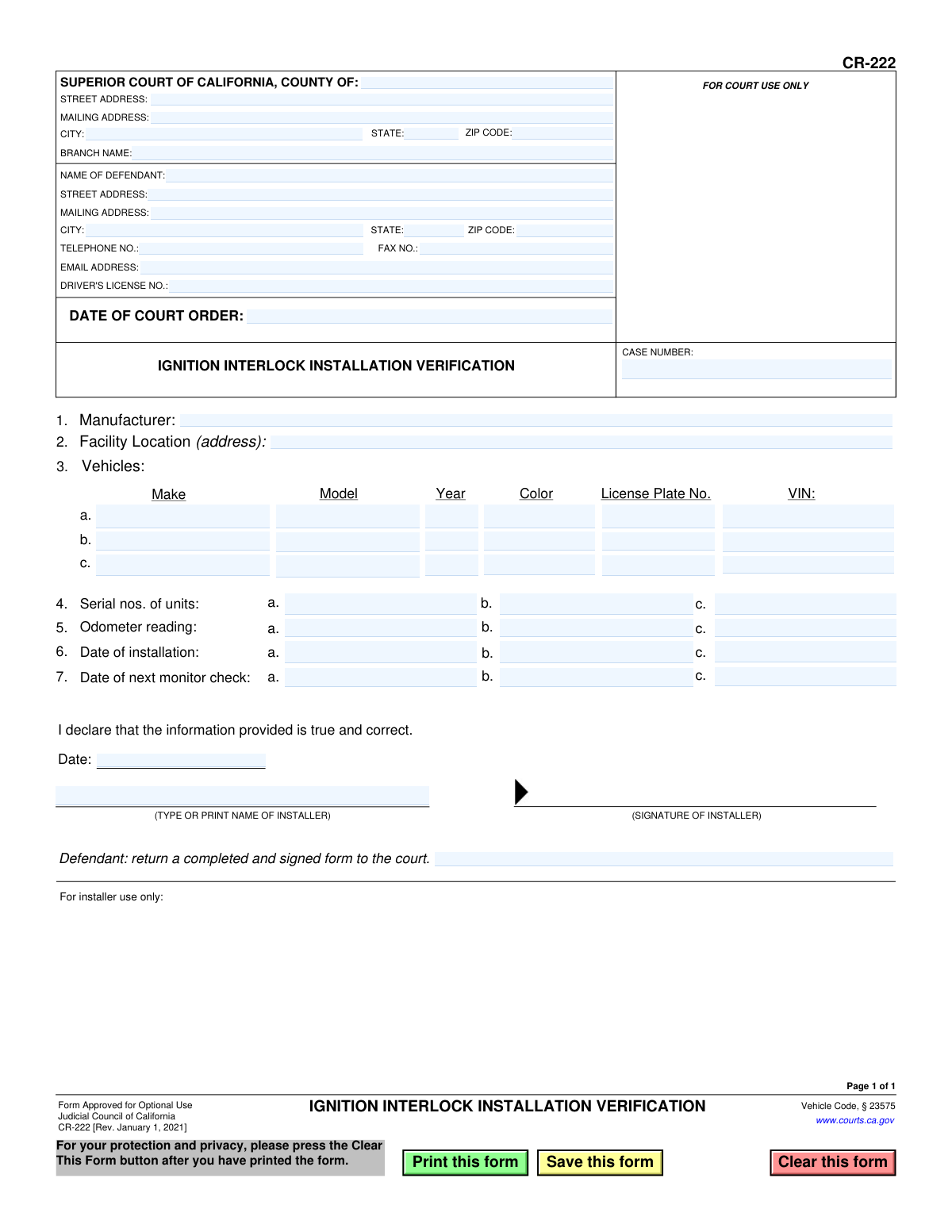
Yes! You can use AI to fill out Form CR-222, Ignition Interlock Installation Verification
Form CR-222 is a legal document used in California to verify that a court-ordered ignition interlock device (IID) has been installed in a defendant's vehicle. It serves as official proof to the court, completed by the installer, detailing the device, vehicle, and installation date, which is crucial for the defendant to comply with legal requirements. Today, this form can be filled out quickly and accurately using AI-powered services like Instafill.ai, which can also convert non-fillable PDF versions into interactive fillable forms.
CR-222 is part of the
California court forms category on Instafill.
Our AI automatically handles information lookup, data retrieval, formatting, and form filling.
It takes less than a minute to fill out CR-222 using our AI form filling.
Securely upload your data. Information is encrypted in transit and deleted immediately after the form is filled out.
Form specifications
| Form name: | Form CR-222, Ignition Interlock Installation Verification |
| Number of fields: | 58 |
| Number of pages: | 1 |
| Language: | English |
Instafill Demo: How to fill out PDF forms in seconds with AI
How to Fill Out CR-222 Online for Free in 2026
Are you looking to fill out a CR-222 form online quickly and accurately? Instafill.ai offers the #1 AI-powered PDF filling software of 2026, allowing you to complete your CR-222 form in just 37 seconds or less.
Follow these steps to fill out your CR-222 form online using Instafill.ai:
- 1 Navigate to Instafill.ai and upload or select Form CR-222, Ignition Interlock Installation Verification.
- 2 Use the AI assistant to accurately input the court and case information, including the county and case number.
- 3 Enter the defendant's personal information, such as name, address, and driver's license number.
- 4 Have the certified installer fill in the technical details, including the IID manufacturer, facility location, vehicle information (make, model, VIN), and device serial numbers.
- 5 The installer must record the installation date, odometer reading, and the date of the next scheduled monitor check for each vehicle.
- 6 The installer must sign and date the form to certify the accuracy of the installation details.
- 7 Review the completed form for any errors before the defendant submits it to the designated court as required.
Our AI-powered system ensures each field is filled out correctly, reducing errors and saving you time.
Why Choose Instafill.ai for Your Fillable CR-222 Form?
Speed
Complete your CR-222 in as little as 37 seconds.
Up-to-Date
Always use the latest 2026 CR-222 form version.
Cost-effective
No need to hire expensive lawyers.
Accuracy
Our AI performs 10 compliance checks to ensure your form is error-free.
Security
Your personal information is protected with bank-level encryption.
Frequently Asked Questions About Form CR-222
This form serves as official proof to the California Superior Court that you have complied with a court order to have an Ignition Interlock Device (IID) installed in your vehicle(s).
The IID installer will fill out the technical details of the installation (sections 1-7). However, you (the defendant) are responsible for providing your personal and case information and for submitting the completed form to the court.
You should bring your driver's license, vehicle information (make, model, license plate, VIN), and your court case number. This ensures the installer can accurately complete the verification form.
The form explicitly states, 'Defendant: return a completed and signed form to the court.' You must submit it to the Superior Court branch handling your case, as listed at the top of the form.
The certified installer who performs the IID installation must sign and date the form to declare that the information provided is true and correct.
The form provides space for three vehicles. If a court order requires IIDs on more than three vehicles, contact the court clerk for instructions on how to properly document the additional installations.
This is the date for your first scheduled appointment to have the IID calibrated and its data downloaded by the installer. This is a mandatory part of maintaining compliance with the IID program.
Failing to submit this form means you have not proven compliance with the court's order. This could lead to penalties, such as a violation of your probation or a continued suspension of your driving privileges.
No, you should leave the 'FOR COURT USE ONLY' box and the 'CASE NUMBER' field at the top right blank. These sections will be completed by court staff when they process your form.
Yes, services like Instafill.ai use AI to help you accurately fill in your personal details and case information on the form. This can save time and help prevent errors before you take the form to the installer.
You can upload the PDF to a platform like Instafill.ai, which makes the document interactive. You can then type your information directly into the fields and print the partially completed form to take to your installation appointment.
If you have a non-fillable or 'flat' PDF, you can use a service like Instafill.ai. It can convert the document into a smart, fillable form online, allowing you to easily type in your information.
Compliance CR-222
Validation Checks by Instafill.ai
1
Valid VIN Format
Ensures the Vehicle Identification Number (VIN) is a standard 17-character alphanumeric string. This is critical for uniquely identifying the vehicle associated with the interlock device. If the VIN is not in the correct format, the submission should be rejected as it prevents proper vehicle verification and record-keeping.
2
Installation Date After Court Order
Verifies that the 'Date of installation' is on or after the 'Date of Court Order'. This check confirms that the installation was performed in compliance with the court's mandate. A validation failure indicates a potential non-compliance issue, and the form should be flagged for review before acceptance.
3
Monitor Check Date After Installation
Checks that the 'Date of next monitor check' is a future date that occurs after the 'Date of installation'. This is a logical necessity, as the follow-up check cannot precede the installation itself. An invalid date sequence would render the monitoring schedule nonsensical and should prevent form submission.
4
At Least One Vehicle Entry Required
Confirms that information for at least one vehicle (row 'a') has been provided, including make, model, VIN, and installation details. The purpose of the form is to verify installation on a vehicle, so a submission without any vehicle data is incomplete and serves no purpose. The form should be rejected if no vehicle information is present.
5
Vehicle Row Completeness
For each vehicle row where a 'Make' is entered, this validation ensures all other vehicle details (Model, Year, Color, License Plate No., VIN) are also filled out. This prevents partial, unusable vehicle records from being submitted. A failure would trigger a message requiring the user to complete all fields for the specified vehicle.
6
Installation Data Completeness per Vehicle
If a vehicle is listed in a given row (e.g., row 'a'), this check ensures that the corresponding 'Serial no. of unit', 'Odometer reading', 'Date of installation', and 'Date of next monitor check' are all provided. This links the specific device and its service schedule to the correct vehicle. Missing data would make the verification incomplete and should block submission.
7
Valid Driver's License Number Format
Validates that the 'Driver's License No.' field matches the expected format for a California driver's license (e.g., a letter followed by seven digits). An accurate driver's license number is essential for linking the form to the correct defendant in the DMV and court systems. An invalid format should prompt the user for correction.
8
Valid Model Year
Checks that the 'Model Year' for each vehicle is a valid 4-digit number that is not in the future (e.g., between 1950 and the current year + 1). This prevents typographical errors and ensures the vehicle data is plausible. An invalid year should be flagged for correction.
9
Installer Declaration and Signature Date
Ensures the installer's name ('TYPE OR PRINT NAME OF INSTALLER') and the signature 'Date' fields are both completed. This declaration is legally required to certify the truthfulness of the information. The form cannot be considered valid without the installer's attestation and should be rejected if these fields are empty.
10
Case Number Presence
Verifies that the 'CASE NUMBER' field is not empty. The case number is the primary identifier used by the court to file the document and associate it with the defendant's legal proceedings. A missing case number would make it impossible to process the form correctly, so submission should be blocked.
11
Valid Date Formats
Checks that all date fields ('Date of Court Order', 'Date of installation', 'Date of next monitor check', 'Signature Date') are entered in a valid and recognizable date format (e.g., MM/DD/YYYY). This ensures data consistency and prevents errors in date-based logical checks. Any invalid date format should trigger an error message.
12
Odometer Reading Format
Ensures the 'Odometer reading' is a valid positive number. This reading serves as a baseline for monitoring vehicle usage. The validation should reject any non-numeric or negative values to maintain data integrity.
13
Valid ZIP Code Format
Validates that all ZIP code fields contain either a 5-digit or 9-digit (ZIP+4) number. Correct ZIP codes are essential for mail delivery and location verification for both the court and the defendant. An improperly formatted ZIP code should prompt the user for correction.
14
Email Address Format Validation
Checks if the value entered in the 'EMAIL ADDRESS' field follows the standard format for an email address (e.g., '[email protected]'). While optional, if an email is provided, it should be valid to ensure successful communication. An invalid format should trigger a warning or error.
Common Mistakes in Completing CR-222
The case number is the primary identifier linking the form to the defendant's court file. People often misread or transpose digits from court documents, leading to this error. An incorrect case number means the court clerk cannot process the verification, which can result in a finding of non-compliance, potential license suspension, or even a bench warrant. To avoid this, meticulously double-check the case number against the official court order before submission.
This form is often available as a non-fillable PDF, forcing installers to complete it by hand. Rushed or poor handwriting can make critical information like the VIN, case number, or installer's name unreadable. If the court clerk cannot decipher the information, the form will be rejected, causing delays and requiring the defendant to return to the installer. To prevent this, print clearly in block capitals or use a tool like Instafill.ai, which can convert flat PDFs into fillable forms to ensure all entries are typed and legible.
The 17-character VIN is unique to each vehicle and prone to transcription errors. Installers may accidentally transpose letters or numbers (e.g., '5' for 'S', '1' for 'I'). An incorrect VIN invalidates the verification for that vehicle, as it won't match DMV records, potentially leading the court to believe the order was not properly followed. The installer should always verify the VIN directly from the vehicle's chassis, not just from other paperwork. AI-powered tools like Instafill.ai can also help by validating that the VIN has the correct 17-character format.
The installer's signature and date on the declaration are what make the document a valid, sworn verification. In a busy shop, it's easy for an installer to overlook signing the form, or for the defendant to leave without checking. An unsigned form is invalid and will be immediately rejected by the court, forcing the defendant to make another trip to the installer and risk missing their compliance deadline. The defendant must always review the completed form for the installer's signature before leaving the facility.
A court order may require an ignition interlock device on all vehicles a defendant owns or operates, not just their primary one. A common mistake is for the defendant to only have the device installed on one car and list only that one on the form. This is a direct violation of the court order and can lead to severe consequences, including fines, extended license suspension, or jail time. The defendant must read their court order carefully and ensure every required vehicle is equipped with a device and listed on the verification form.
There is often confusion about who fills out what and who submits the form. The installer must fill out all technical details (vehicle info, serial numbers) and sign the form. The defendant is ultimately responsible for ensuring the form is complete and submitting it to the court. A defendant attempting to fill in technical details or an installer assuming they submit the form can lead to an invalid or lost filing. The defendant should get the completed, signed form from the installer and personally file it with the court.
Judicial Council forms are periodically updated, as noted by the revision date in the corner (e.g., 'Rev. January 1, 2021'). Using an older version downloaded from an unofficial site or saved from a previous case can lead to rejection. Courts require the current form to ensure all necessary legal language and fields are present. Always download the CR-222 form directly from the official California Courts website (www.courts.ca.gov) immediately before use.
Defendants or installers may list the wrong court branch name or address, especially in large counties with multiple courthouses. For example, they might write a general county court instead of the specific branch where the case is being heard. This causes the form to be misrouted, leading to significant delays and the risk of being marked as non-compliant. This information should be copied exactly from the defendant's court order or other official legal documents.
Perhaps the most critical error is when the defendant obtains the completed and signed form from the installer but then fails to file it with the court. They may mistakenly believe the installer submits it or simply forget. The form explicitly states, 'Defendant: return a completed and signed form to the court.' Failure to do so means the court has no record of compliance, which will trigger penalties for violating the court order.
The form requires several dates: the date of the court order, the installation date, the date of the next monitor check, and the signature date. Mistakes include entering the wrong installation date or a signature date that doesn't align with the installation. An incorrect 'Date of next monitor check' can cause the defendant to miss their first required service, resulting in a non-compliance report to the court. All dates must be accurate and consistent to avoid scrutiny and rejection.
Saved over 80 hours a year
“I was never sure if my IRS forms like W-9 were filled correctly. Now, I can complete the forms accurately without any external help.”
Kevin Martin Green
Your data stays secure with advanced protection from Instafill and our subprocessors
Robust compliance program
Transparent business model
You’re not the product. You always know where your data is and what it is processed for.
ISO 27001, HIPAA, and GDPR
Our subprocesses adhere to multiple compliance standards, including but not limited to ISO 27001, HIPAA, and GDPR.
Security & privacy by design
We consider security and privacy from the initial design phase of any new service or functionality. It’s not an afterthought, it’s built-in, including support for two-factor authentication (2FA) to further protect your account.
Fill out CR-222 with Instafill.ai
Worried about filling PDFs wrong? Instafill securely fills form-cr-222-ignition-interlock-installation-verification forms, ensuring each field is accurate.