
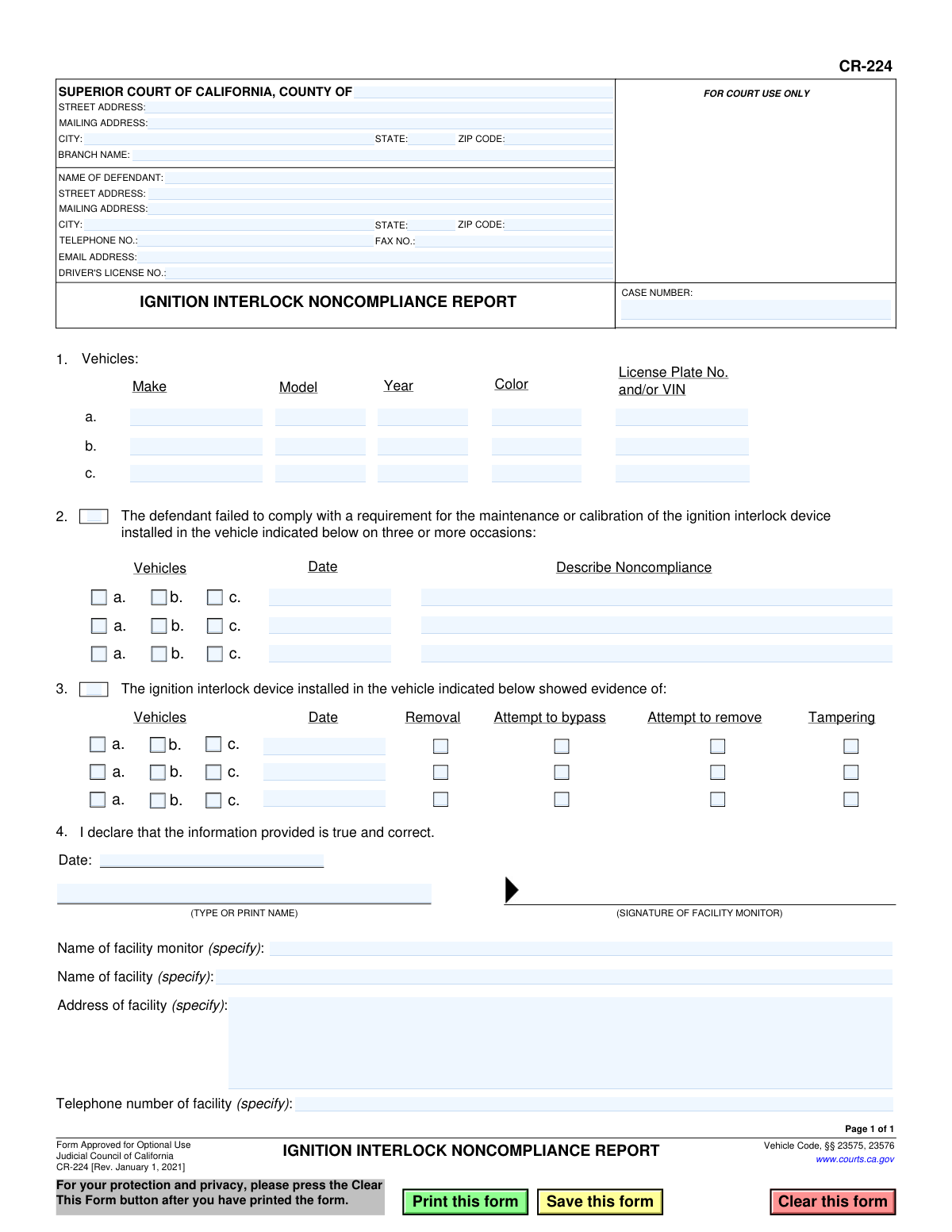
Yes! You can use AI to fill out Form CR-224, Ignition Interlock Noncompliance Report
Don't type 84 fields by hand. Tell our AI about yourself, or upload a document you already have, and it fills every field in seconds. You check it, then download, print or sign.
The AI does the filling. You just check it.
No typing into boxes, nothing to install.
What this form asks for
The AI fills all of it, from your answers or your documents.
The AI checks your answers before you download
13 checks built for this form, so a wrong date or a missing answer is caught before anyone else sees it.
This check ensures the 'CASE NUMBER' field is not empty. The case number is a critical identifier for linking the noncompliance report to the correct legal proceedings. If this field is missing, the form cannot be processed or filed correctly, leading to significant delays.
Validates that both 'NAME OF DEFENDANT' and 'DRIVER'S LICENSE NO.' fields are filled. Positive identification of the defendant is paramount for enforcement and record-keeping. A failure in this check means the report cannot be unambiguously associated with the correct individual.
Verifies that the 'DRIVER'S LICENSE NO.' follows the standard California format, typically a letter followed by seven digits. This ensures the data is accurate and can be validated against DMV records. An invalid format could indicate a typo or incorrect information, preventing verification.
Ensures that at least one of the main checkboxes for Section 2 ('failed to comply') or Section 3 ('evidence of tampering') is checked and has corresponding details. A noncompliance report must contain at least one instance of noncompliance to be valid. If no events are reported, the form submission is rejected as incomplete.
If the main checkbox for Section 2 is checked, this validation confirms that each reported incident row includes a selected vehicle, a date, and a description of the noncompliance. Missing any of these details makes the report vague and potentially inadmissible. The system should prompt the user to complete the required fields for each incident.
If the main checkbox for Section 3 is checked, this validation confirms that each reported incident row includes a selected vehicle, a date, and at least one checked box indicating the type of tampering. Without all three pieces of information, the report lacks the necessary evidence for the court. The form should be rejected if an incident is claimed without specifying the vehicle, date, and type of tampering.
And 7 more checks
- Vehicle Reference Integrity
- Sufficient Vehicle Identification (License Plate or VIN)
- Valid Vehicle Model Year
- Chronological Date Consistency
- Mandatory Declaration and Facility Information
- Valid Facility Telephone Number Format
- VIN Format Validation
Let AI fill out your CR-224
No typing. Every field filled in seconds, checked, ready to sign.
How to Fill Out CR-224 Online for Free in 2026
What the AI walks you through.
- Navigate to Instafill.ai and upload or select the CR-224, Ignition Interlock Noncompliance Report.
- Use the AI assistant to accurately input the Superior Court information, including the county and branch name, along with the specific case number.
- Enter the defendant's full name, address, contact information, and driver's license number in the designated fields.
- List the details for each vehicle associated with the ignition interlock device, including make, model, year, and license plate or VIN.
- Check the appropriate boxes to indicate the type of noncompliance, whether it's failure to maintain/calibrate or evidence of tampering, removal, or bypassing, and provide the dates and specific details for each incident.
- Provide the facility monitor's name, the monitoring facility's name and address, and the date. The monitor must then sign the declaration.
- Review all the entered information for completeness and accuracy before saving, printing, and submitting the report to the court.
Common Mistakes in Completing CR-224
The ones the AI is built to catch.
Incorrect or Missing Case Number
Incomplete Vehicle Identification
Transposing VIN or License Plate Characters
Vague Description of Noncompliance
Ambiguous Tampering/Removal Reporting
Failing to Link Violations to a Specific Vehicle
Missing or Invalid Facility Monitor Signature
Incorrect Date Formatting or Omission
Confusing Court and Defendant Information Fields
Submitting a Low-Quality or Non-Fillable Scan
Frequently Asked Questions About CR-224
Is it really free for 7 days?
Can I fill other forms too?
How do I cancel?
How does the AI fill out CR-224?
What happens to my information?
How complex is CR-224 to fill out?
What is the purpose of Form CR-224, the Ignition Interlock Noncompliance Report?
Who is responsible for filling out and submitting this form?
As a defendant with an IID, will I be asked to fill out this form?
What kind of information do I need to have ready to fill out this form?
How do I complete Section 2 regarding maintenance or calibration failures?
What is the difference between 'tampering,' 'removal,' and 'bypass' in Section 3?
What vehicle information is required in Section 1?
Who signs the declaration in Section 4?
Where is this form sent after it is completed?
What happens after this noncompliance report is filed with the court?
Can AI tools help my facility fill out these reports more efficiently?
How can I use Instafill.ai to complete Form CR-224 online?
The PDF version of Form CR-224 I have is not fillable. What can I do?
Get your CR-224 filled out by AI
$0 today. Cancel before Nov 1 and you pay nothing.
Other forms like this one
California court forms: Judicial Council of California Form SC-105, Request for Court Order and Answer (Small Claims), Judicial Council of California Form SC-120, Defendant’s Claim and ORDER to Go to Small Claims Court (Small Claims), Judicial Council of California Form SER-001, Request for Sheriff to Serve Court Papers, Judicial Council of California Form SER-001, Request for Sheriff to Serve Court Papers, Affidavit for Collection of Personal Property California Probate Code Section 13100, Form POS-040, Proof of Service—Civil, Declaration of Facts of Death (California Superior Court), declaration-of-marriage-for-court-proceeding-california-family-law, ADOPT-200, Adoption Request, ADOPT-200, Stepparent Adoption Request, ADOPT-210, Adoption Agreement, ADOPT-310, Contact After Adoption Agreement, Judicial Council of California Form ADOPT-200, Adoption Request, Form ADR-107, Mediation Attendance Sheet, Form ADR-110, Order Appointing Referee, Form ADR-109, Stipulation or Motion for Order Appointing Referee, Form ADR-102, Request for Trial De Novo After Judicial Arbitration, Form ADR-108, Referee's Report (Code Civ. Proc., §§ 638, 639), Form ADR-106, Petition to Confirm, Correct, or Vacate Contractual Arbitration Award, Form ADR-104, Rejection of Award and Request for Trial After Attorney-Client Fee Arbitration
Let AI fill out your CR-224
Your trial starts once a card is added. You pay nothing before Nov 1.
Our AI already knows this form, all 84 fields of it. Skip the typing: tell it about yourself, or upload what you have, and it fills the whole form in seconds.
- AI fills every field on the form, checkboxes included
- No typing into boxes: answer a few questions, or upload a document you already have, an old copy of this form, a photo of a document
- The AI checks the answers; you review and change anything before you download
- Download the finished PDF, print it, or sign it online
- Encrypted, and never used to train AI
Cancel before Nov 1 and you pay nothing.
A card is needed to start the trial. Cancel in two clicks from your account.
Terms · Privacy