Yes! You can use AI to fill out Form CR-301, Warrant Request and Order
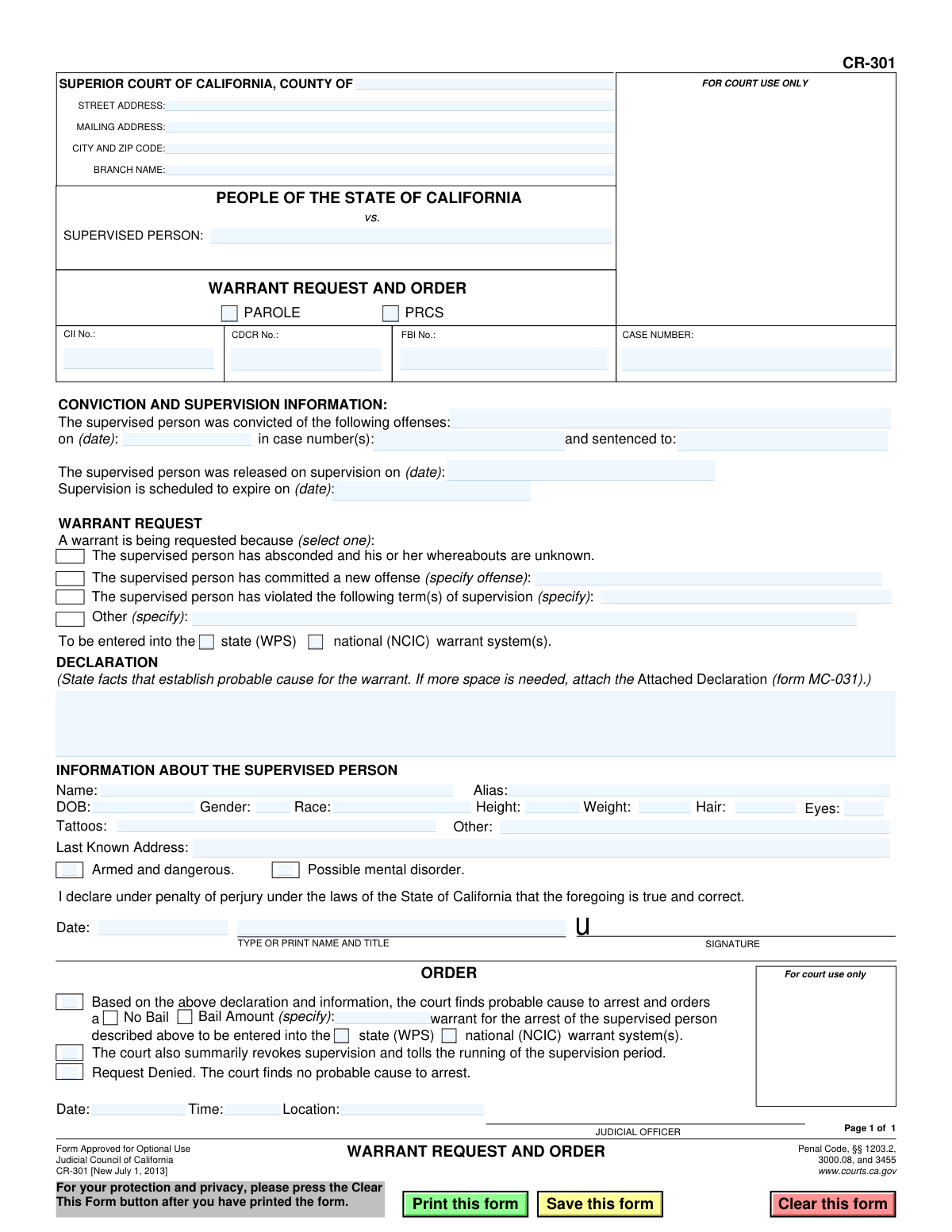
Form CR-301 is a legal document used within the Superior Court of California to request an arrest warrant for a person under supervision, such as parole or post-release community supervision (PRCS). It requires a declaration of facts to establish probable cause that the individual has violated the terms of their supervision, committed a new offense, or absconded. Today, this form can be filled out quickly and accurately using AI-powered services like Instafill.ai, which can also convert non-fillable PDF versions into interactive fillable forms.
CR-301 is part of the
California court forms category on Instafill.
Our AI automatically handles information lookup, data retrieval, formatting, and form filling.
It takes less than a minute to fill out CR-301 using our AI form filling.
Securely upload your data. Information is encrypted in transit and deleted immediately after the form is filled out.
Form specifications
| Form name: | Form CR-301, Warrant Request and Order |
| Number of fields: | 59 |
| Number of pages: | 1 |
| Language: | English |
Instafill Demo: How to fill out PDF forms in seconds with AI
How to Fill Out CR-301 Online for Free in 2026
Are you looking to fill out a CR-301 form online quickly and accurately? Instafill.ai offers the #1 AI-powered PDF filling software of 2026, allowing you to complete your CR-301 form in just 37 seconds or less.
Follow these steps to fill out your CR-301 form online using Instafill.ai:
- 1 Navigate to Instafill.ai and upload or select the CR-301 Warrant Request and Order form.
- 2 Enter the court information, including the county, street address, and branch name.
- 3 Provide the case number and all identifying information for the supervised person, such as name, aliases, date of birth, and physical descriptors.
- 4 Fill in the details of the original conviction and the current supervision, including start and scheduled expiration dates.
- 5 State the reason for the warrant request by checking the appropriate box and providing a detailed declaration of facts that establish probable cause.
- 6 The declaring officer must type or print their name and title, then sign and date the request under penalty of perjury.
- 7 Review the entire form for accuracy before submitting it to the judicial officer for their review and order.
Our AI-powered system ensures each field is filled out correctly, reducing errors and saving you time.
Why Choose Instafill.ai for Your Fillable CR-301 Form?
Speed
Complete your CR-301 in as little as 37 seconds.
Up-to-Date
Always use the latest 2026 CR-301 form version.
Cost-effective
No need to hire expensive lawyers.
Accuracy
Our AI performs 10 compliance checks to ensure your form is error-free.
Security
Your personal information is protected with bank-level encryption.
Frequently Asked Questions About Form CR-301
This form is used by a supervising agency, like a parole or probation department, to request an arrest warrant for an individual who has allegedly violated the terms of their supervision. A judicial officer then uses the same form to approve or deny the warrant request.
A supervising officer, such as a parole or probation officer, completes the 'Warrant Request' and 'Declaration' sections. A judicial officer then reviews the request and completes the 'Order' section at the top of the form.
The 'supervised person' is an individual who has been released from custody and is currently on Parole or Postrelease Community Supervision (PRCS) for a prior criminal conviction.
In the 'Declaration' section, you must state the specific facts that establish probable cause for the arrest. This includes detailing the new offense, the terms of supervision that were violated, or the reasons for believing the person has absconded.
WPS refers to the state's Warrant/Protection System, and NCIC is the FBI's National Crime Information Center. Checking these boxes indicates which law enforcement databases the warrant should be entered into if it is granted by the court.
A judicial officer will review the form to determine if there is probable cause for an arrest. They will then either sign the order to issue the warrant or deny the request if probable cause is not found.
If the judge finds there is no probable cause, they will check the 'Request Denied' box in the 'ORDER' section. No arrest warrant will be issued based on this request.
This checkbox serves as a critical safety warning for law enforcement officers who will be serving the warrant. It alerts them that the individual may pose a significant threat, allowing them to take appropriate precautions.
Parole is a period of state-level supervision following release from prison for serious felonies. PRCS, or Postrelease Community Supervision, is a newer form of county-level supervision for individuals convicted of less-serious felonies.
Yes, services like Instafill.ai use AI to help you accurately and efficiently complete forms. This can save time and reduce errors by auto-filling fields from your existing case data.
To fill out the form online, you can upload the CR-301 PDF to the Instafill.ai platform. The AI will make the form interactive, allowing you to easily type in your information before downloading the completed document.
If you have a non-fillable or 'flat' PDF, you can use a service like Instafill.ai. Simply upload the file, and the tool will automatically convert it into an interactive, fillable form for you to complete online.
Compliance CR-301
Validation Checks by Instafill.ai
1
Ensures Case Number is Provided
This validation confirms that the 'CASE NUMBER' field is not empty. The case number is the primary identifier for the legal proceeding and is essential for correctly filing the warrant and associating it with the proper court records. Failure to provide a case number would render the document un-fileable and prevent any judicial action.
2
Validates Supervised Person's Name is Entered
This check ensures that the 'SUPERVISED PERSON' name field is populated. The identity of the individual is the most fundamental piece of information on a warrant request. Without a name, law enforcement cannot identify or apprehend the subject, and the warrant would be legally invalid.
3
Verifies Date of Birth is a Valid Past Date
This validation checks that the 'DOB' (Date of Birth) field contains a complete and logical date that occurs in the past. This is crucial for positively identifying the supervised person and distinguishing them from others with similar names. An invalid or future date would cause identification system errors and could invalidate the warrant.
4
Enforces Chronological Order of Supervision Dates
This check verifies the logical sequence of key dates: the conviction date must be before or on the supervision release date, which must be before the supervision expiration date. This ensures the timeline of the supervision period is coherent and legally sound. An illogical sequence of dates would indicate a data entry error and could call the entire request into question.
5
Requires Selection of a Warrant Request Reason
This validation ensures that at least one reason for the warrant request is selected from the provided options (e.g., 'violated term(s)', 'committed a new offense', 'absconded'). A specific reason is legally required to establish the basis for the warrant. Submitting a request without a selected reason would result in an incomplete and legally insufficient application.
6
Mandates Specification for Conditional Warrant Reasons
This check confirms that if a warrant reason of 'violated the following term(s)', 'committed a new offense', or 'Other' is selected, the corresponding text field specifying the details is not left empty. This detail is necessary to provide the court with sufficient information to evaluate probable cause. Failure to specify the details makes the selected reason vague and unsupported.
7
Ensures Declaration of Probable Cause is Complete
This validation verifies that the 'DECLARATION' text area, which contains the facts establishing probable cause, is not empty. This narrative is the legal cornerstone of the warrant request, upon which the judge bases their decision. A blank declaration means there is no stated cause for arrest, and the request must be rejected.
8
Validates Declarant's Information is Provided
This check ensures that the declarant's 'Date' and 'TYPE OR PRINT NAME AND TITLE' are filled out in the signature section. This information authenticates the request and establishes accountability for the information provided. Missing declarant information can invalidate the sworn statement and lead to the rejection of the warrant request.
9
Confirms a Single Judicial Order is Selected
This validation ensures that the judicial officer selects exactly one option in the 'ORDER' section: either 'Request Denied' or 'the court finds probable cause to arrest'. The form cannot have both or neither selected, as this represents the definitive and mutually exclusive outcome of the request. An ambiguous order would create confusion and is not legally executable.
10
Ensures Bail Status is Determined if Warrant is Ordered
This check is triggered if the judge orders a warrant. It verifies that either the 'No Bail' box is checked or a specific monetary value is entered in the 'Bail Amount' field. A clear bail determination is a required component of an arrest warrant, and failure to specify the bail status would result in an incomplete order.
11
Requires Warrant System Selection for Approved Warrants
If the court orders a warrant, this validation ensures that at least one warrant system ('state (WPS)' or 'national (NCIC)') is selected for entry. This instructs law enforcement on the geographic scope for the warrant's dissemination and is critical for making the warrant active. Without this selection, the warrant may not be entered into any system, rendering it ineffective.
12
Verifies Supervision Type is Indicated
This check ensures that one of the supervision type checkboxes, 'PAROLE' or 'PRCS' (Post Release Community Supervision), is selected. This information is crucial as it defines the legal authority under which the person is supervised and the warrant is requested. An unspecified supervision type creates ambiguity regarding the applicable laws and procedures.
Common Mistakes in Completing CR-301
Users frequently transpose digits or enter incorrect identifiers in the Case Number, CII, CDCR, or FBI fields. This often happens due to manual data entry from different source documents. An incorrect number can delay processing, prevent the warrant from being linked to the correct criminal record, or cause it to be rejected by the court clerk, requiring a full resubmission.
Entering an incomplete legal name, omitting known aliases, or using an outdated address for the supervised person is a common error. Physical descriptors like weight or hair color may also be outdated. This significantly hampers law enforcement's ability to locate and positively identify the correct individual, potentially leading to mistaken identity or failed apprehension attempts.
The declaration section is often filled with conclusory statements (e.g., "subject absconded") instead of specific, objective facts (e.g., "subject failed to report for scheduled appointments on X and Y dates, and their phone is disconnected"). A judge cannot find probable cause based on conclusions alone, which leads to the warrant request being denied. The declaration must detail the who, what, when, and where to establish a solid factual basis for the warrant.
Fillers often check a box for the warrant reason, such as "violated the following term(s) of supervision," but then fail to provide the required specifics in the corresponding text field. Simply writing "violated terms" is insufficient and will lead to the request being rejected for vagueness. To avoid this, clearly specify the exact term that was violated or the new criminal offense that was committed, referencing specific dates and actions.
Forgetting to physically or digitally sign the form, omitting the date of signature, or failing to print the declarant's name and title is a frequent and critical error. The signature and date are essential for the perjury declaration to be legally valid. An unsigned or undated request is invalid on its face and will be immediately rejected by court staff, halting the entire process.
Users sometimes enter the wrong county, branch name, or address for the Superior Court at the top of the form. This mistake is common when an officer's jurisdiction spans multiple court districts or when using a template from a previous case. Filing the request with the wrong court leads to significant delays, as the document must be rejected and rerouted to the correct venue.
Mistakes in entering the conviction date, supervision release date, or supervision expiration date can jeopardize the entire warrant. An incorrect expiration date, in particular, may lead a judge to believe the court no longer has jurisdiction, resulting in a denial. Using consistent, unambiguous date formats (e.g., MM/DD/YYYY) is crucial for clarity and accuracy. AI-powered tools like Instafill.ai can help by validating date formats automatically.
The form requires the requestor to specify whether the warrant should be entered into the state (WPS) and/or national (NCIC) warrant systems. It is a common oversight to leave these boxes unchecked in both the 'Warrant Request' and 'Order' sections. This omission can result in a valid warrant not being entered into the databases that law enforcement officers check during traffic stops or other encounters, defeating the purpose of the warrant.
When a fillable version of the PDF is not available, users may print and complete it by hand, often resulting in illegible handwriting. This makes it difficult for court clerks to accurately enter the data into the court's system, risking errors in the supervised person's name, case number, or the details of the violation. To prevent this, users should always type information when possible. Tools like Instafill.ai can convert flat, non-fillable PDFs into fillable forms to ensure all entries are clear and legible.
Requestors may check the "Armed and dangerous" or "Possible mental disorder" boxes without providing corresponding evidence in the declaration. These are serious flags that require a factual basis, such as recent reports of weapon possession or documented erratic behavior. Without supporting facts, a judge may disregard these warnings, and they will not be officially included with the warrant, depriving officers of critical safety information.
Saved over 80 hours a year
“I was never sure if my IRS forms like W-9 were filled correctly. Now, I can complete the forms accurately without any external help.”
Kevin Martin Green
Your data stays secure with advanced protection from Instafill and our subprocessors
Robust compliance program
Transparent business model
You’re not the product. You always know where your data is and what it is processed for.
ISO 27001, HIPAA, and GDPR
Our subprocesses adhere to multiple compliance standards, including but not limited to ISO 27001, HIPAA, and GDPR.
Security & privacy by design
We consider security and privacy from the initial design phase of any new service or functionality. It’s not an afterthought, it’s built-in, including support for two-factor authentication (2FA) to further protect your account.
Fill out CR-301 with Instafill.ai
Worried about filling PDFs wrong? Instafill securely fills form-cr-301-warrant-request-and-order forms, ensuring each field is accurate.