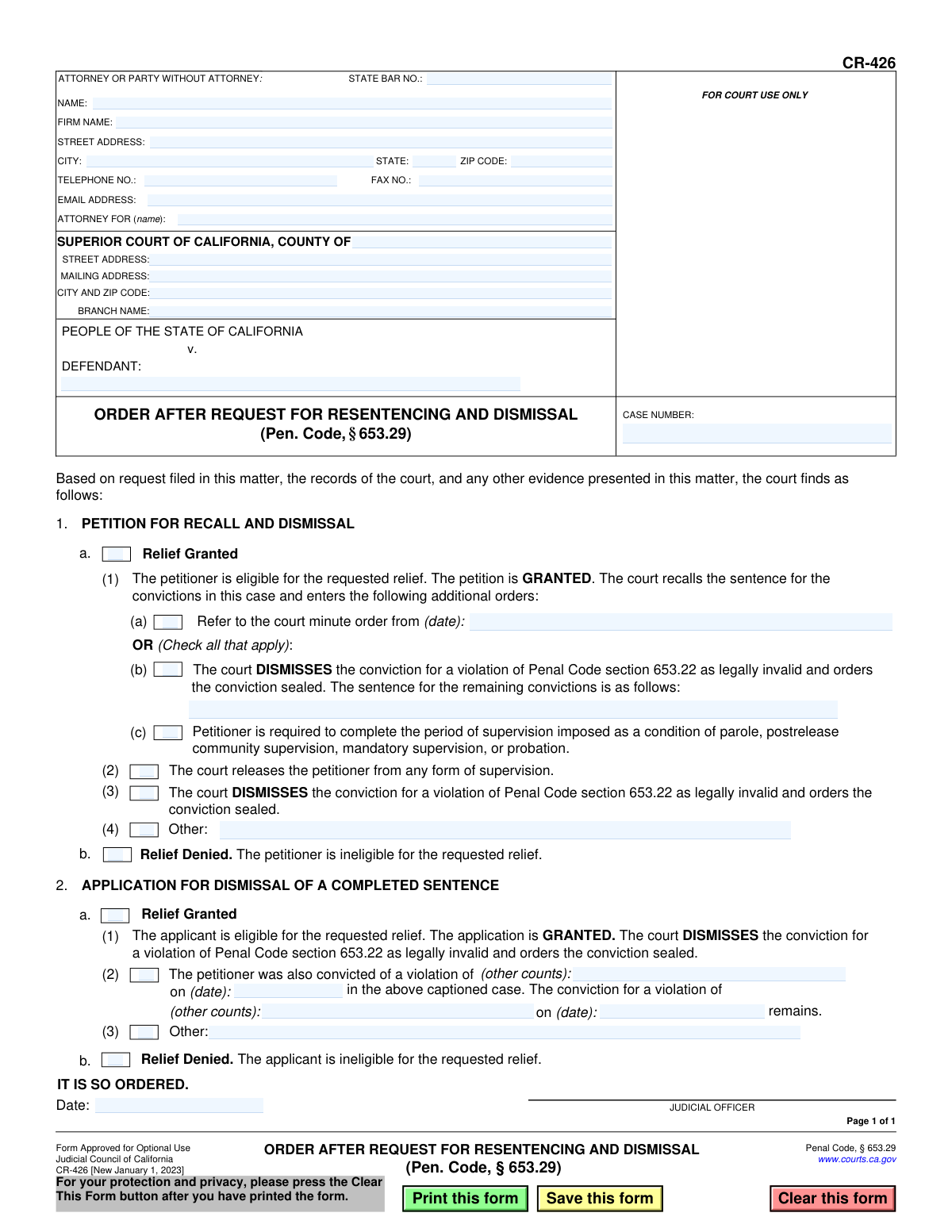
Yes! You can use AI to fill out Form CR-426, Order After Request for Resentencing and Dismissal (Pen. Code, § 653.29)

Form CR-426, Order After Request for Resentencing and Dismissal, is a legal document used in the California court system. A judge issues this order to formally grant or deny a defendant's request to have their sentence recalled and conviction dismissed for a violation of Penal Code section 653.22. This form documents the court's final decision and any related actions, such as sealing the conviction record. Today, this form can be filled out quickly and accurately using AI-powered services like Instafill.ai, which can also convert non-fillable PDF versions into interactive fillable forms.
CR-426 is part of the California court forms category on Instafill.
Our AI automatically handles information lookup, data retrieval, formatting, and form filling.
It takes less than a minute to fill out CR-426 using our AI form filling.
Securely upload your data. Information is encrypted in transit and deleted immediately after the form is filled out.

Form specifications

Form name: Form CR-426, Order After Request for Resentencing and Dismissal (Pen. Code, § 653.29)
Number of fields: 44
Number of pages: 1
Language: English
main-image

Instafill Demo: How to fill out PDF forms in seconds with AI

How to Fill Out CR-426 Online for Free in 2026

Are you looking to fill out a CR-426 form online quickly and accurately? Instafill.ai offers the #1 AI-powered PDF filling software of 2026, allowing you to complete your CR-426 form in just 37 seconds or less.
Follow these steps to fill out your CR-426 form online using Instafill.ai:
  1. 1 Navigate to Instafill.ai and upload the CR-426 form or select it from the template library.
  2. 2 Use the AI assistant to fill in the header information, including attorney/party details, court information, and the specific case number and defendant name.
  3. 3 Based on the court's ruling, check the appropriate boxes to indicate whether the order pertains to a 'Petition for Recall and Dismissal' or an 'Application for Dismissal of a Completed Sentence'.
  4. 4 Select whether relief is 'Granted' or 'Denied'. If granted, fill in the specific details of the order, such as dates, dismissal of convictions, or sealing of records.
  5. 5 If there are any additional court directives, enter them in the 'Other' text fields provided.
  6. 6 Enter the date the order is made and identify the judicial officer issuing the order.
  7. 7 Review the entire completed form for accuracy, then download, print, and submit it to the court for the judge's signature and official filing.

Our AI-powered system ensures each field is filled out correctly, reducing errors and saving you time.

Why Choose Instafill.ai for Your Fillable CR-426 Form?

Speed

Complete your CR-426 in as little as 37 seconds.

Up-to-Date

Always use the latest 2026 CR-426 form version.

Cost-effective

No need to hire expensive lawyers.

Accuracy

Our AI performs 10 compliance checks to ensure your form is error-free.

Security

Your personal information is protected with bank-level encryption.

Frequently Asked Questions About Form CR-426

Form CR-426 is a court order used by a California judge to grant or deny a request for resentencing and dismissal of a conviction for loitering with intent to commit prostitution (former Penal Code § 653.22).

A judicial officer, or judge, is the one who completes and signs this form. It serves as the court's official decision in response to a petition filed by an individual or their attorney.

This form is the final order from the judge. To begin the process, you must first file a petition or application with the superior court where you were convicted, asking for relief under Penal Code § 653.29.

Section 1, 'Petition for Recall and Dismissal,' is for individuals who are still serving a sentence or are under supervision. Section 2, 'Application for Dismissal of a Completed Sentence,' is for those who have already finished their entire sentence.

If your request is granted, the conviction is deemed legally invalid and is hidden from public view for most purposes, such as typical employment or housing background checks.

No, this order only applies to the specific conviction for violating former Penal Code section 653.22. The form clarifies that any other convictions in the case will remain on your record unless addressed separately.

If the judge denies relief, it means the court determined you were not eligible to have your conviction dismissed under the law. The specific reasons for the denial would be found in the court's records for your case.

To start the process, you will need your personal information, the case number, the date of your conviction, and specific details about the charge you want dismissed.

The processing time varies by court and caseload. After you file your initial petition, you can check with the court clerk for an estimated timeframe for a decision.

You should keep a certified copy of the signed order for your personal records. This serves as official proof that your conviction was dismissed and sealed by the court.

Yes, while the judge completes the CR-426 order, AI-powered services like Instafill.ai can help you accurately fill out the initial petition or application form required to start the process, saving you time and reducing errors.

Simply upload the petition or application form to the Instafill.ai platform. The AI will identify all the form fields, allowing you to enter your information and generate a completed, downloadable document.

Services like Instafill.ai can convert non-fillable PDFs into interactive, fillable forms. Upload your document, and the tool will make it easy to type your information directly into the correct fields.

Compliance CR-426
Validation Checks by Instafill.ai

1
Case Number Presence
Validates that the 'Case Number' field is not empty. The case number is a unique identifier for the court proceedings and is essential for linking the order to the correct file. A missing case number would render the document impossible to file and process correctly.
2
Defendant Name Presence
Ensures the 'DEFENDANT' field is populated. This field identifies the individual subject to the court's order, which is a fundamental requirement for legal validity. Failure to name the defendant makes the order ambiguous and unenforceable.
3
Mutually Exclusive Relief Decision in Section 1
Verifies that only one of '1.a. Relief Granted' or '1.b. Relief Denied' is selected. These two options are mutually exclusive outcomes for the petition. Selecting both or neither would create a logical contradiction, making the court's decision unclear and the order invalid.
4
Mutually Exclusive Relief Decision in Section 2
Checks that only one of '2.a. Relief Granted' or '2.b. Relief Denied' is selected for the application. Similar to Section 1, these are opposing decisions. The system must enforce this exclusivity to ensure the order reflects a single, unambiguous ruling from the judicial officer.
5
Completeness of Relief Granted in Section 1
Ensures that if '1.a. Relief Granted' is checked, at least one of the sub-options (1, 2, 3, or 4) is also selected. Granting relief requires specifying the exact nature of that relief. Failure to select a sub-option leaves the order's effect undefined and legally insufficient.
6
Conditional Date Requirement for Minute Order
Ensures that if checkbox '1.a(1)(a)' (referencing a court minute order) is checked, the corresponding date field is filled. The date is a critical piece of information needed to locate the referenced minute order. Without it, the instruction is incomplete and cannot be acted upon.
7
Conditional Text for 'Other' Option
Validates that if an 'Other' checkbox is selected (e.g., in section 1.a(4) or 2.a(3)), the adjacent text field is not empty. This ensures that any custom or additional orders are clearly specified. An empty 'Other' field would make the selection meaningless and create ambiguity.
8
Conditional Details for Other Convictions in Section 2
Verifies that if checkbox '2.a(2)' is selected, the text fields for 'other counts' and the associated date fields are populated. This information is necessary to clarify which convictions remain on the record. Missing these details would make the order incomplete and potentially confusing.
9
Valid Email Address Format
Checks that the value entered in the 'EMAIL ADDRESS' field follows the standard format for an email address (e.g., '[email protected]'). This is important for ensuring that any electronic communications or notifications from the court are deliverable. An invalid format would lead to communication failures.
10
Valid State Bar Number Format
Ensures the 'STATE BAR NO.' field contains a numeric value, as expected for California State Bar numbers. While not a full verification against a database, this format check prevents entry of clearly incorrect text. This helps maintain data integrity for attorney records.
11
Order Date Presence
Validates that the final 'Date' field next to the Judicial Officer's signature line is filled. This date, known as the execution date, is legally significant as it marks when the order becomes effective. An undated order is considered incomplete and may not be enforceable.
12
ZIP Code Format Validation
Checks that the 'ZIP CODE' field in the attorney's address contains a valid 5-digit or 9-digit (ZIP+4) numeric format. This is crucial for ensuring the accuracy of mailing addresses for physical correspondence. An incorrectly formatted ZIP code can lead to mail delivery delays or failures.
13
County Name Presence
Ensures the 'COUNTY OF' field is populated to identify the specific Superior Court jurisdiction. This is a fundamental piece of information required to identify the issuing court and is necessary for proper filing and record-keeping. An order without a county is jurisdictionally ambiguous.
14
Logical Date Consistency
Verifies that the final 'Order Date' is not earlier than any other dates specified on the form, such as the minute order date in 1.a(1)(a). The final order should logically occur at the end of the sequence of events it describes. This check prevents chronological impossibilities in the legal record.

Common Mistakes in Completing CR-426

Incorrect or Incomplete Case Number

Users frequently enter the case number with transposed digits, missing characters, or an incorrect format. The case number is the court's primary identifier for a legal matter, and any error can cause the order to be rejected, misfiled, or applied to the wrong record. This leads to significant delays and requires refiling. Always verify the case number against the most recent court documents for accuracy.

Incomplete Court Information

Filers often neglect to fill out the full court address, particularly the specific branch name or the distinction between the street and mailing address. This is especially common in counties with multiple courthouse locations. An incomplete address can cause the document to be routed incorrectly within the court system, delaying its arrival to the correct judge or clerk for processing and signature.

Contradictory Selections

A critical error is checking boxes that create a logical contradiction, such as selecting both 'Relief Granted' (e.g., 1a) and 'Relief Denied' (e.g., 1b) within the same section. This makes the proposed order legally nonsensical and guarantees its rejection by the court clerk or judge. The filer must choose one definitive outcome for the petition or application.

Missing Details for Granted Relief

Users often check a box to grant relief but then fail to provide the mandatory accompanying information. For example, checking box 1a(1)(a) without entering the date of the minute order, or checking 2a(2) without specifying which other counts remain and on what date. This renders the order incomplete and unenforceable, requiring correction and resubmission.

Ambiguous 'Attorney For' Designation

In the 'ATTORNEY FOR (name):' field, filers sometimes write 'Self', 'Pro Per', or their own name instead of the defendant's name. This field must clearly state the name of the party the attorney is representing, which is the Defendant listed in the case caption. An incorrect entry can cause confusion for the court clerk and may require clarification before the order is processed.

Confusion Between Petition and Application Sections

The form has two distinct sections: Section 1 for a 'Petition for Recall and Dismissal' and Section 2 for an 'Application for Dismissal of a Completed Sentence'. Filers may mistakenly fill out the wrong section based on the nature of their original request. This error can result in the judge signing an order that does not accurately reflect the legal basis for the relief sought, potentially invalidating the order.

Vague or Legally Insufficient 'Other' Entries

When using the 'Other' fields (e.g., 1a(4) or 2a(3)), filers may provide descriptions that are too vague, informal, or legally imprecise. An order from the court must be clear and unambiguous. A poorly drafted 'Other' condition can lead to the order being rejected or misinterpreted later, creating further legal complications.

Forgetting the Attorney's State Bar Number

Attorneys preparing this form sometimes forget to include their State Bar Number in the designated field. This number is required by the court to verify the attorney's identity and their standing with the State Bar of California. Omitting this information can lead to filing rejections or delays while the clerk's office attempts to verify the attorney's credentials.

Failing to Specify Remaining Convictions

In Section 2a(2), when relief is granted for one count but other convictions in the same case remain, it is crucial to list those remaining counts and their conviction dates. A common mistake is to leave this section blank, creating ambiguity about the status of the defendant's other convictions. This can lead to future legal disputes or incorrect updates to the criminal record.

Incorrectly Filling as a Non-Fillable PDF

This form is often found as a non-fillable PDF, leading users to print and fill it out by hand, which can result in illegible entries and data errors. This slows down court processing and increases the chance of rejection. Using a tool like Instafill.ai can convert the flat PDF into an interactive, fillable form, ensuring all entries are clear, properly formatted, and validated before printing.
Saved over 80 hours a year

“I was never sure if my IRS forms like W-9 were filled correctly. Now, I can complete the forms accurately without any external help.”

Kevin Martin Green

Your data stays secure with advanced protection from Instafill and our subprocessors

Robust compliance program

Transparent business model

You’re not the product. You always know where your data is and what it is processed for.

ISO 27001, HIPAA, and GDPR

Our subprocesses adhere to multiple compliance standards, including but not limited to ISO 27001, HIPAA, and GDPR.

Security & privacy by design

We consider security and privacy from the initial design phase of any new service or functionality. It’s not an afterthought, it’s built-in, including support for two-factor authentication (2FA) to further protect your account.

Fill out CR-426 with Instafill.ai

Worried about filling PDFs wrong? Instafill securely fills form-cr-426-order-after-request-for-resentencing-and-dismissal-pen-code-65329 forms, ensuring each field is accurate.