Yes! You can use AI to fill out Form CR-602, Capital Case Attorney List of Exhibits (Criminal)
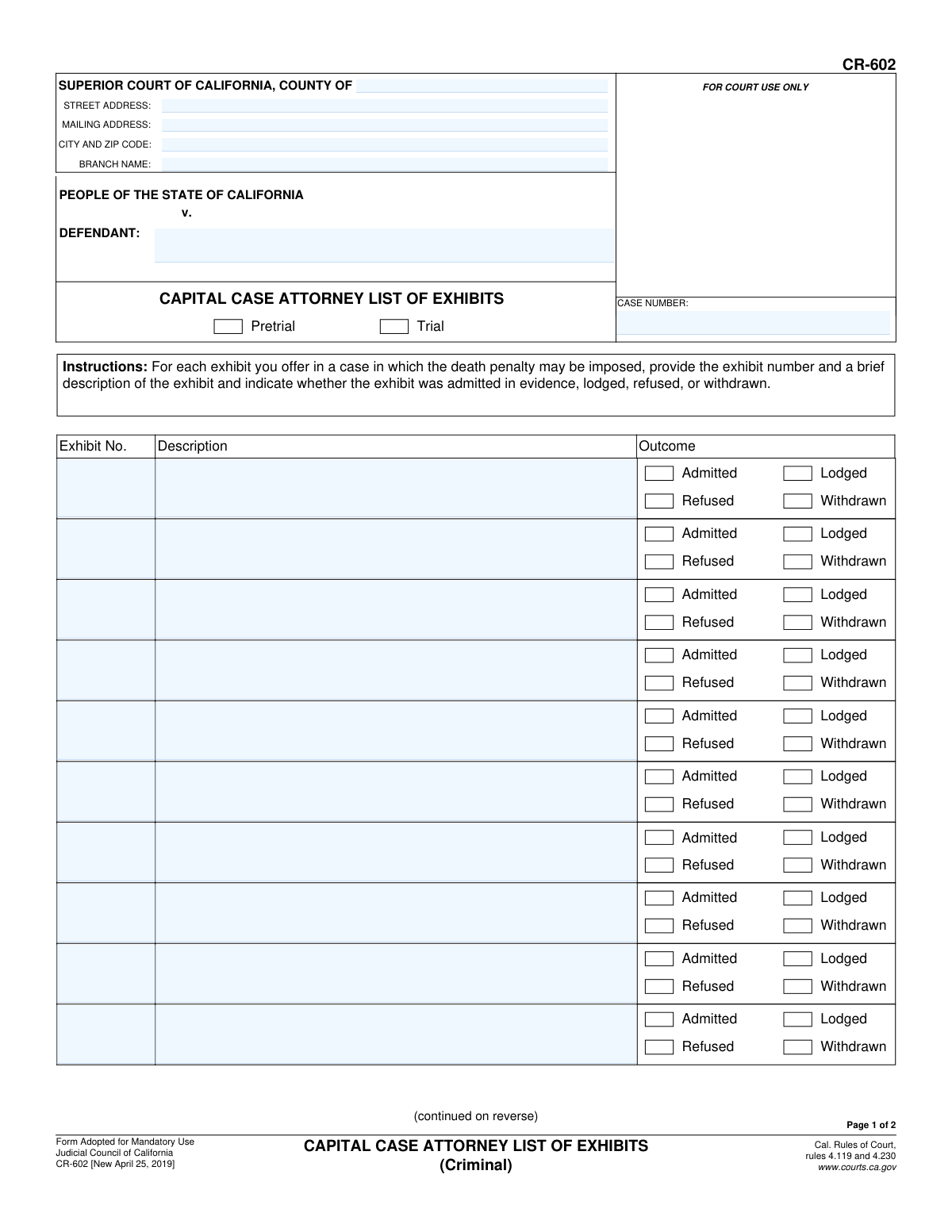
This is Form CR-602, the Capital Case Attorney List of Exhibits, a mandatory document for criminal proceedings in California where the death penalty may be imposed. Attorneys use this form to provide a detailed log of all exhibits offered during pretrial or trial, including the exhibit number, a brief description, and its status (admitted, refused, lodged, or withdrawn). Today, this form can be filled out quickly and accurately using AI-powered services like Instafill.ai, which can also convert non-fillable PDF versions into interactive fillable forms.
CR-602 is part of the
California court forms category on Instafill.
Our AI automatically handles information lookup, data retrieval, formatting, and form filling.
It takes less than a minute to fill out CR-602 using our AI form filling.
Securely upload your data. Information is encrypted in transit and deleted immediately after the form is filled out.
Form specifications
| Form name: | Form CR-602, Capital Case Attorney List of Exhibits (Criminal) |
| Number of fields: | 135 |
| Number of pages: | 1 |
| Language: | English |
Instafill Demo: How to fill out PDF forms in seconds with AI
How to Fill Out CR-602 Online for Free in 2026
Are you looking to fill out a CR-602 form online quickly and accurately? Instafill.ai offers the #1 AI-powered PDF filling software of 2026, allowing you to complete your CR-602 form in just 37 seconds or less.
Follow these steps to fill out your CR-602 form online using Instafill.ai:
- 1 Navigate to Instafill.ai and upload or select the CR-602 form.
- 2 Enter the court information, case number, and the names of the People of the State of California and the Defendant.
- 3 Indicate whether the exhibit list is for Pretrial or Trial proceedings by checking the appropriate box.
- 4 For each exhibit, enter the assigned exhibit number and a concise description in the provided rows.
- 5 Select the outcome for each exhibit by checking the corresponding box: Admitted, Refused, Lodged, or Withdrawn.
- 6 If more space is needed, attach an additional sheet. Once complete, date the form, print your name, and sign as the attorney for the specified party.
- 7 Review the completed form for accuracy and then download, print, or e-file it as required by the court.
Our AI-powered system ensures each field is filled out correctly, reducing errors and saving you time.
Why Choose Instafill.ai for Your Fillable CR-602 Form?
Speed
Complete your CR-602 in as little as 37 seconds.
Up-to-Date
Always use the latest 2026 CR-602 form version.
Cost-effective
No need to hire expensive lawyers.
Accuracy
Our AI performs 10 compliance checks to ensure your form is error-free.
Security
Your personal information is protected with bank-level encryption.
Frequently Asked Questions About Form CR-602
Form CR-602, the Capital Case Attorney List of Exhibits, is a mandatory form used in California to list and track the status of all exhibits offered by an attorney in a criminal case where the death penalty may be imposed.
This form must be completed by the attorney for either the prosecution or the defense who is offering exhibits during a capital case. Each party's attorney is responsible for their own list of exhibits.
No, this form is specifically for capital cases where the death penalty is a potential outcome. For other criminal cases, you would typically use a different form, such as CR-125.
An exhibit is 'Lodged' when it is given to the court for review but has not yet been officially accepted into evidence. This allows the judge to examine the item before ruling on its admissibility.
An exhibit is 'Refused' if the judge denies its admission into evidence after it was offered. An exhibit is 'Withdrawn' if the attorney who offered it decides to take it back before the judge makes a ruling.
If you run out of space, check the box on page 2 that says 'Check here if you need more space.' You can then attach additional pages, making sure to title them 'CR-602, List of Exhibits' and include the case information.
The description should be brief yet specific enough to clearly identify the exhibit for the court record. For example, 'Security footage from 123 Main St, May 1, 2023' is better than just 'Video'.
At the top of page 1, there are checkboxes to indicate whether the exhibits listed are being offered during the pretrial phase or the trial itself. You should select the appropriate option for the current proceedings.
Yes, AI-powered services like Instafill.ai can help by auto-filling repetitive information such as court addresses, case numbers, and party names, which saves time and helps prevent errors.
You can use a service like Instafill.ai to fill out this form online. Simply upload the CR-602 PDF, and the platform will provide an interactive version that you can complete, save, and download from your browser.
If you have a non-fillable or 'flat' PDF, you can upload it to Instafill.ai. The service uses AI to recognize the form fields and will automatically convert it into an interactive, fillable form for you to complete online.
The completed form should be filed with the court clerk to become part of the official case record. You should also provide copies to opposing counsel as required by court rules.
Compliance CR-602
Validation Checks by Instafill.ai
1
Case Number Consistency Across Pages
This check verifies that the 'CASE NUMBER' field is identical on both page 1 and page 2 of the form. Case number consistency is critical to ensure that all pages of the document are correctly associated with the same legal case. A mismatch could lead to filing errors or the rejection of the document by the court clerk.
2
Defendant Name Consistency Across Pages
This validation ensures that the 'DEFENDANT' name entered on page 1 matches the 'DEFENDANT' name on page 2. Consistent identification of the defendant is fundamental for legal document integrity. Discrepancies could create ambiguity and legal challenges regarding the document's applicability.
3
Mandatory Court County
This check confirms that the 'COUNTY OF' field for the Superior Court is not empty. This information is essential for routing the document to the correct jurisdiction and courthouse. Failure to provide the county would make it impossible to file the document correctly.
4
Proceeding Stage Selection
Validates that one of the proceeding stage options, 'Pretrial' or 'Trial', has been selected at the top of the form. This selection provides context for the list of exhibits and is a required piece of information for court records. The form is incomplete if neither is chosen.
5
Exhibit Row Integrity
For each row in the exhibit list, this check ensures that if any one field ('Exhibit No.', 'Description', or 'Outcome') is filled, then all three fields for that row must be completed. This prevents incomplete entries, such as listing an exhibit number without a description or an outcome. An incomplete row is ambiguous and not useful for the court record.
6
Exclusive Exhibit Outcome
This validation confirms that for each listed exhibit, exactly one outcome ('Admitted', 'Refused', 'Lodged', or 'Withdrawn') is selected. An exhibit cannot have multiple statuses simultaneously. This check prevents contradictory or ambiguous data entry, ensuring clarity in the official record of evidence.
7
Unique Exhibit Numbers
This check scans all 'Exhibit No.' fields across the entire form (including any indicated attachments) to ensure that each number is unique. Duplicate exhibit numbers would create severe confusion in court proceedings and in the official case record. If a duplicate is found, the form submission should be flagged for correction.
8
Valid Signature Date
This validation ensures the 'Date' field in the signature block is a valid, non-future date in a recognized format (e.g., MM/DD/YYYY). The signature date authenticates when the document was attested to by the attorney. A future date is logically impossible, and an invalid format can cause data processing errors.
9
Attorney Identification Completeness
This check verifies that the attorney's printed name and the party they represent ('attorney for (PARTY)') are both filled out in the signature section on page 2. These fields are required to identify who is submitting the list of exhibits and on whose behalf. Missing information would invalidate the submission's authority.
10
Attachment Indication Check
This validation checks if the 'Check here if you need more space' box is ticked. If it is, the system should flag the submission for a manual or automated verification to ensure that an attachment page titled 'CR-602, List of Exhibits' is actually present. This prevents claims of additional exhibits that were not actually submitted.
11
Case Number Format Validation
This check verifies that the value entered in the 'CASE NUMBER' field conforms to the standard format used by California Superior Courts. While formats can vary slightly by county, they typically follow a predictable pattern of letters and numbers. This validation helps catch typos and ensures the case number is syntactically correct for proper indexing.
12
Required Header Information
This validation ensures that the core case identifying information on page 1, specifically the 'DEFENDANT' name and 'CASE NUMBER', are not empty. These fields are the primary identifiers for the entire document. A form missing this information cannot be processed or filed.
Common Mistakes in Completing CR-602
Attorneys or their staff often fill out the 'DEFENDANT' and 'CASE NUMBER' fields on page 1 but forget to fill them out on page 2, or they enter slightly different information. This happens due to oversight when handling multi-page documents. Inconsistent data can lead to filing errors, confusion in the clerk's office, and potential delays as the pages may be misidentified or separated.
Users frequently enter overly brief descriptions like 'Photo,' 'Document,' or 'Audio file' in the 'Description' column. This lack of specificity makes it difficult for the court, opposing counsel, and appellate reviewers to understand what the exhibit actually is. To avoid this, provide a concise but clear description, such as 'Photo of front door of 123 Main St.' or 'Bank statement for Jane Doe, March 2023.' This ensures the record is unambiguous.
An exhibit is often listed with its number and description, but the user forgets to check one of the four outcome boxes: 'Admitted,' 'Refused,' 'Lodged,' or 'Withdrawn.' This omission leaves the record incomplete and requires manual correction later, potentially during a high-pressure trial setting. Always double-check that every listed exhibit has a corresponding outcome selected to maintain an accurate record of proceedings.
Submitting the form without the attorney's signature and the date is a critical error that can invalidate the entire document. This often happens when the filer is in a hurry and overlooks the signature block on the final page. An unsigned form will be rejected by the court clerk, causing filing delays and requiring the attorney to re-submit the document correctly.
On page 2, next to the signature line, there is a field to identify which party the attorney represents (e.g., 'Defendant' or 'People'). This field is frequently left blank. This omission creates ambiguity, as the court clerk may not immediately know which side is submitting the exhibit list, potentially leading to misfiling. Always specify the party you represent to ensure clarity.
Users may enter the wrong county, an incorrect branch name, or an incomplete court address in the header section. This can occur when an attorney practices in multiple jurisdictions and fills in the information from memory. An incorrect court address can cause the document to be misrouted or rejected, delaying its entry into the official case file. Always verify the exact court name and address before submission.
The form includes a checkbox or radio button list at the top to indicate whether the exhibits are for a 'Pretrial' hearing or the 'Trial' itself. Filers often overlook this selection. This information is crucial for context, as the status and relevance of exhibits can differ between pretrial motions and the main trial. Failing to make this selection creates an incomplete record for the court.
When more space is needed, users may check the box on page 2 but fail to attach the continuation sheet, or they attach a sheet without the required title 'CR-602, List of Exhibits.' This can lead to the attached information being lost or disregarded. To avoid this, ensure any attached pages are clearly labeled as instructed on the form and securely fastened to the main document.
When a fillable PDF is not used, the form is often printed and completed by hand, resulting in illegible entries for exhibit numbers, descriptions, and names. This creates significant problems for court clerks who must manually enter the data and can lead to critical errors in the official court record. To prevent this, always type directly into the form if possible. If the form is a non-fillable PDF, tools like Instafill.ai can convert it into a fillable version to ensure all entries are clear and legible.
Users sometimes fail to follow a consistent and sequential numbering or lettering scheme for exhibits (e.g., mixing numbers and letters like '1, 2, A, 4'). This can also include skipping numbers or duplicating them, which creates confusion for the judge, jury, and opposing counsel when referencing evidence. It is essential to establish a clear, sequential system (e.g., 1, 2, 3... for one party; A, B, C... for another) and stick to it throughout the trial.
Saved over 80 hours a year
“I was never sure if my IRS forms like W-9 were filled correctly. Now, I can complete the forms accurately without any external help.”
Kevin Martin Green
Your data stays secure with advanced protection from Instafill and our subprocessors
Robust compliance program
Transparent business model
You’re not the product. You always know where your data is and what it is processed for.
ISO 27001, HIPAA, and GDPR
Our subprocesses adhere to multiple compliance standards, including but not limited to ISO 27001, HIPAA, and GDPR.
Security & privacy by design
We consider security and privacy from the initial design phase of any new service or functionality. It’s not an afterthought, it’s built-in, including support for two-factor authentication (2FA) to further protect your account.
Fill out CR-602 with Instafill.ai
Worried about filling PDFs wrong? Instafill securely fills form-cr-602-capital-case-attorney-list-of-exhibits-criminal forms, ensuring each field is accurate.