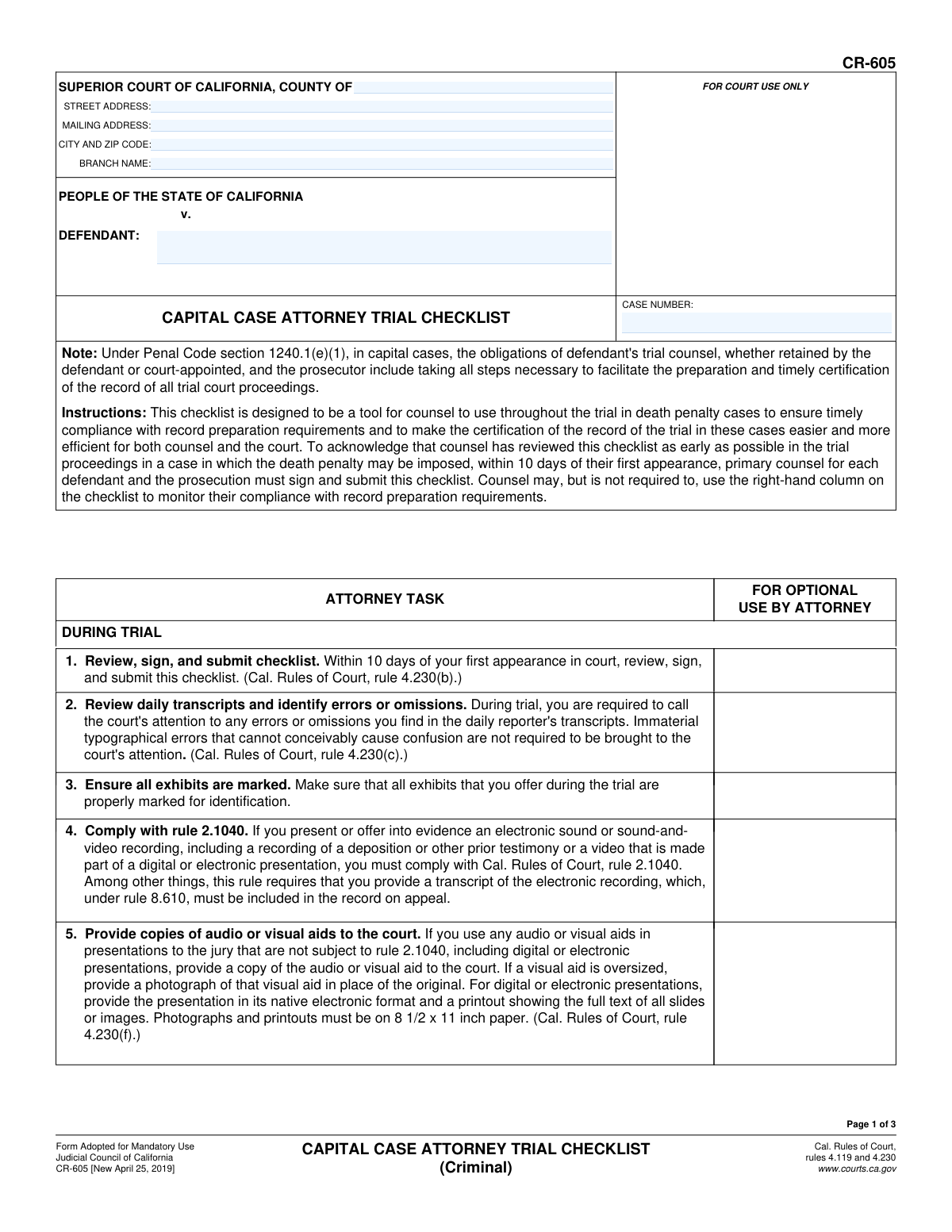
Yes! You can use AI to fill out Form CR-605, Capital Case Attorney Trial Checklist (Criminal)
Form CR-605, the Capital Case Attorney Trial Checklist, is a mandatory document for both prosecution and defense attorneys in California death penalty cases. It serves as a tool to track and verify compliance with all legal requirements for preparing a complete and accurate trial record for the appeal process. Today, this form can be filled out quickly and accurately using AI-powered services like Instafill.ai, which can also convert non-fillable PDF versions into interactive fillable forms.
CR-605 is part of the
California court forms category on Instafill.
Our AI automatically handles information lookup, data retrieval, formatting, and form filling.
It takes less than a minute to fill out CR-605 using our AI form filling.
Securely upload your data. Information is encrypted in transit and deleted immediately after the form is filled out.
Form specifications
| Form name: | Form CR-605, Capital Case Attorney Trial Checklist (Criminal) |
| Number of fields: | 14 |
| Number of pages: | 1 |
| Language: | English |
Instafill Demo: How to fill out PDF forms in seconds with AI
How to Fill Out CR-605 Online for Free in 2026
Are you looking to fill out a CR-605 form online quickly and accurately? Instafill.ai offers the #1 AI-powered PDF filling software of 2026, allowing you to complete your CR-605 form in just 37 seconds or less.
Follow these steps to fill out your CR-605 form online using Instafill.ai:
- 1 Navigate to Instafill.ai and upload your Form CR-605 or select it from the template library.
- 2 Provide the case details, including the court name, address, case number, and defendant's name, into the designated fields.
- 3 Review the checklist of attorney tasks required throughout the trial, such as reviewing daily transcripts and managing exhibits.
- 4 As the trial progresses, use the form to track the preparation of required lists, including appearances (CR-601), exhibits (CR-602), motions (CR-603), and jury instructions (CR-604).
- 5 Complete the post-trial sections if a death penalty is imposed, detailing actions like reviewing transcripts and conferring with opposing counsel.
- 6 Enter your name, the party you represent, and provide a digital signature and date to acknowledge your review and compliance.
- 7 Download the completed CR-605 to save for your records and submit it to the court within the required timeframe.
Our AI-powered system ensures each field is filled out correctly, reducing errors and saving you time.
Why Choose Instafill.ai for Your Fillable CR-605 Form?
Speed
Complete your CR-605 in as little as 37 seconds.
Up-to-Date
Always use the latest 2026 CR-605 form version.
Cost-effective
No need to hire expensive lawyers.
Accuracy
Our AI performs 10 compliance checks to ensure your form is error-free.
Security
Your personal information is protected with bank-level encryption.
Frequently Asked Questions About Form CR-605
This checklist is a tool for attorneys in death penalty cases to ensure they comply with all record preparation requirements, making the record certification process more efficient for everyone involved.
Primary counsel for both the defendant and the prosecution in a capital case must sign and submit this checklist to acknowledge they have reviewed their responsibilities.
You must review, sign, and submit this checklist within 10 days of your first appearance in court for the capital case.
You are required to review the daily reporter's transcripts during the trial and promptly inform the court of any significant errors or omissions you discover.
You must provide a copy of any audio or visual aid to the court. For digital presentations, you must provide both the native electronic file and a paper printout of all slides or images.
You must prepare and submit lists of all appearances (Form CR-601), exhibits offered (Form CR-602), motions made (Form CR-603), and jury instructions submitted (Form CR-604).
These lists must be submitted to the court no later than 21 days after a death sentence is imposed. This deadline is extended for very long transcripts.
If the combined clerk's and reporter's transcripts exceed 10,000 pages, deadlines for submitting lists and reviewing the record are extended by 3 days for each additional 1,000 pages.
You must review the transcripts for completeness and accuracy, confer with opposing counsel about any errors, and then file a declaration with either a request for corrections or a statement that none are needed.
If you are relieved as counsel, you must provide the substituting attorney with the lists of all appearances, exhibits, motions, and jury instructions you have prepared within five days.
Yes, you can use services like Instafill.ai, which leverage AI to accurately auto-fill form fields, saving you time and reducing the risk of errors.
To fill out this form online, you can upload the PDF to a service like Instafill.ai. The platform allows you to complete all the necessary fields digitally, then download or print the completed form.
If you have a non-fillable PDF, you can use a tool like Instafill.ai. It can convert flat, non-interactive PDFs into fillable forms that you can easily complete on your computer.
Compliance CR-605
Validation Checks by Instafill.ai
1
Case Number Consistency
This check verifies that the case number entered in the header of all three pages is identical. It is critical to ensure that all pages of the submitted document belong to the same case file. A mismatch could lead to the pages being separated or the entire document being rejected, causing significant delays in a time-sensitive capital case proceeding.
2
Defendant Name Consistency
This validation ensures the defendant's name is entered identically on all pages where the field appears. Consistency in the defendant's name is fundamental for accurate record-keeping and case identification. Any discrepancy could create ambiguity and potential legal challenges regarding the proper filing and association of documents to the correct individual's case.
3
Mandatory Case Number
This check ensures the 'CASE NUMBER' field is not empty. The case number is the primary identifier for all court records, and its absence would make it impossible to associate the checklist with the correct legal case. A form submitted without a case number would be considered incomplete and immediately rejected by the court clerk.
4
Mandatory Attorney Name
This validation confirms that the attorney's printed name is provided alongside the signature. An identifiable name is required to attribute the signature and the acknowledgment of responsibilities to a specific counsel of record. A missing name would invalidate the submission, as the court could not verify who reviewed and signed the checklist.
5
Mandatory Signature Date
This check ensures the 'Date' field next to the attorney's signature is filled out. The form must be submitted within 10 days of the attorney's first appearance, making the date essential for verifying compliance with court rules. An omission prevents the court from confirming the timeliness of the submission, potentially leading to a finding of non-compliance.
6
Valid Signature Date Format
This validation verifies that the signature date is entered in a recognized date format (e.g., MM/DD/YYYY). A standardized format is necessary for accurate data processing and record-keeping by the court's systems. An invalid or ambiguous date format could cause the form to be flagged for manual review or rejected for correction.
7
Plausible Signature Date
This check ensures the signature date is not in the future and is on or after the form's adoption date of April 25, 2019. This serves as a logical sanity check to catch significant data entry errors. An impossible date would indicate a mistake that must be corrected before the form can be accepted as a valid legal filing.
8
Mandatory Party Representation
This validation confirms that the field indicating the party the attorney represents (e.g., 'Defendant', 'Prosecution') is completed. This information is crucial for the court to understand the context of the submission and which side is acknowledging their duties. A blank field creates ambiguity and would require clarification, delaying the acceptance of the form.
9
Mandatory Court County
This check ensures that the 'COUNTY OF' field is filled in, specifying the Superior Court's jurisdiction. This is the most basic information needed to route the document to the correct courthouse and clerk's office. A submission without a county is un-fileable and would be returned.
10
Valid California County
This validation checks the entered court county against a known list of the 58 official counties in California. This prevents misfiling due to spelling errors or the use of unofficial abbreviations. Ensuring the county is correct is critical for the document to enter the correct court's record system.
11
Mandatory Defendant Name
This check verifies that the 'DEFENDANT' field on the first page is not left blank. Along with the case number, the defendant's name is a primary identifier for the case. Submitting a form without this information would render it incomplete and un-processable by the court.
12
Court Address Completeness
This validation ensures that if a street address is provided for the court, the corresponding city and ZIP code are also present. A partial address is not useful and suggests an incomplete form. This check promotes data integrity for court location information, which is important for mail and official notices.
13
ZIP Code Format Validation
This check verifies that the ZIP code entered in the 'CITY AND ZIP CODE' field follows a valid 5-digit or 9-digit (XXXXX-XXXX) format. Correct formatting is essential for automated mail sorting and ensuring the accuracy of the court's address in the database. An invalid format can lead to processing errors and returned mail.
Common Mistakes in Completing CR-605
Attorneys, particularly when newly assigned to a capital case, may overlook the strict deadline in Task 1, which requires this checklist to be signed and submitted within 10 days of their first appearance. This initial failure to comply can reflect poorly on counsel and signals a potential for future issues with record management. To avoid this, attorneys should immediately calendar this deadline upon their first appearance and use case management software to set reminders.
Task 6 explicitly requires that specific Judicial Council forms (CR-601, CR-602, CR-603, CR-604) be used for listing appearances, exhibits, motions, and jury instructions. Attorneys sometimes create their own lists or spreadsheets out of habit, which will be rejected by the court. This leads to unnecessary delays in the record certification process. Always use the exact forms specified to ensure compliance and prevent rework.
The top section of the form requires the court's address, branch name, defendant's name, and case number, and these fields are repeated on subsequent pages. Attorneys often rush and may leave fields blank, use abbreviations, or enter inconsistent information across pages. These errors can cause filing and administrative delays. Using a tool like Instafill.ai can prevent this by auto-filling consistent case and court information across all pages of the document.
Task 5 details very specific requirements for submitting audio or visual aids, including providing digital presentations in their native format plus a full printout, and ensuring photographs are on 8.5 x 11 inch paper. It is common for legal teams to submit only a USB drive or improperly sized photos, which fails to comply with the rule. This can result in the evidence being improperly documented for the appellate record, so it is crucial to follow the formatting rules precisely.
Tasks 7, 9, and 10 have deadlines that are extended based on the length of the trial transcripts (e.g., 'extended by 3 days for each 1,000 pages of combined transcripts over 10,000 pages'). Attorneys can easily misread or miscalculate these variable deadlines, leading to missed filings for crucial documents like exhibit lists and correction requests. To prevent this, counsel must carefully calculate the extension based on the final page count and clearly document the new due date.
Task 6a requires a 'separate list of Penal Code section 987.9 appearances' to be 'maintained under seal.' A common and serious mistake is to include these confidential, funding-related appearances in the main, public list of appearances (form CR-601). This breaches confidentiality and can create significant legal and procedural problems. Attorneys must be diligent in maintaining two distinct lists to protect sensitive information.
The checklist requires that the list of exhibits (Task 6b) and jury instructions (Task 6d) include the disposition of each item (e.g., 'admitted in evidence, refused, lodged, or withdrawn'). A frequent error is to submit a list of the items without this critical status information. This omission makes the list incomplete for appellate purposes and will require correction, delaying the certification of the record.
Task 7 specifies that lists should be submitted to the court in electronic form, 'Unless otherwise provided by local rule.' Attorneys may default to submitting paper copies without checking the specific court's local rules on electronic filing for this process. This can lead to the submission being rejected, forcing the attorney to re-submit and potentially miss the deadline. Always verify local rules for the required submission format.
The signature block on page 3 requires a date, a typed or printed name, a signature, and the name of the party being represented. It is common for filers to leave one of these fields blank, especially the 'party' field, which should specify 'PEOPLE OF THE STATE OF CALIFORNIA' or the defendant's name. An incomplete signature block can invalidate the submission, as it fails to properly acknowledge who reviewed the checklist and on whose behalf.
Attorneys often receive court forms as flat, non-fillable PDFs, leading to them printing the form and filling it out by hand, which can result in illegible entries and data entry errors. This manual process is inefficient and prone to mistakes, especially on a multi-page document with repetitive fields. AI-powered tools like Instafill.ai can convert non-fillable PDFs into interactive, fillable forms, allowing for clean, typed entries and reducing the chance of errors.
Saved over 80 hours a year
“I was never sure if my IRS forms like W-9 were filled correctly. Now, I can complete the forms accurately without any external help.”
Kevin Martin Green
Your data stays secure with advanced protection from Instafill and our subprocessors
Robust compliance program
Transparent business model
You’re not the product. You always know where your data is and what it is processed for.
ISO 27001, HIPAA, and GDPR
Our subprocesses adhere to multiple compliance standards, including but not limited to ISO 27001, HIPAA, and GDPR.
Security & privacy by design
We consider security and privacy from the initial design phase of any new service or functionality. It’s not an afterthought, it’s built-in, including support for two-factor authentication (2FA) to further protect your account.
Fill out CR-605 with Instafill.ai
Worried about filling PDFs wrong? Instafill securely fills form-cr-605-capital-case-attorney-trial-checklist-criminal forms, ensuring each field is accurate.