Yes! You can use AI to fill out Form EA-109, Notice of Court Hearing (Elder or Dependent Adult Abuse Prevention)

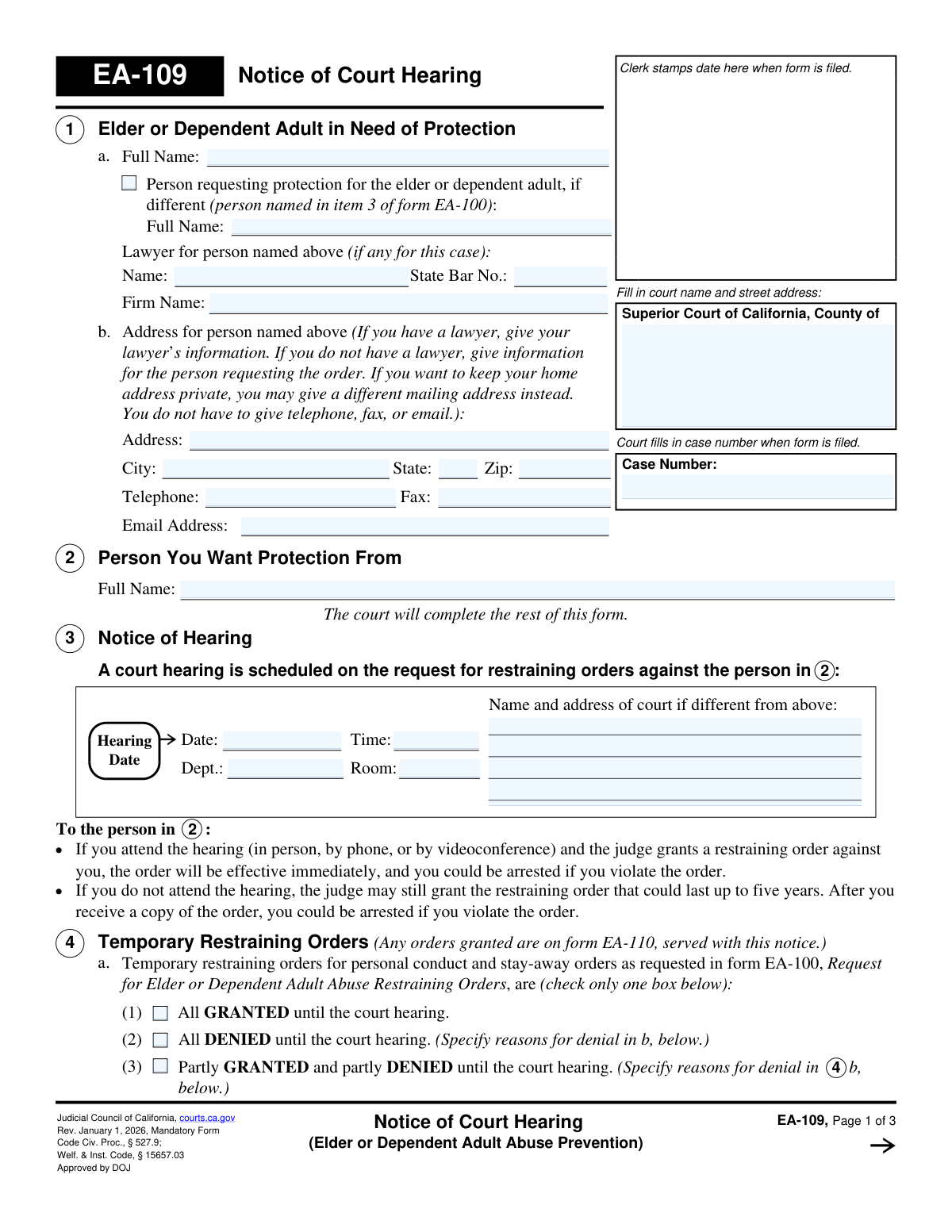
Form EA-109, Notice of Court Hearing, is a mandatory California judicial form used to schedule and provide notice of a court hearing for an Elder or Dependent Adult Abuse Restraining Order. It informs the person accused of abuse about the hearing details and any temporary orders granted or denied. This notice is a critical step in the legal process to protect vulnerable adults, ensuring the respondent is properly served. Today, this form can be filled out quickly and accurately using AI-powered services like Instafill.ai, which can also convert non-fillable PDF versions into interactive fillable forms.
EA-109 is part of the California court forms category on Instafill.
Our AI automatically handles information lookup, data retrieval, formatting, and form filling.
It takes less than a minute to fill out EA-109 using our AI form filling.
Securely upload your data. Information is encrypted in transit and deleted immediately after the form is filled out.

Form specifications

Form name: Form EA-109, Notice of Court Hearing (Elder or Dependent Adult Abuse Prevention)
Number of fields: 42
Number of pages: 1
Language: English
main-image

Instafill Demo: How to fill out PDF forms in seconds with AI

How to Fill Out EA-109 Online for Free in 2026

Are you looking to fill out a EA-109 form online quickly and accurately? Instafill.ai offers the #1 AI-powered PDF filling software of 2026, allowing you to complete your EA-109 form in just 37 seconds or less.
Follow these steps to fill out your EA-109 form online using Instafill.ai:
  1. 1 Navigate to Instafill.ai and upload or select Form EA-109.
  2. 2 Use the AI assistant to identify fields for the court name, case number, and information about the protected person and the person to be restrained.
  3. 3 Enter the full name and contact information for the person needing protection and their representative, if applicable.
  4. 4 Review the sections to be completed by the court, such as the hearing date, time, location, and the judge's decision on temporary restraining orders. Instafill.ai can help differentiate user-fillable fields from court-only sections.
  5. 5 Carefully read the service instructions in Section 5 to understand which documents must be served to the respondent and the required timeline.
  6. 6 After the court fills in its portion, review the entire form for accuracy before proceeding with the legal service process as instructed.
  7. 7 Securely download, print, and file the completed EA-109 form with the appropriate Superior Court of California as part of the case file.

Our AI-powered system ensures each field is filled out correctly, reducing errors and saving you time.

Why Choose Instafill.ai for Your Fillable EA-109 Form?

Speed

Complete your EA-109 in as little as 37 seconds.

Up-to-Date

Always use the latest 2026 EA-109 form version.

Cost-effective

No need to hire expensive lawyers.

Accuracy

Our AI performs 10 compliance checks to ensure your form is error-free.

Security

Your personal information is protected with bank-level encryption.

Frequently Asked Questions About Form EA-109

This form officially notifies the parties involved about the date, time, and location of a court hearing for an Elder or Dependent Adult Abuse Restraining Order. It also indicates whether a Temporary Restraining Order (TRO) has been granted until the hearing.

The person requesting the protection order (or their lawyer) fills out their information in section 1. The court clerk and judge will complete the rest of the form, including the hearing details and decisions on temporary orders.

A TRO is a short-term order granted by a judge to provide immediate protection until the full court hearing can take place. Section 4 of this form will show if the judge granted, denied, or partially granted the temporary orders you requested.

You must arrange for another adult (not you or anyone being protected) to personally deliver, or 'serve,' a copy of Form EA-109 and other required documents to the person you want protection from. This must be done within the timeframe specified by the court in section 5.

You should carefully read the notice for the hearing date and any temporary orders made against you. It is highly recommended that you attend the hearing to tell your side of the story, as a restraining order lasting up to five years can be issued even if you are not present.

You must attend the hearing to have your request for a restraining order considered. If you do not show up, the judge will likely dismiss your case and any temporary orders will expire.

You can file a written response using Form EA-120, Response to Request for Elder or Dependent Adult Abuse Restraining Orders. You must also have a copy of your response served on the person who requested the order before the hearing.

If you need more time to serve the documents, you can ask the court to postpone the hearing. You should review Form EA-115-INFO, How to Ask for a New Hearing Date, for instructions on how to request a new date.

The person who serves the forms must complete and sign a Proof of Service form, like Form EA-200. This completed form must then be filed with the court to demonstrate that the other party was properly notified of the hearing.

If the judge grants the restraining order after the hearing, it can last for up to five years. Violating the order is a crime and can lead to arrest.

Yes, services like Instafill.ai use AI to accurately auto-fill court forms, such as the initial EA-100 Request form. This can help save time and reduce the chance of errors on your paperwork.

You can use a service like Instafill.ai to complete your forms on a computer. Simply upload the necessary documents, and the platform will guide you through filling out all the required fields before you print them for filing with the court.

If you have a non-fillable or 'flat' PDF, you can use a service like Instafill.ai. It has the capability to convert the document into an interactive, fillable form that you can easily complete online.

You can request accommodations like a sign language interpreter by contacting the clerk's office at least five days before your hearing. You will likely need to fill out Form MC-410, Disability Accommodation Request.

Compliance EA-109
Validation Checks by Instafill.ai

1
Case Number Consistency Across Pages
This check ensures that the 'Case Number' entered on page 1 is identical to the 'Case Number' on all subsequent pages (page 2 and page 3). Maintaining a consistent case number is critical for document integrity and ensures that all pages of the notice are correctly associated with the same legal case file. A mismatch could lead to filing errors, confusion, and potential legal invalidity of the notice.
2
Required Protected Person's Name
Validates that the 'Full Name' field for the 'Elder or Dependent Adult in Need of Protection' (Section 1a) is not empty. This is the primary individual the legal action is intended to protect, and their identity is fundamental to the case. Failure to provide this name would make the entire notice legally meaningless and result in immediate rejection.
3
Required Restrained Person's Name
Ensures the 'Full Name' of the 'Person You Want Protection From' (Section 2) is provided. The notice must clearly identify the individual against whom the restraining orders are sought for proper service and legal effect. Without this name, law enforcement cannot enforce the order, and the notice is invalid.
4
Hearing Date Validity and Chronology
Verifies that the 'Hearing Date' in Section 3 is a valid, fully-qualified date that occurs in the future. It also checks that this date is on or after the clerk's filing date (stamp) and the Judicial Officer's signature date. A hearing cannot be scheduled for a past date or before the notice is officially filed and signed, as this would be logically and legally impossible.
5
Hearing Time Format
Checks that the 'Time' field for the court hearing in Section 3 is in a valid time format (e.g., HH:MM AM/PM). An improperly formatted or ambiguous time could cause the parties to miss the hearing, potentially resulting in a default judgment or dismissal of the request. This validation ensures clarity for all involved parties.
6
Exclusive TRO Decision Selection
Validates that in Section 4a, only one of the three options ('All GRANTED', 'All DENIED', or 'Partly GRANTED and partly DENIED') is selected. These options are mutually exclusive. Selecting more than one would create a logical contradiction regarding the status of the temporary restraining order, making the notice ambiguous and unenforceable.
7
Conditional Requirement for TRO Denial Reason
This check ensures that if the temporary restraining order is 'All DENIED' or 'Partly GRANTED' (Section 4a), a reason for the denial is provided in Section 4b. The court is required to state its reasoning for denying protective orders. Failure to provide a reason when one is required could be grounds for an appeal or reconsideration.
8
State Bar Number Format
If a lawyer's name is entered in Section 1, this validates that the 'State Bar No.' field contains a valid numerical format. State Bar numbers are unique identifiers for licensed attorneys, and ensuring the number is present and correctly formatted is crucial for verifying the lawyer's credentials and contact information. An invalid format could hinder communication and case processing.
9
ZIP Code Format Validation
Verifies that the 'Zip' code provided in the address block in Section 1b is a valid 5-digit or 9-digit (ZIP+4) format. A correct ZIP code is essential for ensuring legal notices and other correspondence are mailed successfully to the correct party or their lawyer. An invalid ZIP code will lead to returned mail and delays in the legal process.
10
Service Days Numerical Value
Ensures the field specifying the number of days for service in Section 5 contains a positive integer. This number dictates the legal deadline by which the respondent must be served before the hearing. The value must be a clear, whole number to be legally unambiguous; a non-numeric or negative value would make the service requirement void.
11
Logical Service of Temporary Restraining Order
This validation checks that if the box 'EA-110, Temporary Restraining Order' (Section 5b) is checked for service, then the TRO decision in Section 4a must be 'All GRANTED' or 'Partly GRANTED'. It is logically inconsistent and legally incorrect to serve a Temporary Restraining Order form if the request for one was fully denied by the court. This prevents confusion and improper service.
12
Specification for 'Other' Service Documents
If the 'Other' checkbox is marked in Section 5e, this check validates that the corresponding text field ('specify') is not empty. This ensures that any additional documents required for service are explicitly named on the notice. Failing to specify the 'Other' documents would leave the service instructions incomplete and potentially invalidate the service.
13
Email Address Format Validation
If an email address is provided in Section 1b, this check verifies that it conforms to a standard email format (e.g., [email protected]). While optional, if an email is provided, it must be valid to be useful for electronic communication and service. An invalid format could lead to failed deliveries and missed communications.
14
Judicial Officer Signature Date Presence
Validates that the 'Date' field next to the Judicial Officer's signature line is filled. The signature date is what gives the orders and the notice of hearing their legal authority and establishes the timeline for all subsequent actions, such as service and the hearing itself. A missing date invalidates the document.

Common Mistakes in Completing EA-109

Filling in Sections Reserved for the Court

Petitioners often mistakenly fill out sections intended for the court, such as the hearing date in Section 3 or the Temporary Restraining Order decision in Section 4. The form explicitly states 'The court will complete the rest of this form' after Section 2. Filling these sections can confuse court clerks, lead to rejection of the form, and cause significant processing delays, requiring the petitioner to start over.

Using Incomplete or Inaccurate Names

The form requires the full legal names for both the protected person (Section 1) and the restrained person (Section 2). People frequently use nicknames, initials, or misspell names, which can render a restraining order unenforceable by law enforcement. It is critical to use the complete and correct legal name as it appears on an official ID to ensure the court order is valid and effective.

Misidentifying the Petitioner vs. the Protected Person

In Section 1a, there is confusion between the 'Elder or Dependent Adult in Need of Protection' and the 'Person requesting protection... if different'. A family member filing on behalf of an elder might incorrectly put their own name in the first field. This creates legal ambiguity about who is actually being protected, which can cause the clerk to reject the filing until it is clarified.

Unsafely Disclosing a Confidential Home Address

Section 1b allows for a private mailing address, yet petitioners often list their confidential home address out of fear of leaving a field blank. This is extremely dangerous, as the restrained person receives a copy of this form, revealing the petitioner's location. To avoid this risk, a P.O. Box, a lawyer's address, or another safe alternative address must be used if privacy is a concern.

Entering Incorrect Court Name or Address

At the top of the form, the petitioner must provide the exact name and street address of the correct Superior Court branch. Common errors include typos, using a generic name like 'County Courthouse,' or listing the wrong location, which can lead to the form being rejected or misfiled. This mistake halts the legal process and requires the petitioner to refile the documents in the correct jurisdiction.

Submitting an Obsolete Version of the Form

Courts mandate the use of the most current version of any form, as indicated by the revision date in the header (e.g., 'Rev. January 1, 2026'). People often download outdated versions from unofficial websites, which results in automatic rejection by the court clerk. To prevent this, always download the form directly from the official California Courts website (courts.ca.gov).

Filing Form EA-109 Without the Main Request (EA-100)

Form EA-109 is only a 'Notice of Court Hearing' and is not a standalone request. A frequent mistake is filing it without the primary petition, Form EA-100, 'Request for Elder or Dependent Adult Abuse Restraining Orders'. Submitting the notice by itself is meaningless as there is no underlying request for the court to act upon, and the filing will be rejected.

Misunderstanding the Personal Service Requirement

The instructions on page 2 state that the petitioner is responsible for having the documents formally delivered ('served') to the restrained person. Petitioners often mistakenly assume the court performs this service or attempt to deliver the papers themselves. Service by the petitioner is invalid and will prevent the case from proceeding, as the court cannot make orders unless the other party has been properly notified by a neutral third party.

Submitting an Illegible Handwritten Form

When a form is printed and filled out by hand, illegible writing can make critical information like names and addresses unreadable. This can lead to an unenforceable order or failed service attempts, causing the entire case to be delayed or dismissed. To ensure clarity, it is best to type directly into the fillable PDF; if the form is a flat PDF, a tool like Instafill.ai can convert it into a fillable version to avoid handwriting issues.

Omitting Mandatory Information in Petitioner Sections

Petitioners must fully complete all their required fields, including the court information, their own details in Section 1, and the restrained person's full name in Section 2. Leaving any of these fields blank, especially the name of the person to be restrained, will cause the clerk to reject the form. AI-powered form filling tools like Instafill.ai can help prevent this by validating that all mandatory fields are completed before submission.
Saved over 80 hours a year

“I was never sure if my IRS forms like W-9 were filled correctly. Now, I can complete the forms accurately without any external help.”

Kevin Martin Green

Your data stays secure with advanced protection from Instafill and our subprocessors

Robust compliance program

Transparent business model

You’re not the product. You always know where your data is and what it is processed for.

ISO 27001, HIPAA, and GDPR

Our subprocesses adhere to multiple compliance standards, including but not limited to ISO 27001, HIPAA, and GDPR.

Security & privacy by design

We consider security and privacy from the initial design phase of any new service or functionality. It’s not an afterthought, it’s built-in, including support for two-factor authentication (2FA) to further protect your account.

Fill out EA-109 with Instafill.ai

Worried about filling PDFs wrong? Instafill securely fills form-ea-109-notice-of-court-hearing-elder-or-dependent-adult-abuse-prevention forms, ensuring each field is accurate.