Yes! You can use AI to fill out Form EA-820, Prohibited Items Finding and Orders (Elder or Dependent Adult Abuse Prevention)
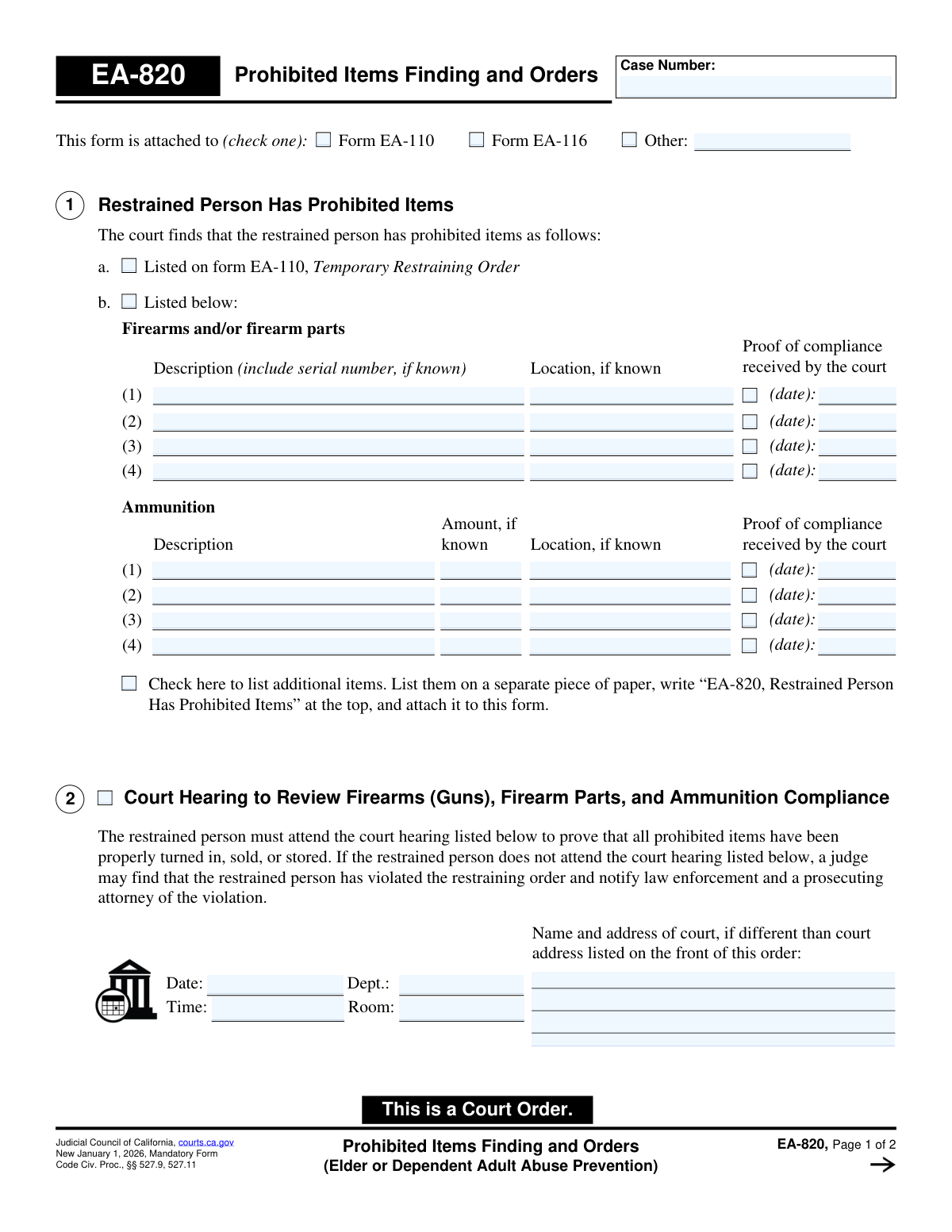
Form EA-820, Prohibited Items Finding and Orders, is a crucial judicial document used in California for elder or dependent adult abuse prevention cases. It serves as a court order detailing the court's findings that a restrained person possesses prohibited items and mandates their surrender. The form is vital for enforcing restraining orders by scheduling compliance hearings and notifying law enforcement of violations to ensure the protected person's safety. Today, this form can be filled out quickly and accurately using AI-powered services like Instafill.ai, which can also convert non-fillable PDF versions into interactive fillable forms.
EA-820 is part of the
California court forms category on Instafill.
Our AI automatically handles information lookup, data retrieval, formatting, and form filling.
It takes less than a minute to fill out EA-820 using our AI form filling.
Securely upload your data. Information is encrypted in transit and deleted immediately after the form is filled out.
Form specifications
| Form name: | Form EA-820, Prohibited Items Finding and Orders (Elder or Dependent Adult Abuse Prevention) |
| Number of fields: | 58 |
| Number of pages: | 1 |
| Language: | English |
Instafill Demo: How to fill out PDF forms in seconds with AI
How to Fill Out EA-820 Online for Free in 2026
Are you looking to fill out a EA-820 form online quickly and accurately? Instafill.ai offers the #1 AI-powered PDF filling software of 2026, allowing you to complete your EA-820 form in just 37 seconds or less.
Follow these steps to fill out your EA-820 form online using Instafill.ai:
- 1 Navigate to Instafill.ai and upload or select the Form EA-820.
- 2 Enter the case number and check the box to indicate which restraining order form this document is attached to.
- 3 In Section 1, detail the court's findings by listing all prohibited items the restrained person possesses, including descriptions and known locations of firearms, parts, and ammunition.
- 4 Complete Section 2 by entering the date, time, department, and location for the court hearing where the restrained person must prove compliance.
- 5 If the restrained person has not complied, fill out Section 3 to document the violation and identify the law enforcement and prosecuting agencies to be notified.
- 6 Use the AI-powered tools to review all entered information for accuracy and completeness before the order is finalized and signed by a judicial officer.
- 7 Securely save, print, or file the completed court order as required by court procedures.
Our AI-powered system ensures each field is filled out correctly, reducing errors and saving you time.
Why Choose Instafill.ai for Your Fillable EA-820 Form?
Speed
Complete your EA-820 in as little as 37 seconds.
Up-to-Date
Always use the latest 2026 EA-820 form version.
Cost-effective
No need to hire expensive lawyers.
Accuracy
Our AI performs 10 compliance checks to ensure your form is error-free.
Security
Your personal information is protected with bank-level encryption.
Frequently Asked Questions About Form EA-820
Form EA-820, 'Prohibited Items Finding and Orders,' is a California court order used in elder or dependent adult abuse cases. It officially lists firearms, firearm parts, and ammunition that a restrained person has been ordered to surrender and tracks their compliance.
This form is completed by the court, not by the parties in the case. A judge or court clerk fills it out based on findings made during a court hearing to create an official court order.
This means Form EA-820 is a supplemental order that provides specific details about firearms related to a primary restraining order, such as a Temporary Restraining Order (EA-110). It is part of the same legal action and should be kept with the other orders.
Section 1 lists the specific prohibited items the restrained person must surrender, such as firearms and ammunition. It includes space for a description, serial number, and known location of each item.
The hearing is a mandatory appearance for the restrained person to prove to the judge that they have properly turned in, sold, or stored all the prohibited items listed in the order. Proof, such as a receipt from law enforcement, is required.
If the restrained person does not attend the scheduled hearing, the judge may find that they have violated the restraining order. The court can then notify law enforcement and a prosecuting attorney of the violation.
This means the court has determined the restrained person failed to obey the order to surrender their items. The court will then immediately notify the specified law enforcement and prosecuting agencies of this violation.
The court lists items based on information provided in the case. This information may come from the initial request for a restraining order (Form EA-110) or other evidence presented in court.
You must immediately surrender all items listed on the form and get a receipt. You must then file the receipt with the court and attend the scheduled hearing to prove you have complied.
Yes, services like Instafill.ai use AI to help you accurately auto-fill your legal forms, which can save time and help prevent errors. While the court fills out EA-820, you can use these tools for other forms you need to prepare.
You can upload a form to the Instafill.ai platform, and its AI will identify the fields and help you fill them in with your saved information. After reviewing for accuracy, you can download the completed document.
If you have a non-fillable or 'flat' PDF, you can use a service like Instafill.ai to make it interactive. Simply upload the document, and the platform will convert it into a fillable form you can complete online.
Compliance EA-820
Validation Checks by Instafill.ai
1
Case Number Consistency
This check ensures the 'Case Number' entered on page 1 is identical to the 'Case Number' on page 2. The case number is the primary identifier linking this order to a specific legal proceeding. If the numbers mismatch, the document could be misfiled or considered invalid, causing significant administrative and legal problems.
2
Exclusive Attachment Context Selection
Validates that exactly one checkbox is selected in the section 'This form is attached to'. The user must choose either 'Form EA-110', 'Form EA-116', or 'Other'. This is critical for establishing the legal context of the order, and selecting zero or multiple options creates ambiguity that could render the order difficult to interpret or enforce.
3
Conditional 'Other' Form Specification
This validation ensures that if the 'Other' checkbox is selected as the attachment context, the accompanying text field is filled out. This is necessary to specify which document this order is attached to. Failure to provide this information would result in an incomplete and vague reference, making it impossible to know the order's origin.
4
Prohibited Items Source Requirement
Ensures that at least one checkbox in Section 1 is checked, indicating whether prohibited items are listed on Form EA-110 (1a) or detailed on this form (1b). The entire purpose of the form is to address prohibited items, so this information is mandatory. If neither is selected, the order is incomplete and has no legal effect.
5
Conditional Item Description for Section 1b
If the checkbox for Section 1b ('Listed below') is marked, this check verifies that at least one 'Description' field for a firearm or ammunition is completed. This ensures that the order is specific about which items must be surrendered. An order that indicates items are listed below but provides no descriptions is contradictory and unenforceable.
6
Valid Future Hearing Date
This check validates that the 'Date' provided for the court hearing in Section 2 is a valid date and occurs in the future. A hearing cannot be scheduled for the past, and an invalid date format would cause system errors and fail to properly notify the individual. This is essential for ensuring due process and the validity of the hearing notice.
7
Valid Hearing Time Format
Ensures the 'Time' field in Section 2 is entered in a standard, recognizable time format (e.g., HH:MM AM/PM). An ambiguous or incorrectly formatted time could cause the restrained person to miss the hearing. This would lead to an automatic violation and further legal action based on a potentially faulty notice.
8
Hearing Location Specificity
Validates that if a hearing date and time are entered in Section 2, either the 'Dept.' or 'Room' field is also filled in. This information is crucial for the restrained person to find the correct courtroom. Without this detail, the notice is incomplete and the person may be unable to attend the hearing, even if they are at the correct courthouse.
9
Valid Past Order Date for Non-Compliance
This check ensures the date entered in Section 3a, for when the original orders were granted, is a valid date that occurs in the past. A finding of non-compliance must refer to a pre-existing order. Entering a future or invalid date would be logically impossible and would invalidate the court's finding of a violation.
10
Conditional Agency Notification
Verifies that if Section 3 is completed to indicate non-compliance, then the name of the law enforcement agency (3b) or prosecuting agency (3c) is provided. The form states the court 'will immediately notify' these agencies, so the information is required to execute the order. Leaving these fields blank would render the notification portion of the court order moot.
11
Proof of Compliance Date Validity
This validation checks that any date entered in the 'Proof of compliance received by the court' column is a valid, correctly formatted date. These dates are part of the official court record for tracking the restrained person's compliance. Invalid or improperly formatted dates would corrupt the case record and create confusion about whether the order has been satisfied.
12
Attachment Indication for Additional Items
Validates that if the 'Check here to list additional items' box is checked in Section 1, an attachment is included with the submission. The checkbox explicitly states that items are listed on a separate paper, so the absence of that attachment makes the order incomplete. This prevents a situation where an order references items that are not documented anywhere in the filing.
13
Logical Section Exclusivity
This check ensures that the form does not contain entries for both Section 2 (scheduling a future compliance hearing) and Section 3 (finding that non-compliance has already occurred). These sections represent different stages of the legal process and are typically mutually exclusive on a single order. Including both creates a legally confusing and contradictory document that would require judicial clarification.
Common Mistakes in Completing EA-820
This critical error involves entering the wrong case number or leaving it blank on one or both pages. This often happens due to transcription mistakes or not having the primary case file for reference. An incorrect case number can lead to the form being rejected by the court clerk, causing significant delays, or being filed in the wrong case, creating serious legal confusion. To prevent this, always double-check the case number against official court documents and ensure it is entered identically on every page; AI-powered tools like Instafill.ai can automatically populate this field across all pages after a single entry, eliminating this risk.
The form requires the user to check a box at the top to indicate which primary order it is attached to (e.g., Form EA-110, EA-116). People often overlook this section, assuming the connection is obvious or unimportant. Without this link, the form lacks legal context, which can confuse court staff and make the order difficult to process or enforce. Always ensure the correct box is checked to properly associate this findings form with the main restraining order.
In Section 1, filers may list items with generic descriptions like 'handgun' or 'rifle' without providing specific details. This happens when the exact information isn't readily available or the importance of specificity is underestimated. Vague descriptions make it nearly impossible for law enforcement to identify and confiscate the correct items, rendering the order ineffective and allowing the restrained person to potentially retain dangerous weapons. To avoid this, provide the make, model, caliber, color, and serial number for every firearm, and be as detailed as possible for all other prohibited items.
The form provides limited space for listing prohibited items and instructs users to attach a separate page for more. A common mistake is to either try to squeeze illegible information into the small boxes or to forget to label and attach the extra page correctly. This can result in the court being unaware of all the items the restrained person possesses, creating a significant safety loophole. Always follow the instructions: check the box for additional items, use a separate sheet, label it clearly with 'EA-820, Restrained Person Has Prohibited Items' and the case number, and securely attach it.
Section 2 requires the precise date, time, department, and room number for the compliance hearing. Errors occur from misreading the court calendar or simple transcription mistakes. Inaccurate information gives the restrained person a valid reason for missing the hearing, forcing the court to reschedule and delaying the confirmation that dangerous items have been surrendered. To prevent this, meticulously verify all hearing details with the official court notice or clerk before filling out the form.
People often overlook the field in Section 2 for the court's name and address if it's different from the main courthouse. This is a critical error when hearings are held in different buildings, annexes, or satellite court locations. This omission can cause the restrained person to go to the wrong location, miss their hearing, and potentially lead to an erroneous non-compliance finding. If the hearing is not in the main courthouse listed on the first page of the primary order, always fill in the complete name and address of the correct location.
In Section 3, which is filled out upon non-compliance, the form requires naming the specific law enforcement and prosecuting agencies to be notified. Filers often lack knowledge of jurisdictional boundaries and may list the wrong agency (e.g., city police instead of the county sheriff). This mistake is critical because it sends the notification to an agency that has no authority to act, meaning the violation goes unaddressed and enforcement fails. Before completing this section, confirm the correct agencies based on the restrained person's residence or the location of the offense.
Filling out a legal form by hand often results in illegible entries, especially for critical data like names, dates, and serial numbers. This is a common issue when people are rushing or have poor penmanship. Illegible information can be misinterpreted by court clerks, leading to incorrect data in the official record, or can prevent law enforcement from being able to enforce the order effectively. The best way to avoid this is to use a fillable PDF. If the form is a flat, non-fillable PDF, tools like Instafill.ai can convert it into an interactive, fillable version, ensuring all entries are typed, clear, and legible.
Section 3 is only to be completed by the court if the restrained person has failed to comply with the order to surrender items. A common misunderstanding is for a party to try and fill this section out preemptively or at the initial filing. This section documents a finding of non-compliance after the fact, including the date of the original order that was violated. Filling this out incorrectly can invalidate the form and shows a misunderstanding of the legal process. This section should be left blank unless a judge is making a specific finding of non-compliance at a hearing.
Saved over 80 hours a year
“I was never sure if my IRS forms like W-9 were filled correctly. Now, I can complete the forms accurately without any external help.”
Kevin Martin Green
Your data stays secure with advanced protection from Instafill and our subprocessors
Robust compliance program
Transparent business model
You’re not the product. You always know where your data is and what it is processed for.
ISO 27001, HIPAA, and GDPR
Our subprocesses adhere to multiple compliance standards, including but not limited to ISO 27001, HIPAA, and GDPR.
Security & privacy by design
We consider security and privacy from the initial design phase of any new service or functionality. It’s not an afterthought, it’s built-in, including support for two-factor authentication (2FA) to further protect your account.
Fill out EA-820 with Instafill.ai
Worried about filling PDFs wrong? Instafill securely fills form-ea-820-prohibited-items-finding-and-orders-elder-or-dependent-adult-abuse-prevention forms, ensuring each field is accurate.