Yes! You can use AI to fill out Form EM-109, Notice of Hearing—Emancipation of Minor
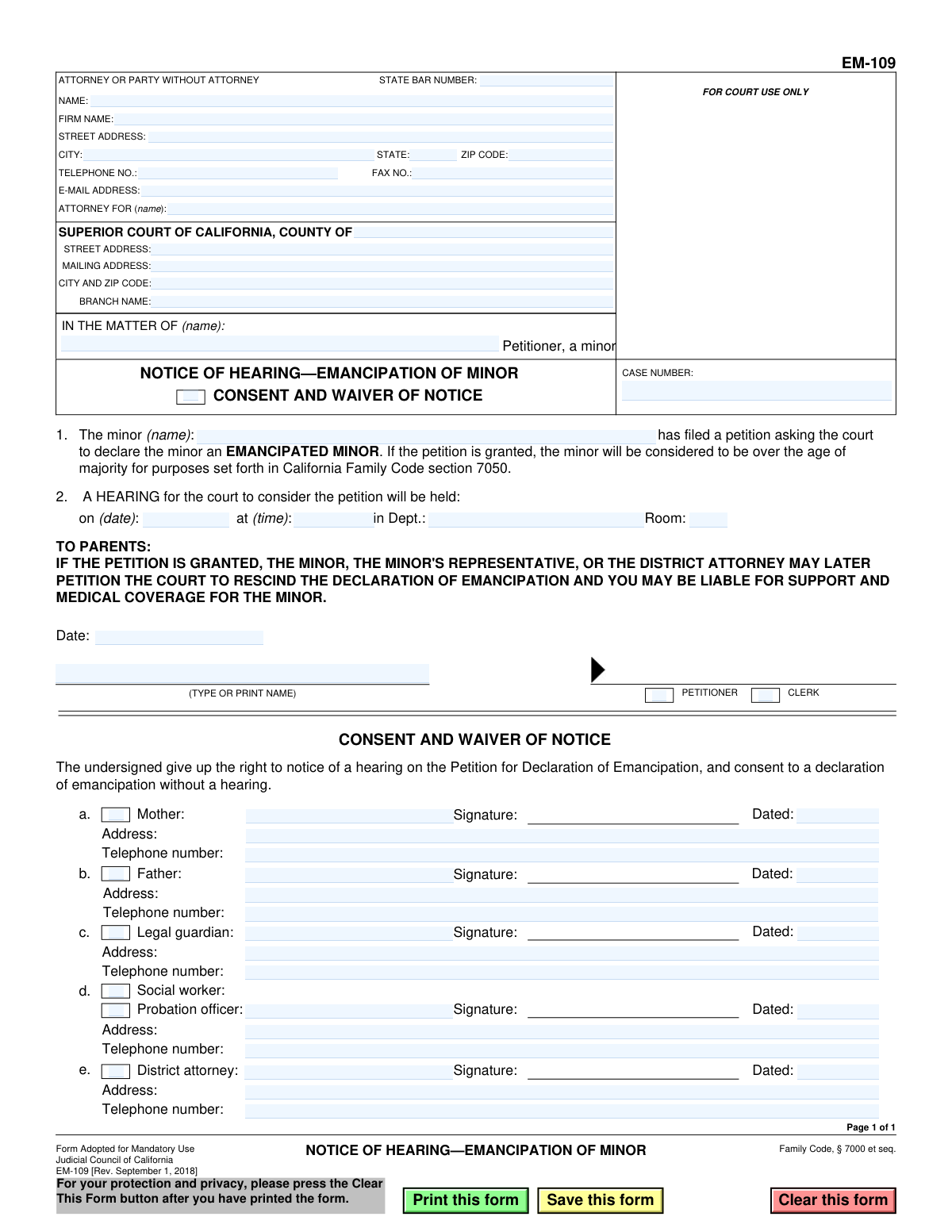
Form EM-109, Notice of Hearing—Emancipation of Minor, is a legal document required by the Superior Court of California. It serves to formally inform a minor's parents, legal guardians, and other relevant parties about a scheduled court hearing to decide on the minor's petition to be legally emancipated. The form also includes a section where these parties can waive their right to notice and consent to the emancipation, potentially expediting the legal proceedings. Today, this form can be filled out quickly and accurately using AI-powered services like Instafill.ai, which can also convert non-fillable PDF versions into interactive fillable forms.
EM-109 is part of the
California court forms category on Instafill.
Our AI automatically handles information lookup, data retrieval, formatting, and form filling.
It takes less than a minute to fill out EM-109 using our AI form filling.
Securely upload your data. Information is encrypted in transit and deleted immediately after the form is filled out.
Form specifications
| Form name: | Form EM-109, Notice of Hearing—Emancipation of Minor |
| Number of fields: | 58 |
| Number of pages: | 1 |
| Language: | English |
Instafill Demo: How to fill out PDF forms in seconds with AI
How to Fill Out EM-109 Online for Free in 2026
Are you looking to fill out a EM-109 form online quickly and accurately? Instafill.ai offers the #1 AI-powered PDF filling software of 2026, allowing you to complete your EM-109 form in just 37 seconds or less.
Follow these steps to fill out your EM-109 form online using Instafill.ai:
- 1 Navigate to Instafill.ai and upload or select Form EM-109, Notice of Hearing—Emancipation of Minor.
- 2 Use the AI assistant to input the Superior Court information, including the county, address, and branch name.
- 3 Enter the petitioner's (minor's) name, case number, and the attorney's contact details if one is involved.
- 4 Fill in the specific details for the court hearing: date, time, department, and room number.
- 5 If parents, guardians, or other officials are waiving notice, have them complete the 'Consent and Waiver of Notice' section with their signature, address, and contact information.
- 6 The petitioner or court clerk must sign and date the notice section.
- 7 Review all the information for accuracy with the AI's guidance, then download, save, or print the completed form for filing with the court.
Our AI-powered system ensures each field is filled out correctly, reducing errors and saving you time.
Why Choose Instafill.ai for Your Fillable EM-109 Form?
Speed
Complete your EM-109 in as little as 37 seconds.
Up-to-Date
Always use the latest 2026 EM-109 form version.
Cost-effective
No need to hire expensive lawyers.
Accuracy
Our AI performs 10 compliance checks to ensure your form is error-free.
Security
Your personal information is protected with bank-level encryption.
Frequently Asked Questions About Form EM-109
This form is used to officially notify a minor's parents or legal guardians that the minor has filed a petition with the court to be legally emancipated. It specifies the date and time of the court hearing where the petition will be considered.
A copy of this notice must be given to the minor's parents, legal guardians, and in some cases, a probation officer, social worker, or the District Attorney, depending on the minor's specific circumstances.
This section is for parents or guardians who agree with the minor's emancipation and do not wish to attend the court hearing. By signing, they give up their right to receive formal notice of the hearing and consent to the emancipation being granted.
Signing the waiver indicates your agreement with the emancipation and means the court can grant it without a formal hearing. However, be aware that the form states you could become liable for support again if the emancipation is ever rescinded by the court.
If the petition is granted, the minor is legally considered an adult for most purposes as defined by California Family Code section 7050. This includes the ability to enter contracts, make their own healthcare decisions, and live independently.
The court clerk will fill in the hearing details, including the date, time, and department, after the petition has been filed with the court. The petitioner should leave this section blank.
If a parent or guardian does not sign the waiver, they must be formally served with the notice. They then have the right to appear at the scheduled court hearing to either support or contest the minor's petition for emancipation.
If the minor is a ward or dependent of the court, their assigned social worker or probation officer must be notified. Their signature on the waiver indicates their consent to the emancipation on behalf of their agency.
This form, along with the main petition for emancipation, must be filed at the Superior Court in the county where the minor lives.
Yes, services like Instafill.ai use AI to help you accurately auto-fill form fields with your information. This can save time and reduce the chance of making errors on the form.
You can use a service like Instafill.ai to complete the form online. Simply upload the PDF to their platform, and it will become an interactive form that you can type into, save, and print.
If you have a non-fillable or 'flat' PDF, you can use a tool like Instafill.ai. Their service can convert the non-fillable PDF into an interactive, fillable form that you can easily complete on your computer.
Compliance EM-109
Validation Checks by Instafill.ai
1
Valid Future Hearing Date
This validation checks that the hearing date entered in section 2 is a valid calendar date and is scheduled for the future. A hearing cannot be scheduled for a past date, as this would make the notice legally defective. If the date is invalid or in the past, the form submission should be rejected to prevent filing an invalid notice.
2
Consistent Minor Name
Verifies that the minor's name in the 'IN THE MATTER OF' caption is identical to the name in the body of the notice ('The minor (name):'). This consistency is crucial for legal clarity and ensures the document unambiguously refers to the correct individual. A mismatch could create legal challenges regarding the validity of the notice and should trigger a warning.
3
Mandatory Court County
Ensures the 'COUNTY OF' field in the court information section is not empty. This field is essential for identifying the correct legal jurisdiction and courthouse where the case is filed. A missing county name would render the document un-fileable and cause significant processing delays, so this field must be required.
4
Waiver Signature and Date Co-dependency
This check ensures that if a signature is provided for any party in the 'Consent and Waiver of Notice' section (e.g., Mother, Father), the corresponding 'Dated' field for that party is also filled. A signature is legally invalid without a date to establish when the consent was given. The validation should flag any signature that lacks a corresponding date.
5
Valid Waiver Date
Validates that any date entered in the 'Dated' fields within the 'Consent and Waiver of Notice' section is a valid calendar date and is not in the future. A waiver must be dated on or before the day it was signed to be legally effective. A future date would invalidate the waiver and should be flagged as an error.
6
Standard ZIP Code Format
Checks that all ZIP code fields (for the court and attorney/party) contain either a 5-digit or 9-digit (ZIP+4) numeric format. Correct ZIP codes are essential for the proper delivery of legal documents and correspondence by mail. An invalid format could result in returned mail and missed deadlines, so the user should be prompted to correct it.
7
Standard Telephone Number Format
Ensures that all telephone number fields are entered in a recognizable format, such as (XXX) XXX-XXXX or XXXXXXXXXX. This allows court staff and other parties to easily contact the filer or other relevant individuals. An invalid number would hinder communication, which is critical in legal proceedings, and should be corrected.
8
Valid Email Address Syntax
Verifies that the E-MAIL ADDRESS field contains a string that follows the standard '[email protected]' format. As courts increasingly use electronic communication, a valid email address is crucial for receiving official notices. An invalid address would mean the party misses important electronic correspondence and should be flagged.
9
Attorney Identification with State Bar Number
Validates that if a 'STATE BAR NUMBER' is provided, the 'NAME' field for the attorney is also filled out. The bar number is uniquely tied to a specific attorney, so the name is required for verification. This check prevents filings with an orphaned bar number, which could lead to rejection by the court clerk.
10
Mandatory Petitioner Name
Ensures the 'IN THE MATTER OF (name)' field, which identifies the minor petitioner, is not left blank. This is the primary identifier for the entire case and is absolutely essential for the document to have any legal meaning. A blank field would make the form incomplete and unprocessable.
11
Valid Hearing Time Format
Ensures the hearing time entered in section 2 follows a standard time format (e.g., HH:MM AM/PM). This prevents ambiguity for all parties who must appear at the hearing. An incorrectly formatted time could lead to missed court appearances and should be flagged for correction.
12
Valid Signature Date
Checks that the 'Date' field next to the Petitioner or Clerk signature is a valid date and is not in the future. This date authenticates when the notice was prepared or signed. An invalid or future date would call the document's authenticity into question and could lead to its rejection by the court.
13
Case Number Format Validation
Checks the 'CASE NUMBER' field against the known format for the specified court/county, if available. While it may be blank on initial filing, if a number is entered, it should be validated to catch data entry errors. An incorrect case number can lead to documents being misfiled or rejected, delaying the legal process.
Common Mistakes in Completing EM-109
Filers often enter a generic court address or the wrong county, rather than the specific branch of the Superior Court where the petition is being filed. This mistake can lead to the notice being misfiled or rejected by the clerk, causing significant delays in scheduling a hearing. To prevent this, always verify the exact courthouse address and branch name on the official county court's website before completing the form.
Minors filing for themselves (pro se) can be confused by the 'ATTORNEY OR PARTY WITHOUT ATTORNEY' section. They should enter their own name and contact information, not their parent's, and can write 'Petitioner' or 'Pro Se' in the 'ATTORNEY FOR (name)' field. Incorrectly filling this section can cause processing delays as the court clerk tries to determine who is filing the document.
The form requires the minor's name in multiple locations, such as 'IN THE MATTER OF' and in the body of the notice. People sometimes use a nickname or an incomplete name in one field and their full legal name in another. This inconsistency creates legal ambiguity and may require filing amended documents, so it is critical to use the minor's full, legal name consistently throughout the form.
Parents or guardians may sign this section thinking they are merely acknowledging the petition, without realizing they are waiving their legal right to formal notice and consenting to the emancipation. This is a significant legal action that gives up important rights and can expedite the emancipation process. It is crucial for signatories to understand the full legal weight of their signature before signing this section.
Each signature block in the waiver section requires a signature, date, full address, and telephone number. It is very common for one or more of these fields to be left blank, which can invalidate the entire waiver. An invalid waiver forces the petitioner to formally serve notice to that party, delaying the court hearing and adding procedural steps.
The petitioner (the minor) cannot sign on behalf of their parents, legal guardian, or other listed parties in the 'Consent and Waiver of Notice' section. Each named individual must provide their own original signature. Attempting to sign for someone else is fraudulent and can lead to severe legal consequences, including immediate dismissal of the petition.
A frequent and critical error is forgetting to sign and date the form at the bottom left, above the 'PETITIONER' label. An unsigned or undated legal document is invalid and will be rejected by the court clerk upon submission. This simple oversight halts the entire process until a properly signed form is resubmitted.
Fields such as 'CASE NUMBER' and the hearing details (date, time, department) are typically assigned by the court clerk upon filing. Petitioners often mistakenly try to fill these in themselves, which is incorrect and can cause confusion. These fields, along with any area marked 'FOR COURT USE ONLY,' should be left blank on the initial submission.
The form lists multiple potential parties, including legal guardians, probation officers, and social workers. A petitioner might only focus on their parents and neglect to obtain a waiver from another legally involved party. The court requires all relevant parties to be notified, and failing to do so will delay the proceedings until proper service is completed.
This form is often available as a flat PDF, leading people to fill it out by hand. Illegible handwriting can cause the court clerk to make data entry errors, resulting in incorrect case information or notices sent to the wrong address. Using a tool like Instafill.ai can convert the non-fillable PDF into a fillable version, ensuring all entries are clear, professional, and accurate.
Saved over 80 hours a year
“I was never sure if my IRS forms like W-9 were filled correctly. Now, I can complete the forms accurately without any external help.”
Kevin Martin Green
Your data stays secure with advanced protection from Instafill and our subprocessors

Robust compliance program
Transparent business model
You’re not the product. You always know where your data is and what it is processed for.
ISO 27001, HIPAA, and GDPR
Our subprocesses adhere to multiple compliance standards, including but not limited to ISO 27001, HIPAA, and GDPR.
Security & privacy by design
We consider security and privacy from the initial design phase of any new service or functionality. It’s not an afterthought, it’s built-in, including support for two-factor authentication (2FA) to further protect your account.
Fill out EM-109 with Instafill.ai
Worried about filling PDFs wrong? Instafill securely fills form-em-109-notice-of-hearingemancipation-of-minor forms, ensuring each field is accurate.