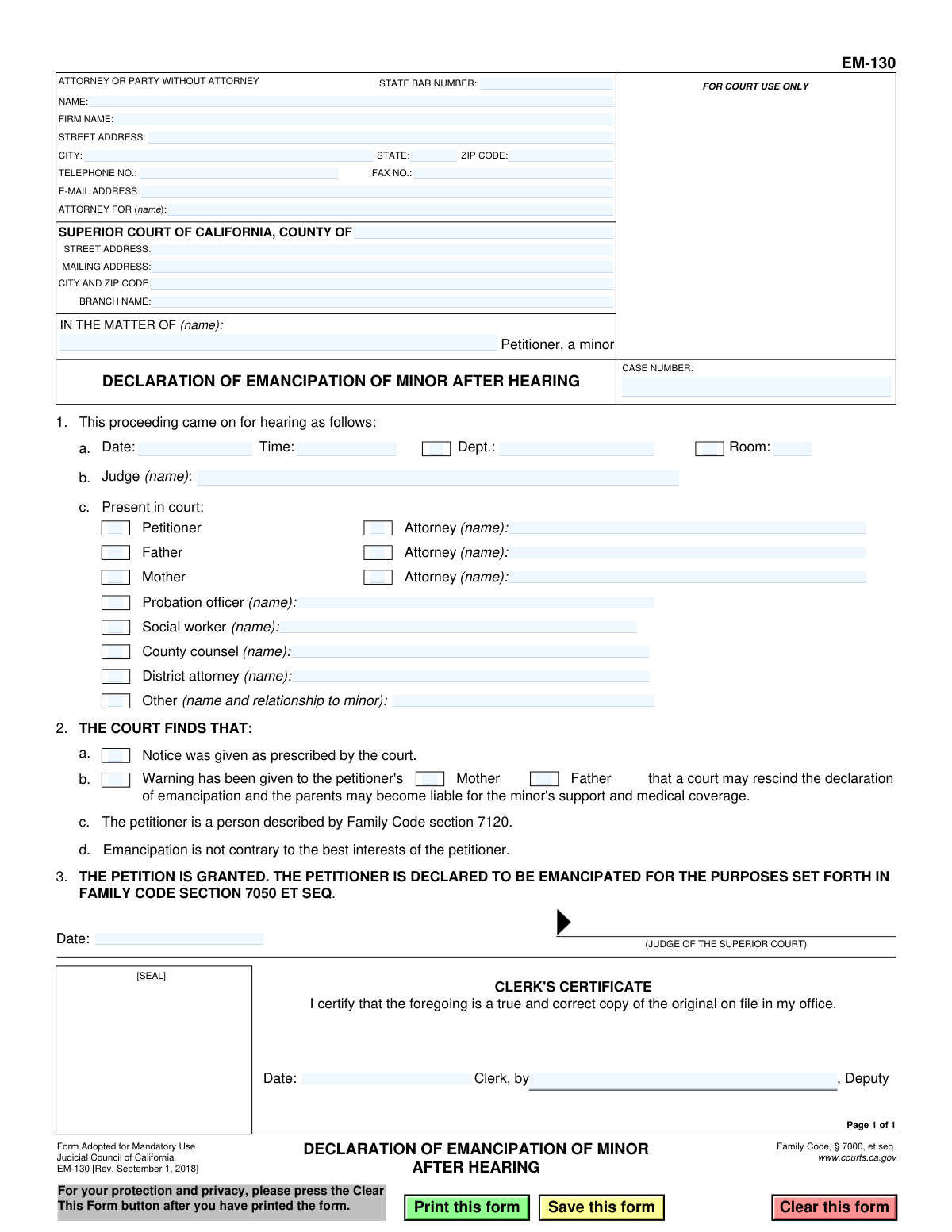
Yes! You can use AI to fill out Form EM-130, Declaration of Emancipation of Minor After Hearing

California Form EM-130 is the legal document issued by a Superior Court judge to finalize a minor's emancipation. After a hearing, if the court finds that the minor meets the legal requirements and that emancipation is in their best interest, this form is signed and filed to grant them the legal rights and responsibilities of an adult. Today, this form can be filled out quickly and accurately using AI-powered services like Instafill.ai, which can also convert non-fillable PDF versions into interactive fillable forms.
EM-130 is part of the California court forms category on Instafill.
Our AI automatically handles information lookup, data retrieval, formatting, and form filling.
It takes less than a minute to fill out EM-130 using our AI form filling.
Securely upload your data. Information is encrypted in transit and deleted immediately after the form is filled out.

Form specifications

Form name: Form EM-130, Declaration of Emancipation of Minor After Hearing
Number of fields: 55
Number of pages: 1
Language: English
main-image

Instafill Demo: How to fill out PDF forms in seconds with AI

How to Fill Out EM-130 Online for Free in 2026

Are you looking to fill out a EM-130 form online quickly and accurately? Instafill.ai offers the #1 AI-powered PDF filling software of 2026, allowing you to complete your EM-130 form in just 37 seconds or less.
Follow these steps to fill out your EM-130 form online using Instafill.ai:
  1. 1 Navigate to Instafill.ai and upload your Form EM-130 or select it from the template library.
  2. 2 Enter the attorney or self-represented party's contact information and the specific Superior Court details.
  3. 3 Input the case information, including the petitioner's name and the assigned case number.
  4. 4 Fill in the details of the court hearing, such as the date, time, department, and the judge's name.
  5. 5 Indicate all parties who were present at the hearing by checking the appropriate boxes and filling in their names.
  6. 6 Confirm the court's findings by checking the relevant boxes regarding notice, petitioner's qualifications, and best interests.
  7. 7 Review all entered information for accuracy, then download the completed form for submission to the court for the judge's signature and clerk's certification.

Our AI-powered system ensures each field is filled out correctly, reducing errors and saving you time.

Why Choose Instafill.ai for Your Fillable EM-130 Form?

Speed

Complete your EM-130 in as little as 37 seconds.

Up-to-Date

Always use the latest 2026 EM-130 form version.

Cost-effective

No need to hire expensive lawyers.

Accuracy

Our AI performs 10 compliance checks to ensure your form is error-free.

Security

Your personal information is protected with bank-level encryption.

Frequently Asked Questions About Form EM-130

This is a court order, not an application. It is the official document issued by a judge after a hearing to legally declare a minor emancipated.

No, you do not fill out this form. The court completes and issues this form after your hearing if your petition for emancipation is granted.

This form is for the court to formalize its decision. Once signed by a judge, it serves as the minor's official proof of emancipation.

The form records the details of the court hearing, the judge's legal findings, and the final order declaring the minor emancipated. It also lists who was present at the hearing, such as the minor, parents, and any attorneys.

This is a legal finding by the judge confirming that you meet the specific requirements for emancipation under California law. These requirements include being at least 14 years old, willingly living separate from your parents, and managing your own finances.

This warning informs the parents that the court can cancel the emancipation later. If that happens, the parents could become legally responsible for the minor's support and medical care again.

You should keep the certified copy of this form in a safe place. It is your legal proof of emancipation, which you can use to enter into contracts, enroll in school, or make your own healthcare decisions.

The Clerk's Certificate is a stamp and signature from the court clerk verifying that your copy is a true and correct duplicate of the original court order. This certification makes your copy an official document.

This form is typically prepared and signed by the judge at the conclusion of your emancipation hearing or shortly thereafter. You should receive a copy from the court clerk once it is finalized.

Since this form is completed by the court, you do not fill it out yourself. However, AI services like Instafill.ai can be very helpful for filling out the initial Petition for Declaration of Emancipation (Form EM-100) accurately and quickly.

You can use Instafill.ai to automatically fill in your personal information on the required application forms, like the Petition for Emancipation. Simply upload the form, and the AI will help you complete the fields, saving you time and reducing errors.

While you don't need to fill this specific form, if you receive any non-fillable court PDF, services like Instafill.ai can convert it into an interactive, fillable form. This is useful for adding notes or managing your legal documents digitally.

The Petition (EM-100) is the form you fill out to ask the court for emancipation. This Declaration (EM-130) is the form the court fills out to grant your request after a successful hearing.

Compliance EM-130
Validation Checks by Instafill.ai

1
Ensures Case Number is Provided
This check verifies that the 'CASE NUMBER' field is not empty. The case number is a unique identifier assigned by the court to a specific legal proceeding, and it is essential for filing, tracking, and referencing the document correctly. A missing case number will result in the form being rejected by the court clerk as it cannot be associated with an existing case file.
2
Validates Presence of Petitioner's Name
This validation ensures that the petitioner's name field, 'IN THE MATTER OF (name)', is filled out. The petitioner is the central party to the emancipation proceeding, and their name is required to identify who the court order applies to. Failure to provide the petitioner's name makes the entire declaration legally meaningless and invalid.
3
Confirms Judge's Name is Entered
This check verifies that the Judge's name is provided in section 1a. The declaration is an official court order resulting from a hearing, and the identity of the presiding judicial officer is a mandatory component for the order's authenticity and legal validity. An order without a judge's name is incomplete and unenforceable.
4
Verifies Required Court Findings are Checked
This validation confirms that checkboxes for findings 2b ('The petitioner is a person described by Family Code section 7120') and 2c ('Emancipation is not contrary to the best interests of the petitioner') are marked. These are statutory requirements for granting emancipation in California. If these findings are not explicitly made by the court, the legal basis for the emancipation is missing, and the declaration is invalid.
5
Validates Hearing Date Format and Logic
This check ensures the 'Date' in section 1 is a valid calendar date and is not in the future. Since this form is a declaration *after* a hearing, the date must be in the past or the present day. An invalid or future date would be a logical contradiction, indicating a data entry error and making the document's timeline nonsensical.
6
Ensures Clerk's Certification Date is Logically Correct
This validation checks that the Clerk's Certificate 'Date' is on or after the hearing date specified in section 1. The clerk cannot certify a copy of an order before the hearing has even occurred. This check prevents chronological errors that would undermine the document's credibility and procedural correctness.
7
Requires Name if Attendance is Checked
This check ensures that for any party marked as 'Present in court' in section 1c (e.g., Petitioner, Mother, Father's Attorney), the corresponding name field is filled. Simply checking a box without identifying the person is insufficient for a legal record. This validation ensures the court record accurately reflects who was present at the hearing.
8
Validates State Bar Number is Numeric
This check verifies that the 'STATE BAR NUMBER' field contains only numbers. California State Bar numbers are numeric identifiers for licensed attorneys, and this format validation helps ensure a valid number has been entered. An incorrectly formatted number could prevent proper identification of the attorney of record.
9
Ensures ZIP Code Format is Valid
This validation confirms that the 'ZIP CODE' field in the attorney/party address section follows a standard 5-digit or 9-digit (ZIP+4) format. Correctly formatted ZIP codes are crucial for mail delivery and ensuring legal notices are sent to the proper address. An invalid format could lead to returned mail and procedural delays.
10
Validates E-mail Address Format
This check ensures that the 'E-MAIL ADDRESS' field, if filled, contains a value in a valid format (e.g., '[email protected]'). Courts increasingly use email for official communication, so a valid email address is important for timely and efficient correspondence. An invalid format would cause communication failures.
11
Cross-Validates Attorney and 'Attorney For' Fields
This check verifies that if an attorney is listed, the name in the 'ATTORNEY FOR (name)' field matches the petitioner's name from the 'IN THE MATTER OF' field. This ensures clarity on who the attorney represents. A mismatch could create confusion about legal representation and potentially invalidate the filing.
12
Ensures Court County is Specified
This validation checks that the 'SUPERIOR COURT OF CALIFORNIA, COUNTY OF' field is completed. Specifying the county is fundamental to establishing the jurisdiction of the court issuing the order. Without the county, it's impossible to determine which court has authority, rendering the document legally ineffective.
13
Validates Phone Number Format
This check ensures that the 'TELEPHONE NO.' field follows a standard 10-digit format (e.g., XXX-XXX-XXXX or (XXX) XXX-XXXX). A valid phone number is essential for the court or other parties to contact the filer. An improperly formatted number can hinder communication and cause delays.
14
Validates Warning Recipient Field is Completed
This check verifies that the field indicating who was given the warning at the top of the form ('Warning has been given to the petitioner's...') is filled out, likely with 'parents' or 'guardian'. This text is a required judicial warning about the consequences of rescinding emancipation. Failure to document who received the warning could be a procedural error and grounds for challenging the order later.

Common Mistakes in Completing EM-130

Incorrectly Identifying the Petitioner

Filers often mistakenly enter a parent's name in the 'IN THE MATTER OF (name)' field. This field is specifically for the name of the minor who is petitioning for emancipation. This error can cause significant confusion and lead to the document being misfiled or rejected, as it legally misidentifies the subject of the court order. To avoid this, always enter the full legal name of the minor seeking emancipation in this box.

Confusion in 'ATTORNEY FOR' Field for Self-Represented Parties

When a minor is self-represented (acting as their own attorney), they often get confused and write 'Self', 'Pro Se', or leave the 'ATTORNEY FOR (name)' field blank. The correct procedure is to write their own name in this field, as they are representing themselves. Failure to do so can cause processing delays while the clerk seeks clarification. Using a guided form-filling tool can help populate this correctly based on representation status.

Incomplete Court Information

People frequently enter just the county name (e.g., 'Los Angeles') and neglect to provide the full street address, mailing address, and specific branch name of the Superior Court. California counties have numerous court branches, and omitting this specific information can lead to the form being filed at the wrong location, delaying the case. Always look up the exact address and branch name for the court handling your case before filling out this section.

Pre-filling Judicial Findings

A common error is for the petitioner to fill out Section 3, 'THE COURT FINDS THAT...'. These findings, such as whether notice was properly given or if emancipation is in the minor's best interest, are determinations made by the judge during the hearing. Filling them in beforehand is inappropriate and will require correction. This section should be left blank for the judge or court clerk to complete.

Omitting or Incorrectly Formatting the Case Number

The case number is the primary identifier for a court proceeding, yet it is often left blank or entered with typos. Without the correct case number, the clerk cannot link the declaration to the existing file, which will cause the document to be rejected. Always double-check the case number from previous court documents and enter it exactly as it appears. AI-powered tools like Instafill.ai can save and reuse case information across related forms to prevent this error.

Incorrectly Documenting Who Was Present in Court

In Section 2, filers may check a box for a person who was present but forget to write their name, or vice-versa. For example, they might check the 'Mother' box but not write her name in the adjacent field. This creates an incomplete record of the hearing. Ensure that for every person present, you both check the appropriate box and write their full name in the space provided.

Ignoring the Warning Recipient Field

The very first sentence at the top of the form contains a blank space: 'Warning has been given to the petitioner's...'. This is a required field intended to specify who received the legal warning (e.g., 'parents', 'mother', 'father'). Many filers overlook this line entirely, leaving it blank. This omission can lead to the form being deemed incomplete by the court clerk, as it fails to document a required advisement.

Leaving Filer Contact Information Blank

The top-left section for the 'ATTORNEY OR PARTY WITHOUT ATTORNEY' is crucial for court communication, but filers often omit their telephone number or email address. If the court has questions or needs to send notices, missing contact information can halt all progress on the case. Always provide at least one reliable method of contact. If the form is a non-fillable PDF, a tool like Instafill.ai can convert it to a fillable version, making it easier to complete all necessary fields.

Misidentifying the Filer's Role

A self-represented minor might try to fill in the 'STATE BAR NUMBER' field, or an attorney might forget to enter it. This section clearly distinguishes between an attorney and a party without one. If you are not an attorney, leave the State Bar Number field blank. If you are an attorney, failing to provide your bar number can lead to rejection of the filing.

Failing to Complete Hearing Details

While this form is an 'After Hearing' declaration, the party preparing the order for the judge's signature is often expected to fill in the hearing details in Section 1 (Date, Time, Dept., Room, and Judge's name). Leaving this section blank places an administrative burden on court staff and can delay the signing and filing of the order. Refer to the court's official calendar or notice of hearing to accurately complete these fields.
Saved over 80 hours a year

“I was never sure if my IRS forms like W-9 were filled correctly. Now, I can complete the forms accurately without any external help.”

Kevin Martin Green

Your data stays secure with advanced protection from Instafill and our subprocessors

Robust compliance program

Transparent business model

You’re not the product. You always know where your data is and what it is processed for.

ISO 27001, HIPAA, and GDPR

Our subprocesses adhere to multiple compliance standards, including but not limited to ISO 27001, HIPAA, and GDPR.

Security & privacy by design

We consider security and privacy from the initial design phase of any new service or functionality. It’s not an afterthought, it’s built-in, including support for two-factor authentication (2FA) to further protect your account.

Fill out EM-130 with Instafill.ai

Worried about filling PDFs wrong? Instafill securely fills form-em-130-declaration-of-emancipation-of-minor-after-hearing forms, ensuring each field is accurate.