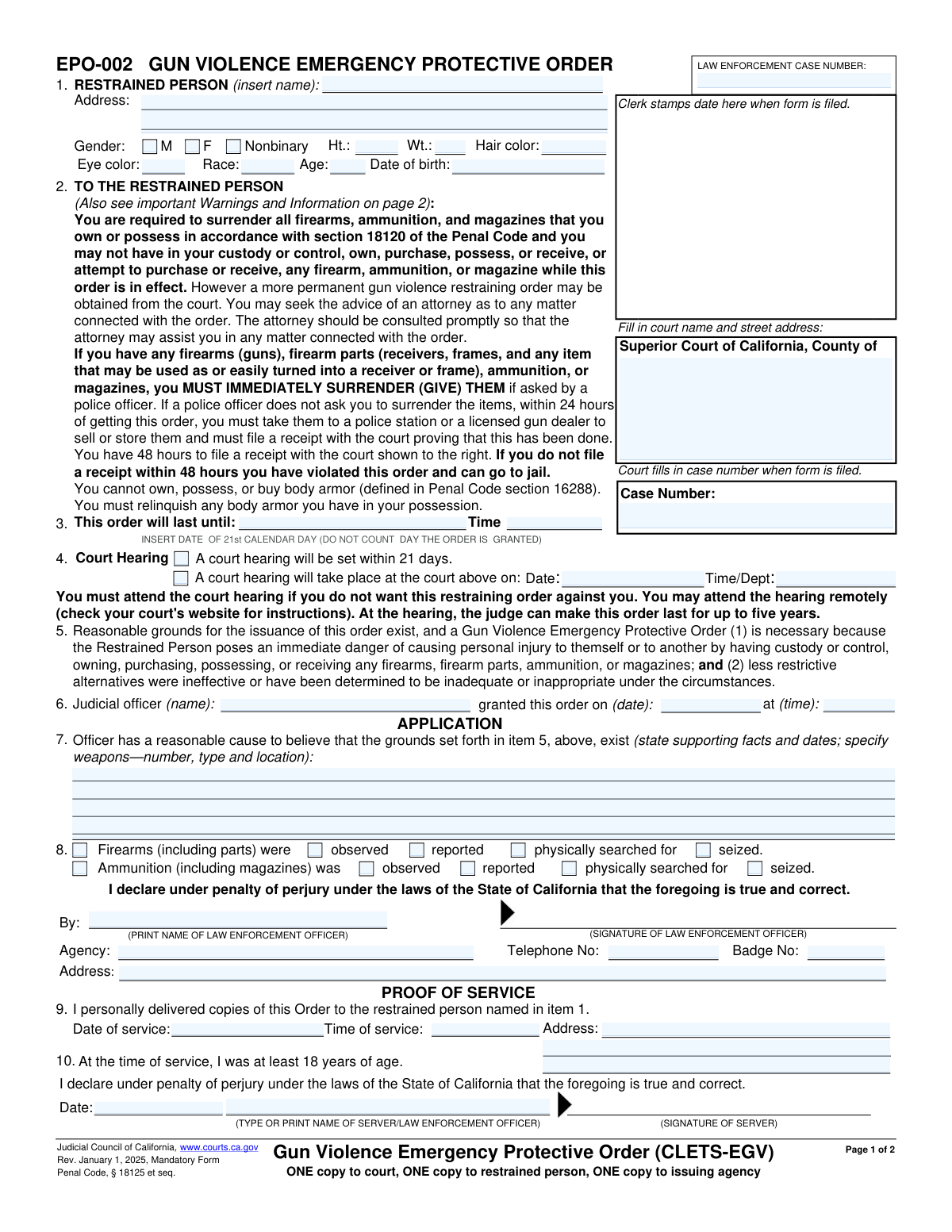
Yes! You can use AI to fill out Form EPO-002, Gun Violence Emergency Protective Order (CLETS-EGV)

Form EPO-002, the Gun Violence Emergency Protective Order, is a mandatory California judicial form used by law enforcement to obtain a temporary court order when there is reasonable cause to believe a person poses an immediate danger of gun violence to themselves or others. This order requires the immediate surrender of all firearms, ammunition, and magazines and sets a court hearing within 21 days to determine if a longer-term restraining order is necessary. Today, this form can be filled out quickly and accurately using AI-powered services like Instafill.ai, which can also convert non-fillable PDF versions into interactive fillable forms.
EPO-002 is part of the California court forms category on Instafill.
Our AI automatically handles information lookup, data retrieval, formatting, and form filling.
It takes less than a minute to fill out EPO-002 using our AI form filling.
Securely upload your data. Information is encrypted in transit and deleted immediately after the form is filled out.

Form specifications

Form name: Form EPO-002, Gun Violence Emergency Protective Order (CLETS-EGV)
Number of fields: 51
Number of pages: 1
Language: English
main-image

Instafill Demo: How to fill out PDF forms in seconds with AI

How to Fill Out EPO-002 Online for Free in 2026

Are you looking to fill out a EPO-002 form online quickly and accurately? Instafill.ai offers the #1 AI-powered PDF filling software of 2026, allowing you to complete your EPO-002 form in just 37 seconds or less.
Follow these steps to fill out your EPO-002 form online using Instafill.ai:
  1. 1 Navigate to Instafill.ai and upload the EPO-002 form or select it from the template library.
  2. 2 Use the AI assistant to accurately fill in the court information, law enforcement case number, and details for the Superior Court of California.
  3. 3 Enter the personal details of the restrained person in Section 1, including name, address, and physical descriptors.
  4. 4 In the application section (Section 7), provide a detailed statement of the facts, supporting dates, and specific weapons that establish reasonable cause for the order.
  5. 5 Complete the law enforcement officer's declaration, including name, agency, badge number, and signature.
  6. 6 Fill out the Proof of Service section (Section 9) after the order has been personally delivered to the restrained person.
  7. 7 Review all entered information for completeness and accuracy before saving, printing, and filing the form with the court and serving copies as required.

Our AI-powered system ensures each field is filled out correctly, reducing errors and saving you time.

Why Choose Instafill.ai for Your Fillable EPO-002 Form?

Speed

Complete your EPO-002 in as little as 37 seconds.

Up-to-Date

Always use the latest 2026 EPO-002 form version.

Cost-effective

No need to hire expensive lawyers.

Accuracy

Our AI performs 10 compliance checks to ensure your form is error-free.

Security

Your personal information is protected with bank-level encryption.

Frequently Asked Questions About Form EPO-002

This is an emergency court order, initiated by law enforcement, to temporarily prohibit a person who poses an immediate danger to themself or others from owning or possessing firearms, ammunition, and magazines.

The 'restrained person' is the individual who the court has ordered to not possess firearms because they are believed to be an immediate threat of causing gun violence. Their personal details are listed in Section 1 of the form.

This emergency protective order is temporary and lasts for up to 21 calendar days. Before it expires, a court hearing will be held to determine if a longer-term order is needed.

You must immediately surrender all firearms, firearm parts, and ammunition to law enforcement if requested. If not, you have 24 hours to sell them to a licensed dealer or turn them in to a police station for storage.

Yes, you are required to file a receipt (Form GV-800) with the court within 48 hours of receiving the order to prove you have complied. Failure to file this receipt is a violation of the order and can result in penalties.

The court hearing is scheduled to decide whether the temporary 21-day order should be extended for a longer period, potentially up to five years. You must attend the hearing if you wish to contest the order.

Violating this order is a misdemeanor crime, punishable by a fine of up to $1,000, imprisonment for up to six months, or both. It can also lead to an additional five-year firearm prohibition.

A law enforcement officer completes the application section with facts justifying the need for the order, and a judicial officer signs it. The restrained person receives the completed order and must comply with its terms.

As the restrained person, you are prohibited from owning, possessing, or buying body armor. You are required to relinquish any body armor you have.

You can file a written response with the court using Form GV-020, 'Response to Gun Violence Emergency Protective Order.' It is strongly recommended that you consult an attorney promptly for assistance.

Yes, law enforcement agencies preparing the order can use services like Instafill.ai. These tools use AI to accurately auto-fill form fields, which saves time and reduces errors.

An officer can upload the EPO-002 form to Instafill.ai, which will make the fields interactive. The AI can help populate known information, and the officer can then complete the narrative sections before submitting it to a judicial officer.

If you have a non-fillable or 'flat' PDF, you can use a service like Instafill.ai. It can convert the document into an interactive, fillable form that is easy to complete and save digitally.

This order specifically targets the immediate risk of gun violence and prohibits firearm possession, and it is initiated by law enforcement. It does not affect the terms of any other protective orders you may have, which remain in full effect.

Compliance EPO-002
Validation Checks by Instafill.ai

1
Restrained Person DOB and Age Consistency
This check validates that the 'Age' provided for the restrained person is consistent with the 'Date of birth' entered. It calculates the age based on the date of birth and compares it to the value in the age field. This is important for ensuring the accuracy of identifying information, which is critical for law enforcement databases. If the values do not match, the form submission should be flagged for manual review and correction.
2
Order Expiration Date Calculation
Validates that the date in Item 3 ('This order will last until') is exactly 21 calendar days after the order's grant date in Item 6. The form explicitly states this rule ('DO NOT COUNT DAY THE ORDER IS GRANTED'). This check ensures the order's duration complies with legal statutes. An incorrect expiration date could render the order unenforceable or legally invalid.
3
Court Hearing Date Logic
Ensures the court hearing date in Item 4 is a valid future date that occurs on or before the order's expiration date from Item 3. The hearing must happen while the emergency order is still in effect. This validation prevents scheduling errors that could jeopardize the legal process for obtaining a longer-term order. A failure would require the user to correct the hearing date.
4
Order Grant Date and Time Validity
Verifies that the date and time the order was granted (Item 6) are not in the future. The grant date serves as the baseline for all other time-sensitive events on the form. This check prevents logical impossibilities, such as an order being granted tomorrow. If the date or time is in the future, the submission must be rejected.
5
Officer Justification Completeness
This check ensures that the text field in Item 7, which contains the officer's supporting facts and observations, is not empty. This narrative is the primary legal justification for the emergency order. A blank justification means there is no stated cause for the order, making the form legally insufficient and requiring its rejection until the information is provided.
6
Proof of Service Date and Time Logic
Validates that the 'Date of service' and 'Time of service' in Item 9 occur on or after the order's grant date and time from Item 6. A person cannot be served with an order before it has been officially granted by a judicial officer. This ensures the chronological integrity of the legal process. A service date/time prior to the grant date/time would invalidate the proof of service.
7
Required Fields for Restrained Person Identification
Ensures that the 'Name' and 'Address' fields for the restrained person in Item 1 are not empty. These details are fundamental for identifying the correct individual and for future service of court documents. Without this information, the order cannot be properly entered into law enforcement systems (CLETS) or enforced effectively.
8
Law Enforcement Case Number Presence
This validation confirms that the 'LAW ENFORCEMENT CASE NUMBER' field at the top of the form is filled out. This number is a key identifier that links the protective order to the broader law enforcement incident report and case file. Missing this number complicates record-keeping and cross-referencing for all involved agencies. The form should be considered incomplete without it.
9
Officer and Agency Identification Completeness
Verifies that the issuing law enforcement officer's printed name, agency, and badge number are all provided in the application section. This information establishes the authority and identity of the officer requesting the order. Failure to provide complete identification could call the order's authenticity into question and would require the form to be returned for completion.
10
Valid Date of Birth Format
Checks that the 'Date of birth' in Item 1 is a valid calendar date and is a date in the past. This ensures data quality for a critical piece of identifying information. An invalid or future date of birth would corrupt the record and hinder proper identification in state and federal databases. The entry must be corrected before submission.
11
Gender Selection Requirement
Ensures that one of the gender checkboxes (M, F, or Nonbinary) in Item 1 is selected for the restrained person. This is a required descriptor for law enforcement identification purposes. An incomplete physical description can delay or prevent positive identification by officers in the field. The form should prompt the user to make a selection if none is checked.
12
Valid Time Format
This check ensures that all time fields on the form (e.g., in Items 3, 6, and 9) are entered in a valid format, such as HH:MM. Correctly formatted time is essential for establishing a precise legal timeline for when the order expires, when it was granted, and when it was served. Ambiguous or invalid time entries could lead to disputes over the order's enforceability.
13
Judicial Officer Name Completeness
Verifies that the name of the judicial officer who granted the order is entered in Item 6. The judicial officer's name is required to confirm that the order was issued with proper legal authority. An order without a named judicial officer is invalid on its face. The submission must be rejected if this field is empty.

Common Mistakes in Completing EPO-002

Miscalculating the 21-Day Expiration Date

In Section 3, officers must calculate the order's expiration date, which is 21 calendar days after the grant date, not including the grant day itself. A common error is miscounting the days or including the grant day, resulting in an incorrect expiration date. This can lead to legal challenges and confusion about when the order ceases to be enforceable. To avoid this, officers should carefully count on a calendar or use an automated tool to ensure accuracy.

Providing Insufficient Detail in the Application Narrative

Section 7 requires a statement of facts supporting the order. Officers sometimes write vague or conclusory statements like 'subject is a danger' without detailing the specific threats, actions, dates, and weapons involved. This lack of specific, objective evidence can cause a judicial officer to deny the order for failing to establish reasonable cause. Officers must provide a clear, factual narrative to justify the need for the emergency order.

Entering Incomplete or Inconsistent Personal Identifiers

Section 1 requires the restrained person's full legal name, date of birth, and physical description. Mistakes include using nicknames, misspelling names, or entering an age that conflicts with the date of birth. These errors can cause critical delays or failures when entering the order into the CLETS database, making it difficult for other officers to identify the individual and enforce the order. Verifying information against an official ID is crucial.

Forgetting to Complete the Proof of Service

The Proof of Service in Section 9 is essential legal documentation that the restrained person received a copy of the order. In the urgency of a situation, an officer may forget to fill in the date, time, and location of service, or neglect to sign the declaration. An incomplete or missing Proof of Service can render the order unenforceable and lead to its dismissal in court, negating the protective measures.

Submitting a Form with Illegible Handwriting

This form contains critical data that must be accurately entered into statewide law enforcement systems. Illegible handwriting can lead to data entry errors, such as misspelling a name or transposing numbers in a case file, which could prevent the order from being found or enforced correctly. Filling the form electronically or using clear block letters is essential. AI-powered tools like Instafill.ai can convert non-fillable PDFs into fillable versions, eliminating handwriting issues.

Forgetting the Officer's Signature on the Application

The officer's signature under penalty of perjury in the Application section (below Section 8) legally validates the sworn statement. Forgetting to sign the form is a critical administrative error that can render the entire application invalid and cause its immediate rejection by the court. Officers must perform a final review to ensure all required signatures are present before submission.

Failing to Specify the Status of Firearms in Section 8

Section 8 uses checkboxes to document whether firearms or ammunition were 'observed,' 'reported,' 'searched for,' or 'seized.' A frequent mistake is leaving this section blank or checking boxes in a way that is ambiguous. This makes it unclear to the court and other officers what actions were taken regarding the weapons, which is a central purpose of the order. Officers must carefully and accurately document the status of all weapons.

Using an Outdated Version of the Form

Legal forms are periodically updated, as noted by the revision date (e.g., 'Rev. January 1, 2025'). Using an obsolete version may mean the form lacks new legal requirements or contains outdated language, which can lead to its rejection by the court clerk. This delays the entire protective order process. Officers should always source forms from the official Judicial Council website to ensure they are using the current version. Services like Instafill.ai can help by providing access to the latest official forms.

Entering Incorrect Court Information

The top of the form requires the specific Superior Court name and county. An officer might inadvertently write the wrong county, especially if they work near a county line, or leave the information incomplete. This error can cause the form to be misfiled or sent to the wrong courthouse, delaying the scheduling of the hearing and entry of the order into the system. Verifying the correct court jurisdiction for the incident location is a necessary first step.

Omitting Officer Identification and Contact Details

The application section requires the officer's printed name, agency, phone number, and badge number. Leaving this information incomplete or illegible makes it difficult for the court or other agencies to follow up with the reporting officer if questions arise. This can slow down the legal process or create issues during the subsequent court hearing. Ensuring this data is complete and clearly written is vital for inter-agency communication.
Saved over 80 hours a year

“I was never sure if my IRS forms like W-9 were filled correctly. Now, I can complete the forms accurately without any external help.”

Kevin Martin Green

Your data stays secure with advanced protection from Instafill and our subprocessors

Robust compliance program

Transparent business model

You’re not the product. You always know where your data is and what it is processed for.

ISO 27001, HIPAA, and GDPR

Our subprocesses adhere to multiple compliance standards, including but not limited to ISO 27001, HIPAA, and GDPR.

Security & privacy by design

We consider security and privacy from the initial design phase of any new service or functionality. It’s not an afterthought, it’s built-in, including support for two-factor authentication (2FA) to further protect your account.

Fill out EPO-002 with Instafill.ai

Worried about filling PDFs wrong? Instafill securely fills form-epo-002-gun-violence-emergency-protective-order-clets-egv forms, ensuring each field is accurate.