Yes! You can use AI to fill out Form for Documenting Court Interpreting Experience

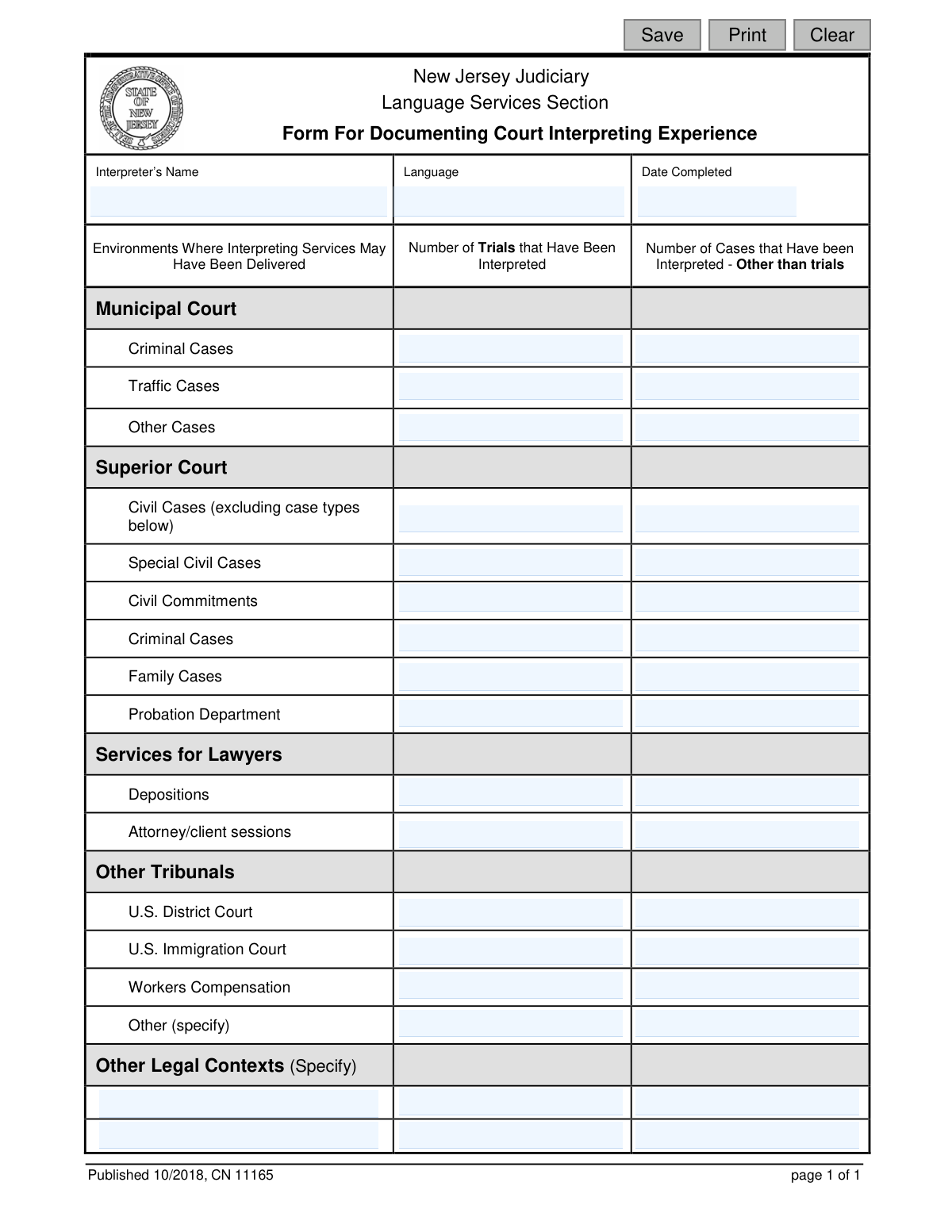
This form is issued by the New Jersey Judiciary's Language Services Section for court interpreters to document their professional experience. It requires interpreters to quantify the number of trials and other cases they have worked on in different legal environments, such as Municipal Court, Superior Court, and depositions. This documentation is crucial for tracking an interpreter's qualifications and work history within the state's legal system. Today, this form can be filled out quickly and accurately using AI-powered services like Instafill.ai, which can also convert non-fillable PDF versions into interactive fillable forms.
CN 11165 is part of the New Jersey forms category on Instafill.
Our AI automatically handles information lookup, data retrieval, formatting, and form filling.
It takes less than a minute to fill out CN 11165 using our AI form filling.
Securely upload your data. Information is encrypted in transit and deleted immediately after the form is filled out.

Form specifications

Form name: Form for Documenting Court Interpreting Experience
Number of fields: 42
Number of pages: 1
Language: English
main-image

Instafill Demo: How to fill out PDF forms in seconds with AI

How to Fill Out CN 11165 Online for Free in 2026

Are you looking to fill out a CN 11165 form online quickly and accurately? Instafill.ai offers the #1 AI-powered PDF filling software of 2026, allowing you to complete your CN 11165 form in just 37 seconds or less.
Follow these steps to fill out your CN 11165 form online using Instafill.ai:
  1. 1 Navigate to Instafill.ai and upload or select the 'Form for Documenting Court Interpreting Experience'.
  2. 2 Use the AI assistant to automatically populate your name, language, and the completion date.
  3. 3 Review the pre-filled personal information for accuracy and make any necessary corrections.
  4. 4 Systematically enter the number of trials and cases you have interpreted for each listed court environment, such as Municipal Court, Superior Court, and other tribunals.
  5. 5 If applicable, provide details in the 'Other' sections for any legal contexts not explicitly listed on the form.
  6. 6 Carefully review all entered data to ensure it accurately reflects your interpreting experience.
  7. 7 Securely save, print, or download the completed form for submission to the New Jersey Judiciary Language Services Section.

Our AI-powered system ensures each field is filled out correctly, reducing errors and saving you time.

Why Choose Instafill.ai for Your Fillable CN 11165 Form?

Speed

Complete your CN 11165 in as little as 37 seconds.

Up-to-Date

Always use the latest 2026 CN 11165 form version.

Cost-effective

No need to hire expensive lawyers.

Accuracy

Our AI performs 10 compliance checks to ensure your form is error-free.

Security

Your personal information is protected with bank-level encryption.

Frequently Asked Questions About Form CN 11165

This form is used by the New Jersey Judiciary's Language Services Section to document an interpreter's court interpreting experience. It is intended for court interpreters who are applying for or maintaining their credentials with the NJ Judiciary.

A 'Trial' is a formal proceeding where evidence is presented to decide a case. 'Cases - Other than trials' refers to all other court events you've interpreted for, such as arraignments, plea hearings, motions, or case management conferences.

If you have no experience in a particular area, simply leave the corresponding field blank or enter '0'. The form is designed to capture your complete work history, and it is understood that not all interpreters will have experience in every setting.

Yes, you should document all relevant legal interpreting experience, regardless of the jurisdiction. The form includes sections for federal courts, indicating that experience outside the NJ state court system is relevant and should be included.

The form itself does not provide submission instructions. You should refer to the application materials you received or contact the New Jersey Judiciary's Language Services Section directly for guidance on how to submit the form.

Use the 'Other' sections to document any relevant legal interpreting experience that does not fit into the pre-listed categories. This could include administrative hearings, arbitrations, or specific types of legal proceedings not mentioned elsewhere on the form.

You should strive to be as accurate as possible by providing exact numbers based on your records. If you must estimate, ensure your estimates are made in good faith and are a reasonable reflection of your work history.

A deposition is formal, sworn testimony taken out of court as part of legal discovery. An attorney/client session is a private, privileged meeting between a lawyer and their client to prepare for a case or discuss legal strategy.

Yes, services like Instafill.ai use AI to help you fill out forms more efficiently. These tools can accurately auto-fill your personal information and other recurring data, saving you time and reducing the chance of errors.

To fill this form online, you can upload it to the Instafill.ai platform. The service will make the form interactive, allowing you to easily type your information directly into the fields and then download the completed document.

If you have a non-fillable or 'flat' PDF, you can use a service like Instafill.ai. It can convert the non-fillable PDF into an interactive, fillable form that you can easily complete on your computer.

You will need your full name, the language you interpret, and a detailed record of your interpreting assignments. It is helpful to have your personal log or calendar of past work to accurately count the number of trials and other cases.

Compliance CN 11165
Validation Checks by Instafill.ai

1
Ensures Interpreter's Name is Provided
This check verifies that the 'Interpreter’s Name' field (IntNameFull) is not empty. The name is a critical identifier for the person submitting their experience, linking the documented work to a specific individual. If the name is missing, the form cannot be processed as the experience cannot be attributed to anyone.
2
Ensures Interpreting Language is Specified
This validation confirms that the 'Language' field (LangNameFull) has been filled out. The language is fundamental to understanding the interpreter's qualifications and the context of their experience. A submission without a specified language is incomplete and cannot be evaluated for language-specific needs.
3
Ensures Completion Date is Present
This check ensures that the 'Date Completed' field (CompleteDt) is not left blank. The date provides context for when the experience was documented and helps track the timeliness of submissions. Without a date, it is difficult to manage records and assess the currency of the interpreter's experience.
4
Validates the Format of the Completion Date
This validation checks that the value entered in the 'Date Completed' field (CompleteDt) adheres to a standard date format, such as MM/DD/YYYY. Consistent formatting is essential for data integrity, sorting, and automated processing. An invalid format will trigger an error, requiring the user to correct the entry before submission.
5
Ensures Completion Date is Not a Future Date
This check verifies that the 'Date Completed' (CompleteDt) is not a date in the future. An interpreter can only document experience that has already occurred, so a future date is a logical impossibility. If a future date is entered, the form will be rejected to prevent erroneous data entry.
6
Validates Experience Counts are Whole Numbers
This validation ensures that all fields for counting trials and cases (e.g., MuniTrial1, SuperiorCase2) contain only whole numbers. The number of interpreted cases or trials cannot be a fraction, decimal, or contain text. This check prevents data entry errors and maintains the logical integrity of the experience data.
7
Ensures Experience Counts are Not Negative
This check confirms that all numeric input fields for trial and case counts are zero or greater. It is impossible to have a negative number of interpreted cases, so any negative value indicates a data entry error. The validation prevents submission of logically flawed data, prompting the user for correction.
8
Verifies at Least One Experience Item is Documented
This validation checks that the sum of all trial and case count fields is greater than zero. The purpose of the form is to document experience, so a submission with no experience listed is not useful. If all counts are zero or blank, the system should prompt the user to confirm if they intended to submit an empty form.
9
Requires Description for 'Other Tribunal' When Count is Entered
This check ensures that if a number greater than zero is entered for 'Other' trials (TribunalTrial4) or cases (OtherDescCase1), the corresponding specification field (OtherDesc1) must be filled out. This context is necessary to understand what the 'Other' category refers to. Failure to provide a description will result in a validation error, as the numeric data is meaningless without it.
10
Requires Count for 'Other Tribunal' When Description is Entered
This validation ensures that if text is entered into the 'Other (specify)' field (OtherDesc1), then at least one of the corresponding count fields (TribunalTrial4 or OtherDescCase1) must be greater than zero. A description without a corresponding number of cases or trials is incomplete. This prevents users from describing a type of work without quantifying it.
11
Requires Description for 'Other Legal Contexts' When Count is Entered
This check verifies that if a count greater than zero is entered for 'Other Legal Contexts' trials (OtherDescTrial2) or cases (OtherDescCase2), the specification field (OtherDesc2) must not be empty. The description is essential for clarifying the nature of the experience documented in this catch-all category. Without the description, the submitted numbers lack the necessary context for evaluation.
12
Requires Count for 'Other Legal Contexts' When Description is Entered
This validation ensures that if a description is provided in the 'Other Legal Contexts (Specify)' field (OtherDesc2), a corresponding count greater than zero must be entered in either the trials (OtherDescTrial2) or cases (OtherDescCase2) field. This rule enforces completeness, ensuring that any described experience is also quantified. The form will prompt for a number if a description is provided without one.
13
Validates Interpreter's Name for Fullness
This check validates that the 'Interpreter's Name' field (IntNameFull) likely contains a full name, for instance by checking for at least one space between characters. This encourages users to enter their full legal name rather than a single name or an initial, which is important for official records and identification. While not foolproof, it helps improve the quality of the name data collected.
14
Validates Language Field for Proper Naming
This check ensures the 'Language' field (LangNameFull) contains only alphabetic characters, spaces, or hyphens. This prevents the entry of numbers or random special characters, which are not valid in a language name. It serves as a basic sanity check to improve data quality and ensure the language specified is a real one.

Common Mistakes in Completing CN 11165

Confusing Trials with Other Case Appearances

Interpreters often misclassify legal proceedings, counting hearings, motions, or arraignments as 'trials' because they misunderstand the form's specific distinction. Incorrectly logging these events inflates trial experience and misrepresents qualifications, potentially leading to rejection or requests for clarification. To avoid this, carefully distinguish between a full trial and any other court appearance, and use AI-powered tools like Instafill.ai which can provide field-specific guidance to prevent such classification errors.

Incorrectly Categorizing Court or Case Type

An interpreter may not be familiar with specific jurisdictional differences, such as between 'Superior Court - Civil Cases' and 'Special Civil Cases,' leading to experience being logged in the wrong category. This provides an inaccurate picture of their specialized expertise and can delay form processing while reviewers verify the information. Always refer to case documents to confirm the exact court and case type before entering data.

Omitting Descriptions for 'Other' Categories

Applicants frequently enter a number in a row like 'Other (specify)' but forget to fill in the corresponding text field explaining what that experience entails. This omission makes the data useless to the reviewer and can result in the application being considered incomplete. To prevent this, always double-check that any number entered in an 'Other' field is accompanied by a clear description; smart form fillers like Instafill.ai can enforce this rule by prompting the user for the description if the number field is filled.

Using Non-Numeric or Vague Quantities

Instead of precise numbers, applicants sometimes write 'several,' 'many,' or a range like '10-15' in the numeric fields, often when estimating from memory. This makes the data impossible to process and demonstrates a lack of detailed record-keeping, which can negatively impact their evaluation. AI form-filling tools like Instafill.ai automatically validate fields to ensure only single, whole numbers are entered, preventing this mistake entirely.

Inconsistent or Ambiguous Language Specification

In the 'Language' field, an applicant might enter a general term like 'Chinese' instead of the specific language or dialect interpreted, such as 'Mandarin' or 'Cantonese.' This ambiguity can cause issues if the Judiciary is assessing qualifications for a specific language pair and may lead to follow-up questions. To avoid this, always use the full, specific name of the language; Instafill.ai can help by suggesting standardized language names from a predefined list.

Improper or Inconsistent Date Formatting

The 'Date Completed' field is often filled out using inconsistent formats like DD/MM/YY or with the month spelled out, as no specific format is requested. This can cause processing errors in digital systems and may require manual correction, slowing down the review. Tools like Instafill.ai can automatically format dates into a standard MM/DD/YYYY format, eliminating ambiguity. If the form is a non-fillable PDF, Instafill.ai can also convert it into an interactive, fillable version.

Double-Counting Different Events from a Single Case

Interpreters may count a deposition and a subsequent trial for the same legal case as two separate 'cases,' which incorrectly inflates their experience totals. This misrepresentation can be discovered during an audit and damage the interpreter's credibility. You should track experience by unique case numbers to ensure each case is only counted once in the 'Other than trials' section, while the trial itself is counted separately in the 'Trials' column.

Providing Rough Estimates Instead of Documented Figures

The form is for 'Documenting' experience, yet many applicants provide rough estimates from memory rather than consulting their logs, calendars, or invoices. This can lead to significant inaccuracies that undermine the purpose of the form and call the interpreter's professionalism into question if discovered. Always refer to your professional records to provide exact, verifiable numbers; using an AI tool like Instafill.ai can help by securely storing and retrieving past submission data for easy reference.

Misclassifying Probation Department Experience

Experience with the Probation Department is often mistakenly logged under the general 'Criminal Cases' or 'Family Cases' categories. This happens when applicants overlook the specific 'Probation Department' line item within the Superior Court section. Failing to itemize this experience correctly prevents the Judiciary from accurately assessing the interpreter's specific skills in that environment, so carefully review all categories before entering data.

Entering an Incomplete or Unofficial Name

Applicants may enter a nickname or omit a middle name or initial that is part of their official record with the Judiciary, creating data-matching problems. This can make it difficult for reviewers to link the form to the correct interpreter profile in their system, delaying processing. An AI tool like Instafill.ai can save your official profile information and autofill your full, legal name correctly every time to prevent such inconsistencies.
Saved over 80 hours a year

“I was never sure if my IRS forms like W-9 were filled correctly. Now, I can complete the forms accurately without any external help.”

Kevin Martin Green

Your data stays secure with advanced protection from Instafill and our subprocessors

Robust compliance program

Transparent business model

You’re not the product. You always know where your data is and what it is processed for.

ISO 27001, HIPAA, and GDPR

Our subprocesses adhere to multiple compliance standards, including but not limited to ISO 27001, HIPAA, and GDPR.

Security & privacy by design

We consider security and privacy from the initial design phase of any new service or functionality. It’s not an afterthought, it’s built-in, including support for two-factor authentication (2FA) to further protect your account.

Fill out CN 11165 with Instafill.ai

Worried about filling PDFs wrong? Instafill securely fills form-for-documenting-court-interpreting-experience forms, ensuring each field is accurate.