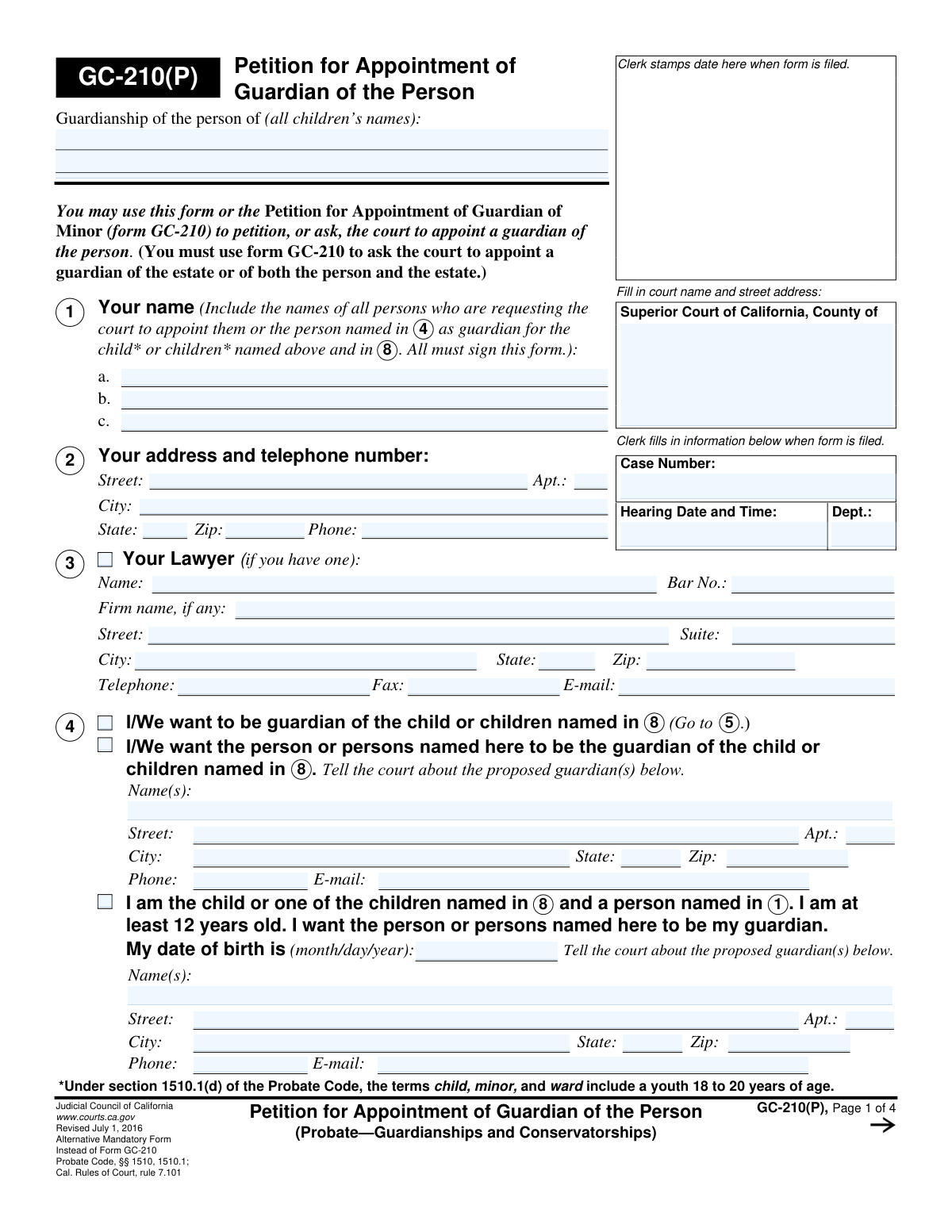
Yes! You can use AI to fill out Form GC-210(P), Petition for Appointment of Guardian of the Person
Form GC-210(P), Petition for Appointment of Guardian of the Person, is a legal document filed in California courts to request the appointment of a guardian for a minor. This form is specifically for guardianship of the 'person,' which covers care and custody, as opposed to the 'estate,' which involves managing finances. Filing this petition is a critical step to ensure a child's welfare is legally entrusted to a responsible adult when parents are unable to provide care. Today, this form can be filled out quickly and accurately using AI-powered services like Instafill.ai, which can also convert non-fillable PDF versions into interactive fillable forms.
GC-210(P) is part of the
California court forms category on Instafill.
Our AI automatically handles information lookup, data retrieval, formatting, and form filling.
It takes less than a minute to fill out GC-210(P) using our AI form filling.
Securely upload your data. Information is encrypted in transit and deleted immediately after the form is filled out.
Form specifications
| Form name: | Form GC-210(P), Petition for Appointment of Guardian of the Person |
| Number of fields: | 112 |
| Number of pages: | 1 |
| Language: | English |
Instafill Demo: How to fill out PDF forms in seconds with AI
How to Fill Out GC-210(P) Online for Free in 2026
Are you looking to fill out a GC-210(P) form online quickly and accurately? Instafill.ai offers the #1 AI-powered PDF filling software of 2026, allowing you to complete your GC-210(P) form in just 37 seconds or less.
Follow these steps to fill out your GC-210(P) form online using Instafill.ai:
- 1 Navigate to Instafill.ai and upload your GC-210(P) form or select it from the platform's template library.
- 2 Provide the court information and your personal details as the petitioner. If you have an attorney, enter their information as well.
- 3 Enter the full name and contact information for the proposed guardian, and specify your relationship to them.
- 4 List the full legal name and date of birth for each child who needs a guardian. You will also need to attach a separate GC-210(CA) form for each child.
- 5 Explain to the court why the guardianship is necessary and convenient for each child involved.
- 6 Indicate any other requests, such as waiving the notice of hearing for certain relatives, and list any other forms or attachments being filed with the petition.
- 7 Review all the information populated by the AI for accuracy, then sign and date the form. Download the completed document for filing with the court.
Our AI-powered system ensures each field is filled out correctly, reducing errors and saving you time.
Why Choose Instafill.ai for Your Fillable GC-210(P) Form?
Speed
Complete your GC-210(P) in as little as 37 seconds.
Up-to-Date
Always use the latest 2026 GC-210(P) form version.
Cost-effective
No need to hire expensive lawyers.
Accuracy
Our AI performs 10 compliance checks to ensure your form is error-free.
Security
Your personal information is protected with bank-level encryption.
Frequently Asked Questions About Form GC-210(P)
This form is a petition used to ask a California Superior Court to appoint a legal guardian for the person of a minor child. A guardian of the person is responsible for the child's care, custody, and control.
Form GC-210(P) is used only when petitioning for guardianship of the child's person. If you need to request guardianship of the child's estate (finances) or both the person and the estate, you must use the standard Form GC-210.
Any person seeking to be appointed as a child's guardian, or someone nominating another person to be the guardian, should file this form. A child who is at least 12 years old can also use this form to nominate their own guardian.
You must attach a 'Guardianship Petition—Child Information Attachment' (Form GC-210(CA)) for each child and a 'Declaration Under Uniform Child Custody Jurisdiction and Enforcement Act (UCCJEA)' (Form FL-105/GC-120). Other forms, like the 'Confidential Guardian Screening Form' (GC-212), may also be required.
No, you can list all children on one petition. However, you must complete and attach a separate 'Guardianship Petition—Child Information Attachment' (Form GC-210(CA)) for each individual child.
You need to clearly explain the specific circumstances that make the guardianship necessary for the child's well-being. This could include reasons like the parents being deceased, unable to provide care, or having their parental rights terminated.
This is a request for the court to excuse you from formally notifying certain relatives about the guardianship hearing. You must provide a valid reason, such as not knowing their location after reasonable efforts or if giving notice might harm the child.
Yes, if the proposed guardian is unrelated, they must agree to provide any information requested by an investigating agency. This is confirmed by checking the appropriate box in section 6 and potentially attaching a signed statement.
Yes, a child who is 12 years of age or older can state their preference by filling out and signing the relevant part of the petition (section 4). The court will give consideration to the child's wishes.
All petitioners (the people asking to be appointed guardian) must sign the form. If the child is between 18 and 21 years old and is not a petitioner, they must also sign to consent to the appointment.
The form instructs you to check the box indicating you need more space and continue your explanation on a separate sheet of paper. Be sure to label the attachment clearly with the form name and corresponding item number, such as 'Form GC-210(P)—Attachment 9'.
Yes, services like Instafill.ai use AI to help you accurately auto-fill form fields, which can save you time and reduce errors. This is especially helpful for complex forms with repetitive information.
Simply upload the GC-210(P) form to the Instafill.ai platform. The service will make the form interactive and guide you through the process of filling in all the required information step-by-step.
You can use a service like Instafill.ai, which can convert flat, non-fillable PDFs into interactive forms you can easily complete on your computer. This avoids the need to print and fill out the form by hand.
Compliance GC-210(P)
Validation Checks by Instafill.ai
1
Petitioner Identity Selection
Validates that exactly one of the three checkboxes in items 1, 2, or 3 is selected to identify the petitioner. This is crucial for understanding who is filing the petition: the proposed guardian, a third party nominating a guardian, or the child themselves. If more than one or none are selected, the petition's standing is ambiguous and cannot be processed correctly.
2
Child Petitioner Age Verification
If checkbox 3 is selected, indicating the child is a petitioner, this check verifies the child's provided date of birth. The calculated age must be 12 years or older as specified on the form. This is a legal requirement for a minor to petition on their own behalf, and failure to meet this threshold would invalidate their standing as a petitioner.
3
Proposed Guardian Information Completeness
When checkbox 2 is selected (nominating another person as guardian), this validation ensures the proposed guardian's name and full address fields are all completed. Missing contact information for the proposed guardian would prevent the court and other parties from communicating with them, halting the entire process. This check ensures all necessary parties can be identified and located.
4
Child Information Required
Ensures that the full name and date of birth for at least one child are entered in item 8. A petition for guardianship cannot exist without a child who is the subject of the action. This check prevents the submission of an empty or incomplete petition that lacks the fundamental information needed to proceed.
5
Date of Birth Format and Validity
Verifies that all date of birth fields on the form are entered in a valid MM/DD/YYYY format and represent a real, past date. This is important for accurately calculating a child's age to determine legal status and eligibility. An invalid or improperly formatted date would cause processing errors and could lead to incorrect legal determinations.
6
Unrelated Guardian Declaration Requirement
This check is triggered if checkbox 5b ('Not related to the child') is selected. It validates that the subsequent questions in item 6 (regarding foster homes and providing information) are answered. The court requires additional scrutiny and information for unrelated guardians, and failing to provide this information will result in the petition being rejected as incomplete.
7
Attachment Requirement for Unrelated Guardian
If checkbox 6c is selected, indicating a signed statement from an unrelated guardian is attached, this validation flags that 'Attachment 6' is required. The system should verify that the total page attachment count in item 11 is greater than zero. This ensures that mandatory documentary evidence, as required by the form's instructions, is not overlooked.
8
Guardianship Necessity Justification
Validates that the free-text explanation field in item 9 ('The guardianship is necessary or convenient for the reasons given below') is not empty. This justification is the core legal argument for the petition and is required by the court to assess the need for a guardianship. A blank submission would be summarily rejected for failing to state a cause of action.
9
Primary Petition Request Selection
Ensures that checkbox 10a ('Appoint the person... as guardian') is selected. This is the primary relief requested from the court in this petition. Without this selection, the petition lacks a clear purpose and the court would not know what action to take, leading to dismissal.
10
Conditional Explanation for Waiver of Notice
If checkbox 10b ('Excuse me/us from having to give notice') is selected, this check verifies that the corresponding text box contains an explanation. A request to waive a person's due process right to notice requires a compelling reason. An empty explanation for such a significant request would result in its automatic denial.
11
Petitioner Signature and Date Presence
Verifies that at least one petitioner has signed and dated the form in item 12. A signature under penalty of perjury is what makes the document a legal declaration, and a date establishes when it was signed. An unsigned or undated petition is not legally valid and will not be filed or acted upon by the court clerk.
12
Header Consistency Across Pages
This validation checks that the 'Guardianship of the person of (all children’s names)' field is filled and consistent on every page of the form. This header information is critical for ensuring all pages of a single petition are kept together and correctly associated with the case file. Mismatched or missing headers can lead to lost pages and incomplete court records.
13
Mandatory Supporting Form Declaration
Validates that required attachments, specifically the 'Guardianship Petition—Child Information Attachment (form GC-210(CA))' and 'Declaration Under UCCJEA (form FL-105/GC-120)', are referenced. The form explicitly states these must be attached. This check ensures the petitioner acknowledges these critical, legally required supporting documents are included, preventing an immediate rejection for procedural non-compliance.
14
Attachment Count Logic
Verifies that if any 'Check here if you need more space' box is checked (e.g., in items 8, 9, 10b, 10c), the 'pages attached' count in item 11 is a number greater than zero. This provides a logical cross-check to ensure that referenced attachments are accounted for. A mismatch could indicate that the petitioner forgot to include the extra pages or miscounted, prompting a review.
Common Mistakes in Completing GC-210(P)
Item 8 explicitly requires attaching a separate Form GC-210(CA) for each child and a Form FL-105/GC-120 (UCCJEA). Petitioners frequently overlook this multi-form requirement, leading to an incomplete filing that is either rejected by the clerk or delayed by the court. To avoid this, carefully read all instructions and use the checklist in Item 11 to confirm every required attachment is included before submission.
In Item 9, petitioners often provide vague statements like 'it is in the child's best interest' without providing specific, supporting facts. The court needs a detailed narrative explaining exactly why each child needs a guardian, such as parental death, incapacity, or abandonment. A weak or generic explanation can lead to the court questioning the necessity of the guardianship and potentially denying the petition.
The signature section on Page 4 is a common point of error, especially when there are multiple petitioners who must all sign. Forgetting a signature, or failing to have the proposed ward sign if they are between 18 and 20 years old, will invalidate the petition. This oversight requires the form to be corrected and re-filed, causing significant delays in the legal process.
The form requires the full names of all children and the case number to be written at the top of every page for consistency. People often fill this out on the first page but forget on subsequent pages, which can lead to administrative confusion or pages being misplaced. Using an AI-powered form-filling tool like Instafill.ai can prevent this by automatically populating recurring information across all pages of the document.
The instructions on the first page clearly state that this form, GC-210(P), is only for 'Guardian of the Person' and cannot be used to manage a child's finances or property. A petitioner who also needs to manage the child's estate must use Form GC-210. Filing the wrong form wastes time and money, as it addresses the wrong legal issue and will be dismissed.
In Item 10b, petitioners may ask to be excused from notifying a relative without providing the required justification. The court requires a detailed account of the 'reasonable efforts' made to locate the person or a clear explanation of why giving notice would harm the child. Simply stating a relative is 'unreachable' is insufficient and will likely result in the request being denied, delaying the hearing.
In Item 8 and the page headers, petitioners sometimes use informal names (e.g., 'Danny' instead of 'Daniel') or omit middle names. Legal petitions require the child's full legal name as it appears on their birth certificate to ensure the court order is valid and enforceable. Using incorrect names can create legal and administrative problems down the line.
If the proposed guardian is not related to the child, Item 6 requires specific follow-up actions, which may include attaching a separate signed statement. Petitioners often check the 'Not related' box in Item 5 but then fail to complete the corresponding declarations in Item 6. This oversight results in an incomplete petition for a non-relative guardianship, which is subject to stricter scrutiny by the court.
The checklist in Item 11 must accurately reflect all documents being filed with the petition. Petitioners may check a box for a form that is not actually included, or forget to check a box for a form that is attached. This discrepancy forces the court clerk or judge to halt processing to determine what is missing, causing unnecessary delays.
Saved over 80 hours a year
“I was never sure if my IRS forms like W-9 were filled correctly. Now, I can complete the forms accurately without any external help.”
Kevin Martin Green
Your data stays secure with advanced protection from Instafill and our subprocessors

Robust compliance program
Transparent business model
You’re not the product. You always know where your data is and what it is processed for.
ISO 27001, HIPAA, and GDPR
Our subprocesses adhere to multiple compliance standards, including but not limited to ISO 27001, HIPAA, and GDPR.
Security & privacy by design
We consider security and privacy from the initial design phase of any new service or functionality. It’s not an afterthought, it’s built-in, including support for two-factor authentication (2FA) to further protect your account.
Fill out GC-210(P) with Instafill.ai
Worried about filling PDFs wrong? Instafill securely fills form-gc-210p-petition-for-appointment-of-guardian-of-the-person forms, ensuring each field is accurate.