Yes! You can use AI to fill out Form Interrogatories—General
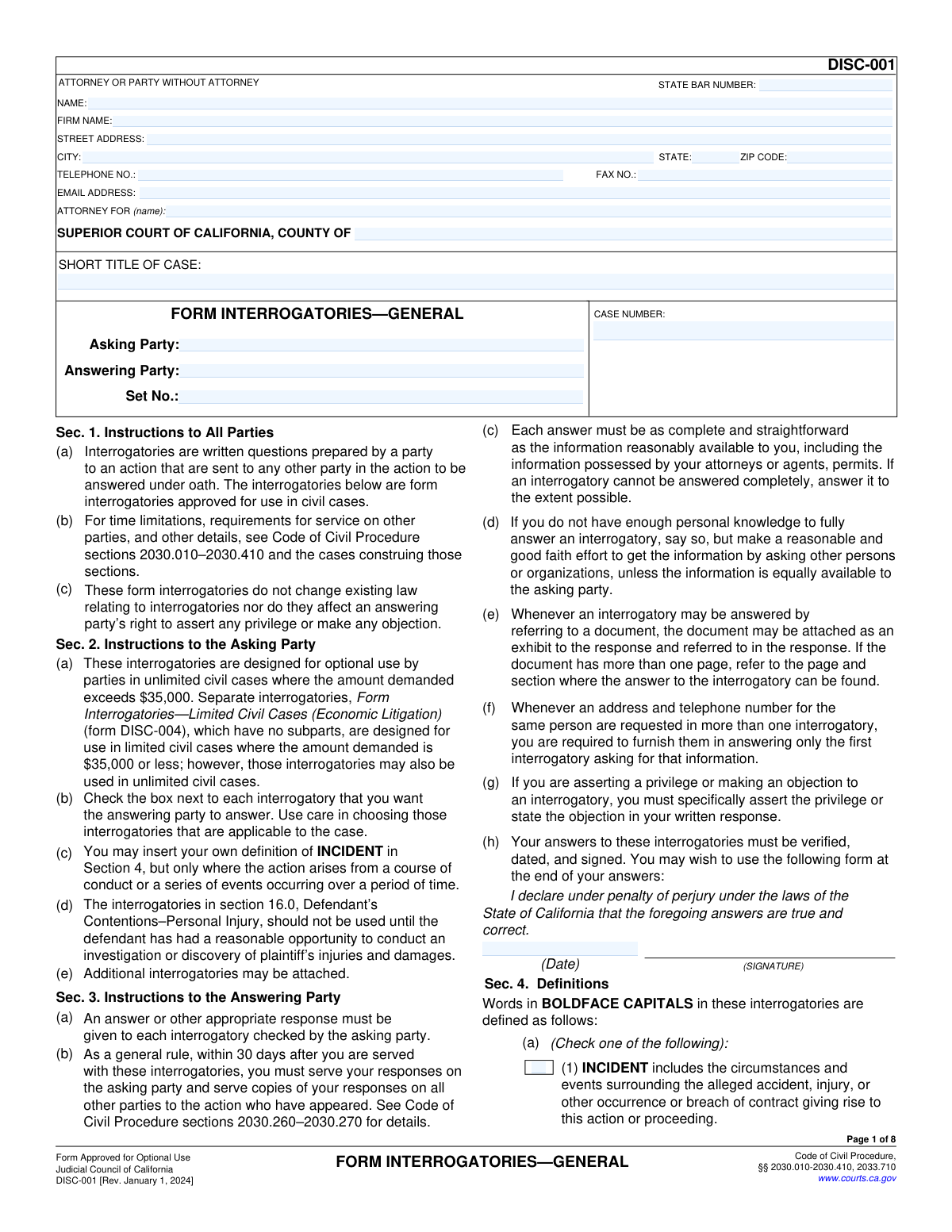
Form DISC-001, Form Interrogatories—General, is a standard set of written questions approved by the Judicial Council of California for use in the discovery phase of unlimited civil cases (where the amount in dispute exceeds $35,000). It allows one party to obtain information under oath from another party regarding the facts and contentions of the case, covering topics like personal background, insurance, injuries, and the incident itself. Today, this form can be filled out quickly and accurately using AI-powered services like Instafill.ai, which can also convert non-fillable PDF versions into interactive fillable forms.
DISC-001 is part of the
California court forms category on Instafill.
Our AI automatically handles information lookup, data retrieval, formatting, and form filling.
It takes less than a minute to fill out DISC-001 using our AI form filling.
Securely upload your data. Information is encrypted in transit and deleted immediately after the form is filled out.
Form specifications
| Form name: | Form Interrogatories—General |
| Number of fields: | 130 |
| Number of pages: | 1 |
| Language: | English |
Instafill Demo: How to fill out PDF forms in seconds with AI
How to Fill Out DISC-001 Online for Free in 2026
Are you looking to fill out a DISC-001 form online quickly and accurately? Instafill.ai offers the #1 AI-powered PDF filling software of 2026, allowing you to complete your DISC-001 form in just 37 seconds or less.
Follow these steps to fill out your DISC-001 form online using Instafill.ai:
- 1 Navigate to Instafill.ai and upload or select the Form DISC-001, Form Interrogatories—General.
- 2 Use the AI assistant to populate the header with court, case, and party information.
- 3 As the Asking Party, check the boxes next to each interrogatory you want the Answering Party to answer.
- 4 As the Answering Party, provide complete and straightforward answers to each checked question, allowing the AI to help structure your responses based on available information.
- 5 Identify and attach any supporting documents referenced in your answers, as instructed by the form.
- 6 Carefully review all the information for accuracy, then have the Answering Party date and sign the declaration under penalty of perjury.
- 7 Download, print, and serve the completed responses on the asking party and all other parties to the action as required by the Code of Civil Procedure.
Our AI-powered system ensures each field is filled out correctly, reducing errors and saving you time.
Why Choose Instafill.ai for Your Fillable DISC-001 Form?
Speed
Complete your DISC-001 in as little as 37 seconds.
Up-to-Date
Always use the latest 2026 DISC-001 form version.
Cost-effective
No need to hire expensive lawyers.
Accuracy
Our AI performs 10 compliance checks to ensure your form is error-free.
Security
Your personal information is protected with bank-level encryption.
Frequently Asked Questions About Form DISC-001
This form consists of pre-written questions, called interrogatories, that one party in a California civil lawsuit sends to another party to answer under oath. It is a tool used during the discovery phase to gather information and evidence relevant to the case.
The 'Answering Party' named on the form must fill it out. This is the party who has received the questions from the 'Asking Party' in the lawsuit.
No, you only need to provide an answer or an appropriate response to the interrogatories that the Asking Party has specifically checked. You can ignore the questions that are not checked.
As the Answering Party, you generally have 30 days from the date you were served with the form to serve your responses. You must send the responses to the Asking Party and copies to all other parties in the case.
If you don't have enough personal knowledge, you must say so but also make a reasonable, good-faith effort to get the information from other people or organizations available to you. This includes information possessed by your attorneys or agents.
Verifying your answers means you must sign a statement at the end, under penalty of perjury, declaring that your responses are true and correct. This makes your answers sworn testimony.
Yes, if a question can be answered by referring to a document, you can attach it as an exhibit. You must specify the page and section where the answer can be found in your response.
This section asks for personal details like your full name and past names used, date of birth, residence history, and employment history. If you are a business entity, it asks for details like your corporate or partnership structure and business addresses.
You must specifically state your objection or assert the privilege in your written response for that interrogatory. You cannot simply ignore the question.
If you have a non-fillable PDF, you can use a service like Instafill.ai. It can convert flat PDFs into interactive, fillable forms so you can easily type in your answers.
Yes, services like Instafill.ai use AI to accurately auto-fill form fields with your information, which can save time and help avoid errors. You must still review all answers for accuracy before signing.
You can upload the Form DISC-001 PDF to the Instafill.ai platform. The AI will make the form fillable and assist in populating the fields, after which you can download, print, and sign the completed document.
Form DISC-001 is designed for unlimited civil cases where the amount demanded exceeds $35,000. Form DISC-004 is designed for limited civil cases ($35,000 or less), but DISC-001 can still be used in those cases if the parties choose.
Compliance DISC-001
Validation Checks by Instafill.ai
1
Ensures Case Number is Provided
This check verifies that the 'CASE NUMBER' field is not empty. The case number is a critical identifier for court documents, linking the form to the correct legal proceeding. If this field is left blank, the form cannot be correctly filed or processed by the court system, leading to rejection.
2
Validates State Bar Number Format
This validation ensures that the 'STATE BAR NUMBER' is a numeric value. The State Bar Number is a unique identifier assigned to licensed attorneys, and it must be in the correct format for verification purposes. A non-numeric or incorrectly formatted entry could prevent the system from identifying the attorney of record.
3
Validates Email Address Structure
This check verifies that the value entered in the 'EMAIL ADDRESS' field follows the standard '[email protected]' format. This is crucial for ensuring that any electronic communications or service of documents can be successfully delivered. An invalid email format would trigger an error to prompt the user for correction.
4
Ensures Party Identification is Complete
This validation confirms that the 'Asking Party' and 'Answering Party' fields at the top of the form are filled in. These fields are fundamental to the document's legal context, identifying who is sending the questions and who must respond. A submission without this information is legally incomplete and would be invalid.
5
Validates INCIDENT Definition Selection
This check ensures that in Section 4(a), the user has selected exactly one of the two options for defining 'INCIDENT'. If the second option, allowing for a custom definition, is chosen, this check also verifies that the corresponding text field is not empty. This is crucial for establishing a clear and unambiguous basis for all subsequent answers on the form.
6
Chronological Validation of Date of Birth
This check verifies that the date entered for 'date of your birth' in section 2.2 is a valid date that occurs before the current date. This prevents impossible entries, such as future dates or invalid date formats. An invalid entry would make the personal identification data unreliable.
7
Conditional Requirement for Business Entity Details
This check validates that if a user indicates they are a specific business entity (e.g., by answering 'yes' to 3.1 'Are you a corporation?'), then all corresponding sub-fields (3.1a-e) must be completed. It also ensures that only one primary business entity type (3.1, 3.2, 3.3, etc.) is selected. This prevents incomplete or contradictory information about the answering party's business structure.
8
Conditional Requirement for Injury Details
This check enforces conditional logic based on the answer to interrogatory 6.1. If the user answers 'yes' to attributing injuries to the INCIDENT, then interrogatory 6.2, which asks to identify each injury, becomes a required field. This ensures that a claim of injury is substantiated with specific details, preventing incomplete or ambiguous responses.
9
Conditional Requirement for Lost Income Details
This validation enforces the rule from interrogatory 8.1. If the user answers 'yes' to attributing loss of income to the INCIDENT, then interrogatories 8.2 through 8.8 become required. This ensures that any claim for lost wages is supported by the necessary details about employment, income, and time missed from work.
10
Chronological Validation of Lost Income Dates
This validation ensures that the 'date you returned to work' (interrogatory 8.5) is chronologically after the 'last date before the INCIDENT that you worked' (interrogatory 8.3). This logical check prevents contradictory date entries related to a claim for lost income. If the dates are inconsistent, the claim calculation would be flawed, so the entry must be corrected.
11
Validates Prior Claim Date Range
This check verifies that for any prior claim listed in section 11.1, the date of the incident giving rise to that claim occurred within the last 10 years from the current date, as specified by the question. An entry with a date outside this range would be flagged as non-compliant with the interrogatory's instructions. This ensures the provided information is within the requested scope.
12
Validates Vehicle Model Year
This check ensures the vehicle 'year' entered in section 20.2(a) is a plausible 4-digit number, for example, between 1900 and the current year plus two. This prevents typographical errors like entering '22' instead of '2022' or other nonsensical values. It ensures the vehicle information collected is accurate and realistic.
13
Verifies Signature Date is Not in the Future
This validation checks that the date entered on the signature line is not a future date. A declaration under penalty of perjury must be dated on or before the day it is signed. A future date is logically impossible and would invalidate the legal declaration, so the form submission would be blocked.
Common Mistakes in Completing DISC-001
Users often enter the wrong case number, misspell party names, or leave the 'Short Title of Case' field incomplete. This typically happens due to carelessness or not having the correct court documents on hand for reference. Such errors can cause the filing to be rejected by the court clerk or lead to significant confusion and delays in the legal process. To avoid this, always cross-reference the information with the official Summons or Complaint; if the form is a non-fillable PDF, a tool like Instafill.ai can convert it to a fillable version and help ensure case data is consistent across all documents.
A critical and frequent mistake is forgetting to sign and date the verification statement required by Section 3(h), which attests that the answers are true under penalty of perjury. This often occurs because the signature block is at the very end of a long document. Unverified responses are legally invalid and treated as if no answer was provided, which can lead to sanctions or a motion to compel from the opposing party. Always perform a final check for the signature and date before serving the responses.
Parties often provide non-responsive answers like 'See complaint,' 'Investigation ongoing,' or 'The document speaks for itself' instead of the specific facts required. This violates the duty under Section 3(c) to answer as completely and straightforwardly as possible with all reasonably available information. These evasive tactics almost always result in deficiency letters and costly, time-consuming motions to compel, and they can damage your credibility with the court.
The form defines terms like 'INCIDENT,' 'DOCUMENT,' and 'YOU OR ANYONE ACTING ON YOUR BEHALF' in Section 4, but filers often fail to read or apply these definitions. For example, a user might narrowly interpret 'DOCUMENT' as only paper files, forgetting to include required electronically stored information like emails, texts, and digital photos. This leads to incomplete and inaccurate responses, potentially resulting in sanctions for failure to disclose.
Questions in Section 2.0 and 11.0 demand historical data like five years of residence addresses or ten years of prior personal injury claims. People frequently provide incomplete lists by relying on memory alone, which can be used later to attack their credibility. Before answering, it is crucial to gather personal records, old resumes, and legal files to ensure every required item is listed accurately and completely.
Many interrogatories (e.g., 2.13, 15.1) are divided into multiple subparts (a, b, c, etc.) that request distinct pieces of information. A common error is to answer the main question but neglect to address each individual subpart, rendering the entire response incomplete. This forces the asking party to file a motion to compel, wasting time and money for both sides. Carefully read and respond to every single subpart of a checked question.
When objecting to a question, parties often write a generic 'Objection' or 'Privileged' without stating the specific legal basis as required by Section 3(g). An improper objection is legally ineffective and can be deemed waived by the court, forcing the party to answer the question anyway. Objections must specifically state the grounds, such as 'Objection, the question calls for information protected by the attorney-client privilege.'
Interrogatory 1.1 requires listing every person who helped prepare the answers, but filers often forget to include investigators, accountants, or even family members who helped gather information. This omission can be problematic, as the opposing party is entitled to know who contributed to the factual basis of the responses. To avoid this, keep a log of everyone you consult and list them accurately as required.
Section 3(e) allows a party to answer by referencing a document, but many people make the mistake of attaching a large exhibit without specifying the exact page and section where the answer is located. This makes the answer non-compliant and forces the other party to search for the information. When referencing a document, you must provide a precise citation (e.g., 'See Exhibit A, page 5, paragraph 3') to guide the reader to the exact answer.
The form repeatedly asks for the name, ADDRESS, and telephone number for individuals like witnesses (12.1), employers (2.6), and doctors (6.4). A frequent error is providing only a name, which is insufficient. This happens when the information isn't readily available, but Section 3(d) requires a good faith effort to obtain it. AI-powered tools like Instafill.ai can help prevent this by validating address and phone number formats, reminding you to fill in all required fields for a complete and compliant response.
Saved over 80 hours a year
“I was never sure if my IRS forms like W-9 were filled correctly. Now, I can complete the forms accurately without any external help.”
Kevin Martin Green
Your data stays secure with advanced protection from Instafill and our subprocessors
Robust compliance program
Transparent business model
You’re not the product. You always know where your data is and what it is processed for.
ISO 27001, HIPAA, and GDPR
Our subprocesses adhere to multiple compliance standards, including but not limited to ISO 27001, HIPAA, and GDPR.
Security & privacy by design
We consider security and privacy from the initial design phase of any new service or functionality. It’s not an afterthought, it’s built-in, including support for two-factor authentication (2FA) to further protect your account.
Fill out DISC-001 with Instafill.ai
Worried about filling PDFs wrong? Instafill securely fills form-interrogatoriesgeneral forms, ensuring each field is accurate.