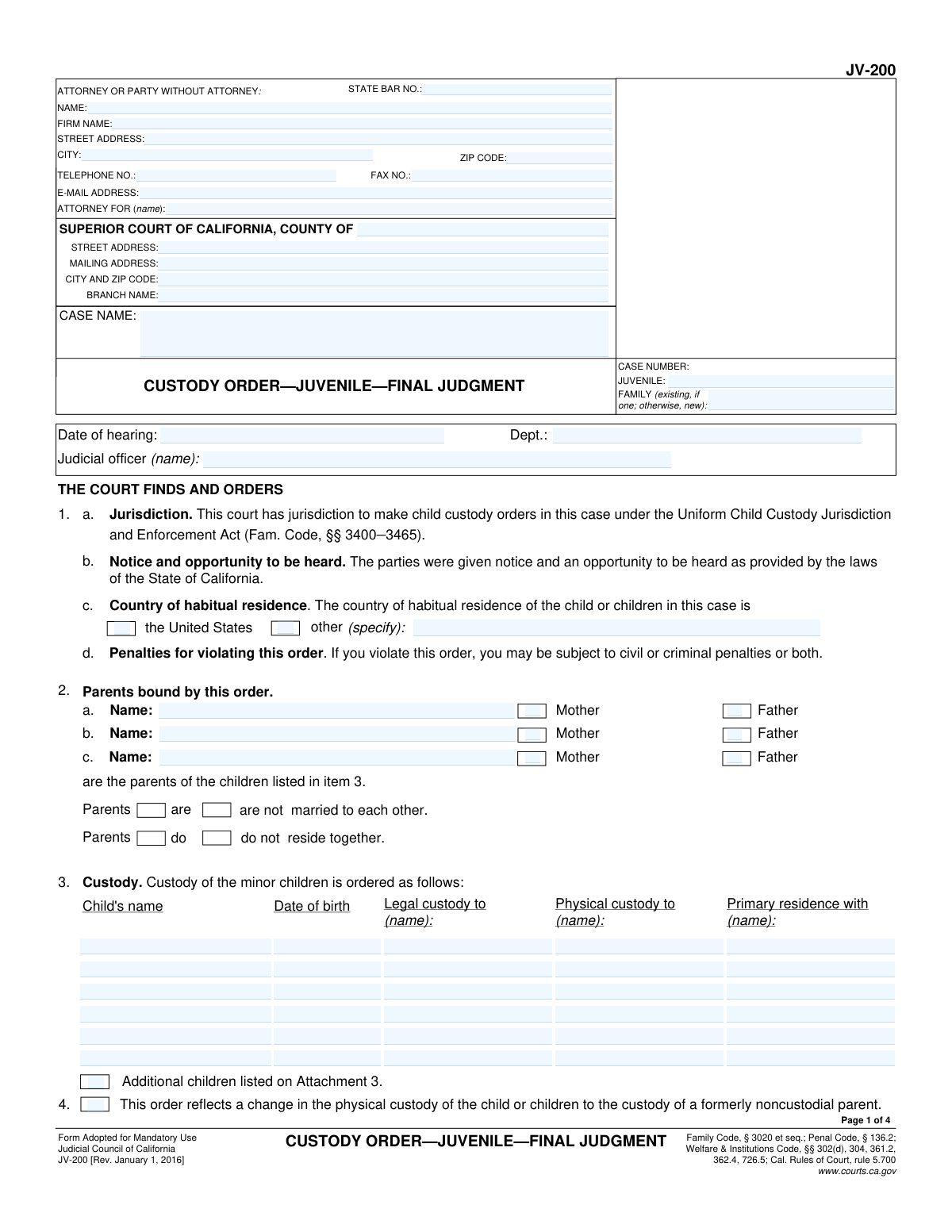
Yes! You can use AI to fill out Form JV-200, Custody Order—Juvenile—Final Judgment
Form JV-200 is a legal document issued by a California juvenile court to establish a final, enforceable order for child custody. This form is critical as it formally dictates the terms of legal and physical custody, visitation schedules (parenting time), and any other related court orders, such as child abduction prevention measures. It serves as the official judgment that concludes the custody aspect of a juvenile case. Today, this form can be filled out quickly and accurately using AI-powered services like Instafill.ai, which can also convert non-fillable PDF versions into interactive fillable forms.
JV-200 is part of the
California court forms category on Instafill.
Our AI automatically handles information lookup, data retrieval, formatting, and form filling.
It takes less than a minute to fill out JV-200 using our AI form filling.
Securely upload your data. Information is encrypted in transit and deleted immediately after the form is filled out.
Form specifications
| Form name: | Form JV-200, Custody Order—Juvenile—Final Judgment |
| Number of fields: | 167 |
| Number of pages: | 1 |
| Language: | English |
Instafill Demo: How to fill out PDF forms in seconds with AI
How to Fill Out JV-200 Online for Free in 2026
Are you looking to fill out a JV-200 form online quickly and accurately? Instafill.ai offers the #1 AI-powered PDF filling software of 2026, allowing you to complete your JV-200 form in just 37 seconds or less.
Follow these steps to fill out your JV-200 form online using Instafill.ai:
- 1 Navigate to Instafill.ai and upload or select the JV-200 form.
- 2 Enter the court and case information, including the county, case numbers (juvenile and family), and attorney details if applicable.
- 3 Provide the full names and birthdates of the minor children involved and identify the parents.
- 4 Detail the court's custody orders by checking the appropriate boxes for legal and physical custody and naming the custodial parent(s).
- 5 Define the visitation (parenting time) schedule for each parent, referencing any attachments like form JV-205 if necessary.
- 6 Include any additional orders, such as those for child abduction prevention, parentage declarations, or other specific findings, and note any attached forms.
- 7 Review all entered information for accuracy, then download the completed form for the judicial officer's signature and subsequent filing with the court clerk.
Our AI-powered system ensures each field is filled out correctly, reducing errors and saving you time.
Why Choose Instafill.ai for Your Fillable JV-200 Form?
Speed
Complete your JV-200 in as little as 37 seconds.
Up-to-Date
Always use the latest 2026 JV-200 form version.
Cost-effective
No need to hire expensive lawyers.
Accuracy
Our AI performs 10 compliance checks to ensure your form is error-free.
Security
Your personal information is protected with bank-level encryption.
Frequently Asked Questions About Form JV-200
The JV-200 form is a final court order from a California juvenile court that establishes legal and physical custody, visitation schedules, and other related orders for a child when the juvenile court case is closing.
This form is for the parents or guardians of children involved in a juvenile court case. It serves as the official, legally binding judgment outlining each parent's custody rights and responsibilities.
Legal custody (item 3) refers to the right to make important decisions for your child, such as healthcare and education. Physical custody determines where the child will live primarily.
The visitation schedule is detailed in items 5 and 6. It may be fully described on an attached form (like JV-205), set as a minimum amount of time, or left for the parents to arrange.
As stated in item 8, you must provide the other parent with at least 45 days' written notice before moving the child's residence for more than 30 days, unless you have a prior written agreement.
Item 14 explains that certain orders, like an Emergency Protective Order (EPO) or a criminal no-contact order, take precedence over conflicting terms in this civil custody order. Law enforcement will enforce the most restrictive order.
The juvenile court clerk sends the signed order to the family court in the appropriate county. The order is then filed in a new or existing family law case, making it enforceable through the family court system.
Once the juvenile court case is closed, any requests to modify or terminate the custody order must be filed in the family court case where the JV-200 was filed, not the juvenile court.
These are other official court forms used to provide specific details. For example, form JV-205 is used to outline a detailed visitation schedule, and form FL-341(C) can be used for a holiday schedule.
This section is used to formally state that a court has legally identified a child's parents. It requires referencing the specific court case where parentage was established.
Yes, while the judge finalizes this order, you can use AI-powered services like Instafill.ai to help organize your information and fill out related forms you might need to file. These tools accurately populate form fields, saving you time and reducing errors.
With Instafill.ai, you upload your form, and its AI identifies all the fields. You then enter your information once, and the service automatically and accurately fills out the entire document for you.
You can use a service like Instafill.ai to solve this. Simply upload the flat or scanned PDF, and their technology will convert it into an interactive, fillable form that you can easily complete online.
Compliance JV-200
Validation Checks by Instafill.ai
1
Ensures at least one Case Number is provided
This check verifies that either the 'JUVENILE' or 'FAMILY' case number field is completed at the top of the form. Case numbers are critical for identifying and tracking the legal proceeding. Failure to provide a case number would make the order impossible to file correctly and associate with the proper legal case.
2
Validates Child's Date of Birth
This validation ensures that for each child listed in item 3, the 'Date of birth' is a valid date in a standard format (e.g., MM/DD/YYYY) and precedes the current date. This is crucial for establishing the child's minor status and for legal accuracy. An invalid or future date would render the order legally deficient and could cause significant processing errors.
3
Requires Specification for 'Other' Habitual Residence
This check ensures that if the 'other' checkbox is selected in item 1c regarding the child's country of habitual residence, the corresponding 'specify' text field is not empty. This information is vital for determining jurisdiction under the Uniform Child Custody Jurisdiction and Enforcement Act (UCCJEA). An empty 'specify' field makes the jurisdictional finding incomplete and potentially invalid.
4
Verifies Hearing Date and Judicial Officer Name
This validation confirms that both the 'Date of hearing' and the 'Judicial officer (name)' fields in item 1 are completed and contain valid data. These details are fundamental to the order's authenticity, establishing when and by whose authority the judgment was made. Missing this information would invalidate the order as it would lack the basic elements of a court judgment.
5
Validates Attorney State Bar Number Format
This check verifies that the 'STATE BAR NO.' field, if filled, contains only numeric characters. The State Bar Number is a unique identifier for a licensed attorney, and ensuring its correct format is important for verification and record-keeping. An incorrectly formatted number could prevent the system from identifying the attorney of record.
6
Ensures Custody Award is Specified
This validation checks that at least one of the custody fields in item 3 ('Legal custody to', 'Physical custody to', 'Primary residence with') has a name entered. The primary purpose of the form is to issue a custody order, so failing to specify who has custody makes the order meaningless. The form must clearly state the custody arrangement to be enforceable.
7
Validates Completeness of Visitation Orders
This check verifies that if a parent's name is entered in item 5 or 6 for visitation, at least one of the sub-options (a, b, or c) is selected to define the terms. Conversely, if a visitation option is selected, a parent's name must be provided. An incomplete visitation order is ambiguous and unenforceable, leading to future conflict.
8
Requires Details for Active Restraining Orders
This validation ensures that if a checkbox is marked in item 14 (a, b, or c) to indicate an existing protective order, all corresponding details like case number, court, and expiration date are provided. This information is critical for law enforcement to understand the hierarchy of orders and enforce them correctly. Missing details could lead to incorrect enforcement or failure to enforce a critical safety order.
9
Ensures Mutually Exclusive Visitation Choices
This validation prevents the selection of conflicting options within the visitation sections (items 5 and 6). A user cannot select both 'No visitation is ordered' (option c) and a specific visitation plan (options a or b) for the same parent. This check ensures the order is clear and free of contradictions, which is vital for enforceability.
10
Requires Specification for 'Other' Parentage Court
This check ensures that if the 'other' radio button is selected in item 9 for the type of court that determined parentage, the adjacent 'specify' text field must be filled. This detail is necessary to locate the prior court order being referenced. Failure to specify the court type makes the reference incomplete and difficult to verify.
11
Validates ZIP Code Format
This check ensures that all ZIP code fields (e.g., for the court or attorney) contain a valid 5-digit or 9-digit (ZIP+4) numeric format. Correctly formatted ZIP codes are essential for mail delivery and accurate location records for the court and parties. An invalid format can lead to returned mail and communication breakdowns.
12
Ensures Consistency of Case Information Across Pages
This check verifies that the 'CASE NAME' and 'CASE NUMBER' fields are identical in the header of all pages of the form. Maintaining consistency is essential for document integrity, ensuring that all pages belong to the same case file, especially if they become separated. A mismatch could lead to pages being misfiled or the document being rejected.
13
Requires Parent Name for Custody/Visitation
This validation ensures that the names of the parents entered in item 2 are used consistently in subsequent sections where a parent's name is required, such as custody (item 3) and visitation (items 5 and 6). The order must clearly identify which parent is being granted rights or responsibilities. Using undefined or inconsistent names makes the order ambiguous and unenforceable.
14
Validates Expiration Date Format and Logic
This check verifies that any 'expiration date' field, such as those in item 14 for protective orders, is a valid date and occurs after the hearing date. An invalid date format would cause a data error. An expiration date in the past would mean the order being referenced is already expired, which is crucial information for the court to note.
Common Mistakes in Completing JV-200
Users often incorrectly enter, switch, or omit the 'JUVENILE' and 'FAMILY' case numbers at the top of each page. This happens because they may not understand that the juvenile court order is being filed into a family law case, which requires both numbers for proper cross-referencing. An error here can cause significant delays, lead to the order being filed incorrectly, or make it difficult to locate and enforce the order in the family court system. To avoid this, carefully copy both case numbers from previous court documents and double-check their placement in the correct fields.
People frequently fail to specify all aspects of custody, often confusing 'Legal Custody' (decision-making) with 'Physical Custody' (where the child lives). They might fill out one but not the other, or neglect to name the parent with the 'Primary residence,' creating an ambiguous and potentially unenforceable order. This can lead to future disputes and require returning to court for clarification. Ensure that a name is entered for both legal and physical custody, even if the same parent has both, to create a clear and complete order.
A very common error is checking a box in items 5, 6, 10, 11, or 12 that refers to an attachment (e.g., JV-205, FL-341(C), FL-341(D)) but then failing to complete and attach the corresponding form. This mistake renders that specific part of the order, such as the holiday schedule or visitation details, completely void and unenforceable. Before filing, review every checked box and confirm that the specified attachment is fully filled out and included with the submission. AI-powered tools like Instafill.ai can help by flagging references to attachments and ensuring all necessary documents are part of the final package.
In Items 5 and 6, parties often write vague terms like 'reasonable visitation' instead of using the specific options provided. When selecting the option for a minimum schedule, they frequently forget to specify the number of hours, times, and the time period (e.g., 'per week'). This ambiguity makes the visitation order difficult to enforce if parents disagree later. To prevent this, always define a clear, specific minimum schedule, even if you intend to be flexible, as it provides a baseline for the court to enforce.
Mistakes in a child's full legal name or date of birth are frequent and have serious consequences. An incorrect date of birth can affect when custody and support obligations legally end, while a misspelled name can cause identity verification issues for legal, medical, or educational purposes. These errors usually stem from rushing or not cross-referencing with official documents like a birth certificate. Always verify this information carefully before submission to prevent future legal complications.
Item 9 requires details from a previous court order establishing parentage, including the case number, county, and date. Parties often leave this section blank because they do not have the documents handy or do not remember the information. Failing to include this data can weaken the legal foundation of the custody order and create challenges if parentage is ever questioned. It is crucial to locate the prior parentage judgment and accurately transcribe all the required information onto the form.
Self-represented individuals often get confused by the header section, either filling in their name in the 'ATTORNEY FOR' field or leaving it blank. The correct procedure is to write 'Pro Per' or 'Self-Represented' after your name in the main party field and leave the State Bar No. blank. This mistake can cause confusion for the court clerk and opposing counsel about whether a party has legal representation. Using a tool like Instafill.ai can help populate these fields correctly based on whether you are an attorney or a self-represented party.
Parties often neglect to check the boxes and provide details for other existing protective orders (criminal, domestic violence, etc.) in Item 14. This information is critical for law enforcement to determine which order takes precedence in a conflict. Omitting these details can lead to improper enforcement or non-enforcement of a no-contact order, potentially endangering a protected party. Always research and include the case numbers and expiration dates of any other relevant restraining orders.
In Item 2, the simple checkboxes for whether the parents 'are/are not married' and 'do/do not reside together' are frequently overlooked. While seemingly minor, this information provides important context for the court regarding the family's situation and can be relevant to other related legal matters. This oversight happens due to haste, but taking a moment to ensure every box is considered can prevent the form from being rejected or requiring clarification.
If a party is responsible for completing Page 4, they often make errors in the transmittal (Item 16) and mailing certificate (Item 17) sections. They may select the wrong receiving court or fail to list the full name and correct mailing address for every person who must be served. An incorrect address means a party will not receive a copy of the final, filed order, violating their due process rights and potentially invalidating future enforcement actions. If the form is a non-fillable PDF, a tool like Instafill.ai can convert it to a fillable version, making it easier to enter this detailed information accurately.
Saved over 80 hours a year
“I was never sure if my IRS forms like W-9 were filled correctly. Now, I can complete the forms accurately without any external help.”
Kevin Martin Green
Your data stays secure with advanced protection from Instafill and our subprocessors

Robust compliance program
Transparent business model
You’re not the product. You always know where your data is and what it is processed for.
ISO 27001, HIPAA, and GDPR
Our subprocesses adhere to multiple compliance standards, including but not limited to ISO 27001, HIPAA, and GDPR.
Security & privacy by design
We consider security and privacy from the initial design phase of any new service or functionality. It’s not an afterthought, it’s built-in, including support for two-factor authentication (2FA) to further protect your account.
Fill out JV-200 with Instafill.ai
Worried about filling PDFs wrong? Instafill securely fills form-jv-200-custody-orderjuvenilefinal-judgment forms, ensuring each field is accurate.