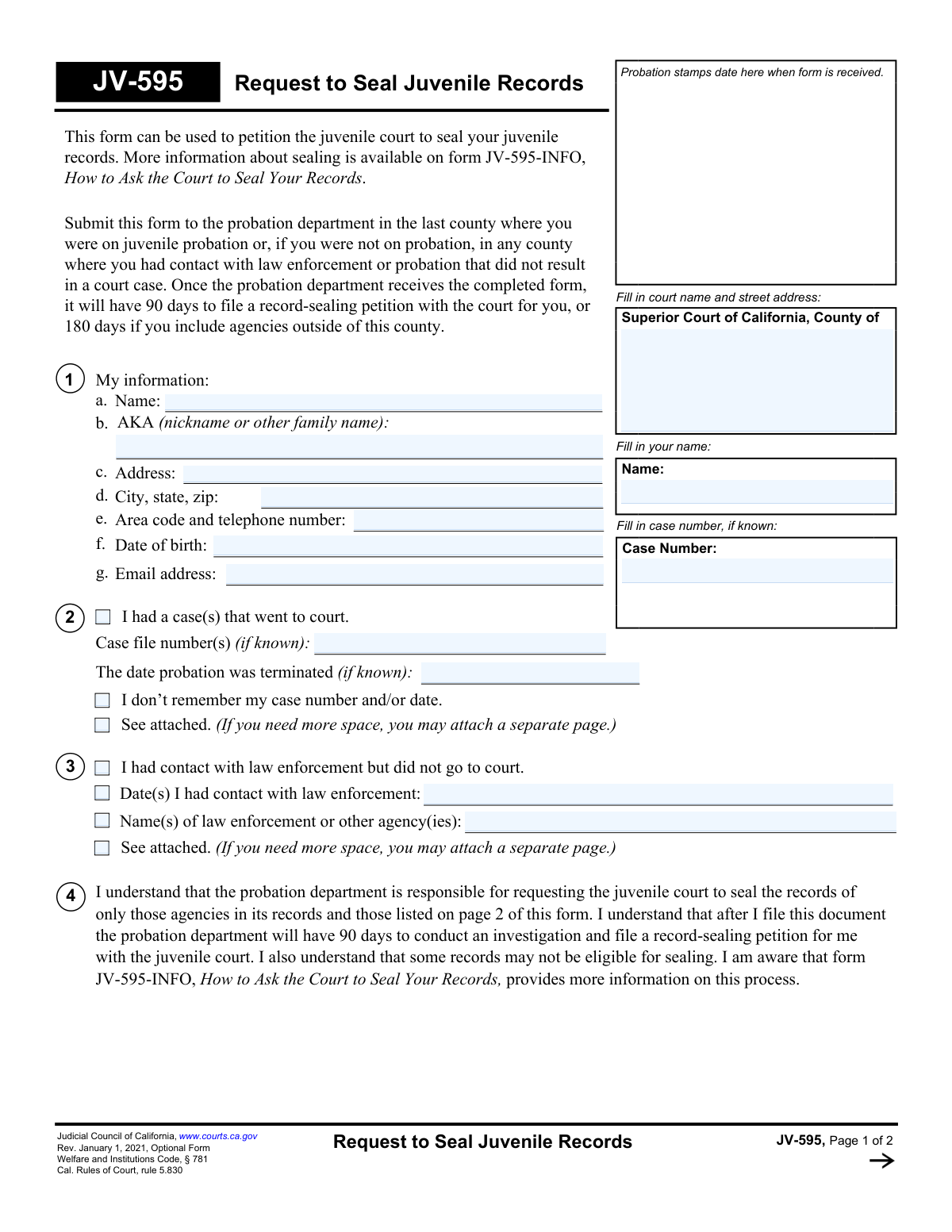
Yes! You can use AI to fill out Form JV-595, Request to Seal Juvenile Records

Form JV-595, Request to Seal Juvenile Records, is a legal document used to petition the Superior Court of California to seal a person's juvenile records under Welfare and Institutions Code § 781. This process is crucial for individuals seeking to limit public access to past juvenile offenses, which can impact future opportunities for employment, housing, and education. Today, this form can be filled out quickly and accurately using AI-powered services like Instafill.ai, which can also convert non-fillable PDF versions into interactive fillable forms.
JV-595 is part of the California court forms category on Instafill.
Our AI automatically handles information lookup, data retrieval, formatting, and form filling.
It takes less than a minute to fill out JV-595 using our AI form filling.
Securely upload your data. Information is encrypted in transit and deleted immediately after the form is filled out.

Form specifications

Form name: Form JV-595, Request to Seal Juvenile Records
Number of fields: 51
Number of pages: 1
Language: English
main-image

Instafill Demo: How to fill out PDF forms in seconds with AI

How to Fill Out JV-595 Online for Free in 2026

Are you looking to fill out a JV-595 form online quickly and accurately? Instafill.ai offers the #1 AI-powered PDF filling software of 2026, allowing you to complete your JV-595 form in just 37 seconds or less.
Follow these steps to fill out your JV-595 form online using Instafill.ai:
  1. 1 Navigate to Instafill.ai and upload the JV-595 form or select it from the template library.
  2. 2 Provide your personal information in Section 1, including your full name, date of birth, and current contact details.
  3. 3 Complete Section 2 by providing details of any juvenile court cases, including case numbers and probation termination dates if known.
  4. 4 If you had contact with law enforcement that did not lead to a court case, fill out the details in Section 3.
  5. 5 In Section 5, list all other agencies (such as schools, DMV, or specific police departments) that may have records of your juvenile contacts to ensure they are included in the sealing request.
  6. 6 Carefully review all the information populated by the AI to ensure accuracy and completeness.
  7. 7 Electronically sign and date the form, then download it for submission to the appropriate county probation department as instructed on the form.

Our AI-powered system ensures each field is filled out correctly, reducing errors and saving you time.

Why Choose Instafill.ai for Your Fillable JV-595 Form?

Speed

Complete your JV-595 in as little as 37 seconds.

Up-to-Date

Always use the latest 2026 JV-595 form version.

Cost-effective

No need to hire expensive lawyers.

Accuracy

Our AI performs 10 compliance checks to ensure your form is error-free.

Security

Your personal information is protected with bank-level encryption.

Frequently Asked Questions About Form JV-595

The JV-595 form is used to petition the juvenile court in California to seal your juvenile records. This includes records from court cases and contacts with law enforcement that occurred before you turned 18.

Anyone who has a juvenile record in California and wishes to have it sealed should fill out this form. This applies whether your case went to court or if you only had contact with law enforcement.

Submit the form to the probation department in the last county where you were on juvenile probation. If you were not on probation, submit it to the probation department in any county where you had contact with law enforcement.

The probation department has 90 days to investigate and file a record-sealing petition for you. This timeline extends to 180 days if they need to contact agencies outside of the county.

It's okay if you don't remember all the details. The form includes a checkbox for when you don't remember your case number, and the probation department will research your history as part of its investigation.

Section 2 is for cases that went to juvenile court, where you would list your case number. Section 3 is for contacts you had with law enforcement that did not result in a court case.

You must list all agencies, like police departments or schools, that might have records of your offense. The court can only seal records from agencies listed on the petition, so any unlisted agency's records may not be sealed.

If your case was transferred between counties, records in both will be sealed. If you have separate, non-transferred records in another county, you may need to file another JV-595 form in that county.

No, submitting the form begins the process but does not guarantee the outcome. The form states that some records may not be eligible for sealing, and the final decision rests with the juvenile court.

Yes, services like Instafill.ai use AI to accurately auto-fill form fields, which can save you time and help prevent errors.

You can use a service like Instafill.ai to complete the form online. Simply upload the document, and the AI will help you fill in your information accurately and efficiently.

If you have a non-fillable PDF, you can use a tool like Instafill.ai. It can convert flat PDFs into interactive, fillable forms so you can easily type your information before printing.

Compliance JV-595
Validation Checks by Instafill.ai

1
Ensures Petitioner Name is Consistent Across Form
This check verifies that the petitioner's name entered in the top section of Page 1, in Section 1a, and in the header of Page 2 are all identical. This is critical for ensuring data integrity and that all pages of the document correctly correspond to the same individual. A mismatch could lead to processing errors or incorrect record association.
2
Validates Date of Birth Format and Implied Age
This validation confirms that the 'Date of birth' in Section 1f is a real, valid calendar date in a recognized format (e.g., MM/DD/YYYY). It should also check that the date indicates the petitioner is now over 18 years old, as sealing juvenile records is typically performed for adults. An invalid date or a date indicating the person is still a minor would halt the request for clarification.
3
Verifies Completeness of Petitioner's Contact Information
This check ensures that all required fields in Section 1 ('My information') are filled out, specifically Name, Address, City/State/Zip, and Telephone Number. This information is essential for the probation department and the court to communicate with the petitioner regarding their request. Failure to provide complete information will result in an incomplete submission and processing delays.
4
Validates Telephone Number Format
This check ensures the telephone number provided in Section 1e conforms to a standard format, such as a 10-digit number (area code + number). Proper formatting is necessary for automated systems and to ensure staff can successfully contact the petitioner. An invalid format would trigger an error message prompting the user to correct the entry.
5
Validates Email Address Format
If an email address is provided in Section 1g, this validation verifies that it follows the standard '[email protected]' format. While optional, a valid email is a key method of modern communication for case updates. An incorrectly formatted email is useless and should be flagged for correction to avoid communication failures.
6
Logical Check for Record History
This validation ensures that the petitioner has provided information in either Section 2 (court cases) or Section 3 (law enforcement contact), or both. A request to seal records is invalid if there is no history of any records to seal. If both sections are left blank, the form submission should be flagged as potentially erroneous or incomplete.
7
Validates Format of Probation Termination Date
If a date is entered for 'The date probation was terminated' in Section 2, this check verifies it is a valid calendar date. This date is important for determining eligibility for sealing. An invalid entry, such as 'a few years ago' or a non-existent date, would be rejected, and the user would be asked to provide a specific date or check the 'I don’t remember' box.
8
Cross-Field Date Consistency Check
This validation performs a logical check to ensure that any dates provided in Section 2 (Probation Termination) or Section 3 (Law Enforcement Contact) occur after the petitioner's Date of Birth from Section 1f. A contact or probation date that is before the person was born is a logical impossibility. This check prevents data entry errors that could invalidate the entire request.
9
Verifies Signature Block Date is Present and Valid
This check confirms that the 'Date' field in the final signature block is filled out with a valid calendar date. It also ensures the date is not in the future. The signature date legally attests to the truthfulness of the information at the time of signing, so its presence and accuracy are mandatory for the form to be legally valid.
10
Ensures Printed Name in Signature Block Matches Petitioner Name
This validation verifies that the printed name under the signature line matches the petitioner's name provided in Section 1a. This confirms the identity of the person signing the declaration. A mismatch would raise questions about who is attesting to the information and could cause the form to be rejected.
11
Attachment Indication Check
This check scans the form for any checked 'See attached' boxes in Sections 2, 3, or 5. If any of these boxes are checked, the system flags the submission as requiring one or more physical or digital attachments. This prevents the processing of a form where referenced supplementary documents are missing, ensuring the probation department has all necessary information.
12
Conditional Logic for 'I don't remember' Checkbox
This validation checks the state of the 'I don’t remember my case number and/or date' checkbox in Section 2. If this box is checked, the system should not require or validate the 'Case file number(s)' or 'The date probation was terminated' fields. This logic prevents forcing a user to provide information they have explicitly stated they do not know, improving user experience and data accuracy.

Common Mistakes in Completing JV-595

Submitting the Form to the Wrong Agency

Applicants often mistakenly file this form directly with the court clerk because it is a judicial council form. However, the instructions clearly state that the form must first be submitted to the probation department of the relevant county. Submitting it to the court first will result in rejection and significant delays, as the probation department must conduct a 90-day investigation before any petition is filed with the court.

Providing Incomplete or Vague Agency Information in Section 5

The form warns that records from unlisted agencies may not be sealed. A common error is listing generic agencies like 'Police Department' or 'School' without specifying the city, county, or district. This ambiguity makes it impossible for the probation department to identify and notify the correct entity, leading to an incomplete sealing where those specific records remain accessible on background checks. Always provide the full, specific name and address of every agency.

Forgetting to List All Aliases and Nicknames (AKAs)

People often omit childhood nicknames, maiden names, or other 'also known as' (AKA) names, believing them to be irrelevant. However, juvenile records may have been created using these exact names. Failure to list all possible names can result in the probation department being unable to locate all associated records, leaving parts of the juvenile history unsealed and discoverable.

Leaving the Top of Page 2 Blank

The form requires the applicant's name and case number to be entered at the top of both page 1 and page 2. It is a frequent oversight to leave the header on page 2 blank. If the pages become separated during processing, the second page, which contains the critical list of agencies to be notified, becomes unidentifiable, potentially nullifying that part of the request and leading to an incomplete sealing.

Confusing Court Cases with Law Enforcement Contacts

Applicants often mix up information between Section 2 ('I had a case(s) that went to court') and Section 3 ('I had contact with law enforcement but did not go to court'). Listing a simple police stop in the court section, or a court case in the contact section, confuses the investigation process. This can cause delays as the probation department searches for court files that don't exist or overlooks non-court contacts that need sealing.

Failing to Sign or Date the Form

A simple but critical mistake is forgetting to physically sign and date the declaration at the bottom of page 2. An unsigned form is legally invalid and cannot be processed. It will be returned to the applicant, and the 90-day investigation period will not begin until a properly signed and dated form is received, delaying the entire sealing process.

Using Illegible Handwriting

When the form is printed and filled out by hand, messy or illegible handwriting can cause serious problems. A misspelled name, an incorrect digit in a case number, or an unreadable agency name can lead to the inability to find records or the notification of wrong parties. This can halt the process or result in an incomplete sealing. To avoid this, it is best to use a fillable PDF; if the original is not fillable, a tool like Instafill.ai can convert it, allowing you to type for maximum clarity.

Not Providing a Complete Address History

The form asks for a current address, but the investigation requires knowledge of all jurisdictions where an offense may have occurred. Applicants sometimes fail to consider contacts that happened in cities or counties where they no longer live. To ensure all records are found, you must list agencies from all previous locations, including police departments, sheriff's offices, and school districts relevant to your entire juvenile history.

Failing to Attach Supplemental Pages Correctly

The form provides limited space and notes 'See attached' for additional information. A common mistake is attaching a poorly labeled sheet of paper. To be effective, any attached page must be clearly labeled at the top with the applicant's full name, case number, and the specific section the information pertains to (e.g., 'Attachment for Section 5'). Without this context, the attachment may be disregarded or lost.

Missing the Case Number and Forgetting the Checkbox

In Section 2, if an applicant does not remember their case number, they may leave the field blank without checking the box that says 'I don’t remember my case number and/or date.' This creates ambiguity for the person processing the form. Checking the box explicitly confirms the information is forgotten, not just omitted, which helps streamline the probation department's research. AI-powered tools like Instafill.ai can use data validation to prompt users to either fill the field or check the corresponding box, preventing such errors.
Saved over 80 hours a year

“I was never sure if my IRS forms like W-9 were filled correctly. Now, I can complete the forms accurately without any external help.”

Kevin Martin Green

Your data stays secure with advanced protection from Instafill and our subprocessors

Robust compliance program

Transparent business model

You’re not the product. You always know where your data is and what it is processed for.

ISO 27001, HIPAA, and GDPR

Our subprocesses adhere to multiple compliance standards, including but not limited to ISO 27001, HIPAA, and GDPR.

Security & privacy by design

We consider security and privacy from the initial design phase of any new service or functionality. It’s not an afterthought, it’s built-in, including support for two-factor authentication (2FA) to further protect your account.

Fill out JV-595 with Instafill.ai

Worried about filling PDFs wrong? Instafill securely fills form-jv-595-request-to-seal-juvenile-records forms, ensuring each field is accurate.